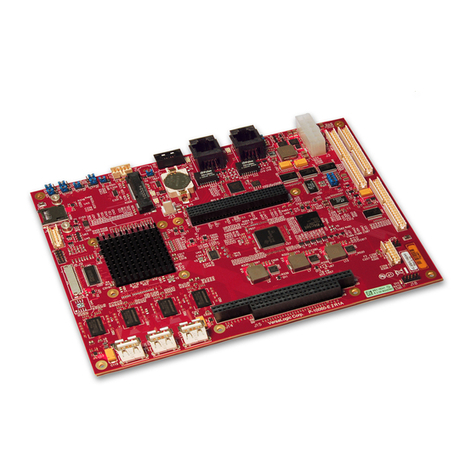
Embest MarS Board User manual

MarS Board
User Manual
Version 2.1---Dec. 27th, 2021

Embest Technology
Copyright © 2014 Embest Technology MarS Board User Manual
i
Copyright Statement:
MarS Board and its related intellectual property are owned by Shenzhen
Embest Technology Co., Ltd.
Shenzhen Embest Technology has the copyright of this document and reserves
all rights. Any part of the document should not be modified, distributed or
duplicated in any approach and form with the written permission issued by
Embest Technology Co., Ltd.
The use of Microsoft, MS-DOS, Windows, Windows95, Windows98,
Windows2000 and Windows embedded CE 6.0 are authorized by Microsoft.
Revision History:
Version
Date
Note
1.0
2013-3-29
Original Version
1.1
1.2
2.0
2013-5-11
2013-11-1
2014-8-25
Revision
Revision
Kernel upgrade to 3.0.35, Android upgrade
to 4.3
2.1
2021-12-27
Upgrade MFGTOOLS to run under Win10

Embest Technology
Copyright © 2014 Embest Technology MarS Board User Manual
ii
Table of Contents
Chapter 1 Product Overview ............................................................................................. 1
1.1 Introduction ..............................................................................................................1
1.2 Packing List ............................................................................................................. 1
1.3 Product Features .....................................................................................................1
1.4 System Block Diagram ............................................................................................3
1.5 Hardware Dimensions (mm) ................................................................................... 4
Chapter 2 Introduction to Hardware .................................................................................5
2.1 CPU Introduction ..................................................................................................... 5
2.1.1 Clock Signals ................................................................................................ 5
2.1.2 Reset Signal ..................................................................................................5
2.1.3 General Interfaces ........................................................................................ 5
2.1.4 Display Interface ........................................................................................... 6
2.1.5 3D Graphics Acceleration System ................................................................6
2.2 Peripheral ICs around CPU .................................................................................... 6
2.2.1 eMMC Flash NCEMBM11-04G .................................................................... 6
2.2.2 DDR H5TQ2G63DFR-H9C ...........................................................................6
2.2.3 AR8035 Ethernet PHY .................................................................................. 7
2.2.4 FE1.1 USB Hub ............................................................................................ 7
2.2.5 FT232RQ USB to UART Chip ...................................................................... 7
2.3 Hardware Interfaces on Mars Board .......................................................................8
2.3.1 Power Jack (J8) ............................................................................................ 8
2.3.2 HDMI Interface (J1) .......................................................................................8
2.3.3 LVDS Interface (J3) .......................................................................................9
2.3.4 USB OTG Interface (J7) ............................................................................... 9
2.3.5 USB Debug Interface (J9) .......................................................................... 10
2.3.6 Ethernet Interface (J2) ................................................................................10
2.3.7 USB Hub Interface (Hub1) ..........................................................................11
2.3.8 USB Hub Extension Interface (J21) ............................................................11
2.3.9 TF Card Interface (J13) ...............................................................................11
2.3.10 LCD Interface (J12) .................................................................................. 12
2.3.11 AUDMUX (Digital Audio Multiplexer) Interface (J11) ................................13

Embest Technology
Copyright © 2014 Embest Technology MarS Board User Manual
iii
2.3.12 CAN1 Interface (J11) ................................................................................ 13
2.3.13 CAN2 Interface (J11) ................................................................................ 14
2.3.14 ECSPI2 (Enhanced Configurable SPI) Interface (J10) ............................14
2.3.15 I2C1 Interface (J11) .................................................................................. 14
2.3.16 I2C3 Interface (J11) .................................................................................. 14
2.3.17 IPU1 (Image Processing Unit 1) Interface (J11) ...................................... 15
2.3.18 KPP Keyboard Interface (J11) ..................................................................15
2.3.19 PWM (Pulse Width Modulation) Interface (J10 & J11)............................ 15
2.3.20 GPMI (General Purpose Memory Interface) (J10) ...................................16
2.3.21 SPDIF (Sony/Philips Digital Interface) (J10) ............................................16
2.3.22 UART1 Interface (J11) .............................................................................. 16
2.3.23 UART3 Interface (J10) ..............................................................................17
2.3.24 UART4 Interface (J11) .............................................................................. 17
2.3.25 UART5 Interface (J11) .............................................................................. 17
2.3.26 USDHC1 (Ultra Secured Digital Host Controller) Interface (J10) ............17
2.3.27 ESAI (Enhanced Serial Audio Interface) (J10 & J11) .............................. 18
Chapter 3 Preparations .................................................................................................... 19
3.1 Software Introduction ............................................................................................ 19
3.2 Learning about Linux System ............................................................................... 19
3.3 Learning about Android System ............................................................................20
3.4 Setting up HyperTerminal ......................................................................................21
Chapter 4 Downloading and Running System ..............................................................23
4.1 Download and Run Linux or Android System .......................................................23
4.2 UcoS System Demonstration ................................................................................27
4.3 Display Mode Configurations of Linux&Android System ......................................27
Chapter 5 Making Images ................................................................................................ 31
5.1 Making Images for Linux .......................................................................................31
5.1.1 Getting Tools and Source Code ................................................................. 31
5.1.2 Compiling System Images ..........................................................................32
5.2 Making Images for Android ................................................................................... 33
5.2.1 Establishment of development environment .............................................. 33
5.2.2 Getting Repo Source Code ........................................................................ 33

Embest Technology
Copyright © 2014 Embest Technology MarS Board User Manual
iv
5.2.3 Compiling System Images ..........................................................................34
Appendix 1 – Installing Ubuntu Linux System ..............................................................36
Technical Support and Warranty .................................................................................... 48

Embest Technology
Copyright © 2014 Embest Technology MarS Board User Manual
1
Chapter 1 Product Overview
1.1 Introduction
MarS Board is an evaluation board designed by Embest Technology and based on
Freescale’s i.MX 6Dual processor. i.MX 6Dual integrates ARM Cortex™-A9 core of up to
1GHz, 2D and 3D graphics processors and 3D 1080p video processor. MarS Board is
featured with abundant interfaces such as HDMI, LVDS, mini USB OTG, mini USB
debug, RJ45, USB host, TF card and LCD display to help developers from different fields
including netbooks, all-in-one PCs, high-end mobile Internet devices, handhold
computers, portable media players, game consoles and portable navigation devices.
1.2 Packing List
MarS Board
Accessories package (option)
HDMI Cable
Mini USB Cable
5V@4A power adapter
4GB TF Card
Gigabit Ethernet line
Other Options
1.3 Product Features
Product Parameters:
Dimensions: 65mm x 102mm
Operation Temperature: 0 ~ 70℃
Operating Humidity: 20% ~ 90% (Non-condensing)

Embest Technology
Copyright © 2014 Embest Technology MarS Board User Manual
2
Power Supply: 5V
Processor:
i.MX 6Dual integrates ARM Cortex™-A9 core
32 KByte L1 Instruction Cache
32 KByte L1 Data Cache
Private Timer and Watchdog
Cortex-A9 NEON MPE (Media Processing Engine) Coprocessor
2D/3D Graphics Processors
On-Board Memories:
4GByte eMMC
4*256MB DDR3 SDRAM
On-Board Interfaces and Buttons:
A HDMI Interface
A LVDS Interface
A LCD Interface
Two 480Mbps High-Speed USB2.0 Hub Interface
Two 480Mbps High-Speed USB2.0 Header Interface
A 480Mbps High-Speed USB2.0 OTG Interface
A COM-USB Debug (com2) Interface
A TF Card Interface
A 10/100M/1Gbps RJ45 Network Interface
A Boot Mode Interface
A Reset Button
Signals of On-Board Interfaces:
An AUDMUX (Digital Audio Multiplexer) Signal
Two CAN Signals
A ECSPI2 (Enhanced Configurable SPI) Signal
Two I2C Signals
A camera/ Parallel signal, up to 16 bit

Embest Technology
Copyright © 2014 Embest Technology MarS Board User Manual
3
A KPP (Keypad Port) Signal
A PWM (Pulse Width Modulation) Signal
A GPMI (General Purpose Memory Interface) Signal
A SPDIF (Sony/Philips Digtal Interface) Signal
Four UART Signals
A USDHC1 (Ultra Secured Digital Host Controller) Signal
A ESAI (Enhanced Serial Audio Interface) Signal
Note:
Pins of some interfaces listed above are multiplexed; please refer to data sheet of the
processor and product schematic.
1.4 System Block Diagram
Figure 1-1 System block diagram of MarS Board

Embest Technology
Copyright © 2014 Embest Technology MarS Board User Manual
4
1.5 Hardware Dimensions (mm)
Figure 1-2 Dimensions of MarS Board

Embest Technology
Copyright © 2014 Embest Technology MarS Board User Manual
5
Chapter 2 Introduction to
Hardware
This chapter will help you learn about the hardware composition of MarS Board by briefly
introduce CPU, peripheral ICs and pin definition of various interfaces on the product.
2.1 CPU Introduction
i.MX 6Dual is an ARM™ Cortex-A9-based dual-core processor from Freescale. It runs at
up to 1GHz, integrates 2D/3D graphics, 3D 1080p video processor and power
management, and provides 64-bit DDR3/LVDDR3/LVDDR2-1066 interfaces as well as
many other interfaces such as high-definition display and camera.
2.1.1 Clock Signals
The clock signals of i.MX 6Dual include a 32.768 KHz RTC clock and a 24 MHz external
clock;
RTC Clock: generated by an external crystal for low-frequency calculation;
External Clock: used to generate main clock signal for PLL, CMM and other
modules;
2.1.2 Reset Signal
Reset singal is determined by POR_B of CPU; low level validates reseting.
2.1.3 General Interfaces
General interfaces include 7 sets of GPIOs, each of which provides 32 dedicated GPIO
pins (except GPIO7 which has 14 pins), and therefore the total pin number of GPIO can
be up to 206.
Table of contents
Other Embest Single Board Computer manuals


Popular Single Board Computer manuals by other brands

WIN Enterprises
WIN Enterprises PL-80910 user manual

AXIOMTEK
AXIOMTEK SBC81206 Series user manual

SeaLevel
SeaLevel SBC-R9 user manual

SMART Embedded Computing
SMART Embedded Computing ATCA-8310 quick start guide

WinSystems
WinSystems PPM-LX800-G Operation manual

GIGAIPC
GIGAIPC QBiX-PPC Series quick start guide