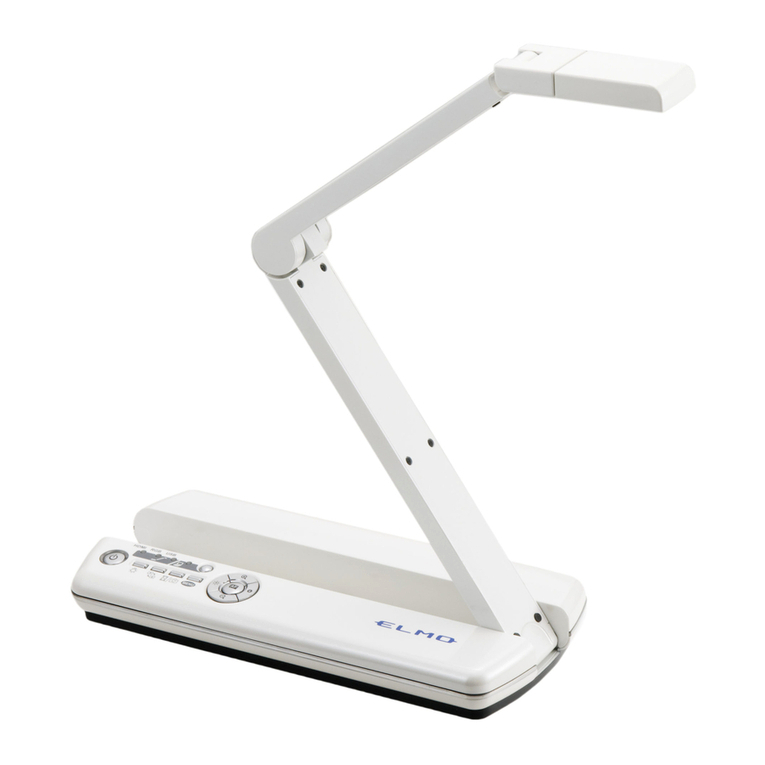
Elmo P10S User manual

With an Eye to Learning
P10S
Visual Presenter

Head Arm Lamp
128X
Zoom
Free Angle
Optical 16X zoom Digital 8X zoom
Standard presenter
OHP
P10S
Capture crisp, live
images
Now you can convey
presentations more
effectively and
inspire your
audience with vivid
moving images on
the big screen. With
a frame rate of 20
fps, the P10S
smoothly captures
and reproduces moving images that can
either be presented live or saved to your PC
for future use.
Weighing in at just 10.4 lbs (4.7
kg) — half the weight of standard
models — and measuring
approximately 19 inches (48 cm)
from front to back, the P10S is
lightweight and compact enough
to comfortably hand carry to any
location.
P10S
Visual Presenter
850,000-pixel
progressive scan CCD camera
The P10S’s advanced camera system
integrates an 850,000-pixel progressive scan
CCD pickup that’s capable of capturing not
only the finest details of images — but
moving objects as well! Combined with true
XGA (1024 x 768) resolution, the P10S
reproduces
three-
dimensional
objects and
subtle shades
of color with
unsurpassed
precision.
128X zoom
Focus in on the intricate details of your
presentation with the 16X optical zoom
function that can enlarge images up to 128
times when combined with the 8X digital
zoom.
Flexible free-angle camera
arm and lamp
The P10S’s
camera head
can be rotated
freely to
capture objects
at precise
angles, making
it easy to
present objects
with the exact look you want. And with the
free-angle lamp, you also have all the
flexibility you need to set ideal lighting
conditions.
See how lightweight and compact the P10S is
The P10S brings field-trip realism to classroom
presentations by capturing both moving and
still images with unsurpassed clarity.
State-of-the-art ELMO technologies help teachers deliver visually
enticing lessons that keep all eyes firmly fixed on learning.

Crystal Clear
Expression
Lightweight and
Compact
Display enlarged images of objects
Project the pages of a textbook
Showcase student projects
Put music and lyrics on view
Education/Training

OptionalJog Dial
DVI
Jog Dial Optional button
Versatile output
The P10S’s versatile output
connections bring you greater presentation
freedom and flexibility. The DVI output lets
you transfer high-quality video data without
any loss of image quality, while an analog
RGB output makes it easy to connect the
P10S to an LCD projector or a PC monitor for
true XGA-resolution display.
User-friendly interface
For the ultimate in easy and intuitive
operation, the P10S incorporates
a Jog Dial zoom control for
quick zoom adjustments
as well as an OPT
(optional) button
that gives you the
flexibility to
assign a frequently used
function to the front panel.

USB 2.0 SD Memory
Card slot
A3
Size
SD
Card
Note: The cord cover pictured
here is made transparent for
explanatory purposes.
Annotation Split Screen function Save video files
Still image
Live video
Bundled
Software
Bundled
Software
Setting
Storage
TWAIN
Driver
SD Memory Card
PC
Digital camera
P10S
With the convenience of bundled software,
creating outstanding PC presentations has never been easier.
Make effective presentations – even without a PC!
Other key features
Quick and easy PC file transfers open up
a new world of possibilities.
“Image Mate for
Presentation”
• Annotation tools let you draw lines
(freehand or straight) in a variety of colors to
highlight and enhance screen images, right
from your PC.
• Split Screen gives you a platform for
comparing live video to stored images —
side by side for greater visual impact.
“Image Mate for
Movie Creation”
Moving images can be easily saved to a PC
for future use as analog RGB 850,000-pixel
video files. Since files are saved in common
AVI or WMV format, they can be played
back effectively using Windows Media
®
Player*.
* AVI/WMV file playback is available with Windows
Media Player versions 6.4 to 11.
State presetting
Instead of having to readjust the machine
every time you use it, the P10S lets you store
up to six frequently used settings such as iris
selection, white balance and lamp on/off.
With quick and easy access to settings, your
preferred adjustments are always ready to go.
Split screen and
slideshow display
Images previously saved to an SD Memory
Card can be conveniently displayed as split
screens (9 or 16 splits) or slideshows,
enabling quick file searches and smooth
operation.
A3-size shooting area
With a large A3-size* shooting area, the
P10S captures a wider image field compared
to the conventional B4 size*.
*A3 size: 11 3/4" x 16 5/8" (297 x 420 mm)
B4 size: 10 1/8" x 14 3/8" (257 x 364 mm)
Cord cover
Cables are always neat
and tidy thanks to the rear
panel cord cover.
TWAIN driver
With TWAIN compatibility, the P10S brings you
the versatility to import saved image files to
commercially available photo retouching software.
SD Memory Card-ready
Now there’s no need to bring a PC and other
hardware to every presentation. The P10S
lets you save images captured by it and
record them onto an SD Memory Card for
future use. Saved images can then be easily
transferred back to a PC via a USB cable.

DVI-D Out RGB Out RGB In RS-232CComposite
Out
S-Video
Out
DC12V In DIP switch
Model P10S
Camera Image pickup device 1/3" progressive scan CCD, 850,000 pixels
Total pixels 1077 (H) x 788 (V)
Effective pixels 1034 (H) x 779 (V)
Frame rate 20 frames/sec.
Resolution RGB output 600 (H) x 600 (V) TV lines
Video output 450 (H) TV lines
Optics Zoom Powered, 16X optical
Lens F2.8, f=4.7 to 75.2 mm
Shooting area Max. 16" x 12" (405 x 303 mm)
Min. 1
1
/
8
" x
7
/
8
" (29 x 22 mm)
Focus Auto/Manual (powered)
Iris Auto (with level adjustment)/Manual
Functions White balance Full-auto/One-push/Manual
Negative/positive conversion
Provided
Text mode Provided
Edge enhancement Provided
Color/B&W selection Provided
Pause mode Provided
Digital zoom Provided (8x)
Gamma adjustment Provided
Slideshow Provided (SD Memory Card image)
Split screen Provided (SD Memory Card image, 9-split, 16-split)
Image save Provided (onto SD Memory Card)
Image rotation Provided (0°, 180°)
State presetting Provided (up to 6 user settings)
Sync. system Internal
Interface Internal selection Int./RGB
Analog RGB output XGA (1024 x 768 @60 Hz)
Video output Composite (x 1), S-Video (x1)
DVI output Provided (x 1)
RGB input Provided (x 1)
RS-232C port Provided (x 1)
USB 2.0 port Provided (x 1)
Memory card SD Memory Card slot Provided
Lighting Upper lighting unit Provided (twin fluorescent lamp)
Others Supplied accessories AC adapter, Power cord, Video RCA cable, RGB cable,
S-Video cable, USB cable, Instruction manual,
IR remote control, Utility software (CD-ROM), Warranty card
Dimensions Set up 14
7
/
8
" x 19" x 23" (377 x 482 x 582 mm)
(W x D x H) Folded 14
7
/
8
" x 19" x 7
1
/
8
" (377 x 482 x 180 mm)
Weight Approx. 10.4 lbs (4.7 kg)
Application software Image Mate for Presentation, Image Mate for Movie
Creation, TWAIN driver (Windows®2000 [SP4 or later],
Windows®XP [SP2 or later], Windows Vista®[32-bit],
Mac OS X)
Power source DC 12V (AC adapter: AC 100 to 240V)
P10S Specifications Profile
Options
Rear Panel
ELMO’s Helping to Provide a Greener
Future for Our Children
This ELMO product complies with RoHS Directive 2002/95/EC (Restriction Of the
use of certain Hazardous Substances in electronic equipment). This compliance
helps to ensure a healthier and greener environment for all our children.
5.6-inch color LCD monitor
LM-5611A
Monitor shoe
MS-30
H: horizontal, V: vertical
Design and specifications are subject to change without prior notice.
The images in this brochure are simulated.
“ ” is a trademark of ELMO COMPANY, LIMITED.
SD logo is a trademark. Other brand names and product names may be trademarks or registered
trademarks of their respective owners.
ELMO CO., LTD. is one of the sponsors
for Japan Committee Vaccines for the
World’s Children (JCV).
JCV operates under basic guidelines and
objectives of the Children’s Vaccine
Initiative (CVI) founded in 1990 by
UNICEF, WHO, UNDP, the Rockefeller
Foundation, and the World Bank.
ELMO CO., LTD. (Head Office and Factory)’s
QMS/EMS has been registered to ISO 9001
& 14001 : 2004.
This brochure is printed on recycled paper with soy ink.
Printed in Japan (O) 06/2008
6-14, Meizen-cho, Mizuho-ku
Nagoya, 467-8567, Japan
E-mail : overseassales@elmo.co.jp
Additional technical information is available from any of the following subsidiary companies:
What is a Document Camera ?
Please visit our new website introducing you to the useful and
effective ways of using the document camera. Let’s start ICT in
education with the document camera!
http://www.elmo.co.jp/doc-cam/
Neanderstr. 18
40233 Dusseldorf, Germany
Tel. (0211) 386470 Fax. (0211) 376630
Web : http://www.elmoeurope.com
..
ELMO (Europe) G.m.b.H.
1478 Old Country Road
Plainview, NY 11803-5034, U.S.A.
Tel. (516) 501-1400 Fax. (516) 501-0429
Web : http://www.elmousa.com
ELMO USA Corp.
Headquarters West Coast Branch
Cypress Pointe Business Park
5676 Corporate Avenue
Cypress, CA 90630, U.S.A.
Tel. (714) 828-8457 Fax. (714) 828-8429
All dimensions in inches (mm)
14 7/8" (377) 19" (482)
19" (482)
1
5
/
8
" (42)
23" (582) 14
7
/
8
" (377)

Other manuals for P10S
1
Table of contents
Other Elmo Document Camera manuals