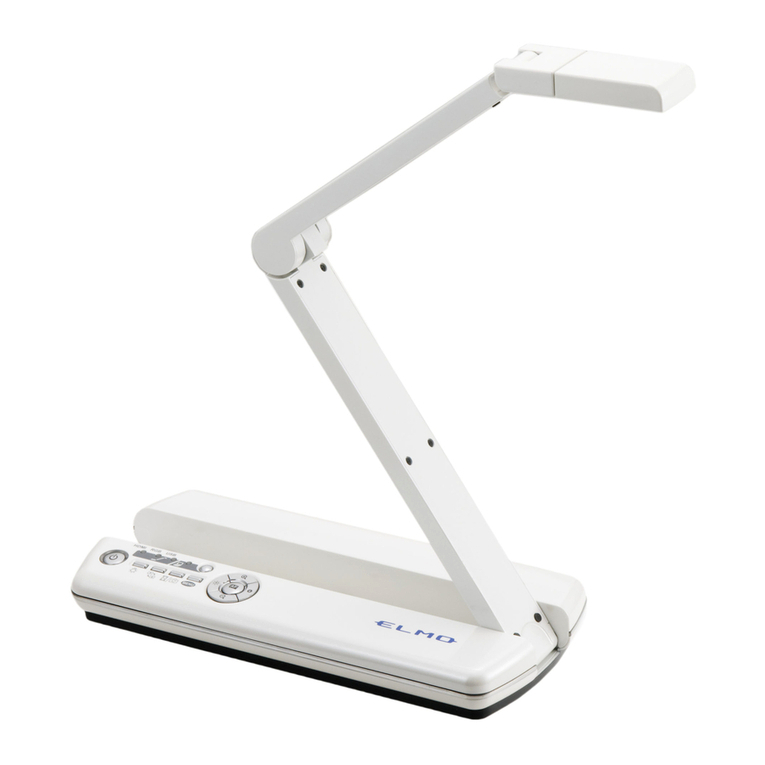
Elmo P30 User manual

Envision beauty in motion
P30
Visual Presenter

Head Arm Lamp
60X
Zoom
Free Angle
Optical 15X zoom Digital 4X zoom
Standard presenter
OHP
P30
The P30 is ideal for a diverse range of
presentation applications – from business
and research to industry and education.
Elmo’s state-of-the-art technologies deliver both
moving and still images with exceptional beauty and clarity.
Capture crisp, live
images
Now you can convey
presentations more
effectively and
inspire your
audience with vivid
moving images on
the big screen. With
a frame rate of 20
fps, the P30 smoothly
captures and
reproduces moving images that can either be
presented live or saved to your PC for future
use.
Weighing in at just 10.4 lbs — half
the weight of standard models —
and measuring approximately 19
inches, the P30 is lightweight and
compact enough to comfortably
hand carry to any location.
P30
Visual Presenter
850,000-pixel
progressive scan CCD camera
The P30’s advanced camera system
integrates an 850,000-pixel progressive scan
CCD pickup that’s capable of capturing not
only the finest details of images — but
moving objects as well! Combined with true
XGA (1,024 x 768) resolution, the P30
reproduces
three-
dimensional
objects and
subtle shades
of color with
unsurpassed
precision.
60X zoom
Focus in on the intricate details of your
presentation with the 4X digital zoom function
that can enlarge images up to 60 times when
combined with the 15X optical zoom lens.
Flexible free-angle camera
arm and lamp
The P30’s
camera head
can be rotated
freely to
capture objects
at precise
angles, making
it easy to
present objects
with the exact look you want. And with the
free-angle lamp, you also have all the
flexibility you need to set ideal lighting
conditions.
See how lightweight and compact the P30 is

Crystal Clear
Expression
Lightweight and
Compact
Business trip reports
Product demos
Presentations at
medical/academic meetings
Auctions for high-quality items
Presentations of large A3-size
documents or photos
Business/Industry
Education/Training

OptionalJog Dial
DVI
Jog Dial Optional button
Versatile output
The P30’s versatile output connections
bring you greater presentation freedom and
flexibility. The DVI output lets you transfer
high-quality video data without any loss of
image quality, while an analog RGB output
makes it easy to connect the P30 to an LCD
projector or a PC monitor for true XGA-
resolution display.
User-friendly
interface
For the ultimate in easy and intuitive
operation, the P30 incorporates
a Jog Dial zoom control for
quick zoom adjustments
as well as an OPT
(optional) button that
gives you the flexibility
to assign a frequently
used function to the front panel.

USB 2.0 SD Memory
Card slot
SD Memory Card
PC
Digital camera
P30
A3
Size
SD
Card
Note: The cord cover pictured
here is made transparent for
explanatory purposes.
Annotation Split Screen function Save video files
Still image
Live video
Bundled
Software
Bundled
Software
Setting
Storage
TWAIN
Driver
With the convenience of bundled software,
creating outstanding PC presentations has never been easier.
Make effective presentations – even without a PC!
Other key features
Quick and easy PC file transferring opens up
a new world of possibilities.
“Image Mate for
Presentation”
• Annotation tools let you draw lines
(freehand or straight) in a variety of colors to
highlight and enhance screen images, right
from your PC.
• Split Screen gives you a platform for
comparing live video to stored images —
side by side for greater visual impact.
“Image Mate for
Movie Creation”
• Moving images can be easily saved to a
PC for future use as analog RGB 850,000-
pixel video files. Since files are saved in
common AVI or WMV format, they can be
played back effectively using Windows
Media®Player*.
* AVI/WMV file playback is available with Windows
Media Player versions 6.4 to 10.
State presetting
Instead of having to readjust the machine
every time you use it, the P30 lets you store
up to eight frequently used settings such as iris
selection, white balance and lamp on/off.
With quick and easy access to settings, your
preferred adjustments are always ready to go.
Slide Shooting Adapter
Even conventional slides are easily presented
using the P30’s included Slide Shooting
Adapter. (See the back page.)
Split screen and
slideshow display
Images previously saved to an SD Memory
Card can be conveniently displayed as split
screens (9 or
16 splits) or
slideshows,
enabling quick
file searches
and smooth
operation.
A3-size shooting area
With a large A3-size shooting area, the P30
captures a wider image field compared to the
conventional B4 size.
Cord cover
Cables are always neat
and tidy thanks to the rear
panel cord cover.
TWAIN driver
With TWAIN compatibility, the P30 brings
you the versatility to import saved image files
to commercially available photo retouching
software.
SD Memory Card-ready
Presentation data, such as PowerPoint
®
files
and digital camera images, previously saved
to an SD Memory Card (sold separately) is
ready to go even without a PC. Thanks to the
P30’s Image Mate for Presentation software,
you can output SD Memory Card data
through the P30 for use in slideshow
presentations. Now with the flexibility of SD
Memory Card storage, which can hold up to
2,048 image files, as well as conventional
PC and camera images, the P30 provides a
new dimension of presentation possibilities.

005005
I
S
O
1
4
0
0
1
:
2
0
0
4
ELMO CO., LTD. (Head Office and Factory)’s QMS/EMS has been registered to
ISO 9001:2000 & ISO 14001:2004.
P30 Specifications Profile
Accessories Options
Slide Shooting Adapter
Model P30
Camera Image pickup device 1/3" progressive scan CCD
Total pixels 1,077 (H) x 788 (V), 850,000 pixels
Effective pixels 1,034 (H) x 779 (V)
Frame rate 20 fps
Resolution RGB output 600 (H) x 600 (V) TV lines
Video output 450 (H) TV lines
Optics Zoom Powered (with variable speed function ),
15X optical, 4X digital
Lens F2.8, f=4.7 to 70.5 mm
Shooting area Max. 16" x 12" (405 x 303 mm),
min. 1
1
/
8
" x
7
/
8
" (30 x 23 mm)
Focus Auto/Manual (powered)
Iris Auto (with level adjustment)/Manual
Functions White balance Full-auto/One-push/Manual
Negative/positive conversion
Provided
Aperture enhancement Provided
Text mode Provided
Edge enhancement Provided
Color/B&W selection Provided
Pause mode Provided
Digital magnification Provided (2X, 4X, Scroll )
Gamma adjustment Provided
OSD (on-screen display) Provided
Slideshow Provided (SD Memory Card image)
Split screen Provided (SD Memory Card image, 9-split, 16-split)
Image save Provided (onto SD Memory Card )
Image rotation Provided (0°, 180°)
State presetting Up to 8 user settings
Sync. system Internal
Input/output Internal selection Int./RGB1
Analog RGB output XGA (1,024 x 768 @60 Hz), VESA
Video output Composite, S-video
RGB input Provided
DVI output Provided
PC interface RS-232C port Provided
USB port Provided
Memory card SD Memory Card slot Provided
Lighting Upper lighting unit Provided (twin fluorescent lamp)
Others Accessories I/R remote control, Slide Shooting Adapter, cables, etc.
Dimensions Set up 14
7
/
8
" x 19" x 23" (377 x 482 x 582 mm)
(W x D x H) Folded 14
7
/
8
" x 19" x 7
1
/
8
" (377 x 482 x 180 mm)
Weight 10.4 lbs (4.7 kg)
Application software Image Mate for Presentation, Image Mate for Movie
Creation, TWAIN driver [for Windows® 2000 (SP4 or later),
Windows® XP (SP2 or later)]
Power source AC 100 to 240V, 50/60 Hz
14 7/8" (377) 19" (482)
19" (482)
1 5/8" (42)
23" (582) 14 7/8" (377)
All dimensions in inches (mm)
Rear Panel
ELMO’s Helping to Provide a Greener
Future for Our Children
This ELMO product complies with RoHS Directive 2002/95/EC (Restriction Of the
use of certain Hazardous Substances in electronic equipment). This compliance
helps to ensure a healthier and greener environment for all our children.
This brochure is printed on recycled paper with soy ink.
E05003 Printed in Japan (O) 05/2006
Neanderstr. 18,
40233 Dusseldorf, Germany
Te l. (0211) 386470 Fax. (0211) 376630
Web : http://www.elmoeurope.com
..
ELMO (Europe) G.m.b.H.
6-14, Meizen-cho, Mizuho-ku,
Nagoya, 467-8567, Japan
E-mail : foreign-div@elmo.co.jp
Additional technical information is available from any of the following subsidiary companies:
1478 Old Country Road,
Plainview, NY 11803-5034, U.S.A.
Te l. (516) 501-1400 Fax. (516) 501-0429
Web : http://www.elmousa.com
ELMO USA Corp.
Headquarters West Coast Branch
Cypress Pointe Business Park,
5676 Corporate Drive,
Cypress, CA 90630, U.S.A.
Te l. (714) 828-8457 Fax. (714) 828-8429
5.6-inch color LCD monitor
LM-5611A
Monitor shoe
MS-30
H: horizontal, V: vertical
Design and specifications are subject to change without prior notice.
is a trademark of ELMO COMPANY, LIMITED.
SD logo is a trademark. Other brand names and product names may be trademarks or registered
trademarks of their respective owners.
Other manuals for P30
3
Table of contents
Other Elmo Document Camera manuals

Elmo
Elmo TT-02RX User manual

Elmo
Elmo L-12 User manual

Elmo
Elmo MX-P User manual

Elmo
Elmo L-12G User manual

Elmo
Elmo Visual Presenter EV-4450AF User manual

Elmo
Elmo P10HD User manual

Elmo
Elmo TT-X1 User manual

Elmo
Elmo MX-P3 User manual

Elmo
Elmo EV 4400 AF User manual

Elmo
Elmo Visual Presenter EV-2500AF User manual