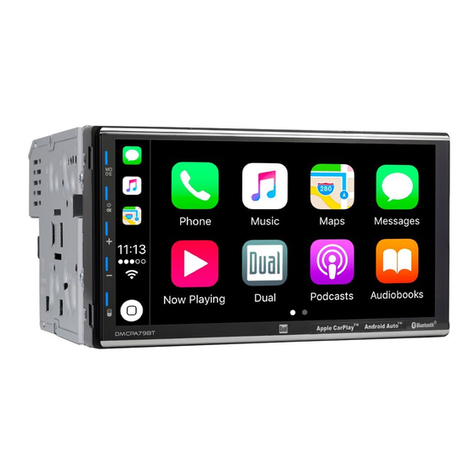
Dietz RETRO300 DAB/BT User manual

RDMINT RPT
AUX
AUX
USB
USB
261 54
3
BAND
AUDIO
IN FO
CL OC K
SRC
RETRO300 DAB/BT
RETRO301 DAB/BT
USB/MP3/WMA/Bluetooth Digital Media Recevier
User Manual (EN)
Bedienungsanleitung (DE)
Manuale Utente (IT)
Mode d´ Emploi (FR)
Manual del usuario (ES)

DE LET E
IN FO
COPY
/REC
AUX USB
IN T
26
5
RD M
4
RP T
3
1
INFO
CLOCK
BAND
AUDIO
SRC
RDM
INT
26
54
RPT
3
1
Overview Of The Unit
Press to Mute or Restore volume.
Tuner Mode: Press to view RDS received information.
Rotate to adjust Volume
Media Playback: Press to view iD3 informations.
BT Handfree: Press to reject/end a call
Returns to the previous item.
Press and hold to view the clcok.
Press to answer or redial a call, press and hold to transfer the call.
INFO
CLOCK
AUDIO
Press to access into the Audio Menu, press and hold to access into the System Menu.
BAND
Tuner Mode: Select the FM bands (FM1/FM2/FM3). Press and hold to access into
Auto Store mode, the six strongest stations of the selected band will be saved in
preset channel automatically.
Media Playback: Press to access search Folder/File music mode.
SRC
Turn the unit on. Press and hold again to turn the unit off.
Select the available source.
Tuner Mode: Rotate enter into the Auto Seek mode, tune and hold to enter into the
Manual Seek mode.
Media Playback: Rotate to track Up/Down, tune and hold for fast Forward/Backward.
Media Playback: Press the Numeric buttons to perform the below operation:
Tuner Mode: Press the Numeric buttons to recall the preset stations. Press and hold the
Numberic buttons to store the listening station.
Preset
Numeric
Buttons
Play/Pause Intro Repeat Folder
Down Folder
Up
Random
DAB Mode: Select a bands (DAB1,DAB2 or DAB3). Press to access into the list of
stored stations.
DAB Mode: Press repeatedly to display available information that is transmitted by a
DAB radio station.
DAB Mode: Press the buttons to store the listening station.
- EN 2 -
Encoder
Volume
Knob
Mute Power
/Source
USB Socket
Aux In Socket
MIC

Listen to Digital Audio Broadcasts (DAB)
Digital Audio Broadcasting (DAB), is a way of broadcasting radio digitally
through a network of transmitters. It provides you with more choice, better
sound quality and more information.
Scan For On-Air Stations
For the first time when DAB mode is switched on.
Press on the main unit repeatedly to select DAB.
The system performs auto scan.
All the available DAB stations are stored.
The radio tunes to the first available station
SRC
Press and hold to enter into the System Menu.
Press and hold to enter into the System Menu.
Press and hold to enter into the System Menu.
AUDIO
AUDIO
AUDIO
Press the repeatedly until [ SCAN ] is displayed.
Press the repeatedly until [PRUNE ] is displayed.
Press the repeatedly until [12V ON] or [12V OFF] is displayed.
Press
, the product starts scanning for on-air DAB radio stations,
the detected stations are saved in the flash memory.
AUDIO
AUDIO
AUDIO
Antenna Power Supply 12V On/Off
[12V ON]: Enable Antenna power supply (12V).
[12V OFF]: Disable Antenna power supply (12V).
Rotate to select an option, and then press to confirm.
Erase The DAB Station List
To remove stations from the list of scanned stations, press .
To exit the system menu, press .
INFO
CLOCK
- EN 3 -

Use Bluetooth Device
Pairing The Bluetooth Device
Making a Call
Call Transfer
On your Bluetooth-enabled device, follow the steps below.
Search for Bluetooth devices.
In the device list, select DIETZ.
Enter the default password "0000", and then confirm the password entry.
Use the Mobile Phone to dial and make an outgoing call.
Once completed the dialing, the phone number and [CALL---] is displayed.
If there is an incoming call, the phone number will be displayed. if the
incoming call has no phone number, [PHONE IN] will be displayed.
You can transfer voice from car speakers to mobile phones during a
telephone conversation. During a telephone conversation, press and hold
voice transfers from car speakers to mobile phone.
Press to answer / accept the call.
When conversation ends, press to terminate the call.
INFO
CLOCK
If the connected Bluetooth device supports Advanced Audio Distribution
Profile (A2DP), you can listen to the music stored on the device through
the unit. If the device also supports Audio Video Remote Control Profile
(AVRCP) profile, you can use the control on the unit or its remote control
to play music stored on the device.
Press repeatedly to select [BT AUDIO].
Press to start play, press it again to pause.
To track up/down, rotate .
Press to view song title information.
SRC
SRC
INFO
CLOCK
You can dial number through the mobile phone.
Receiving a Call
If the pairing is successful, [PAIRED] will be displayed on the LCD
screen of this system.
Bluetooth Audio Streaming A2DP
- EN 4 -

Adjust Setup Menu Settings
Press and hold to enter into the System Menu.
AUDIO
Press the repeatedly to select the item to be adjusted.
Rotate the to select a value/option.
AUDIO
Selectable Setting
Selectable Setting
Adjust the Hours and Minutes
Turn On or Off the RDS function.
Select the time format 12H or 24H
ON: The unit will search for another station with stronger signal, but with the
same program identification as the current station automatically.
ON: Only stations with strong signal can be broadcast. The Local indicator
will light up.
Adjust the LCD display backlight level between Hight or Low
Restore the factory default settings.
To set the power-off-timer enhancement feature (OFF/AUTO/30M/60M/90M).
ON: Turn on the RDS clock. Time shown on the unit will synchronizes with
the clock time of the RDS station.
Once inside the PTY mode, press the get into program type item, and rotat
encoder volume knob to selected category.
Selectable Setting
To unpair the paired mobile phone
Turn On or Off this beep sound
ON: When there is traffic announcement,unit will automatically switch to the
tuner mode (regardless of the current mode) and begins to broadcast
the announcemet on traffic conditions. When the traffic announcement
is over, unit will automatically return to the previous mode.
Select suitable country area for this unit:
EUROPE; ASIA;MID-EAST; AUSTRALIA;USA; LATIN; JAPAN;RUSSIA;
OFF: Traffic announcement does not cut in.
OFF: Stations of both strong and weak signals can be broadcast.
This feature allows to Re-connect or Dis-connect to the
Bluetooth device by manually.
paired mobile phone or
OFF is the powers off immediately when the ignition key is switched off.
AUTO mode will switch off the radio with the ignition, but you can turn the
radio back on (or off) for a 30-minute period.
30/60/90 minutes will keep playing for this time after the ignition is switched off.
OFF: Turn off AF function
OFF: Turn off the RDS clock.
System Mode
Tuner Mode
CLK(Clock Set)
RDS On/Off
Clock Format
AF
(Alternate Frequencies)
Loc On/Off
CT
(Clock Time)
Area
PTY
(Program Type)
Beep On/Off
DIM (Dimmer)
RESET
TIMER
BT Mode
RE-CON
DIS-CON
UNPAIR
TA
(Traffic Announcement)
- EN 5 -

Listening To External Device
Flip open the USB cover, and
the USB socket.
Insert the USB device into
Flip open the USB cover, and
/Smart Phone device into the USB socket.
Insert the iPhone
Turn on the external component and start
playing.
Listening To External Aux Input
3.5mm Cable
(Not Included)
SRC
SRC
Press the to select USB mode, the unit
starts playing from the USB device.
Once the iPhone/Smart Phone is connected
and recognized, the iPhone/Smart Phone
begins to charge.
Press the to select AUDIO IN mode.
USB Smart Phone 1A Charging
This USB only can charge Phones,
but cannot play or decode music
files stores inside the Smart Phones.
NOTE
Playing a USB Device
- EN 6 -

Remove The Unit
Remove The Unit
182mm
53mm
1
2Screw
Dashboard
Sleeve
Control Panel
Bend the appropriate
tabs to hold the sleeve
firmly in place.
Disassembly
Sleeve
Installing The Unit
- EN 7 -

Wiring Diagram
ISO Connector Wiring Chart
Pin
A5
A4
A8
A7
Yellow
Black
Red
Blue
Connect to system
control terminal of the
power AMP or auto
antenna relaycontrol
terminal
(Max150mA/12VDC)
Battery(+)
Ignition(ACC)
Ground
Color and Function
B1/B2
B3/B4
Violet
Grey
Grey/Black
White
White/Black
Green
Green/Black
B5/B6
B7/B8
Right rear speaker
Right front speaker
Left front speaker
Left rear speaker
Pin Color and Function
+
A
B1
2
3
4
4
5
5
6
7
7
8
8
REAR FRONT
SUB-W
L L
R R
DAB
ANTENNA
ISO Connector
DAB
Antenna
Violet/Black
+
- EN 8 -
MIC
External
Microphone
+
+

Press increas the volume.
Tuner Mode: Press access into the Auto Seek mode, press and
hold access into the Manual Seek mode.
Press to access into the Audio Menu mode.
Press to mute or restore volume.
Turn unit On or Off.
Select the available Source.
SRC
AUDIO
Media Playback Mode:Press to track Up/Down, press and
hold for fast Forward/Backward.
Press the volume.decreas
Remote Control Operation
AUDIO
SRC
- EN 9 -

Maximum USB Memory Size 32G
USB Flash Drive and Hard FAT16/FAT32
USB USB2.0 Full speed
USB Port Type A
USB Voltage 5.0V
USB Device
DAB Tuner
Sensitivity -100dBm(Band III)
Selectivity 40dB
Frequency Range 174 - 240MHz
Bluetooth
Frequency Band 2.4000 Ghz - 2.4835GHz ISM Band
Compatible Bluetooth
Profiles
Hands-Free Profiles (HFP)
A2DP(Advanced Audio Distribution Profile)
AVRCP1.3(Audio/Video Remote Control Profile)
Range 3 meters (free space)
Standard Bluetooth 2.1 specification
Output Power Class 2
Product Specifications
General
Power Supply
Suitable speaker impedance
Maximum power output
Continous power output
12V DC (11V to 16V), negative ground
4-8Ω
50W x 4
20W x 4RMS (4 T.H.D)Ω10%
2.0V
Radio Tuner
Frequency Range
FM Tuner
FM 87.5MHz to 108.0MHz
0.8uV
Usable Sensitivity (S/N=20dB)
Pre-AMP output voltage
- EN 10 -
This manual suits for next models
1
Table of contents
Languages: