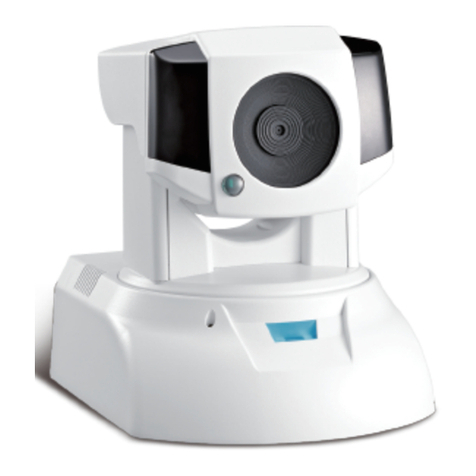
COMPRO IP60 User manual

IP60
Intelligent Megapixel/HD
H.264 Network Camera
User’s manual

IP60 IP Camera User’s Manual
2
www.comprousa.com
Copyright ©2001-2010. Compro Technology, Inc. No part of this document
may be copied or reproduced in any form or by any means without the prior
written consent of Compro Technology, Inc.
Compro, VideoMate, Poladyne, Play with Power, and the Compro logo are
trademarks of Compro Technology, Inc. Other names and marks are
trademarks of their respective owners.
COMPRO makes no warranties with respect to this documentation and
disclaims any implied warranties of merchantability, quality, or fitness for any
particular purpose. The information in this document is subject to change
without notice. COMPRO reserves the right to make revisions to this
publication without obligation to notify any person or entity of any such
changes.
Compro Technology, Inc.
www.comprousa.com
Tel. +886 2 2918 0169, Fax +886 2 2915 2389
4/F, No.12, Alley 6, Lane 45, Pao Shin Road Hsintein City, Taipei, Taiwan.
Support e-mail: support@comprousa.com

IP60 IP Camera User’s Manual
3
Table of Contents
Important Safety Notice............................................................................... 4
Product Overview........................................................................................ 5
Package Contents..................................................................................... 5
Product Description.................................................................................. 6
Key Features ............................................................................................. 7
Specifications ........................................................................................... 7
System Requirements .............................................................................. 9
Hardware Installation ................................................................................ 10
Hardware Overview (Name of Each Part).............................................. 10
Connect Your IP Camera........................................................................ 11
Wireless Connection .............................................................................. 12
Disassembly and Assembly the Camera Stand....................................... 13
Mounting on the Wall or Ceiling............................................................... 14
Software Installation.................................................................................. 16
Controls the IP camera in Internet Explorer ......................................... 30
Configuring the IP camera ..................................................................... 32
Access the IP Camera via iPhone/mobile device .................................... 45
Access the IP Camera via 3GPP Mobile Phone....................................... 46
The Internet Setting................................................................................... 47
DDNS Setup and Port Forwarding............................................................ 48
Firmware Update........................................................................................ 52
Troubleshooting ........................................................................................ 53
Initial Hardware / Software Setup .......................................................... 53
Trouble with the ActiveX Client ............................................................. 55
Remote Viewing via Internet Explorer................................................... 57

IP60 IP Camera User’s Manual
4
Important Safety Notice
Please follow the steps below to protect your IP camera:
Please place the IP camera on a level surface and out of direct sun shine.
Please keep the IP camera inside house and away from water, dust,
humidity or magnetic products.
Please do not drop the IP Camera body to the floor; it may cause the
damage to main parts.
Please do not disassemble or remodel the product, it may cause damage
or fire.
Do not shake, move or disturb the IP camera when it is in operation, as
such actions may result in the malfunction of the device.
Power off the IP Camera as soon as it is found smoking or smelt unusual.
Please do not place the IP Camera around the heat sources, such as
television or microwave oven.

IP60 IP Camera User’s Manual
5
Product Overview
Package Contents
Please check the package contents on your hand, if anything is missing,
please don’t hesitate to contact with your local distributor.
Important!
Please do not use the adaptor that not from Compro technology, it may cause
damage of your IP camera.
IP60
Network Camera RJ-45 LAN
Cable
Power Adaptor
(5V, 2A)
Installation CD
Installation Guide Screw for Ceiling
Mount x 3
Screw Mount x 3

IP60 IP Camera User’s Manual
6
Product Description
IP60 provides an easy-to-install way for the indoor fixed camera solution.
Combined with the H.264/MPEG-4/MJPEG video compression formats,
superior performance and high video quality are achieved with much smaller
recording file size, which means much lower costs for data storage. Utilizing
smart motion detection, with built-in 2-way audio for fast and easy
communications, IP60 ensures instant responses when security is
compromised. In addition, the IP60 built-in the compact MicroSD slot for local
image storage.
High Quality Megapixel/HD Image
Utilizing Megapixel/HD technology enables IP60 to view detail and identify
people and objects at least three times better than the conventional CCTV
camera. Combining with dual H.264 and MPEG-4 or MJPEG streams to
enable optimization of different bandwidth of networks and various image
sizes of devices from PC to mobile phone.
Smart Video and Audio Analytic
IP60 provides two-way audio support of a built-in microphone and speaker,
allowing remote listening of the area via direct voice communication or
pre-recorder audio clips. It also comes with a suite of special professional
grade intelligent video analytic features such as smart video detection, smart
audio detection, and active scene change alarm for proactive surveillance
applications.
Easy Wireless Network Installation
802.11 b/g/n wireless LAN is supported via the WL150 USB upgrade module
with a simple and easy wireless installation process. (Optional Accessory)
Total Surveillance Solution for Home and Business
IP60 bundles a full range of applications to provide an intelligent surveillance
total solution - iWizard is a smart installer to turn the complicated network
camera installation to a simple and fast process; WebVUer is an intuitive IE
based video management software includes all the key features for
trouble-free monitoring home surveillance; ComproView is a powerful feature
rich 32 channels professional grade multi-camera video management solution
for business surveillance.

IP60 IP Camera User’s Manual
7
Key Features
1/4" CMOS Megapixel sensor
Supports real-time H.264, MPEG-4 and MJPEG compression (Triple
Codec)
Supports dual streams simultaneously
Support 4x digital zoom
Video resolution is up to 1280 x 1024 pixels
Image frame rate is up to 30 frames under 640x480 or 15 frames under
1280 x 1024
Smart motion detection
Two way audio with built-in MIC and speaker
Support UPnP (universal plug and play)
Support 10/100 802.3/Ethernet
802.11b/g/n WLAN on applicable model (Optional wireless adaptor)
Digital I/O for External Sensor and Alarm (2 In/1 Out)
Supports local storage (MicroSD), Snapshot
Easy to Install with VideoMate IP camera Wizard
Remote Monitoring from 3GPP Mobile or Phones with web browser
(e.g. iPhone/BlackBerry)
Bundle with powerful 32-channel IP video management software ---
VideoMate ComproView
Specifications
Camera
Image Sensor
1/4" CMOS Megapixel sensor
Lens Focal Length: 4.5 mm
Max Aperture Ratio: F2.0
Fixed iris
Zoom
4x digital zoom
Angle of View 46°horizontal
Focusing Range
0.5m ~ INF
Minimum
Illumination
Color Mode: 1.0 lux
Shutter Time
1/5 ~ 1/16000 Sec
Video
Video
Compression
H.264 ( MPEG-4 Part 10)
Motion JPEG
MPEG-4 Part 2

IP60 IP Camera User’s Manual
8
Resolutions
160x120, 320 x 240, 640 x 480, 1280 x 1024
Frame Rate Up to 30 frames at 640 x 480
Up to 15 frames at 1280 x 1024
Video Streaming
Dual H.264, MJPEG or MPEG-4 video streams
Image Settings Adjustable image size and quality
AGC, AWB, AES
Configurable brightness, saturation and
sharpness
Audio
Audio
Communication
Two-way audio with built-in MIC (S/N ratio 58
dB, 50-10000hz ) and speaker (660mv)
Audio
compression
G.711 PCM 64Kbit/sec
Audio input /
output
MIC input / Audio out
Network
Security
User ID / Password protection
Supported
Protocols DDNS (iDDNS) / PPPoE / HTTP Server / DHCP
Client /NTP Client /DNS Client / FTP Client / SMTP
Client / ARP / ICMP/IPV4/ UDP / TCP/IP
Firmware
Firmware Support UPnP
Support online firmware update
Software
ComproView Multiple channel management
iDDNS service for dynamic IP and desktop
shortcut creation
Recording search and playback
Scheduled and event driven management
Smart Detection
Web Browser
Internet Explorer
(ActiveX)
Monitor the current condition of the monitor area
via Internet Explorer
Capture a still image and save it in JPG format on
PC
Alarm and event management: FTP, I/O alarm,
server notification and email
Supported
Devices
PC, Laptop, Nettop, MID with IE/ActiveX support.
Mobile phone, iphone/ipod, PDA support in

IP60 IP Camera User’s Manual
9
MJPEG mode.
Mobile Phone
MJPEG Mode
Viewing of camera image via phone browsers
3GPP Mode Viewing of camera image via 3G phones
(3GPP Streaming)
General
Operating
Condition
5 °C ~ 40 °C
Power Supply
DC 5V/2A
System
Requirements
Computer with 1.7GHz
processor and 512 MB
memory or above
Supported Operating Systems: Windows XP
SP3, Vista SP1, Windows 7 x86/x64
Included
Accessories
Software CD (Manual included)
Start up Guide
Power adaptor
Network cable
Screws for ceiling mounting
Screw mount
Dimensions
84 x 124.5 x 91.5 mm (including bracket)
System Requirements
Computer with 1.7GHz processor and 512 MB memory or above
Supported Operating Systems : Windows XP SP3, Vista SP1, Windows 7
x86/x64
Supported Web Browsers (ActiveX): Internet Explorer 6 or later

IP60 IP Camera User’s Manual
10
Hardware Installation
Hardware Overview (Name of Each Part)
Lens
Speaker
Microphone
LED Light
Wireless Adaptor
Connector
(USB type)
LAN Port
Microphone Input
Power
Audio Output
I/O port
(2 in / 1 out)
Reset Button
MicroSD card slot
(On the right side)
Table of contents
Other COMPRO Security Camera manuals

COMPRO
COMPRO IP540 User manual
COMPRO
COMPRO TN1500 User manual

COMPRO
COMPRO IP55 User manual

COMPRO
COMPRO TN30 User manual

COMPRO
COMPRO IP70 User manual

COMPRO
COMPRO NC420 User manual

COMPRO
COMPRO VideoMate IP50 User manual

COMPRO
COMPRO TN920P User manual

COMPRO
COMPRO TN65 User manual

COMPRO
COMPRO TN900 User manual

COMPRO
COMPRO CS530 User manual

COMPRO
COMPRO TN70 User manual

COMPRO
COMPRO TN80 User manual

COMPRO
COMPRO NC3230 User manual

COMPRO
COMPRO TN96P User manual

COMPRO
COMPRO TN900R User manual

COMPRO
COMPRO IP55 User manual

COMPRO
COMPRO TN4230 User manual

COMPRO
COMPRO VideoMateIP50 User manual

COMPRO
COMPRO TN3230 User manual