
Commell FS-A70 User manual

FS-A70
PICMG1.3 Full-size CPU Card User’s Manual
Edition: 1.00
2007/07/04

FS-A70User’sManual
-1-
Copyright
Copyright 2007. All rights reserved. This document is copyrighted and all rights are
reserved. The information in this document is subject to change without prior notice to make
improvements to the products.
This document contains proprietary information and protected by copyright. No part of this
document may be reproduced, copied, or translated in any form or any means without prior
written permission of the manufacturer.
All trademarks and/or registered trademarks contains in this document are property of their
respective owners. Disclaimer
The company shall not be liable for any incidental or consequential damages resulting from
the performance or use of this product.
The company does not issue a warranty of any kind, express or implied, including without
limitation implied warranties of merchantability or fitness for a particular purpose.
The company has the right to revise the manual or include changes in the specifications of
the product described within it at any time without notice and without obligation to notify any
person of such revision or changes.
Trademark
All trademarks are the property of their respective holders.
FS-A70User’sManual
-2-
Packing List
Please check package component before you use our products.
Hardware:
FS-A70 Full-Size 1.3 CPU card x 1
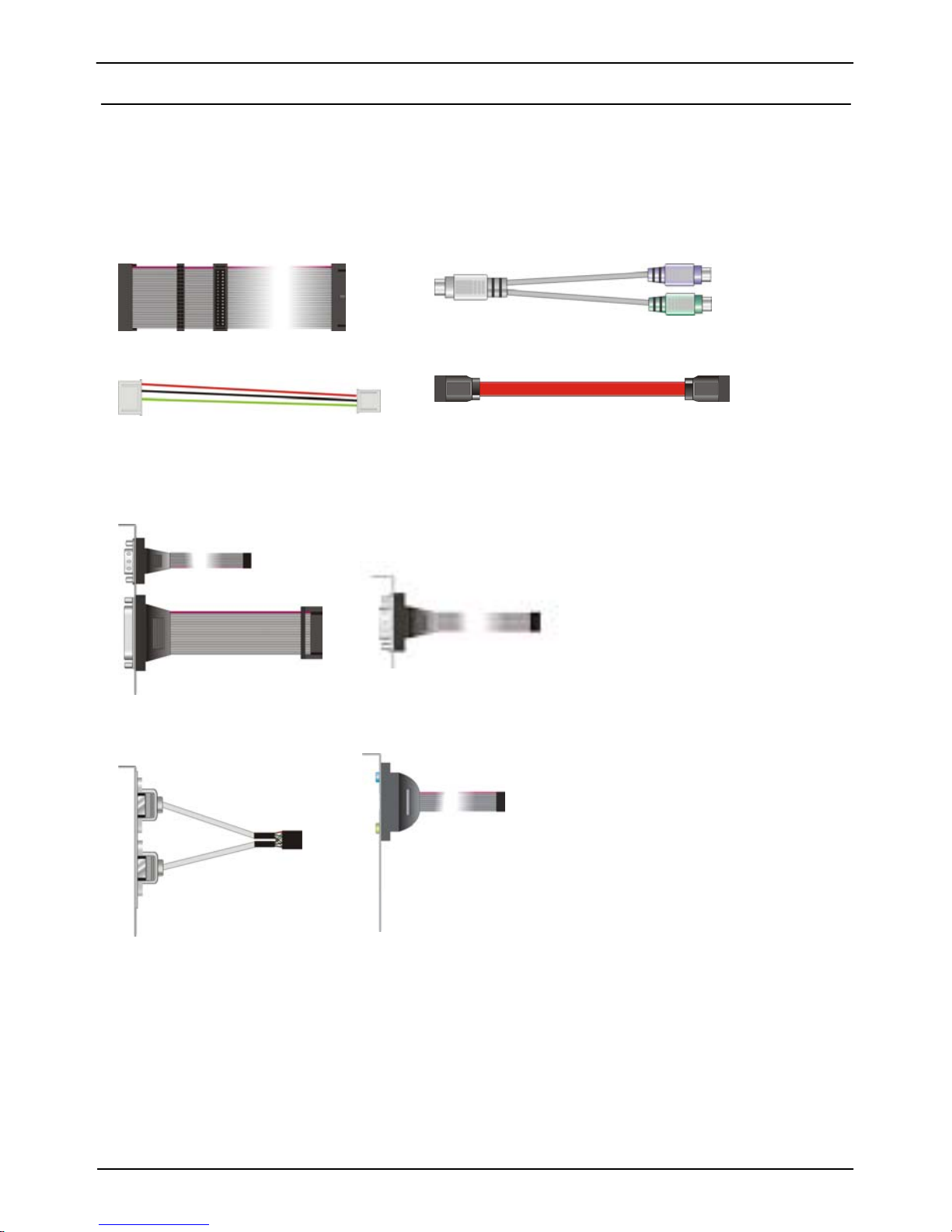
Cable Kit:
4-pin to 3-pin ATX cable x 1
PS/2 Keyboard & Mouse Cable x 1
SATA Cable x 6
Floppy flat cable x 1
Audio Port Cable x 1
DB25 & DB9 cable x 1
USB cable x 3
COM Port Cable x 1
(FS-A70G2-Only)
Other Accessories:
Divers CD (including User’s Manual) x 1
RAID drivers Disk for Windows 2000, Windows XP and Windows Server 2003

FS-A70User’sManual
-3-
Index
Chapter1 <Introduction>............................................................6
1.1 <Product Overview> ......................................................................6
1.2 <Product Specification>.................................................................7
1.3 <Block Diagram>...........................................................................9
1.4 <Mechanical Drawing >...............................................................10
Chapter 2 <Hardware Setup>.................................................11
2.1 <Connector Location>..................................................................11
2.3 <Connector Reference>................................................................13
2.3.1 <Internal Connectors> ..............................................................13
2.3.2 <External Connectors> .............................................................13
2.4 <CPU and Memory Setup>..........................................................14
2.4.1 <CPU installation>...................................................................14
2.4.2 <Memory installation>..............................................................15
2.5 <CMOS Setup>............................................................................16
2.6 <Serial ATAinstallation> .............................................................17
2.7 <LAN Interface>..........................................................................18
2.8 <Onboard Display Interface>.......................................................19
2.8.1 <Analog Display>....................................................................19
2.10 <GPIO interface>.......................................................................22
2.11 <USB2.0 Interface>....................................................................23
2.12 <Power and Fan Installation>.....................................................24
2.13 <Serial Port>...............................................................................26
2.14 <Switch and Indicator>..............................................................28

FS-A70User’sManual
-4-
Chapter 3 <System Configuration>.......................................30
3.1 <SATA configuration>..................................................................30
3.2 <SATA RAID Configuration>......................................................31
3.3 <Audio Configuration>................................................................36
3.4 <Video Memory Setup>...............................................................37
Chapter 4 <BIOS Setup>.........................................................39
Appendix A <I/O Port Pin Assignment>................................41
A.1 <Serial ATA Port>........................................................................41
A.2 <IrDA Port>.................................................................................41
A.3 <VGA Port>.................................................................................42
A.4 <LAN Port>.................................................................................42
Appedix B <System Resources>...........................................43
Appedix C <Flash BIOS>.........................................................47
C.1 BIOS Auto Flash Tool..................................................................47
C.2 Flash Method ...............................................................................47
Appendix D <Programming GPIO’s>....................................48
Appendix E <Watch Dog timer Setting >..............................49

FS-A70User’sManual
-5-
(This page is left for blank)

FS-A70User’sManual
-6-
Chapter1 <Introduction>
1.1 <Product Overview>
FS-A70 is the Full-size single board computer with last Intel desktop technology with
PICMG1.3 form factor. Based on Intel®Q965 and ICH8DO, the board integrates a new
Core 2 Duo/Quad processor 775-pin socket, DDR2 memory socket, Intel®Graphic Media
Accelerator 3000 technology, Serial ATA II with RAID function for a powerful desktop
system.
Intel®LGA775 processor
The Intel®Core 2 Duo/Quad processor now comes with a new form factor with 775-pin
PLGA package, for 533/800/1066MHz front-side-bus, 4MB L2 cache, and for 65nm
manufacturing technology, the PLGA processor without pin header on solder side can make
user installing the processor on the socket easier.
Intel®Q965 and ICH8DO chipset
The Intel Q965 integrates DDR2 533/667/800MHz for memory, and Graphic Media
Accelerator (GMA) 3000 technology for new graphic engine. It can provide up to 256MB of
frame buffer when you install over 1GB of system memory. The ICH8DO integrates with up
to 10 USB2.0 interfaces, and serial ATA II interface with RAID function.
Flexible Extension Interface
The board provides one mini-PCI socket.

FS-A70User’sManual
-7-
1.2 <Product Specification>
General Specification
Form Factor PICMG1.3 Full-size CPU Card
CPU Intel® Core 2 Duo Core / 2 Quad / Pentium 4 / Pentium D /
Celeron D processor with LGA775 socket
Package type: PLGA 775
Front side bus: 533/800/1066MT/s (133/200/266/QuadMHz x 4)
Intel®Hyper-Threading Technology and Dual/Quad core
supported
Memory 2 x 240-pin DDR2 533/667/800MHz SDRAM up to 3GB
Unbufferred, none-ECC memory supported only
Chipset Intel® Q965 (Northbridge) and ICH8DO (Southbridge)
BIOS Phoenix-Award v6.00PG 8Mb SPI flash BIOS
Green Function Power saving mode includes doze, standby and suspend modes.
ACPI version 1.0 and APM version 1.2 compliant
Watchdog Timer System reset programmable watchdog timer with 1 ~ 255
sec./min. of timeout value
Real Time Clock Intel® ICH8DO built-in RTC with lithium battery
Serial ATAII Intel® ICH8DO integrates 6 Serial ATA II interface
RAID 0, 1,5,10 Intel Matrix Storage Technology supported
Multi-I/O Port
Chipset Intel® 82801HDO(ICH8DO) with Winbond® W83627DHG
controller
Serial Port One RS-232 and one RS232/422/485 serial ports
USB Port Ten Hi-Speed USB 2.0 ports with 480Mbps of transfer rate
Parallel Port One internal bi-direction parallel port with SPP/ECP/EPP mode
Floppy Port One internal Floppy port
IrDA Port One IrDA compliant Infrared interface supports SIR
K/B & Mouse External PS/2 keyboard and mouse port on bracket
GPIO One 12-pin Digital I/O connector with 8-bit programmable I/O
interface
Smart Fan One CPU fan connector for fan speed controllable
VGA Display Interface
Chipset Intel® Q965 GMA3000 (Graphic Memory Controller Hub)
Frame Buffer Up to 256MB shared with system memory
Connector External DB15 female connector on bracket

FS-A70User’sManual
-8-
Ethernet Interface
Controller One or two Intel 82573L Gigabit Ethernet controller
Type Triple speed 10/100/1000Base-T
Auto-switching Fast Ethernet
Full duplex, IEEE802.3U compliant
Connector Two External RJ45 connectors with LED on bracket
Audio Interface
Chipset Intel® ICH8DO with Realtek ALC260 HD Audio
Intel High Definition Audio compliance
Interface 2 channels sound output
Connector Internal 10-pin header for line-in/-out, MIC-in, 4-pin header for CD-IN
Expansive Interface
Mini PCI One Mini-PCI socket TYPE III A (32-bit, 33MHz)
Power supply: +3.3V, +5V, 3VSB
PCI-Express One X16 and one X4 or four X1 on PICMG 1.3 Interface
PCI Four PCI bus master on PICMG 1.3 Interface
Power and Environment
Power
Requirement +5V, +12 DC input & 5VSB Requirement
Dimension 338 (L) x 126 (H) mm
Temperature Operating within 0 ~ 60℃(32 ~ 140℉)
Storage within -20 ~ 85℃(-4 ~ 185℉)
Ordering Code
FS-A70G Onboard VGA, Gigabit LAN, Mini-PCI, 6 x SATA, HD Audio,
1 X IrDA, USB, Serial port, LPT, GPIO, FDD
FS-A70G2 Onboard VGA, 2 x Gigabit LAN, Mini-PCI, 6 x SATA, HD Audio,
1 X IrDA, USB, 2 x Serial port, LPT, GPIO, FDD
The specifications may be different as the actual production.

FS-A70User’sManual
-9-
1.3 <Block Diagram>
Intel Core 2 Quad with 775
p
in PLGA
p
rocesso
r
Intel Q965 2 x 240-pin DDR2
533/667/800MHz
up to 3GB
Mini-PCI slot
6 x USB2.0 ports
HD Audio ICH8DO
6 x Serial ATAII ports
Intel 82573L
2 x GLAN
BIOS
SPI
W83627THG
2 x Serial ports
8-bit GPIO
1 x Parallel port
1 x Floppy port
1 x IrDA
four x 1 PCI EXPRESS
X16 PCI EXPRESS
4 PCI 33 MHz
four USB 2.0
Table of contents
Other Commell Motherboard manuals

Commell
Commell MS-C78 User manual

Commell
Commell LV-667 User manual

Commell
Commell FS-97A User manual

Commell
Commell LV-67R User manual

Commell
Commell LV-67N-G User manual

Commell
Commell FS-A71 User manual

Commell
Commell LV-67Z User manual

Commell
Commell LE-362 User manual

Commell
Commell Pico-ITX LP-171 User manual

Commell
Commell P4LA User manual

Commell
Commell LV-67S User manual

Commell
Commell ADP-TPM User manual

Commell
Commell LV-676 User manual

Commell
Commell FS-977PRO User manual

Commell
Commell LS-378 User manual

Commell
Commell LV-67Z7 User manual

Commell
Commell LV-67O User manual

Commell
Commell LV-67B User manual

Commell
Commell LV-677 User manual

Commell
Commell LE-37DJIP User manual













