
CADDX xGenConnect NXG-9-RF User manual

xGenConnect NXG-9-RF
Ireland Programming and
Configuration Guide
P/N 23002-EN • REV A • ISS 21JUN23
Copyright
© 2023 Carrier. All rights reserved. Specifications subject to change
without prior notice.
This document may not be copied in whole or in part or otherwise
reproduced without prior written consent from Carrier, except where
specifically permitted under US and international copyright law.
Trademarks and
patents
Caddx, xGenConnect NXG-9-RF name and logo are trademarks of
Carrier.
Other trade names used in this document may be trademarks or
registered trademarks of the manufacturers or vendors of the
respective products.
Manufacturer
PLACED ON THE MARKET BY:
Carrier Fire & Security Americas Corporation Inc.
13995 Pasteur Blvd
Palm Beach Gardens, FL 33418, USA
AUTHORIZED EU REPRESENTATIVE:
Carrier Fire & Security B.V.
Kelvinstraat 7, 6003 DH Weert, Netherlands
Product warnings and
disclaimers
THESE PRODUCTS ARE INTENDED FOR SALE TO AND
INSTALLATION BY QUALIFIED PROFESSIONALS. CARRIER
FIRE & SECURITY CANNOT PROVIDE ANY ASSURANCE THAT
ANY PERSON OR ENTITY BUYING ITS PRODUCTS, INCLUDING
ANY “AUTHORIZED DEALER” OR “AUTHORIZED RESELLER”, IS
PROPERLY TRAINED OR EXPERIENCED TO CORRECTLY
INSTALL FIRE AND SECURITY RELATED PRODUCTS.
For more information on warranty disclaimers and product safety
information, please check
https://firesecurityproducts.com/policy/product-warning/ or scan the
QR code.
EU compliance
EU directives
Carrier Fire & Security hereby declares that this device is in
compliance with the applicable requirements and provisions of all
applicable rules and regulations, including but not limited to the
Directive 2014/53/EU. For more information see:
firesecurityproducts.com
REACH
Product may contain substances that are also Candidate List
substances in a concentration above 0.1% w/w, per the most
recently published Candidate List found at ECHA Web site.
Safe use information can be found at
https://firesecurityproducts.com/en/content/intrusion-intro
2012/19/EU (WEEE directive): Products marked with this symbol
cannot be disposed of as unsorted municipal waste in the European
Union. For proper recycling, return this product to your local supplier
upon the purchase of equivalent new equipment, or dispose of it at
designated collection points. For more information see:
recyclethis.info.
Contact information
www.firesecurityproducts.com/en/page/caddx

xGenConnect NXG-9-RF Ireland Programming and Configuration Guide i
Content
Important information ii
Limitation of liability ii
Product Warnings ii
Warranty Disclaimers iii
Disclaimer iv
Intended Use iv
Advisory messages v
How to select default 1
How to pair Wi-Fi/GSM card with customers router 6
How to verify connection to router 11
How to learn wireless transmitters from NXG-1820 keypad 12
Deleting wireless sensor from NXG-1820 keypad 15
How to perform engineer walk test from NXG-1820 keypad 16
How to learn in wireless sensors using UltraSync+
application 17
How to perform walk test using UltraSync+ application 19
Walk test RSSI (receiver signal strength indication levels) 21
How to reset a wired smoke detector alarm 23
NXG-9-RF-LB system hardware diagram layout 24
Wiring AS270 siren to NXG-9-RF panel 25
Wiring AS580 siren to NXG-9-RF panel 26
Wiring DP721R smoke detector to NXG-9-RF panel 27

ii xGenConnect NXG-9-RF Ireland Programming and Configuration Guide
Important information
Limitation of liability
To the maximum extent permitted by applicable law, in no event will Carrier Fire
& Security be liable for any lost profits or business opportunities, loss of use,
business interruption, loss of data, or any other indirect, special, incidental, or
consequential damages under any theory of liability, whether based in contract,
tort, negligence, product liability, or otherwise. Because some jurisdictions do not
allow the exclusion or limitation of liability for consequential or incidental
damages the preceding limitation may not apply to you. In any event the total
liability of Carrier Fire & Security shall not exceed the purchase price of the
product. The foregoing limitation will apply to the maximum extent permitted by
applicable law, regardless of whether Carrier Fire & Security has been advised of
the possibility of such damages and regardless of whether any remedy fails of its
essential purpose.
Installation in accordance with this manual, applicable codes, and the instructions
of the authority having jurisdiction is mandatory.
While every precaution has been taken during the preparation of this manual to
ensure the accuracy of its contents, Carrier Fire & Security assumes no
responsibility for errors or omissions.
Product Warnings
YOU UNDERSTAND THAT A PROPERLY INSTALLED AND MAINTAINED
ALARM/SECURITY SYSTEM MAY ONLY REDUCE THE RISK OF EVENTS
SUCH AS BURGLARY, ROBBERY, FIRE, OR SIMILAR EVENTS WITHOUT
WARNING, BUT IT IS NOT INSURANCE OR A GUARANTEE THAT SUCH
EVENTS WILL NOT OCCUR OR THAT THERE WILL BE NO DEATH,
PERSONAL INJURY, AND/OR PROPERTY DAMAGE AS A RESULT.
THE ABILITY OF CARRIER FIRE & SECURITY PRODUCTS, SOFTWARE OR
SERVICES TO WORK PROPERLY DEPENDS ON A NUMBER OF PRODUCTS
AND SERVICES MADE AVAILABLE BY THIRD PARTIES OVER WHICH
CARRIER FIRE & SECURITY HAS NO CONTROL AND FOR WHICH CARRIER
FIRE & SECURITY SHALL NOT BE RESPONSIBLE INCLUDING, BUT NOT
LIMITED TO, INTERNET, CELLULAR AND LANDLINE CONNECTIVITY;
MOBILE DEVICE AND OPERATING SYSTEM COMPATIBILITY; MONITORING
SERVICES; ELECTROMAGNETIC OR OTHER INTERFERENCE, AND
PROPER INSTALLATION AND MAINTENANCE OF AUTHORIZED PRODUCTS
(INCLUDING ALARM OR OTHER CONTROL PANEL AND SENSORS).
ANY PRODUCT, SOFTWARE, SERVICE OR OTHER OFFERING
MANUFACTURED, SOLD OR LICENSED BY CARRIER FIRE & SECURITY,
MAY BE HACKED, COMPROMISED AND/OR CIRCUMVENTED AND
CARRIER FIRE & SECURITY MAKES NO REPRESENTATION, WARRANTY,
COVENANT OR PROMISE THAT ITS PRODUCTS (INCLUDING SECURITY

xGenConnect NXG-9-RF Ireland Programming and Configuration Guide iii
PRODUCTS), SOFTWARE, SERVICES OR OTHER OFFERINGS WILL NOT
BE HACKED, COMPROMISED AND/OR CIRCUMVENTED.
CARRIER FIRE & SECURITY DOES NOT ENCRYPT COMMUNICATIONS
BETWEEN ITS ALARM OR OTHER CONTROL PANELS AND THEIR
WIRELESS OUTPUTS/INPUTS INCLUDING BUT NOT LIMITED TO, SENSORS
OR DETECTORS UNLESS REQUIRED BY APPLICABLE LAW. AS A RESULT,
THESE COMMUNICATIONS MAY BE INTERCEPTED AND COULD BE USED
TO CIRCUMVENT YOUR ALARM/SECURITY SYSTEM.
THE EQUIPMENT SHOULD ONLY BE OPERATED WITH AN APPROVED
POWER ADAPTER WITH INSULATED LIVE PINS.
DO NOT CONNECT TO A RECEPTACLE CONTROLLED BY A SWITCH.
THIS UNIT INCLUDES AN ALARM VERIFICATION FEATURE THAT WILL
RESULT IN A DELAY OF THE SYSTEM ALARM SIGNAL FROM THE
INDICATED CIRCUITS. THE TOTAL DELAY (CONTROL UNIT PLUS SMOKE
DETECTORS) SHALL NOT EXCEED 60 SECONDS. NO OTHER SMOKE
DETECTOR SHALL BE CONNECTED TO THESE CIRCUITS UNLESS
APPROVED BY THE LOCAL AUTHORITY HAVING JURISDICTION.
WARNING! The equipment should only be operated with an approved power
adapter with insulated live pins.
Caution: Risk of explosion if battery is replaced by an incorrect type. Dispose of
batteries according to the instructions. Contact your supplier for replacement
batteries.
Warranty Disclaimers
CARRIER FIRE & SECURITY HEREBY DISCLAIMS ALL WARRANTIES AND
REPRESENTATIONS, WHETHER EXPRESS, IMPLIED, STATUTORY OR
OTHERWISE, INCLUDING ANY IMPLIED WARRANTIES, THE WARRANTIES
OF MERCHANTABILITY OR FITNESS FOR A PARTICULAR PURPOSE.
(USA only) SOME STATES DO NOT ALLOW THE EXCLUSION OF IMPLIED
WARRANTIES, SO THE ABOVE EXCLUSION MAY NOT APPLY TO YOU.
YOU MAY ALSO HAVE OTHER LEGAL RIGHTS THAT VARY FROM STATE
TO STATE.
CARRIER FIRE & SECURITY DOES NOT MAKE ANY CLAIMS OR
WARRANTIES TO YOU OF ANY KIND REGARDING ANY PRODUCT,
SOFTWARE OR SERVICE’S POTENTIAL, ABILITY, OR EFFECTIVENESS TO
DETECT, MINIMIZE, OR IN ANYWAY PREVENT DEATH, PERSONAL INJURY,
PROPERTY DAMAGE, OR LOSS OF ANY KIND WHATSOEVER.
CARRIER FIRE & SECURITY DOES NOT REPRESENT TO YOU THAT ANY
PRODUCT (INCLUDING SECURITY PRODUCTS), SOFTWARE, SERVICE OR
OTHER OFFERING MAY NOT BE HACKED, COMPROMISED AND/OR
CIRCUMVENTED.

iv xGenConnect NXG-9-RF Ireland Programming and Configuration Guide
CARRIER FIRE & SECURITY DOES NOT WARRANT THAT ANY PRODUCT
(INCLUDING SECURITY PRODUCTS), SOFTWARE OR SERVICE
MANUFACTURED, SOLD OR LICENSED BY CARRIER FIRE & SECURITY
WILL PREVENT, OR IN ALL CASES PROVIDE ADEQUATE WARNING OF OR
PROTECTION FROM, BREAK-INS, BURGLARY, ROBBERY, FIRE, OR
OTHERWISE.
CARRIER FIRE & SECURITY DOES NOT WARRANT TO YOU THAT ITS
SOFTWARE OR PRODUCTS WILL WORK PROPERLY IN ALL
ENVIRONMENTS AND APPLICATIONS AND DOES NOT WARRANT ANY
PRODUCTS AGAINST HARMFUL ELECTROMAGNETIC INTERFERENCE
INDUCTION OR RADIATION (EMI, RFI, ETC.) EMITTED FROM EXTERNAL
SOURCES
CARRIER FIRE & SECURITY DOES NOT PROVIDE MONITORING SERVICES
FOR YOUR ALARM/SECURITY SYSTEM (“MONITORING SERVICES”). IF
YOU ELECT TO HAVE MONITORING SERVICES YOU MUST OBTAIN SUCH
SERVICE FROM A THIRD PARTY AND CARRIER FIRE & SECURITY MAKES
NO REPRESENTATION OR WARRANTY WITH RESPECT TO SUCH
SERVICES INCLUDING WHETHER OR NOT THEY WILL BE COMPATIBLE
WITH THE PRODUCTS, SOFTWARE OR SERVICES MANUFACTURED,
SOLD OR LICENSED BY CARRIER FIRE & SECURITY.
Disclaimer
THE INFORMATION IN THIS DOCUMENT IS SUBJECT TO CHANGE
WITHOUT NOTICE. CARRIER FIRE & SECURITY ASSUMES NO
RESPONSIBILITY FOR INACCURACIES OR OMISSIONS AND SPECIFICALLY
DISCLAIMS ANY LIABILITIES, LOSSES, OR RISKS, PERSONAL OR
OTHERWISE, INCURRED AS A CONSEQUENCE, DIRECTLY OR
INDIRECTLY, OF THE USE OR APPLICATION OF ANY OF THE CONTENTS
OF THIS DOCUMENT. FOR THE LATEST DOCUMENTATION, CONTACT
YOUR LOCAL SUPPLIER OR VISIT US ONLINE AT
FIRESECURITYPRODUCTS.COM.
This publication may contain examples of screen captures and reports used in
daily operations. Examples may include fictitious names of individuals and
companies. Any similarity to names and addresses of actual businesses or
persons is entirely coincidental.
The illustrations in this manual are intended as a guide and may differ from your
actual unit as xGenConnect is continually being improved.
Intended Use
Use this product only for the purpose it was designed for; refer to the data sheet
and user documentation. For the latest product information, contact your local
supplier or visit us online at firesecurityproducts.com.
The system should be checked by a qualified technician at least every 3 years
and the backup battery replaced as required.

xGenConnect NXG-9-RF Ireland Programming and Configuration Guide v
Advisory messages
Advisory messages alert you to conditions or practices that can cause unwanted
results. The advisory messages used in this document are shown and described
below.
WARNING! Warning messages advise you of hazards that could result in injury
or loss of life. They tell you which actions to take or to avoid in order to prevent
the injury or loss of life.
Caution: Caution messages advise you of possible equipment damage. They tell
you which actions to take or to avoid in order to prevent the damage.
Note: Note messages advise you of the possible loss of time or effort. They
describe how to avoid the loss. Notes are also used to point out important
information that you should read.

vi xGenConnect NXG-9-RF Ireland Programming and Configuration Guide

Default Engineer Code = 1278 Default Master User Code 1122 Default Standard Code = 2233
xGenConnect NXG-9-RF Ireland Programming and Configuration Guide 1
How to select default
The NXG-9-RF is preloaded with a European EMEA default. To select the Irish
default from the NXG-1820 keypad, follow the below steps.
Note: On the EMEA default the master user code is 1234 and the engineering
code is 9713.
Wire the NXG-1820 keypad to the main control panel.
The keypad display will show “Not Registered. On the main panel hold down the
S1 button for 1 second to activate auto enroll”. The enrollment/learn button S1 is
located on the main control panel PCB.
Figure 1: Panel enrollment S1 LEARN button
Default Engineer Code = 1278 Default Master User Code 1122 Default Standard Code = 2233
2 xGenConnect NXG-9-RF Ireland Programming and Configuration Guide
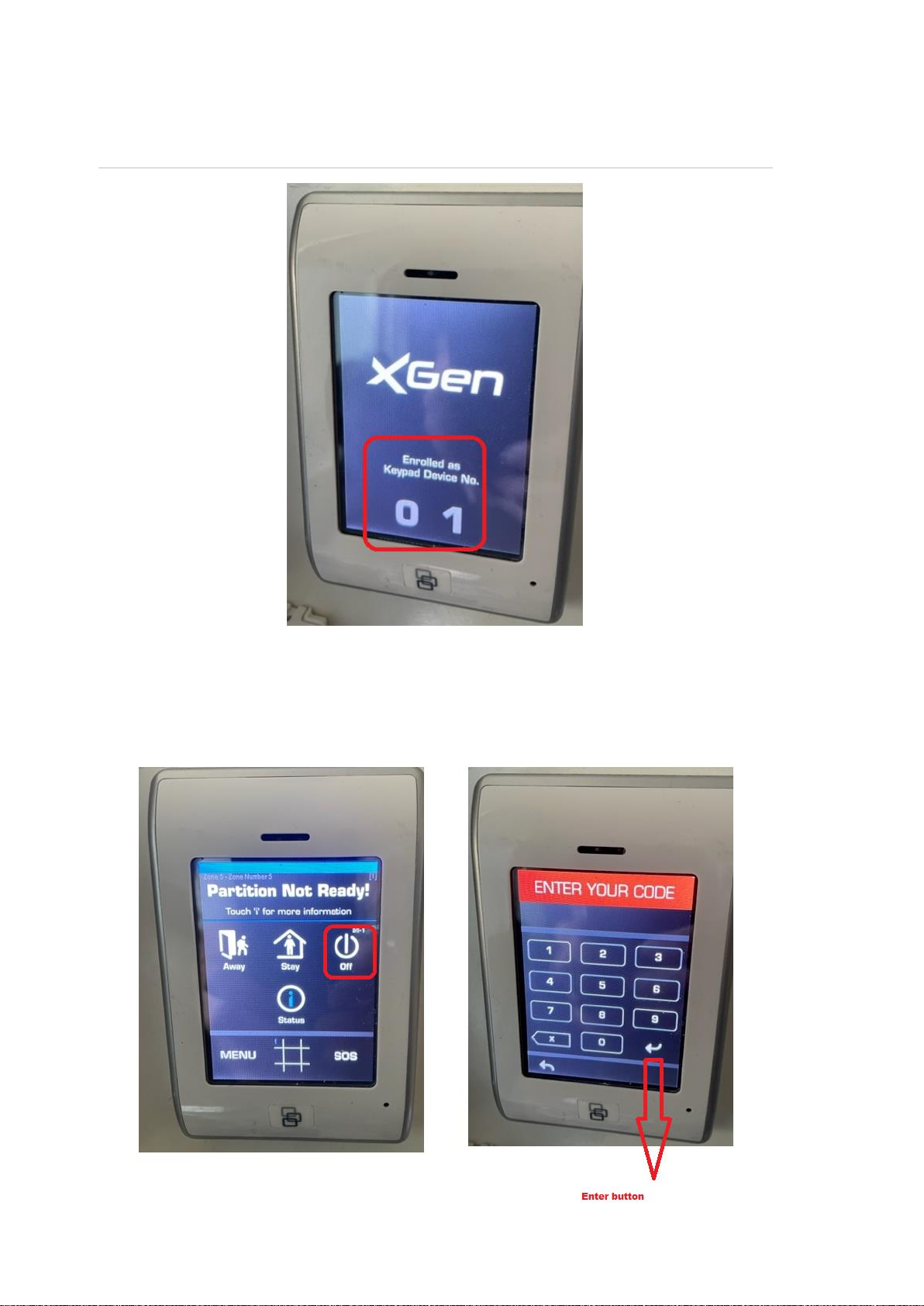
The enrollment process will install NXG-1820 as master keypad 1.
Figure 2: NXG-1820 enrolled as keypad 1
The system may enter an alarm condition. To disarm the system, press the Off
button on NXG-1820, and then enter 1234 followed by the Enter button.
The process usually takes 15 to 20 seconds to auto enroll the hardware devices,
wired on the panel data bus.
Table of contents
Other CADDX Receiver manuals







