Armada 7400 MSG User manual

. . . . . . . . . . . . . . . . . . . . . . . . . . . . . . . . . . . . .
Notice
The information in this guide is subject to change without notice.
COMPAQ COMPUTER CORPORATION SHALL NOT BE LIABLE FOR
TECHNICAL OR EDITORIAL ERRORS OR OMISSIONS CONTAINED HEREIN;
NOR FOR INCIDENTAL OR CONSEQUENTIAL DAMAGES RESULTING FROM
THE FURNISHING, PERFORMANCE, OR USE OF THIS MATERIAL.
This guide contains information protected by copyright. No part of this guide may be
photocopied or reproduced in any form without prior written consent from Compaq
Computer Corporation.
1998 Compaq Computer Corporation.
All rights reserved. Printed in the U.S.A.
COMPAQ, ARMADA, and LTE are registered in the U. S. Patent and Trademark Office.
Microsoft, MS-DOS, Windows, and Windows NT are registered trademarks of
Microsoft Corporation.
The software described in this guide is furnished under a license agreement or
nondisclosure agreement. The software may be used or copied only in accordance with
the terms of the agreement.
Product names mentioned herein may be trademarks and/or registered trademarks of
their respective companies.
Maintenance and Service Guide
&RPSDT$UPDGD)DPLO\RI3HUVRQDO&RPSXWHUV
First Edition September 1998
Documentation Part Number 204249-001
Spare Part Number 204275-001
Compaq Computer Corporation


. . . . . . . . . . . . . . . . . . . . . . . . . . . . . . . . . . . . .
Contents v
Contents
Preface Symbols........................................................................................................vii
Technician Notes..........................................................................................vii
Serial Number..............................................................................................viii
Locating Additional Information ................................................................viii
Chapter 1
Product Description
1.1 Computer Features and Models.............................................................1-1
Features.................................................................................................1-1
Models..................................................................................................1-3
Intelligent Manageability .....................................................................1-4
Power Management Utility ..................................................................1-7
1.2 Computer Components........................................................................1-11
System Memory Options....................................................................1-12
Mass Storage Devices ........................................................................1-13
Power Equipment Options .................................................................1-15
1.3 Computer External Components.........................................................1-16
1.4 Design Overview................................................................................1-22
System Board......................................................................................1-22
Chapter 2
Troubleshooting
2.1 Preliminary Steps ..................................................................................2-2
2.2 Clearing Passwords ...............................................................................2-3
2.3 Power-On Self-Test (POST) .................................................................2-4
2.4 POST Error Messages...........................................................................2-4
2.5 Compaq Utilities....................................................................................2-8
Computer Setup....................................................................................2-8
Computer Checkup (TEST) ...............................................................2-10
Running View System Information (INSPECT) ...............................2-17
Running Compaq Diagnostics............................................................2-18
Boot Sequencing.................................................................................2-18
Factory Default Settings.....................................................................2-18
2.6 Troubleshooting Without Diagnostics................................................2-20
Before Replacing Parts.......................................................................2-20
Checklist for Solving Problems .........................................................2-20

. . . . . . . . . . . . . . . . . . . . . . . . . . . . . . . . . . . . .
vi Contents
Chapter 3
Illustrated Parts Catalog
3.1 Serial Number Location.......................................................................3-1
3.2 Computer System Major Components.................................................3-2
3.3 Display Components............................................................................3-4
3.4 Miscellaneous Hardware Kit Components ..........................................3-6
3.5 Miscellaneous Plastics Kit Components..............................................3-7
3.6 Power Equipment.................................................................................3-8
3.7 Mass Storage Devices ..........................................................................3-9
3.8 Items that Ship with the Computer ....................................................3-10
3.9 Options ...............................................................................................3-12
3.10 Miscellaneous....................................................................................3-14
3.11 Documentation..................................................................................3-14
Chapter 4
Removal and Replacement Preliminaries
4.1 Tools Required.....................................................................................4-1
4.2 Service Considerations.........................................................................4-1
Plastic Parts ..........................................................................................4-1
Cables and Connectors.........................................................................4-2
4.3 Preventing Damage to Removable Drives...........................................4-2
4.4 Preventing Electrostatic Damage.........................................................4-3
Packaging and Transporting Precautions.............................................4-3
Workstation Precautions ......................................................................4-4
Grounding Equipment and Methods....................................................4-5
Electrostatic Voltage Levels and Protective Materials........................4-6
Chapter 5
Removal and Replacement Procedures
5.1 Serial Number ......................................................................................5-1
5.2 Disassembly Reference Chart..............................................................5-2
5.3 Undocking the Computer.....................................................................5-3
Undocking the Computer from the ArmadaStation............................5-3
Undocking the Computer from the Armada MiniStation ...................5-4
5.4 Disconnecting the Computer................................................................5-5
5.5 Computer Logo ....................................................................................5-6
5.6 Computer Feet......................................................................................5-7
5.7 Preparing the Computer for Disassembly............................................5-8
5.8 Battery Packs........................................................................................5-9
Removing a Battery Pack....................................................................5-9
Inserting a Battery Pack.....................................................................5-10
5.9 Hard Drives ........................................................................................5-11
Removing a Hard Drive.....................................................................5-11
Inserting a Hard Drive.......................................................................5-12


. . . . . . . . . . . . . . . . . . . . . . . . . . . . . . . . . . . . .
Contents vii
5.10 MultiBay Devices..............................................................................5-13
Removing MultiBay Devices ............................................................5-13
Inserting MultiBay Devices...............................................................5-14
5.11 PC Cards............................................................................................5-15
Removing a PC Card When the Computer is Off.............................5-16
Removing a PC Card When the Computer is On..............................5-17
Inserting a PC Card............................................................................5-17
5.12 Memory Expansion ...........................................................................5-18
Removing the Memory Compartment Cover....................................5-18
Removing a Memory Expansion Board............................................5-20
Installing a Memory Expansion Board..............................................5-21
5.13 Keyboard/CPU Cover Assembly ......................................................5-22
Removing the Keyboard/CPU Cover Assembly...............................5-22
Installing the Keyboard/CPU Cover Assembly.................................5-27
5.14 Auxiliary Battery...............................................................................5-29
5.15 RTC Battery.......................................................................................5-31
5.16 Audio/Modem or Audio Only Board................................................5-33
5.17 Fan Assembly....................................................................................5-34
5.18 Processor Board.................................................................................5-35
5.19 Display Assembly..............................................................................5-37
Removing the Display Assembly......................................................5-37
Display Assembly Internal Components...........................................5-40
5.20 System Board....................................................................................5-46
Installing the System Board...............................................................5-49
Chapter 6
Specifications
6.1 Physical and Environmental.................................................................6-1
6.2 Display..................................................................................................6-2
6.3 Hard Drive............................................................................................6-3
6.4 Diskette Drive.......................................................................................6-4
6.5 CD-ROM Drive....................................................................................6-5
6.6 DVD-ROM Drive.................................................................................6-6
6.7 LS-120 Drive........................................................................................6-7
6.8 Battery Pack..........................................................................................6-8
6.9 System Interrupts..................................................................................6-9
6.10 System DMA.....................................................................................6-10
6.11 System I/O Addresses .......................................................................6-11
6.12 System Memory Map........................................................................6-13
6.13 Modem Chipset .................................................................................6-13

. . . . . . . . . . . . . . . . . . . . . . . . . . . . . . . . . . . . .
viii Contents
Appendix A
Connector Pin Assignments ..............................................................................A-1
Appendix B
Power Cord Set Requirements
3-Conductor Power Cord Set.....................................................................B-1
General Requirements.........................................................................B-1
Country-Specific Requirements.................................................................B-2
Notes....................................................................................................B-2
Appendix C
Screw Listing ............................................................................................................ C-1
Index ..............................................................................................................................I-1

. . . . . . . . . . . . . . . . . . . . . . . . . . . . . . . . . . . . .
Preface
Preface ix
This Maintenance and Service Guide is a troubleshooting reference that can be used
when servicing the Compaq Armada 7400 Family of Personal Computers.
Compaq Computer Corporation reserves the right to make changes to the Compaq
Armada 7400 Family of Personal Computers without notice.
Additional information is available on the Compaq Armada 7400 Family of Personal
Computers Illustrated Parts Map. Information for the Compaq ArmadaStation and
Armada MiniStation E and EX is available in the Compaq ArmadaStation and Armada
MiniStation E and EX Maintenance and Service Guide and Illustrated Parts Map.
Symbols
The following words and symbols mark special messages throughout this guide:
!WARNING:Text set off in this manner indicates that failure to follow directions in the
warning could result in bodily harm or loss of life.
CAUTION: Text set off in this manner indicates that failure to follow directions in the
caution could result in damage to equipment or loss of information.
IMPORTANT: Text set off in this manner presents clarifying information or specific
instructions.
NOTE: Text set off in this manner presents commentary, sidelights, or interesting points
of information.
Technician Notes
!WARNING:Only authorized technicians trained by Compaq should repair this
equipment. All troubleshooting and repair procedures are detailed to allow only
subassembly/module level repair. Because of the complexity of the individual boards and
subassemblies, no one should attempt to make repairs at the component level or to
make modifications to any printed wiring board. Improper repairs can create a safety
hazard. Any indication of component replacement or printed wiring board modifications
may void any warranty or exchange allowances.
!WARNING:The computer is designed to be electrically grounded. To ensure proper
operation, plug the AC power cord into a properly grounded electrical outlet only.
CAUTION:To properly ventilate the system, you must provide at least 3 inches
(7.62 cm) of clearance on the left and right sides of the computer.

. . . . . . . . . . . . . . . . . . . . . . . . . . . . . . . . . . . . .
xPreface
Serial Number
When requesting information or ordering spare parts, provide the computer serial
number. The serial number is on the bottom of the computer.
Locating Additional Information
In addition to this guide, the following documentation provides information for the
computer:
■Compaq Armada 7400 Family of Personal Computers documentation set
■Microsoft Windows 95/Windows NT 4.0 User’s Guide
■Compaq Service Training Guides
■Compaq Service Advisories and Bulletins
■Compaq QuickFind
■Compaq Service Quick Reference Guide
■Compaq Armada 7400 Family of Personal Computers Illustrated Parts Map
■Compaq ArmadaStation and Armada MiniStation E and EX Maintenance and Service Guide
■Compaq ArmadaStation and Armada MiniStation E and EX Illustrated Parts Map
■Compaq Internet site at http://www.Compaq.com

. . . . . . . . . . . . . . . . . . . . . . . . . . . . . . . . . . . . .
Chapter 1
Product Description 1-1
Product Description
1.1 Computer Features and Models
The Compaq Armada 7400 Family of Personal Computers offers advanced modularity,
an Intel Pentium II processor with 64-bit architecture, an industry-leading Accelerated
Graphics Port (AGP) implementation, and extensive multimedia support. The computer
provides desktop functionality and connectivity through the optional ArmadaStation II
and Armada MiniStation.
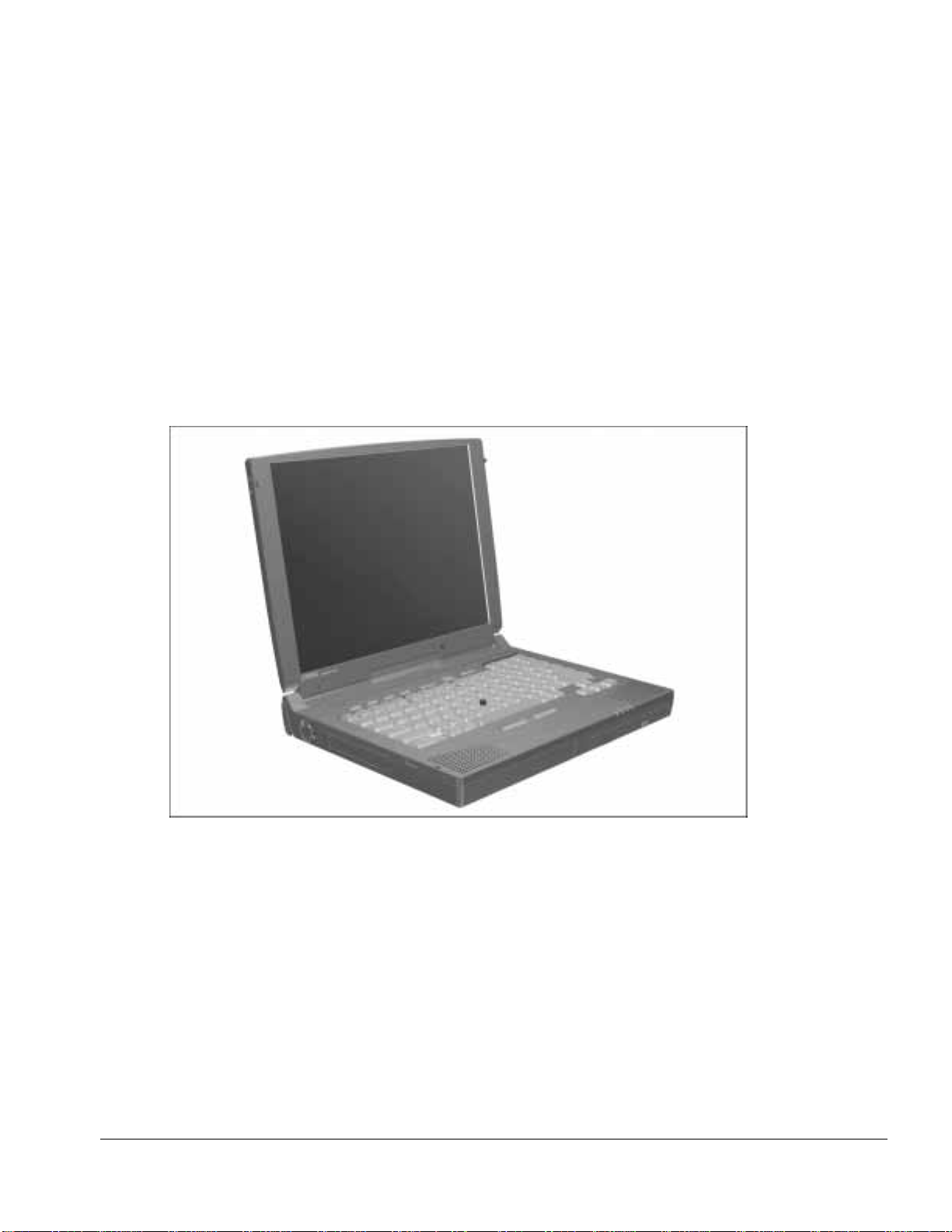
Figure 1-1. Compaq Armada 7400 Personal Computer
Features
The computer has the following standard features:
■Intel Mobile 300- and 266-MHz Pentium II processor with 64-bit architecture, MMX
technology, and 512-KB, level-2 cache memory
■Industry-leading portable computer AGP implementation, featuring:
❏66-MHz dedicated graphics bus
❏frame made AGP
■4-MB SGRAM (synchronous graphics)

. . . . . . . . . . . . . . . . . . . . . . . . . . . . . . . . . . . . .
1-2 Product Description
■32- or 64-MB of SDRAM (synchronous): populated in one slot; expandable to
256 megabytes
■Upgradable flash ROM BIOS
■13.3 XGA (1024 × 768) TFT color display, true color (24-bit) support
■Keyboard with built-in EasyPoint III pointing device and mouse buttons
■Euro symbol provided on Europe/Middle East/Africa keyboards
■External AC adapter
■Lithium ion (Li-ion) battery pack
■Removable 4.0- and 6.4-GB hard drives
■MultiBay that supports a diskette drive, CD-ROM drive, SuperDisk LS -120 drive,
DVD-ROM drive, or second hard drive (in Hard Drive MultiBay Adapter)
■Two PC Card slots that accept 32- and 16-bit Type I, II, and III PC Cards, with
zoomed video interface in the bottom slot
■IrDa-compliant infrared port1(4-Mbps standard) for wireless file transfer, printing,
and file synchronization
■Built-in stereo speakers providing Compaq PremierSound, microphone, and jacks for
stereo audio sound with electronic equalization and wave table synthesis
■Energy Star-compliant power saving features
■Ports and connectors for external equipment, including universal serial bus (USB),
serial, parallel, external monitor, and PS/2-compatible pointing device or keyboard
■Security features
■Desktop functionality available with the optional Compaq ArmadaStation II and
Armada MiniStation E/EX
■Integrated 33.6-Kbps data/14.4-Kbps fax modem (on modem models only;
availability varies by region)
1IrDa 4MB compliant. Infrared performance may vary depending on performance of infrared peripherals, distance
between infrared devices, and applications used.
Table of contents