Zebex Z-3052 User manual


i
Copyright © 2007. All rights reserved.
No warranty of any kind is made in regard to this material, including, but not
limited to, implied warranties of merchantability or fitness for any particular
purpose. We are not liable for any errors contained herein nor for incidental
or consequential damages in connection with furnishing, performance or use
of this material. We shall be under no liability in respect of any defect arising
from fair wear and tear, willful damage, negligence, abnormal working
conditions, failure to follow the instructions and warnings, or misuse or
alteration or repair of the products without written approval. No part of this
document may be reproduced, transmitted, stored in a retrieval system,
transcribed, or translated into any human or computer or other language in
any form or by any means electronic, mechanical, magnetic, optical,
chemical, biological, manual or otherwise, except for brief passages which
may be quoted for purposes of scholastic or literary review, without express
written consent and authorization. We reserve the right to make changes in
product design without reservation and without notification. The material in
this guide is for information only and is subject to change without notice.All
trademarks mentioned herein, registered or otherwise, are the properties of
their various, ill, assorted owners.
General handling precautions
yDo not dispose of the scanner in fire.
yDo not put the scanner directly in the sun or by any heat source.
yDo not use or store the scanner in a very humid place.
yDo not drop the scanner or allow it to collide violently with other objects.
yDo not take the scanner apart without authorization.

ii
Table of Contents
Instructions..............................................................................................................1
1.Getting Started
Unpacking...................................................................................................2
Scanner Outline..........................................................................................3
Disconnecting the cable..............................................................................4
Connecting to a host...................................................................................4
Assembling of optional stand......................................................................5
Testing scanning.........................................................................................6
What’s on the CD-ROM ..............................................................................6
Scanner setup.............................................................................................7
Operation....................................................................................................7
Scanning in handheld mode .......................................................................8
Aiming.......................................................................................................10
Settings and Programming .......................................................................11
Programming options................................................................................11
Default factory device settings..................................................................11
2.User references..................................................................................................12
Set default parameter................................................................................12
Parameter scanning..................................................................................12
Beeper tone ..............................................................................................12
Beeper volume..........................................................................................13
Trigger modes...........................................................................................14
Power modes............................................................................................15
Time delay to low power mode..................................................................15
Decode session timeout............................................................................16
Timeout between decodes, same symbol.................................................17
Beeper after good decode.........................................................................17
Presentation mode session timeout..........................................................18
3.Imager preferences ............................................................................................18
Decode mode............................................................................................20
Snapshot mode.........................................................................................20
Video mode...............................................................................................21
Focus mode ..............................................................................................21
Decoding auto exposure...........................................................................22
Decoding illumination................................................................................22
Decode aiming pattern..............................................................................23
Image capture auto exposure ...................................................................23
Image capture illumination........................................................................24
Gain ..........................................................................................................24
Exposure time...........................................................................................25
LED illumination........................................................................................26
Snapshot mode timeout ............................................................................26
Snapshot aiming pattern ...........................................................................27
Image cropping .........................................................................................27
Crop to pixel addresses.................................................................28
Image resolution........................................................................................29
JPEG image options......................................................................30

iii
JPEG quality and size value..........................................................30
Image file format selector ..............................................................31
Bits per pixel..................................................................................31
Signature capture..................................................................................32
Signature capture file format selector............................................33
Signature capture bits per pixel.....................................................33
Signature capture width.................................................................34
Signature capture height................................................................34
Signature capture JPEG quality.....................................................34
Video view finder.....................................................................................35
Target video frame size..................................................................35
Video view finder image size .........................................................36
4.Serial interface ...................................................................................................37
Serial parameter defaults..........................................................................37
Serial host parameters..............................................................................39
Serial host types............................................................................42
Baud rate.......................................................................................43
Parity .............................................................................................45
Stop bit select................................................................................46
Data bits ........................................................................................46
Check receive errors .....................................................................47
Hardware handshaking..................................................................48
Software handshaking...................................................................50
Host serial response time-out........................................................52
RTS line state................................................................................53
Beep on <BEL>.............................................................................53
Intercharacter delay.......................................................................54
Nixdorf beep / LED options............................................................55
Ignore unknown characters ...........................................................55
ASCII character set for serial hosts...........................................................56
5.USB interface.....................................................................................................61
Introduction...............................................................................................61
USB host parameters................................................................................62
Symbol native API (SNAPI) status handshaking.......................................63
USB country keyboard types (Country codes) ..........................................63
USB keystroke delay.................................................................................65
USB CAPS lock override...........................................................................65
USB ignore unknown characters...............................................................66
Emulate keypad ........................................................................................66
USB keyboard FN 1 substitution...............................................................67
Function key mapping...............................................................................67
Simulated caps lock..................................................................................68
Convert case.............................................................................................68
ASCII character set for USB .....................................................................69
6.Symbologies .....................................................................................................80
Introduction...............................................................................................80
Symbology parameter defaults..................................................................81
UPC/EAN..................................................................................................86
Enable/Disable UPC-A ..................................................................86

iv
Enable/Disable UPC-E ..................................................................86
Enable/Disable UPC-E1 ................................................................86
Enable/Disable EAN-8/JAN-8........................................................87
Enable/Disable EAN-13/JAN-13....................................................87
Enable/Disable Bookland EAN......................................................87
Decode UPC/EAN/JAN supplemental ...........................................88
UPC/EAN/JAN supplemental redundancy.....................................90
Transmit UPC-A check digit...........................................................90
Transmit UPC-E check digit...........................................................91
Transmit UPC-E1 check digit.........................................................91
UPC-A preamble............................................................................92
UPC-E preamble ...........................................................................93
UPC-E1 preamble .........................................................................94
Convert UPC-E to UPC-A..............................................................94
Convert UPC-E1 to UPC-A............................................................95
EAN-8/JAN-8 extend .....................................................................95
UCC coupon extended code..........................................................96
Code 128 ..................................................................................................97
Enable/Disable Code 128..............................................................97
Enable/Disable UCC/EAN-128......................................................97
Enable/Disable ISBT 128...............................................................98
Code 39 ....................................................................................................99
Enable/Disable Code 39................................................................99
Enable/Disable Trioptic Code 39 ...................................................99
Convert Code 39 to Code 32.......................................................100
Code 32 prefix.............................................................................100
Set lengths for Code 39...............................................................101
Code 39 check digit verification...................................................102
Transmit Code 39 check digit ......................................................103
Code 39 full ASCII conversion.....................................................103
Code 39 buffering (Scan & Store)................................................104
Code 93 ..................................................................................................107
Enable/Disable Code 93..............................................................107
Set lengths for Code 93...............................................................107
Code 11...................................................................................................109
Enable/Disable Code 11..............................................................109
Set lengths for Code 11...............................................................109
Code 11 check digit verification...................................................110
Transmit Code 11 check digits..................................................... 111
Interleaved 2 of 5 (ITF)............................................................................112
Enable/Disable Interleaved 2 of 5................................................112
Set lengths for Interleaved 2 of 5.................................................112
I 2 of 5 check digit verification......................................................114
Transmit I 2 of 5 check digit.........................................................114
Convert I 2 of 5 to EAN-13...........................................................115
Discrete 2 of 5 (DTF)...............................................................................115
Enable/Disable Discrete 2 of 5 ....................................................115
Set lengths for Discrete 2 of 5 .....................................................116
Codabar (NW-7)......................................................................................118

v
Enable/Disable Codabar..............................................................118
Set lengths for Codabar...............................................................118
CLSI Editing.................................................................................120
NOTIS Editing..............................................................................120
MSI ........................................................................................................121
Enable/Disable MSI.....................................................................121
Set lengths for MSI......................................................................121
MSI check digits ..........................................................................123
Transmit MSI check digit(s) .........................................................123
MIS check digit algorithm.............................................................124
Postal Codes...........................................................................................125
US Postnet ..................................................................................125
US Planet ....................................................................................125
UK Postal.....................................................................................126
Transmit UK Postal check digit....................................................126
Japan Postal................................................................................127
Australian Postal..........................................................................127
Dutch Postal................................................................................128
Transmit US Postal check digit....................................................128
RSS (Reduced Space Symbology) .........................................................129
RSS-14........................................................................................129
RSS Limited.................................................................................129
RSS expanded ............................................................................130
Convert RSS to UPC/EAN...........................................................130
Composite...............................................................................................131
Composite CC-C .........................................................................131
Composite CC-A/B......................................................................131
Composite TLC-39.......................................................................132
UPC composite mode..................................................................133
Composite beep mode ................................................................134
UCC/EAN Code 128 emulation mode for UCC/EAN composite codes
....................................................................................................135
2D symbologies.......................................................................................136
Enable/Disable PDF417 ..............................................................136
Enable/Disable MicroPDF417......................................................136
Code 128 emulation ....................................................................137
Data Matrix..................................................................................138
Maxicode.....................................................................................138
QR Code......................................................................................138
Redundancy level....................................................................................139
Redundancy level 1.....................................................................139
Redundancy level 2.....................................................................139
Redundancy level 3.....................................................................139
Redundancy level 4.....................................................................139
Security level...........................................................................................141
Intercharacter gap size................................................................142
Report version.........................................................................................142
Macro PDF features ................................................................................143
Macro PDF user indications.........................................................143

vi
Macro PDF transmit / Decode mode symbols .............................144
Transmit Macro PDF control header............................................145
Escape characters.......................................................................146
Flush Macro buffer.......................................................................146
Abort Macro PDF entry................................................................146
7.Miscellaneous scanner options ........................................................................147
Introduction..............................................................................................147
Miscellaneous scanner parameter defaults .............................................148
Miscellaneous scanner parameters.........................................................149
Transmit code ID character .........................................................149
Prefix/Suffix values......................................................................150
Scan data transmission format....................................................151
FN1 substitution values ...............................................................152
Transmit “No Read” message......................................................152
8.Maintenance ....................................................................................................153
Appendix A
Standard default parameters ...................................................................154
Appendix B
Symbol code identifiers ...........................................................................163
AIM code identifiers.................................................................................164
Appendix C
Sample barcodes.....................................................................................169
Appendix D
Numeric barcodes ...................................................................................171
Appendix E
ASCII character set .................................................................................173

1
Introduction
Featuring a powerful image sensor for powerful optical performance, the
Handheld 2D Image Reader is ideal for both 1D and 2D scanning situations.
The reader uses laser aiming and LED illumination, and LED illumination
and can switch between two focus positions for extended working range or
for more precise focusing in high-density bar code decoding or digital picture
taking
With its sturdy ABS plastic construction, sleek, ergonomic styling, and light
weight, the Handheld 2D Image Reader reduces user fatigue, making it easy
to use even in high-volume scanning situations. The Handheld 2D Image
Reader also features best-in-class decoding capabilities, boasting over 20
recognized 1D, postal, and 2D codes, including EAN-UCC composite codes
and PDF 417 matrix codes.
The Handheld 2D Image Reader has advanced features and thoughtful
design that make it ideally adapted to a wide variety of business,
manufacturing, service, and scientific needs.

2
Unpacking
The Handheld 2D Image Reader package should contain:
1 ea. Handheld 2D Image Reader
1 ea. Communication Cable
1 ea. Power Adapter (optional)
1 ea. CD-ROM Support Disk
If any package contents are damaged or missing, please contact your dealer
immediately.
Please leave this Users' Manual within easy access of person using the
scanner.

3
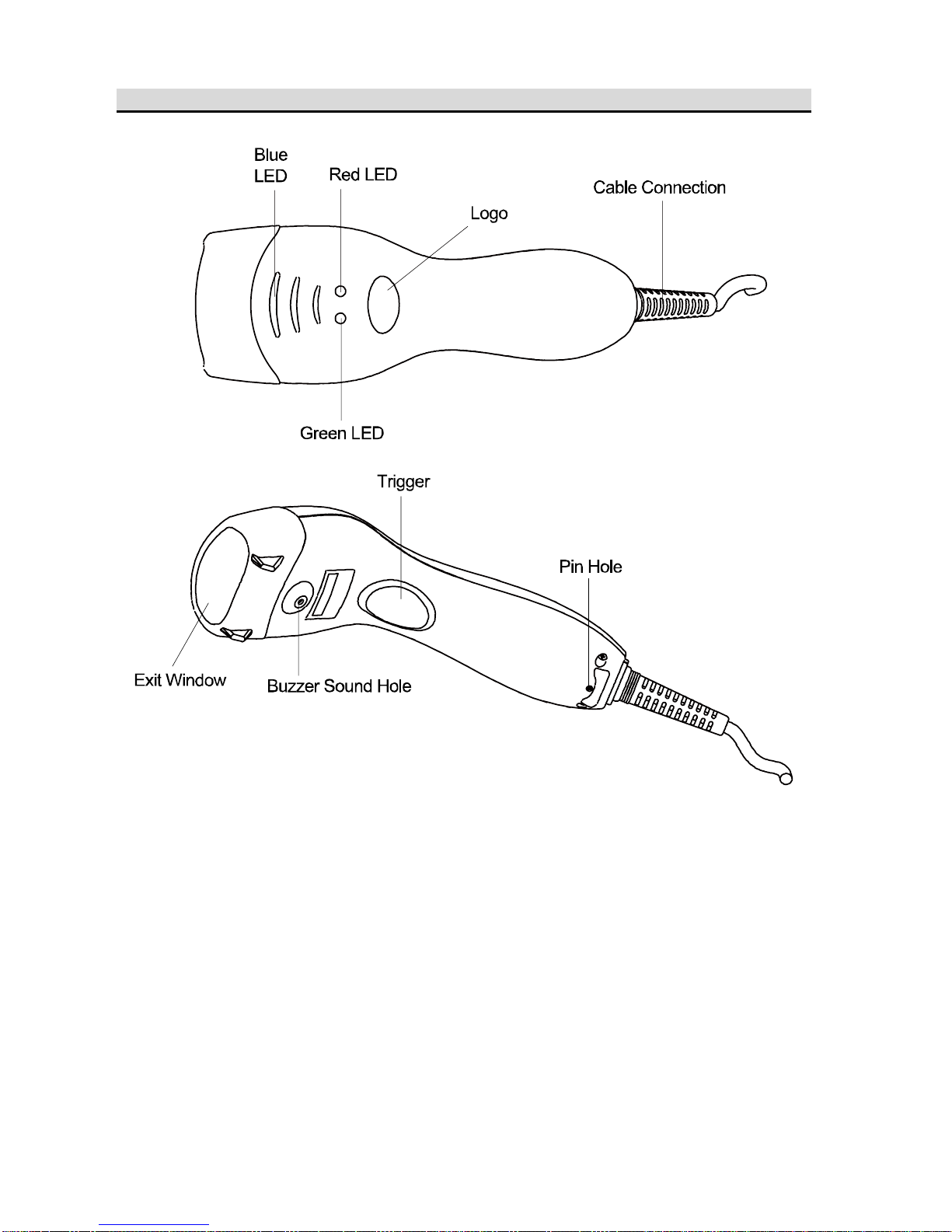
ScannerOutline
The LED indicator on the top of the scanner unit glows red when power is on.
When a barcode is successfully decoded, the LED flashes green and blue
LED and the buzzer sounds.
Other manuals for Z-3052
1
Table of contents
Other Zebex Barcode Reader manuals

Zebex
Zebex Z-3192BT User manual

Zebex
Zebex z-3101 Operating instructions

Zebex
Zebex Z-3100 User manual

Zebex
Zebex Z-3051BT User manual

Zebex
Zebex Z-3070 Series User manual

Zebex
Zebex Z-3191BT Instruction Manual

Zebex
Zebex z-3101 Operating instructions

Zebex
Zebex A-50M+ User manual

Zebex
Zebex Z-3191LE User manual

Zebex
Zebex Z-3130BT User manual

Zebex
Zebex z3190BT User manual

Zebex
Zebex Z-6082 User manual

Zebex
Zebex Z-3052 User manual

Zebex
Zebex Z-8072 User manual

Zebex
Zebex Z-3191BT Instruction Manual

Zebex
Zebex Z-3051HS User manual

Zebex
Zebex Z-5652 Plus User manual

Zebex
Zebex Z-3191BT Instruction Manual

Zebex
Zebex Z-3392 User manual

Zebex
Zebex Z-5160 User manual