Zebex Z-6181 User manual

Dual-Laser Omnidirectional In-Counter Scanner
1


Dual-Laser Omnidirectional In-Counter Scanner
i
Revision History
Changes to the original manual are listed below:
Version Date Description of Version
1.0 July. 20, 2010 Initial release
1.1 March. 21, 2011 Added EAS connection

Dual-Laser Omnidirectional In-Counter Scanner ii
Important Notice
No warranty of any kind is made in regard to this material, including, but not limited to, implied
warranties of merchantability or fitness for a particular purpose. We are not liable for any errors
contained herein or incidental or consequential damages in connection with furnishing,
performance or use of this material.
No part of this document may be reproduced, transmitted, stored in a retrieval system, transcribed,
or translated into any language or computer language in any form or by any means electronic,
mechanical, magnetic, optical, chemical, manual or otherwise, without express written consent
and authorization.
We have taken reasonable measures to provide information in this manual that is complete and
accurate. However, the material in this guide is for information only; we reserve the right to make
changes in product design without reservation and without prior notification. For the latest
revision please contact your distributor.
All trademarks mentioned herein, registered or otherwise, are the properties of their various
respective owners.
Copyright © 2011. All rights reserved.
This manual is in A5 format. Please check your printer setting before printing it out.

Dual-Laser Omnidirectional In-Counter Scanner
iii
Laser Safety
The Dual-Laser Omnidirectional In-Counter Scanner complies with safety standard IEC 60825 for a
Class I laser product. It also complies with CDRH as applicable to a Class IIa laser product. Avoid
long term staring into direct laser light.
Radiant Energy: The Advanced Dual-Laser Omnidirectional In-Counter Scanner uses two low-power
visible laser diodes operating at 650nm in an opto-mechanical scanner resulting in less than 3.9µW
radiated power as observed through a 7mm aperture and averaged over 10 seconds.
Do not attempt to remove the protective housing of the scanner, as unscanned laser light with a
peak output up to 0.8mW would be accessible inside.
Laser Light Viewing: The scan window is the only aperture through which laser light may be
observed from this product. A failure of the scanner motor, while the laser diode continues to emit
a laser beam, may cause emission levels to exceed those for safe operation. The scanner has
safeguards to prevent this occurrence. If, however, a stationary laser beam is emitted, the failing
scanner should be disconnected from its power source immediately.
Adjustments: Do not attempt any adjustments or alteration of this product. Do not remove the
protective housing of the scanner. There are no user-serviceable parts inside.
Caution: Use of controls or adjustments or performance of procedures other than those specified
herein may result in hazardous laser light exposure.
Optical: The use of optical instruments with this product will increase the eye hazard. Optical
instruments include binoculars, magnifying glasses, and microscopes but do not include normal eye
glasses worn by the user.
For CE-Countries
This scanner is in conformity with CE standards. Please note that an approved, CE-marked power
supply unit should be used in order to maintain CE conformance.

Dual-Laser Omnidirectional In-Counter Scanner iv
Table of Contents
Important Notice .....................................................................................................................ii
Introduction ............................................................................................................................ 1
Key Features ................................................................................................................... 1
Unpacking ...................................................................................................................... 2
Cable Installation............................................................................................................ 6
Connection.............................................................................................................................. 7
Connecting Power .......................................................................................................... 7
Verifying Scanner Operation .......................................................................................... 7
Connecting to the Host .................................................................................................. 8
Installation ............................................................................................................................ 12
Pre-Installation Considerations .................................................................................... 12
Installing the Scanner to the Counter........................................................................... 12
Auxiliary Handheld Scanner Connection...................................................................... 19
EAS Connection ............................................................................................................ 20
Window Glass Replacement ........................................................................................ 23
Set Up ................................................................................................................................... 25
Configuring the Scanner............................................................................................... 25
Operation.............................................................................................................................. 28
LED Indications ............................................................................................................. 28
Sound Indications......................................................................................................... 28
Sleep Mode .................................................................................................................. 29
Scan Volume and Package Flow ................................................................................... 30
Scanning Mode............................................................................................................. 31
Maintaining the Scanner .............................................................................................. 32
Trouble Shooting................................................................................................................... 33
Specification.......................................................................................................................... 34
Dimension............................................................................................................................. 35
Pin Assignment ..................................................................................................................... 36
Index .................................................................................................................................... 38

Dual-Laser Omnidirectional In-Counter Scanner
1
USER’S MANUAL
Introduction
The Dual-Laser Omnidirectional In-Counter Scanner is a powerful scanning solution
specially designed for high-traffic environments with limited space. It features dual-laser
technology that enables 32 scan lines to achieve enhanced speed and accuracy, but
manages to do so in a unit that measures significantly less in size than comparable
scanners.
With proprietary hardware decoding technology, this dual-laser scanner is able to decode
virtually every 1D barcode in existence with lightening-quick speed. The visual diagnostic
blue LED on the device provides immediate visual user feedback, increasing both
accuracy and productivity.
Key Features
Unique dual-laser technology
Field-replaceable scratch-resistant window
Instant “two-way object-fly-by” scan reaction
Visual diagnostic blue LED
Barcode stitching capable

Dual-Laser Omnidirectional In-Counter Scanner 2
USER’S MANUAL
Unpacking
The omnidirectional scanner package contains:
1 ea.
Advanced dual-laser omnidirectional in-counter
scanner
1 ea.
Interface cable
(This cable is usually, but not always, supplied.
Model depends on customer needs.)
1 ea.
Power supply & power cord
(Model depends on electrical requirements of your
geographic location)
1 ea. User’s manual & programming guide in CD-ROM
a. Please leave this user’s manual within easy access for persons
using the scanner.
b. If any contents are damaged or missing, please contact your
dealer immediately.

Dual-Laser Omnidirectional In-Counter Scanner
3
USER’S MANUAL
Components
Top V iew
Figure 1: Scanner Top View
Description Function
1 Scan Window Laser aperture
2 Speaker Exit Beep tone indication
3 LED Indicator *2 Indicating reading status and package flow
4 Round Screw * 4 Fixing the top plate to the scanner
5 Flat Screw *4, M4*0.7 For vertical flush mounting

Dual-Laser Omnidirectional In-Counter Scanner 4
USER’S MANUAL
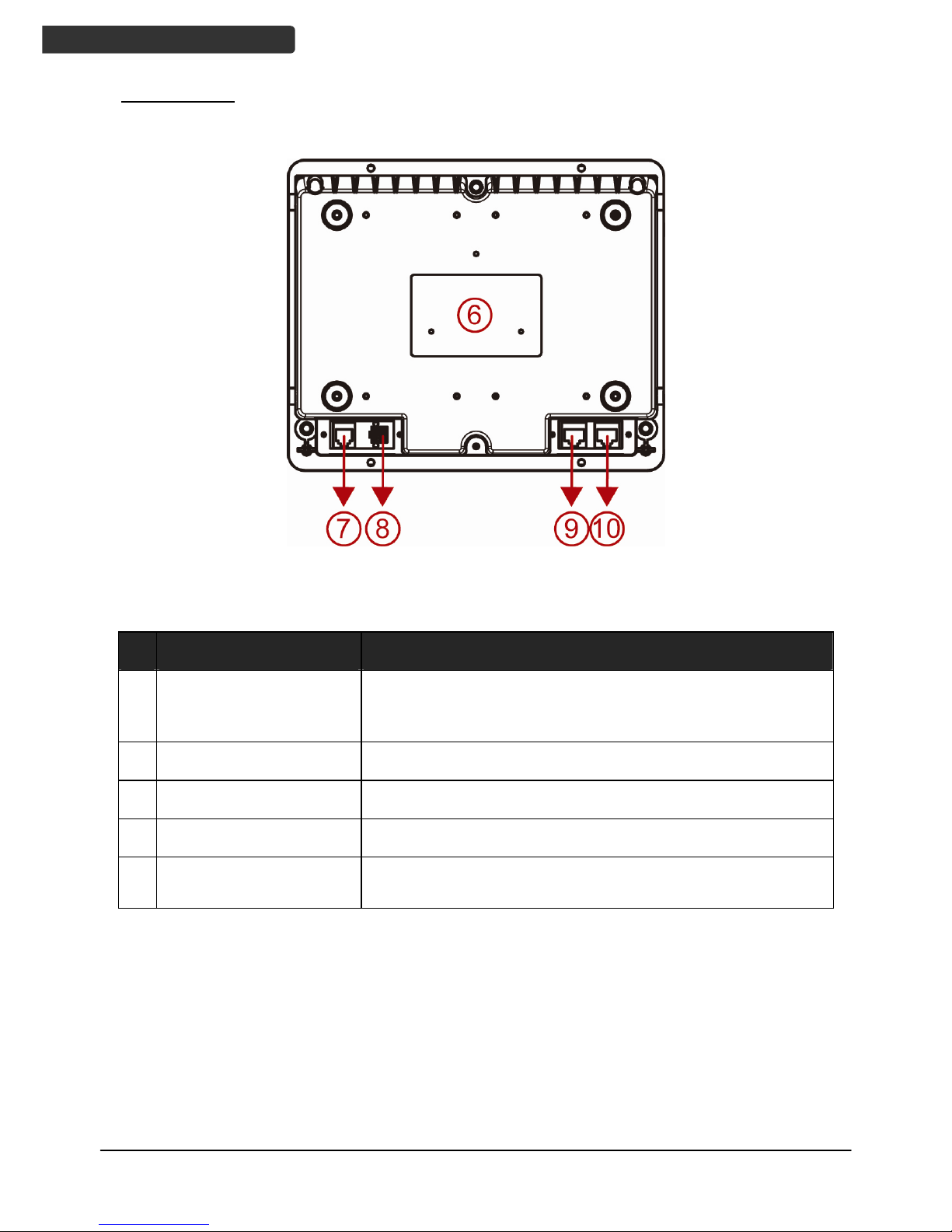
Bottom View
Figure 2: Scanner Bottom View
Description Function
6 Device Label Carrying information such as model name and serial
number
7 EAS Port Electronic article surveillance connection
8 Power Input External AC power input
9 Host Port Interface communication connection to the host
10 AUX Port Connecting an auxiliary peripheral device, usually a
handheld scanner
Table of contents
Other Zebex Barcode Reader manuals

Zebex
Zebex Z-8072 User manual

Zebex
Zebex Z-5652 User manual

Zebex
Zebex ZB- 800 SERIES User manual

Zebex
Zebex Z-3052 User manual

Zebex
Zebex Z-5252 User manual

Zebex
Zebex Z-3192BT User manual

Zebex
Zebex Z-2130 User manual

Zebex
Zebex Z-8072 User manual

Zebex
Zebex Z-9000 Use and care manual

Zebex
Zebex Z-3152 Series Operating instructions

Zebex
Zebex A-50M+ User manual

Zebex
Zebex Z-6182 User manual

Zebex
Zebex Z-3272 Plus User manual

Zebex
Zebex Z-5130 User manual

Zebex
Zebex Z-3052 User manual

Zebex
Zebex Z-3191BT Instruction Manual

Zebex
Zebex Z-3392 User manual

Zebex
Zebex Z-3191BT Instruction Manual

Zebex
Zebex Barcode scanner User manual

Zebex
Zebex Z-6010 User manual