
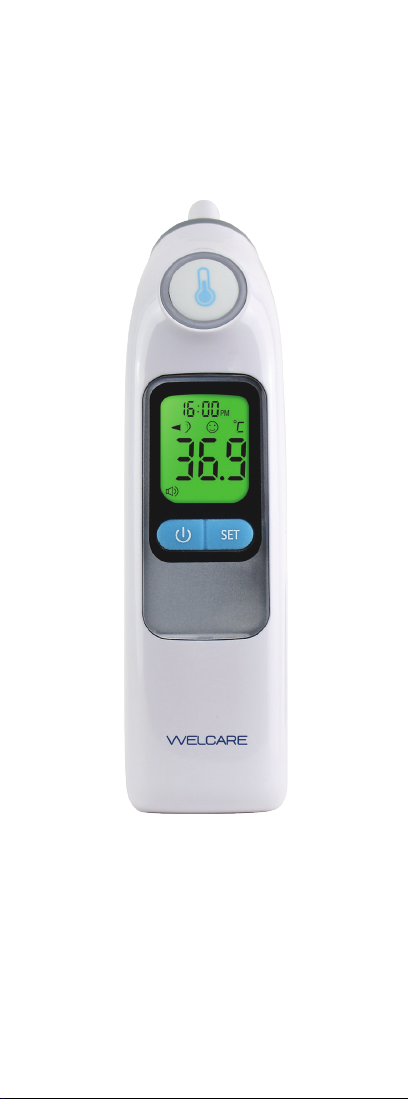
Welcare WET100 Instruction Manual

Read Instructions Carefully Before Use
Model: WET100
Instruction Manual &
Warranty Information
EAR AND OBJECT
TEMPERATURE DETECTION
SECOND
READING
Welcare_WET01_EarTherm_IM.indd 1Welcare_WET01_EarTherm_IM.indd 1 3/12/21 2:21 pm3/12/21 2:21 pm
2. Welcare Ear Thermometer
Model: WET100
Thank you for purchasing this
Welcare Ear Thermometer.
Please keep this instruction manual in a safe place
where it is readily available.
Note: The illustrations in this manual may differ slightly
from the product itself.
Welcare_WET01_EarTherm_IM.indd 2Welcare_WET01_EarTherm_IM.indd 2 3/12/21 2:21 pm3/12/21 2:21 pm

Instruction Manual & Warranty Information 3.
Contents
Important Safety Information.......................................... 4
Features ........................................................................ 6
Package Contents.......................................................... 6
Before Using the Ear Thermometer ................................ 6
Components ................................................................. 7
LCD Display ................................................................... 7
Backlight Screen............................................................ 8
Using the Ear Thermometer ........................................... 9
Switching between °C and °F ........................................ 9
Setting the Time & Date................................................. 9
Turn Sound “ON” or “OFF” ........................................... 11
Change to Ear Mode or Object Mode............................ 11
Reset Parameter Format .............................................. 11
Probe Cover Detection and Eject Function.................... 12
Measuring Ear Temperature ......................................... 13
Fever Alarm ................................................................. 14
Measuring Object Temperature .................................... 14
Memory Function......................................................... 15
Replace the Battery ..................................................... 16
Replacement Accessories ............................................ 16
Cleaning and Maintenance .......................................... 17
Storage........................................................................ 18
Troubleshooting ........................................................... 18
Specications .............................................................. 20
Product Warranty ......................................................... 22
Warranty Form............................................................. 25
Disposal....................................................................... 28
Welcare_WET01_EarTherm_IM.indd 3Welcare_WET01_EarTherm_IM.indd 3 3/12/21 2:21 pm3/12/21 2:21 pm

4. Welcare Ear Thermometer
Important Safety
Information
Read this section thoroughly before using the
product.
Please ensure you observe the safety
instructions to avoid accidents, injury and damage.
Intended purpose
The Infrared Welcare Ear Thermometer is intended to
be used for the intermittent measurement of human body
temperature via the ear canal by people of all ages.
This thermometer is intended for home use only.
This product is not intended for use by persons (including
children) with limited physical, sensory, or mental abilities
or lacking experience and/or knowledge, unless they are
supervised by a person responsible for their safety or have
received and understand the instructions/safety warnings
for use of the product from this person in advance.
Safety Warnings
• It is recommended to use this unit with a Welcare Ear
Thermometer Probe Cover for hygiene purposes.
• DO NOT forcibly insert the probe into the ear.
• If you feel any discomfort such as a pain during the
measurement, stop using the product immediately.
• DO NOT use this product if suffering from an ear disease
such as otitis externa or otitis media. It may worsen the
condition.
• DO NOT use this product when the external auditory
canal is wet, such as after swimming or taking a bath.
It may injure the external auditory canal.
• Conducting self-diagnosis based on the measurement
results and/or treatment can be dangerous. Please follow
the instructions of your doctor.
• If the ear is cold, wait until the ear is warmed up before
taking a temperature measurement.
• To avoid inaccurate readings, always attach a new,
clean probe cover for each temperature reading. Correct
measurement result may not be obtained if dirty probe
covers are used.
• DO NOT use a probe cover after someone else has used
it. This can lead to cross infection.
Welcare_WET01_EarTherm_IM.indd 4Welcare_WET01_EarTherm_IM.indd 4 3/12/21 2:21 pm3/12/21 2:21 pm

Instruction Manual & Warranty Information 5.
Important Safety Information - continued
• For persons wearing hearing aids or earplugs, remove
the device and wait 20 minutes prior to taking a
temperature.
Warnings
• Proper installation of the probe cover ensures accurate
measurements.
• If device is accidentally used without a probe cover, clean
the probe as per cleaning instructions.
• The probe window must be kept clean, dry, and
undamaged to ensure accurate readings
• DO NOT attempt measurements when the thermometer
is wet, as inaccurate readings may result.
• If there is any temperature difference between the places
where the unit is stored and where you are going to take
the measurement, leave the unit in the room where the
unit is going to be used for more than thirty minutes
to allow it to reach room temperature before the rst
measurement.
• DO NOT touch the infrared sensor with a nger or
breathe on it. The probe is the most delicate part of the
thermometer. Use with care when cleaning the lens to
avoid damage.
• DO NOT attempt to open or disassemble the product.
• DO NOT let children play with the product - it is not
a toy.
• Contains small parts that may cause a choking hazard.
Keep children away from packaging, product, and its
components.
• In an emergency case, if a child swallows a battery or a
probe cover, immediately consult with a doctor.
• DO NOT throw batteries into a re. The battery may
explode.
• Remove battery from the device when not in operation
for a long time to prolong the battery life.
• DO NOT put the thermometer in direct sunlight or
expose to extreme temperatures.
• During a measurement, ensure that no mobile phone or
any other electrical devices that emit electromagnetic
eld is within 30cm of this device. This may result
in incorrect operation of the device and/or cause an
inaccurate reading.
Welcare_WET01_EarTherm_IM.indd 5Welcare_WET01_EarTherm_IM.indd 5 3/12/21 2:21 pm3/12/21 2:21 pm

6. Welcare Ear Thermometer
Features
• Fast & Accurate 1 Second Reading - ˚C or ˚F
• High Fever Alarm
• 30 Memory
• Colour Fever Indicator (Green, Yellow or Red)
• Ear & Object Temperature Detection
• Real Time Clock
• 15 Hygienic Disposable Probe Covers included
• Probe Cover Detection & Probe Eject Function
• BPA & Latex Free
Package Contents
• 1 x Welcare Ear Thermometer
• 1 x Packet of Probe Covers (15pc)
• 1 x User Manual & Warranty Information
• 2 x AA Batteries
Before Using the
Ear Thermometer
• Carefully remove all packaging materials and keep the
enclosed documents in a safe place.
• Keep the packaging, product, and its components out of
reach of children.
• Check the product is intact. DO NOT use if broken.
If any abnormalities are detected, please contact our
service centre:
In Australia - 1800 807 464
In New Zealand - 0800 523 583
Welcare_WET01_EarTherm_IM.indd 6Welcare_WET01_EarTherm_IM.indd 6 3/12/21 2:21 pm3/12/21 2:21 pm

Instruction Manual & Warranty Information 7.
Components
A. Probe Cover (disposable)
B. Probe
C. Test Button
D. ON\OFF Button
E. Battery Cover
F. SET Button
G. Probe Eject Button
LCD Display
D
F
E
G
B
A
C
Date & Time
Unit sign: ˚C or ˚F
Temperature
indicator
Temperature result
Low voltage sign
Memory mode
Sound symbol
Object
Temperature mode
Ear
Temperature mode
Probe Cover symbol
Welcare_WET01_EarTherm_IM.indd 7Welcare_WET01_EarTherm_IM.indd 7 3/12/21 2:21 pm3/12/21 2:21 pm

8. Welcare Ear Thermometer
Backlight Screen
Ear mode
Note: The display will light-up GREEN for 3 seconds when
the unit is ready for measurement.
Once the measurement is taken:
Normal Fever
The display will light-up GREEN for
3 seconds with a happy face when a
measurement is completed with
a reading less than 37.3˚C.
Elevated Fever
The display will light-up YELLOW for 3
seconds with a happy face when a
measurement is completed with a reading
less than 37.8˚C but higher than 37.3˚C.
High Fever
The display will light-up RED for 3
seconds with a sad face when a
measurement is completed with a reading
equal to or higher than 37.8˚C.
Object mode
Note: The display screen will light up GREEN for 3 seconds
when the unit is ready for measurement.
Once the OBJECT measurement is completed, the unit will
illuminate GREEN for 3 seconds.
PM
PM
PM
Welcare_WET01_EarTherm_IM.indd 8Welcare_WET01_EarTherm_IM.indd 8 3/12/21 2:21 pm3/12/21 2:21 pm

Instruction Manual & Warranty Information 9.
Using the
Ear Thermometer
When using the thermometer for the rst time, please set
the parameters of the thermometer as per the following
instructions.
• Insert the 2 AA batteries into the unit (see p16)
Note: The use of temperature readings for self-diagnosis
is dangerous. Consult with a doctor for the interpretation of
results. Self-diagnosis may lead to the worsening of medical
conditions.
Switching between
°C and °F
• °C will appear on the display
• Press Button to select and choose the desired
mesurement unit either °C or °F and press SET button.
Setting the Time & Date
The 24H time format gure will appear on the display.
The device can display the time as either an AM/PM
(12-hour) or a 24:00 (24-hour) format.
Set the Time Format
Press and release Button to select the format.
With the preferred time
format on the display,
press SET Button, the
Hour gure is ashing
automatically.
Welcare_WET01_EarTherm_IM.indd 9Welcare_WET01_EarTherm_IM.indd 9 3/12/21 2:21 pm3/12/21 2:21 pm

10. Welcare Ear Thermometer
Set the Time and Date Format - continued
Set the hour
Press and release the Button to
advance one hour until the correct hour
appears.
After the hour is set, press SET
Button, the Minute gure is ashing
automatically.
Set the minute
Press and release the Button to
advance one minute until the correct
minute appears.
After the minute is set, press SET
Button, the Year gure
is ashing automatically.
Set the Date Format
Set the year
Press and release the Button to
advance one year until the correct year
appears.
After the year is set, press SET Button,
the Month gure will appear.
Set the month
Press and release the Button to
advance one month until the correct
month appears.
After the month is set, press SET
Button, the Date gure is ashing
automatically.
Set the day
Press and release the Button to
advance one day until the correct month
appears.
After the day is set, press SET Button to
exit the setting mode.
Note: Once the date is set, the unit will turn off
automatically.
Note: If an Error occurs during setup, press SET repeatedly
until the screen switches off and press the SET Button for
5 seconds.
Welcare_WET01_EarTherm_IM.indd 10Welcare_WET01_EarTherm_IM.indd 10 3/12/21 2:21 pm3/12/21 2:21 pm
Other manuals for WET100
1
Table of contents
Other Welcare Thermometer manuals


