
Verykool Lotus Plus s5007 User manual

Contents
1. Using this manual.....................................................................................................................7
1.1 Read me first.................................................................................................................7
2. Assembling................................................................................................................................7
2.1 General information......................................................................................................8
2.2 Phone Overview............................................................................................................9
2.3Insert the SIM card.......................................................................................................10
2.4 Charge the battery.......................................................................................................10
2.5Insert a memory card....................................................................................................10

3. Getting started........................................................................................................................10
3.1 Turn on or off your device...........................................................................................10
3.2 Use the touch screen ...................................................................................................10
3.3 Lock or unlock the touch screen and the keys .............................................................11
3.4 Get to know the Home screen .....................................................................................11
3.5 Access applications.....................................................................................................12
3.6 Launch multiple applications ......................................................................................12
4. Communication......................................................................................................................12
4.1 Calling ........................................................................................................................12
4.2 Messages.....................................................................................................................13
5. Entertainment........................................................................................................................16
5.1 Camera........................................................................................................................16

5.2 Video Player................................................................................................................17
5.3 Gallery........................................................................................................................18
5.4 Music player ...............................................................................................................18
5.5 FM Radio....................................................................................................................19
6. Personal information .............................................................................................................20
6.1 Contacts ......................................................................................................................20
6.2 Sound recorder............................................................................................................20
7. Web and GPS-based services.................................................................................................20
7.1 Browser.......................................................................................................................20
7.2 Maps...........................................................................................................................21
8. Connectivity............................................................................................................................22
8.1 USB connections.........................................................................................................22

9. Tools........................................................................................................................................22
9.1 Calculator....................................................................................................................22
9.2 Clock...........................................................................................................................22
9.3 Calendar......................................................................................................................23
9.4 Downloads..................................................................................................................23
9.5 File Explorer...............................................................................................................23
9.6 Search .........................................................................................................................24
10. Settings..................................................................................................................................24
10.1 Wi-Fi.........................................................................................................................24
10.2 Bluetooth...................................................................................................................24
10.3 Data usage.................................................................................................................25
10.4 More settings.............................................................................................................25

10.5 Display......................................................................................................................26
10.6 Audio profiles............................................................................................................26
10.7 Storage......................................................................................................................26
10.8 Battery ......................................................................................................................26
10.9 Apps..........................................................................................................................26
10.10 Location..................................................................................................................26
10.11 Security...................................................................................................................27
10. 12 Accounts ................................................................................................................27
10.13 Language & input....................................................................................................27
10.14 Factory data reset....................................................................................................27
10.15 Date & time.............................................................................................................27
10.16Accessibility.............................................................................................................27

10.17About Phone ............................................................................................................27
11. Environmental concern........................................................................................................27
12. E-waste disposable mechanism ...........................................................................................30
13. SAR information..................................................................................................................32

1. Using this manual
Thank you for choosing this mobile device.
This device will provide you with high-quality mobile communication and entertainment based
on exceptional technology and high standards.
This manual has been specially designed to guide you through the functions and features of your
device.
1.1 Read me first
●Before using your device,read the entire manual and all safety instructions to ensure safe and
proper use.
●The descriptions in this manual are based on the default settings of your device.
●The images and screenshots used in this manual may differ from the actual product.
●The contents of this manual may differ from the product, or from software provided by service
providers or carriers, and are subject to change without prior notice.
●Available features and additional services may vary by device, software, or service provider.
●Formatting and delivery of this manual is based on Android operating systems and may vary
depending on the user’s operating system Version.
●Applications on this device may perform differently from functions available in the computer
version of the operating system.
2. Assembling
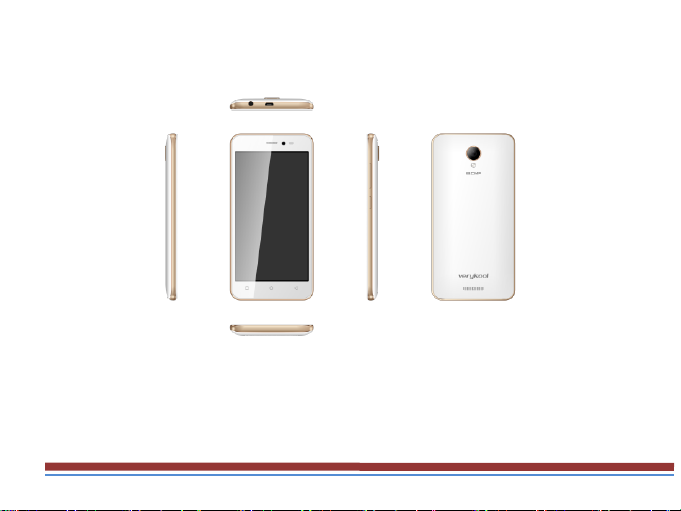
2.1 General information
The phone is a dual SIM phone that encloses features, such as Android version 5.1 Lollipop,
Wi-Fi,8 MP Camera.etc. This phone is provided with two SIM slots for two different SIM cards.
The SIM card inserted in the slot1 is called SIM1, and the other one in the slot2 is known as
SIM2. You can select to operate SIMs as per your needs.
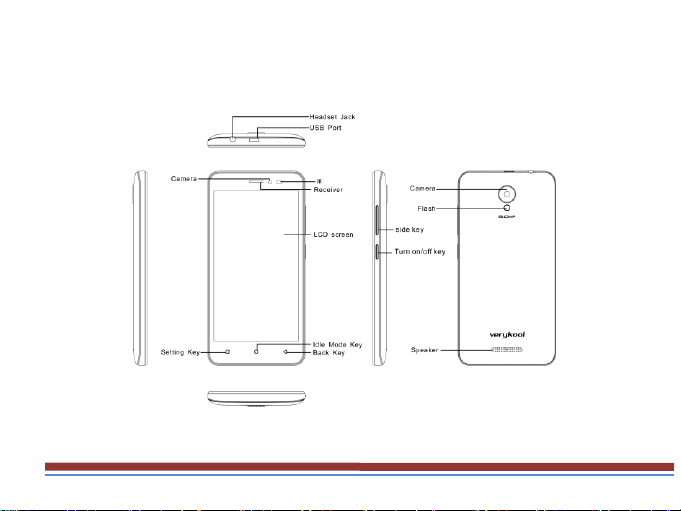
2.2 Phone Overview

2.3Insert the SIM card
Insert the SIM card when you need a cellular service. Do not insert a memory card into the SIM
card slot.
2.4 Charge the battery
Before using the device for the first time or when the battery has been unused for an extended
period, you must fully charge the battery.
●Use only our approved chargers and cables. Unapproved chargers or cables may cause batteries
to explode or damage your device.
2.5Insert a memory card
Your device accepts microSD. Memory cards with maximum capacities of 32 GB When you
insert a memory card into your device, the memory card’s file directory will appear in the SD
card folder.
3. Getting started
3.1 Turn on or off your device
Press and hold the Turn on/off key.
3.2 Use the touch screen
Your device’s touch screen lets you easily select items or perform functions. Learn basic actions
for using the touch screen.
Table of contents
Other Verykool Cell Phone manuals

Verykool
Verykool I123M User manual

Verykool
Verykool i320 User manual

Verykool
Verykool s505 User manual

Verykool
Verykool S5205 User manual

Verykool
Verykool I600 User manual

Verykool
Verykool s5511 User manual

Verykool
Verykool s5014 User manual

Verykool
Verykool I605 User manual

Verykool
Verykool I115 User manual

Verykool
Verykool s350 User manual

Verykool
Verykool W92159B3 User manual

Verykool
Verykool s5031 User manual

Verykool
Verykool P008 User manual

Verykool
Verykool I123 User manual

Verykool
Verykool S5525 User manual

Verykool
Verykool SL5009 User manual

Verykool
Verykool S4007 User manual

Verykool
Verykool i130 User manual

Verykool
Verykool i607 User manual

Verykool
Verykool i129 User manual


