Verykool I600 User manual


Mobiles Ltd. ©2010. All rights are reserved. No part of this document
may be reproduced without permission. All trademarks and brand
names mentioned in this publication are property of their respective
owners.
While all efforts have been made to ensure the accuracy of all contents
in this manual, we assume no liability for errors or omissions or by
statements of any kind in this manual, whether such errors are
omissions or statements resulting from negligence, accidents, or any
other cause. The contents of this manual are subject to change without
any prior notice.
Protect your environment! We strive to produce products in compliance
with global environmental standards. Please consult your local
authorities for proper disposal.
Note: User’s Manual is just to guide the user about the functionality of
the phone. This does not seem any certificate of technology. Some
functions may vary due to modifications and up gradations of software
or due to print mistake.

SAFETY PRECAUTIONS
Before using your phone, please read the following important
information to eliminate or reduce any possibility of causing damage
and personal injury.
Do not use wireless phones while driving.
Switch off wireless devices in aircraft. The signal
may cause interference. Using them on aircraft is
illegal.
Do not use mobile phones near fire. Follow every
rules and regulations. .
Do not use mobile phones at refueling point. Don’t
use near fuel or chemicals.
Follow every rules and regulations in hospital and
health care facilities. Switch off your phone near
medical equipments.
All wireless devices may cause interference.
Only qualified service personnel can install or repair
this device.
Use only approved accessories and batteries.
Use the device only in normal position. Do not
expose your phone to extreme high temperatures
above +60℃(+140°F). Do not use anything static to
clean your phone.
Ensure the phone is turned on and in service. Enter
the emergency number, then press Pick Up key.
Give your location. Do not end the call until told to
do so.

Table of Content
GENERAL INFORMATION..................................................... 1
Antenna............................................................................................1
Network Service...............................................................................1
Accessories......................................................................................1
KNOW YOUR MOBILE PHONE ............................................. 2
Positions of Phone Keys..................................................................2
Functions of Keys.............................................................................3
Display Screen.................................................................................4
Status Icons......................................................................................5
Back Light ........................................................................................5
GETTING STARTED............................................................... 6
First Call...........................................................................................6
Inserting the SIM Card.....................................................................6
Inserting the T-Flash Memory Card..................................................7
Charging the Battery........................................................................7
Switching Your Phone On/Off...........................................................8
Using the Personal Handsfree Handset...........................................8
CALLING................................................................................. 9
Making Calls.....................................................................................9
Answering Calls .............................................................................10
Options in Call................................................................................10
GUIDE TO MENU OPERATIONS ..........................................11
Phone Book.................................................................................... 11
Messaging...................................................................................... 11
Call History.....................................................................................14
User profiles...................................................................................15
Multimedia......................................................................................17
Fun & Games.................................................................................21
Settings..........................................................................................22

File Manager..................................................................................30
Organizer .......................................................................................30
Shortcuts........................................................................................31
Extra...............................................................................................31
Services .........................................................................................32
IMPORTANT INFORMATION................................................ 34
Use of Passwords..........................................................................34
Battery Information.........................................................................35
Usage & Maintenance....................................................................37
Emergency Calls............................................................................38
APPENDIX ............................................................................ 39
Appendix A: Guidance On Entry Methods......................................39
Appendix B: Troubleshooting.........................................................40
Appendix C: Available Accessories................................................ 41
Appendix D: FCC Statement..........................................................41

1
GENERAL INFORMATION
Antenna
Use of other antenna devices could damage your mobile phone and reduce
performance. Your phone has a built-in antenna. Don’t touch the antenna
area unnecessarily when the phone is switched on. Contact with the
antenna affects call quality and may cause the phone to operate at a higher
power level than otherwise needed.
Network Service
To use the phone you must have service from a wireless service provider.
Many of the features in this device depend on features in the wireless
network to function. These network services may not be available on all
networks or you may have to make specific arrangements with your service
provider before you can utilize network services. Your service provider may
need to give you additional instructions for their use and explain what
changes will apply. Some network may have limitations that affect how you
can use network services.
Your service provider may have requested that certain features may be
disabled or not activated in your device. If so, they will not appear in the
device menu. Your device may also has been specially configured, this
configuration may include changes. Contact your service provider for more
information. For availability and information using SIM card services, contact
your service provider.
Accessories
Li-Ion battery is the manufacturer-approved rechargeable battery available
for your phone. May be some batteries perform best after several full
charge/discharge cycles.
Use batteries, chargers and accessories approved by the phone
manufacturer with this particular model. The use of any other type will
invalidate any approval or warranty applying to the phone, and may be
dangerous.
Please consult with your dealer for availability of approved accessories.

2
KNOW YOUR MOBILE PHONE
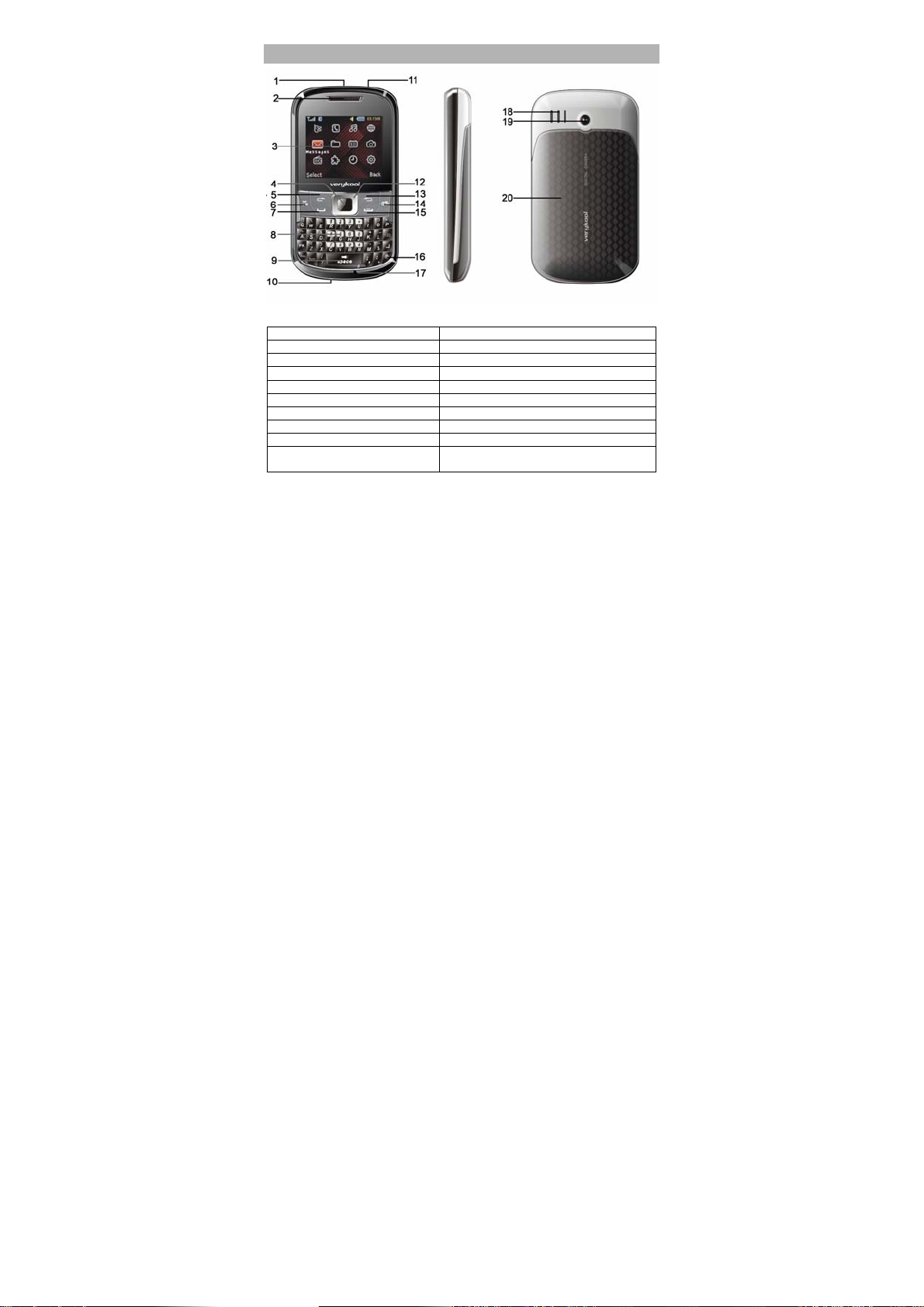
Positions of Phone Keys
1. Cord hole 11. Torch
2. Receiver 12. Direction key
3. Screen 13. Right Soft Key
4. OK key 14. Camera shortcuts key
5. Left Soft key 15. Hang up and Power key
6. Music key 16. Lock key
7. Pick up key 17. Microphone
8. Keypad 18. Speaker
9. Space key 19. Camera
10. Charger and
accessories connector 20. Battery Cover

3
Functions of Keys
Key Name Description
Master
SIM Call
Key
Making or answering a call from
Master SIM.
In the standby mode, press this key to
access the Call Logs.
Call End
Key
End an ongoing call.
Press and hold this key to turn on or
off the mobile phone.
In the menu mode, press this key to
return the standby mode and cancel
current operations.
Press this key to stop the alarm
ringing once the alarm rings.
Right Soft
Key
Use the right soft keys to execute to
functions indicated at the right of the
prompt bar on the screen.
Slave SIM
Call Key /
Left Soft
Key
Use the left soft key to execute to
functions indicated at the left of the
prompt bar on the screen.
In the standby mode, press it to access
main menu.
When the “Master SIM & Slave SIM
open” has been selected, press the left
soft key to making a call with Slave
SIM card after press the number key or
get into the function of phonebook.

4
Selection
Key
Scrolling options in the function list or
the phone book.
In the edit mode, it is used for moving
the cursor.
In the standby mode, press it to
activate a specified function.
Numeric
Keys
Used to enter numbers, letters and
some special characters.
In the standby mode, press and hold
the # key to activate Silent mode,
In the edit mode, you can press the #
key to switch the input method, press
the * key to display the symbols.
Long Press of “*” Key to activate/
deactivate “Torch Light”, Long Press
of “5” Key to activate/deactivate “UV
Currency Checker Light”, Long
Press of “0” Key to activate “FM
Radio”.
Display Screen
Your mobile phone has a single LCD display, which consists of three
main areas:
The First line displays status icons, which indicate the signal strength,
the remaining power of the battery, etc.
The Middle lines display text and graphics, including numbers, text,
animated icons and the information you enter.
The Last line displays the currently available operations assigned to the
left or right soft key.

5
Status Icons
Master SIM Network Signal
Connecting GPRS and using GPRS
Connecting GPRS but no data alternating
Divert all Voice Calls
Auto Keypad Lock
Alarm Clock is activated
Battery Status
Missed Calls
New SMS/MMS or Message Memory Full
MMS is busy
WAP Message
Sound Status
Ring only
Vib. Only
Vib. then Ring
Silent
Note: The picture is for reference only; the product is subject to the real
one.
Back Light
You can set the Back Light for the display and keypad through options
in the menu. The backlight will be off automatically without any key
operation.
Table of contents
Other Verykool Cell Phone manuals

Verykool
Verykool RS76 User manual

Verykool
Verykool S4513 User manual

Verykool
Verykool S5530 User manual

Verykool
Verykool I128 User manual

Verykool
Verykool S810 User manual

Verykool
Verykool I800 User manual

Verykool
Verykool S5017 User manual

Verykool
Verykool i410 User manual

Verykool
Verykool S5528 User manual

Verykool
Verykool S5005 User manual

Verykool
Verykool i119 User manual

Verykool
Verykool SL5000 User manual

Verykool
Verykool s5014 User manual

Verykool
Verykool S401 User manual

Verykool
Verykool s4510 User manual

Verykool
Verykool s4010 User manual

Verykool
Verykool S5525 User manual

Verykool
Verykool R80 User manual

Verykool
Verykool i320 User manual

Verykool
Verykool S5007 User manual