Vanco Evolution EVEX2330 User manual

Vanco Part Number
EVEX2330
HDBaseT™ Boost
Extender (330ft/100m)
www.vanco1.com • 800.626.6445
HDBASET™ BOOST
EXTENDER
(330 ft./ 100m) over single Cat5e/Cat6 or
HDMI Cable

www.vanco1.com 800.626.6445
2
1. Do not expose this unit to water,
moisture, or excessive humidity.
2. Do not install or place this unit in
a built-in cabinet, or other conned
space without adequate ventilation.
3. To prevent risk of electrical shock or
re hazard, due to overheating do not
obstruct unit’s ventilation openings.
4. Do not install near any source of
heat, including other units that may
produce heat.
5. Do not place unit near ames.
6. Only clean unit with a dry cloth.
7. Unplug unit during lightening storms
or when not used for an extended
period of time. A surge protector is
strongly recommended.
8. Protect the power cord from being
walked on or pinched, particularly at
the plugs.
9. Use unit only with accessories
specied by the manufacturer.
10. Refer all servicing to qualied
personnel.
CAUTION
HDMI is a very complex technology requiring continuous authentication of the signal
and the same video resolution and audio settings on all electronic equipment in the
system. When there are multiple sources and displays, the video resolution and
audio setting on all connected units must be adjusted to correspond with that of the
display having the lowest video and audio capability.
WARNING
DEAR CUSTOMER
Thank you for purchasing this product.
For optimum performance and safety, please
read these instructions carefully before connecting,
operating or adjusting this product. Please keep this
manual for future reference.
This product is 100% inspected and tested in the United
States to verify HDMI performance parameters.

www.vanco1.com 800.626.6445 3
INTRODUCTION
The Evolution by Vanco EVEX2330 HDMI Extender over Single Cat5e/6 with HDBaseT
Technology, Bi-directional IR, and Boost extends high denition video and audio signals,
IR, and power at a distance of up to 330ft/100m over a single Cat5e/6 cable. 4K2K
(2160p) resolution can be extended up to 262ft/80m over a single Cat5e/6 cable.
Features HDBaseT Technology that allows for greater transmission range compared
to standard HDMI extenders. Also features Boost Technology which allows HDBaseT
transmission over out of date HDMI cables, turn outdated 1.2 HDMI cables into 4K2K
capable cables! With only one cost effective Cat5e/6 cable, high denition sources with
HDMI outputs can be connected to high denition displays with HDMI inputs over long
distances. Deep color video, DTS-HD or Dolby TrueHD audio, and HDCP is supported and
compatible with the EVEX2330. In addition, EVEX2330 is also equipped with bi-directional
IR pass-through which allows for source or display control.
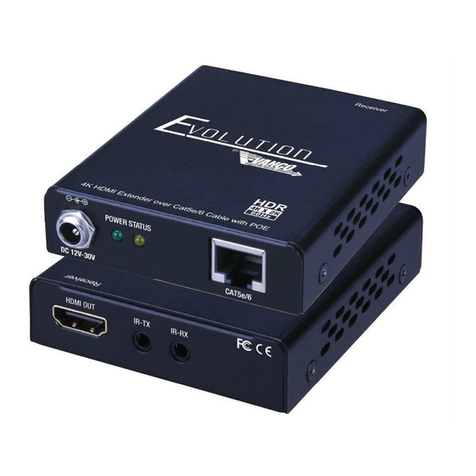
The EVEX2330 includes two units: transmitting unit (EVEX2330-TX) and receiving unit
(EVEX2330-RX). The transmitting unit is used to capture the HDMI input with IR signals
and carries the signals via one cost effective Cat5e/6 cable. The receiving unit is
responsible for equalizing the transmitted HDMI signal and reconstructing IR and serial
control signals. The EVEX2330 offers the most convenient solution for HDMI extension
over a single Cat5e/6 with long distance capability, and provides a solution to update out of
date HDMI cables.
FEATURES

www.vanco1.com 800.626.6445
4
HDBaseT Boost Extender 330ft/100m
Part # EVEX2330
• Features HDBaseT Technology, optimized for whole-home or commercial distribution
of uncompressed high-denition signals at twice the distance of HDMI cables without
degradation
• HDBaseT Extender can connect uncompressed full HD digital video, audio, 100BaseT
Ethernet, and various control signals through a single 330ft/100m Cat5e/Cat6 cable
• Boost feature allows for HDBaseT and 4K2K transmission over out of date HDMI
cables
• 4K2K (2160p) resolution compatible
• HDBaseT Technology that supports HDMI Deep Color, 3D, and up to 4K2K resolution
@ 30hZ
• Transmission Range: Extends 1080p resolutions up to 330ft (100m) over a single
Cat5e/6 cable and 2160p/30hZ (4K2K) resolutions up to 262ft (80m)
• HDCP Compliant
• EDID pass through
• CEC support
• Auto equalization
• Pure unaltered uncompressed 7.1ch digital HDMI over Cat.5/5e/6 cable transmission
• DTS-HD Master Audio and Dolby TrueHD high bit rate audio support
• Wideband IR signal from 20KHz to 60KHz
• Bi-directional IR pass-through
• Wall mountable housing design for a quick and easy installation
• Dimensions: 3.82” (97.1mm) W x 1” (25.4mm) H x 3.58” (91mm) D

www.vanco1.com 800.626.6445 5
SPECIFICATIONS
TECHNICAL SPECS
HDMI Compliance ...................................................... HDMI Deep Color, Full 3D 4K2K @ 30
HDCP Compliance...................................................... Yes
Video Bandwidth ........................................................ Single link 340 MHz (10.2 Gbps)
Video Support ........................................................... 480i/480p/720p/1080i/1080p @60/2160p@30
HDMI over UTP.......................................................... 1080p@60 100m (330ft) Cat5e
Audio Support ........................................................... Surround Sound (up to 7.1 ch) or stereo digital audio
Equalization............................................................... Auto
Input TMDS Signal ..................................................... 1.2 Volts (peak to peak)
Input DDC Signal........................................................ 5 Volts (peak to peak, TTL)
ESD protection .......................................................... (1) Human body model +/- 19kV (air-gap discharge) &
(contact discharge) (2) Core chipset - +/- 8k V
PCB stack-up ............................................................ 6 layer board (impedance control - differential 100,
single 50
IR pass-thru .............................................................. Bi-directional
Input ........................................................................ (TX)1xHDMI + 2x3.5 + 1x mini USB; (RX)2xRJ45
1xRJ45(HDBT) + 1x HDMI (HDBT)
Output...................................................................... (TX) 2xRJ45 + 1xRJ45(HDBT) + 1x HDMI(HDBT)
; (RX)1xHDMI + 2x3.5mm + 1x mini USB
HDMI source control .................................................. Controllable via IR pass-through from RX to TX with
IR extenders
HDMI connector ....................................................... Type A 19 pin female
RJ-45 connector........................................................ WE/SS 8P8C (reverse mode)
3.5mm connector ...................................................... (TX and RX) IR Receiver/ IR blaster
MECHANICAL SPECS
Housing .................................................................... Metal enclosure
Fixedness.................................................................. Wall-mounting case with screws
Power supply............................................................. 5V2A
Power consumption.................................................... Max 12W
Operation temperature............................................... 32-104 degrees F
Storage temperature.................................................. -4 - 140 degrees F
Relative humidity ....................................................... 20-90% RH (no condensation)

www.vanco1.com 800.626.6445
6
PACKAGE CONTENTS
• EVEX2330 (TX and RX)
• IR Blaster (TX)
• IR Receiver (RX)
• (2) DC 5V in line power supply
• Rack-mounting ear set
• Product Manual
1. 5 V DC
2. Power indicator
3. HDMI IN
4. IR Blaster
5. IR Receiver
6. Mini USB (for rmware updates)
7. LAN OUT
8. HDMI (HDBT) OUT
9. TX/RX link indicator
10.RJ45 (HDBaseT OUT)
11. 5 V DC
12. Power indicator
13. HDMI OUT
14. IR Blaster
15. IR Receiver
16. Mini USB (for rmware updates)
17. LAN IN
18. HDMI (HDBT) IN
19. TX/RX link indicator
20. RJ45 (HDBaseT IN)
PANEL DESCRIPTIONS
1234 5 6
7 8 9 10
11 161514
1312
Transmitting Unit Receiving Unit
17 18 19 20

www.vanco1.com 800.626.6445 7
CONNECTION DIAGRAM
CONNECT AND OPERATE
1. Connect a source such as a Blu-Ray Player, game console, A/V Receiver, Cable or
Satellite Receiver, etc. to the HDMI input on the Transmitting unit.
2. Connect a display such as an HDTV or HD Projector to the HDMI output on the
Receiving unit.
3. Connect a single Category 5e/6/7 up to 330ft/100m to the HDBaseT output of the
Transmitting unit, and the other end to the HDBaseT input of the Receiving unit.
4. For Boost feature, connect a single HDMI cable to the HDMI ports on the Transmitting
and Receiving units. (HDMI ports for Boost transmission are located next to the
HDBaseT RJ45 jacks). HDBaseT over Cat5e/6 and Boost over HDMI transmission
cannot be utilized simultaneously.
5. For power, plug in the Transmitting and Receiving units with included DC 5V 2A power
supplies.
6. Power on each device in the same sequence (receiver and transmitter will already be
powered when either unit is plugged in.)
At this point the display connected should display the source signal connected to the extender set. If no
signal is being displayed, connect a shorter Cat5e/6 cable (jumper or patch cable). If a display is having
difculty receiving a signal, access the display’s menu and adjust the resolution (lowest to highest until signal
is displayed). A 24 Hz vertical refresh rate may work better than 60 Hz or higher. Use the source remote at
the receiver emitter to test IR functionality. If the IR remote function is not responding, check the emitters to
ensure they are placed correctly and are plugged into the correct IR jacks on the Extender set receiving and
transmitting units.

www.vanco1.com 800.626.6445
8
IR PASS-THROUGH
IR Blaster TX IR Receiver RX
IR BLASTER (TX)
To control the source: Plug IR Blaster into IR TX port of transmitter unit (EVEX2330-TX);
place blaster in front of the IR eye of the source.
To control the display: Plug IR Blaster into IR TX port of receiver unit (EVEX2330-RX); place
blaster in front of the IR eye of the display.
IR RECEIVER (RX)
To control the source: Plug IR Receiver into IR RX port of receiver unit (EVEX2330-RX);
place receiver at or near display.
To control the display: Plug IR Receiver into IR RX port of transmitter unit (EVEX2330-TX);
place receiver in position where it is able to receive remote signals.
IR Blaster TX IR Receiver RX
1. IR Signal
2. Grounding
1. IR Signal 20-60 kHz)
2. Grounding
3. Power

www.vanco1.com 800.626.6445 9
NOTICE
1. Vanco HDMI and Cat5e/6 cables are strongly recommended for use with this product
to ensure best results.
2. Incorrect placement of IR Blaster and Receiver may result in the failure of the IR
extenders. Please check carefully before plugging in the IR extender to the respective IR
sockets.
3. The transmission length is largely affected by the type of Cat5e/6 cables utilized, the
type of HDMI sources, and the type of HDMI display. The testing result shows solid UTP
cables (usually in the form of 300m [1,000ft] bulk cables) can transmit a lot longer
signals than stranded UTP cables (usually in the form of xed length patch cords).
Shielded STP cables are better suited than unshielded UTP cables. A solid UTP Cat5e/6
cable shows longer transmission range than stranded STP Cat-6 cable. For long
extension applications, use solid UTP/STP category cables.
4. EIA/TIA-568-B termination (T568B) for Cat5e/6 cables is recommended for better
performance.
5. To reduce the interference among the unshielded twisted pairs of wires in Cat5e/6
cables, one can use shielded STP cables to improve EMI problems, which worsens in
long cable transmission.
6. The quality of Cat5e/6 cables can have a major effect on how long the transmission
limit can achieve and quality of picture, the actual transmission range is subject to the
Cat5e/6 cable utilized. For the best results, Cat6 is recommended.
7. If your HDMI display has multiple HDMI inputs, it is found that the rst HDMI input [HDMI
input #1] generally can produce better transmission performance among all HDMI
inputs.

www.vanco1.com 800.626.6445
10
TROUBLE-SHOOTING
1. Best results are usually achieved when the source and display resolutions are the same.
If resolutions differ, the extenders will try to adjust the signal to match the resolution of
the HDTV with the lowest resolution. This will result in a picture with a lower resolution
on the other HDTV sets.
2. If you do not get audio and video, access the “setup” menu on the TV to adjust the audio
and video settings. If the HDMI control circuit cannot establish a handshake, then there
usually will be no audio or video in addition to a blue or black screen with a statement
similar to “this protocol not supported” or “weak signal”.
3. If the above mentioned messages display, reset the receiver by disconnecting the power
supply. You can also disconnect all of the HDMI and power cables, wait 15 minutes for
any voltages to decay and then reconnect all of the cables.
4. If you are still encountering issues, attempt the “hot-plug concept. With all of the HDMI
cables disconnected, turn on the source and plug in the HDMI cable into it’s output,
then power up the Vanco unit and plug the HDMI cable into it’s input, nally turn on the
display and plug the HDMI cable from the receiver into it. This activates all of the devices
in corresponding order and results in a signal being plugged into a device that is on and
will attempt to connect the signal.
5. Most of the major source and display manufacturers employ a proprietary control
channel to communicate between devices from the same manufacturer. Sometimes this
can interfere with the HDMI control circuit or the authentication of the signal. Call the
manufacturer if you experience this issue. Sometimes a player, an audio/video receiver,
or a cable/satellite box may not have the latest software update, usually this can be
downloaded from the manufacturer’s website.
6. If you have problems with the IR control circuit, make sure that the IR RX pigtail is
plugged into extender receiver and pointed at the display, and the IR TX pigtail is
attached to the extender sender and pointed at the source.
SAFETY AND NOTICE
The EVEX2330 HDMI Extender over Single Cat5e/6 with HDBaseT Technology, Bi-
directional IR, and PoE has been tested for conformance to safety regulations and
requirements, and has been certied for international use. However, like all electronic
equipments, the EVEX2330 should be used with care. Please read and follow the safety
instructions to protect yourself from possible injury and to minimize the risk of damage to
the unit.
• Follow all instructions and warnings marked on this unit.
• Do not attempt to service this unit yourself, except where explained in this manual.
• Provide proper ventilation and air circulation and do not use near water.
• Keep objects that might damage the device and assure that the placement of this unit
is on a stable surface.
• Use only the power adapter and power cords and connection cables designed for this
unit.
• Do not use liquid or aerosol cleaners to clean this unit.
• Always unplug the power to the device before cleaning.
Table of contents
Other Vanco Extender manuals

Vanco
Vanco 280502 User manual

Vanco
Vanco Evolution EVEX2005 User manual

Vanco
Vanco EVEXVGAHD User manual

Vanco
Vanco Evalution EV4K2006 User manual

Vanco
Vanco VPW-280572 User manual

Vanco
Vanco EVEX2006 User manual

Vanco
Vanco Evolution EV4KWHDMI User manual

Vanco
Vanco 280723 (164ft) User manual

Vanco
Vanco VPW-280577 User manual

Vanco
Vanco 280626 User manual

Vanco
Vanco 280591 User manual

Vanco
Vanco 280621 User manual

Vanco
Vanco Evolution EVEXKVM1 User manual
Vanco
Vanco Evolution EV4K2006 User manual

Vanco
Vanco Evolution EVEX4K70 User manual

Vanco
Vanco HDWIRKIT User manual

Vanco
Vanco 280544 User manual

Vanco
Vanco IR-EXPKIT User manual

Vanco
Vanco Evolution EVEX2007 User manual

Vanco
Vanco HDEXWIR User manual