Uniden MHS115 User manual

MHS115
Handheld VHF Marine Transceiver
For more exciting new products please visit our website:
Australia: www.uniden.com.au

Making a Distress Call
Speak slowly - clearly - calmly.
For future reference, write your boat’s name & call sign here:
1. Make sure your radio is on.
2. On the radio, press the 16/67-Tri button to switch to Channel 16
(156.8 MHz). (If the corner of the display does not show 16, press
the 16/67-Tri button again until it does.)
3. Press the push to talk button and say: “MAYDAY -- MAYDAY --
MAYDAY.”
4. Say “THIS IS {name of your boat (three times) and call sign/boat
registration number (once)}.”
5. Say “MAYDAY {name or call sign of your boat}.”
6. Tell where you are: (what navigational aids or landmarks are near,
or read the latitude and longitude from your GPS).
7. State the nature of your distress, (e.g. are you sinking, medical
emergency, man overboard, on re, adrift, etc.)
8. State the type of assistance you need (medical, towing, pumps,
etc.).
9. Give number of persons aboard and conditions of any injured
persons.
10. Estimate present seaworthiness of your ship (e.g. how immediate is
the danger due to ooding or re or proximity to shore).
11. Briey describe your ship, giving the ship name (e.g. “Blue Duck is
32 foot cabin cruiser, white hull, blue deck house”).
12. Say: “I WILL BE LISTENING ON CHANNEL 16.”
13. End message by saying “THIS IS {name or call sign of your boat},
OVER.”
14. Release the push to talk button and listen.
If you do not get an answer after 30 seconds, repeat your
call, beginning at step 3, above.
2Handheld VHF Marine TransceiverUNIDEN MHS115

Warning
The exclamation point within an equilateral triangle is
intended to alert the user to the presence of important
operating and maintenance (servicing) instructions in the
literature accompanying the appliance.
NOTE
Floating/Waterproof: JIS7/IPX7
Uniden’s MHS115 radio is designed to meet the water proong standard of
JIS7/IPX7 and will oat in water.
This Means: Protected against the effects of continuous immersion in water.
The MHS115 can withstand immersion in water up to 1.0m depth for 30
minutes. Note this is not suitable for scuba diving.
The MHS115 will only meet this rating if fully assembled
and all rubber seals are well maintained and correctly tted,
and the battery cover securely fastened.
NOTE
After your radio is submerged in water, you might notice that the sound is
distorted. This is because there is still water remaining in and around the
speaker and microphone. Just shake the radio to clear excess water, and the
sound should return to normal.
If your radio is exposed to salt water, clean your radio
thoroughly with fresh water, and dry it before turning it on.
NOTE
3Handheld VHF Marine TransceiverUNIDEN MHS115
The charger is not waterproof.
NOTE

Contents
Making a Distress Call ..............................................................2
Warning ..................................................................................... 3
Introduction ...............................................................................6
Features ................................................................................................. 6
Getting Started ..........................................................................7
What’s Included? ....................................................................................7
Controls and Indicators ........................................................... 8
MHS115 Radio ....................................................................................... 8
Charger ................................................................................................ 10
Reading the Display ............................................................................. 10
How it Works? .........................................................................12
Normal Mode Operation .........................................................13
Normal mode with Triple Watch or Dual Watch ....................................13
Scan Mode Operation .......................................................................... 14
Using the radio in Scan Mode .............................................................. 14
Scan mode with Triple Watch or Dual Watch ....................................... 15
Weather Mode ......................................................................................15
Using the radio in Weather Mode ..........................................................15
INSTANT Channel Feature ....................................................................15
Setting up the Hardware ....................................................... 16
Installing the Battery .............................................................................16
Mounting the Charger .......................................................................... 16
Charging the Battery ............................................................................ 17
Attaching the Belt Clip ..........................................................................17
Using Your Radio ....................................................................18
Turning It On ........................................................................................ 18
Setting It Up ..........................................................................................18
Changing the Volume ...........................................................................18
Setting the Squelch level ...................................................................... 18
4Handheld VHF Marine TransceiverUNIDEN MHS115

Making a Transmission .........................................................................19
Selecting a channel ..............................................................................19
Making a Transmission .........................................................................19
Boosting the transmission power ......................................................... 20
Saving Channels to Memory ............................................................... 20
Turning the key beep on and off ...........................................................21
Setting Key Lock .................................................................................. 21
Using the Battery Save feature ............................................................ 21
Maintenance and Troubleshooting ....................................... 22
Specications ......................................................................... 24
Channels and Frequencies (MHz) ......................................... 26
US Channel Frequencies and Names ..................................................26
Canadian Channel Frequencies and Names ....................................... 28
International Channel Frequencies and Names ................................... 30
Regulations and Safety Warnings ........................................ 32
Warranty .................................................................................. 33
5Handheld VHF Marine TransceiverUNIDEN MHS115

Introduction
The MHS115 is a oating, waterproof, portable two-way VHF transceiver. It is
compact, lightweight, rugged and ts easily in your hand. This handheld VHF
marine radio will give you consistent, outstanding performance in virtually all
conditions and situations.
To ensure that you get the most from the MHS115’s features, please read this
operating guide carefully before using the unit.
Features
Your radio provides the following key features:
• Submersible design. Complies with oating JIS7/IPX7 water-resistant
standards.
• Memory Scan mode. Lets you save channels to memory and monitor them
in quick succession.
• Transmitter power level select/Boost. Lets you boost the transmitter power
from 1W to 2.5W or 5W for added transmission distance.
• Battery level display.
• Dual Watch: This mode lets you monitor Instant CH along with one regular
marine channel.
• Triple Watch: This mode lets you monitor 16CH, 67CH along with one
regular marine channel.
• Battery Save. The Battery Save feature automatically turns off RX power at
regular intervals to save battery power.
• Emergency 16/67 Channel monitoring. Set unit to scan one or both of
these emergency channels regularly within normal scanning cycles.
• Key Lock. Locks keys to prevent accidentally changing channels or
entering data.
• Selectable Volume (0 - 15) and Squelch (0 - 3) levels.
6Handheld VHF Marine TransceiverUNIDEN MHS115

Getting Started
What’s Included?
• If any item is missing or damaged, contact your place of purchase
immediately. Never use damaged products!
• Need help? Get answers at our website:
www.uniden.com.au for Australian model
7Handheld VHF Marine TransceiverUNIDEN MHS115
CHARGE
Charging Cradle
AC Adaptor
Lithium Ion Battery
DC Adaptor
Belt Clip
Mounting Hardware
VOL
TX PWR
16/67
TRI
INST
WX
SQL
UIC
SCAN
MEM
DUAL
LOCK
MHS115
MHS115 Radio

Controls and Indicators
MHS115 Radio
8Handheld VHF Marine TransceiverUNIDEN MHS115
VOL
TX PWR
16/67
TRI
INST
WX
SQL
UIC
SCAN
MEM
DUAL
LOCK
MHS115
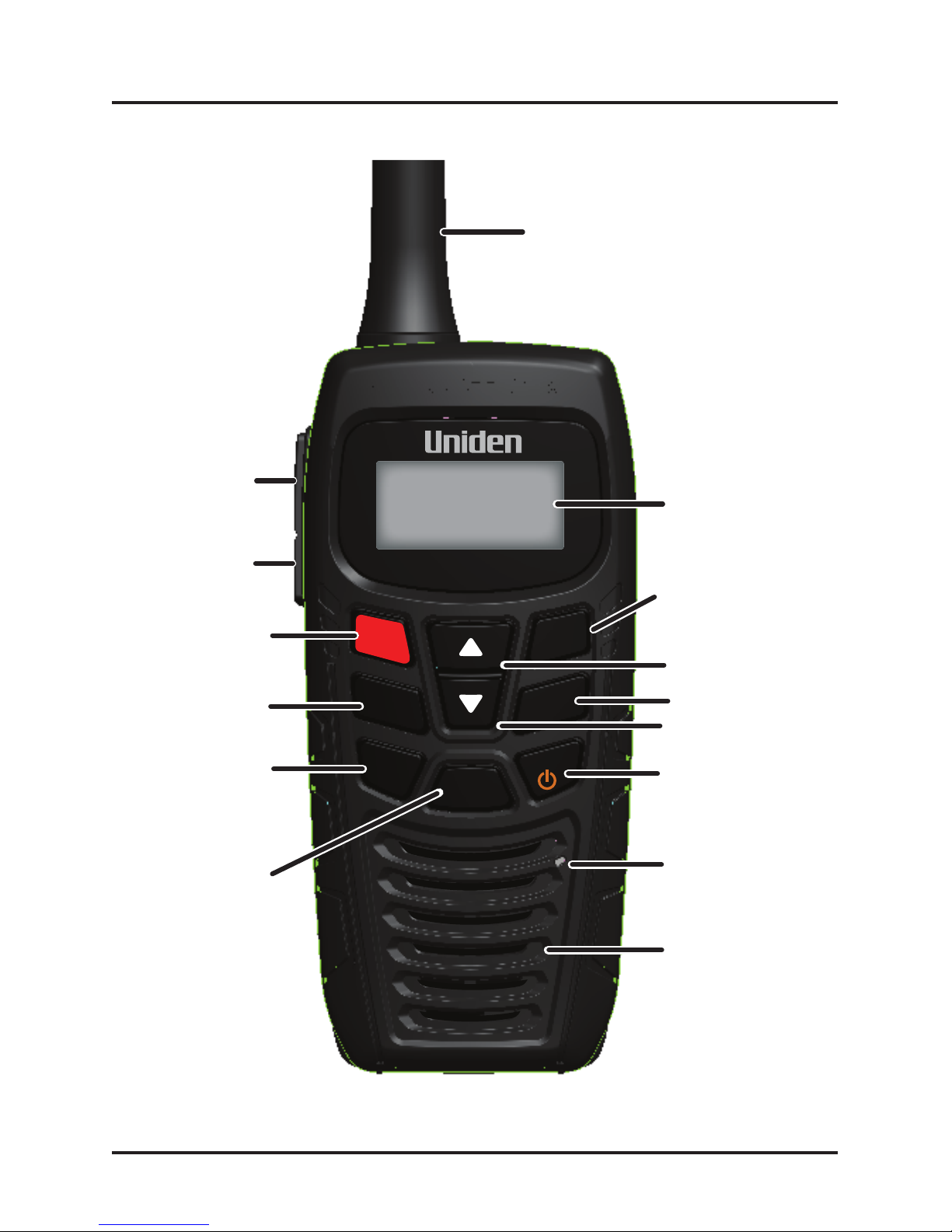
Antenna
LCD
VOL/TX PWR
INST
WX/POWER
16/67/TRI
SQL/UIC
DUAL/LOCK
SCAN/MEM
Speaker
Microphone
Channel Up
Channel Down
Push To Talk
BOOST

Controls and Indicators
Button Press to... Press and hold to...
WX/POWER Select WX channel Turn the radio on or off.
PTT (Push to Talk) NA Talk/transmit on a channel.
Boost NA Transmit with a higher
power level.
16/67/TRI 1st press: Go to
channel 16.
2nd press: Go to
channel 67.
3rd press: Go back to
the starting channel.
Turn Triple Watch on and
off.
DUAL/LOCK Select Dual Watch
function.
Select Key Lock function.
Channel Up Move up channel or
squelch/volume one
step at a time.
Move quickly up the
channels/ squelch/volume
steps.
Channel Down Move down channel or
squelch/volume one
step at a time.
Move quickly down the
channels/ squelch/volume
steps.
SCAN/MEM Select Scan function. Save a channel into
memory or delete a
channel from memory.
9Handheld VHF Marine TransceiverUNIDEN MHS115
Battery Charging
Contacts
Battery Cover Screw
(under belt clip)
Belt Clip

Controls and Indicators
VOL/TX PWR Enter volume setting
condition.
Select transmit power L,
M or H.
SQL/UIC Enter squelch level
setting condition.
Select US, International or
Canadian mode.
INST Instant CH Call Instant CH programming
Reading the Display
Charger
The LCD display shows different information depending on what you are
doing. This sample screen shows some of this information. The following
table shows all the possible icons and what they mean.
10 Handheld VHF Marine TransceiverUNIDEN MHS115
CHARGE
Charging
Contacts
Screw holes
for mounting
Charge LED
Triple or Dual
Watch is on
Battery
status icon
The radio is
transmitting
Transmit power
level 1W,
2.5W(MID),or
5W(no icon)
UIC channel mode
(USA, CANada, or
INTernational)
Key Lock is
active
This channel is
saved in memory
WX Mode is
active
VOL and SQL display when
the Volume or Squelch
modes are active
Current channel
number
Table of contents
Other Uniden Transceiver manuals

Uniden
Uniden 2020 User manual

Uniden
Uniden MHS245 User manual

Uniden
Uniden UH835S User manual

Uniden
Uniden UH785 Series User manual

Uniden
Uniden UH064SX-2NB User manual

Uniden
Uniden Jackson UT-547C/D User manual

Uniden
Uniden UH8080S User manual

Uniden
Uniden 2080 User manual

Uniden
Uniden JACKSON User manual

Uniden
Uniden 2020 User manual

Uniden
Uniden HH955 User manual

Uniden
Uniden XTRAK 50 Series User manual

Uniden
Uniden SEA-WASP MC-4300 User manual

Uniden
Uniden SUNDOWNER UH-011 User manual

Uniden
Uniden GRANT XL User manual

Uniden
Uniden 2020 User manual

Uniden
Uniden HAND- HELD TRANSCEIVER AX52 User manual

Uniden
Uniden UH9050 User manual

Uniden
Uniden UH089NB User manual

Uniden
Uniden UH8050S User manual