SGC 11 - USER MANUAL
Space Guard Series
Photoelectric light curtain controller
Website: www.telcosensors.com
V 1.1 Part Number: 0666220649
E-Mail: info@telcosensors.com
This device is not to be used for Personnel Protection in Machine
Guarding Safety applications. This device does not include the self-
checking redundant circuitry necessary to allow its use in personnel
machine guarding stand-alone safety applications.
Telco A/S reserves the right to make changes without prior notice
Supply voltage
24 V ac, 115 V ac or 230 V ac
Voltage tolerance
Output
1 open / 1 close, 250 V ac / 3 A, 120 V ac / 5 A
Approvals
SGC 11 A
Relay and NPN
Relay
Note: 1. Detectors to be ordered separately.
2. All controllers can be used with a 24 V dc supply voltage.
Relay and NPN output
Relay output
Installations & Adjustments
1
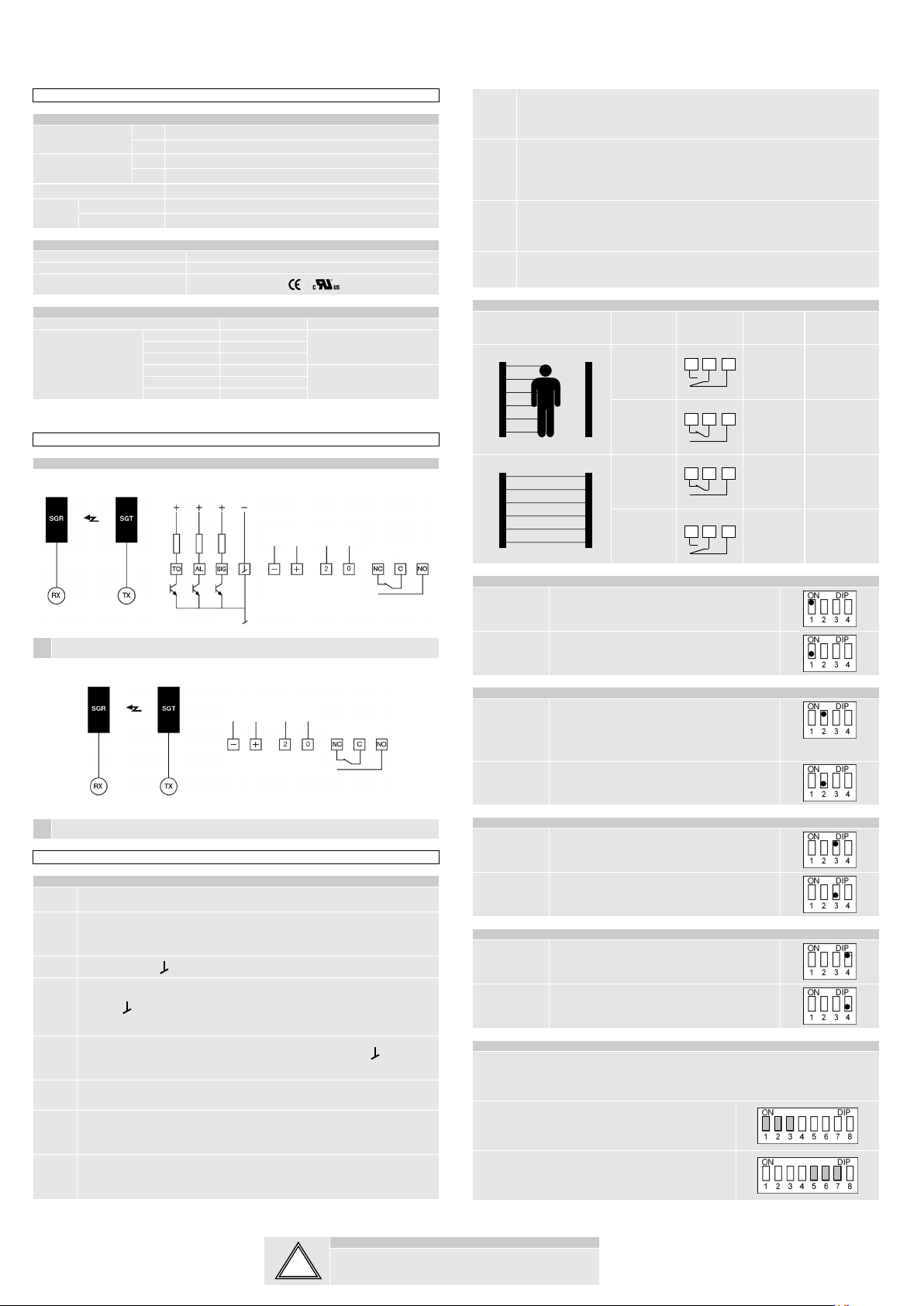
Connect the SGR detector to the RX connector input and the SGT detector to the
TX connector input.
2
Connect either AC power supply to the terminals marked 0 and 2, or connect 24 V
dc power supply to the terminals marked + and -. DO NOT turn power on.
Warning: DO NOT connect AC and DC power supply at the same time
3 Connect terminal to earth or machine frame.
4
Connect to relay on terminal NO, COM, NC or to transistor output on terminal SIG
(signal), (ground) according to your application. For “safety” relay operation use
NO and COM outputs.
5 Connect to the Alarm and Time-out outputs on terminals AL, TO and according
to your application.
6 Turn the gain potentiometer to max sensitivity (fully clockwise).
7 Make sure Operation Mode (SW2 DIP-switch nº 2 : OFF) has been selected. Make
sure Long Range has been selected (SW2 DIP-switch nº1 : ON).
8 Turn power on after double checking your wiring, and checking for correct power
supply voltage.
9
If the controller indicates a broken beam despite a clear optical path between the
detectors, switch to Diagnostic Mode. Wait approx. 15 sec. The RXERR and
TXERR LED’s will indicate the faulty detector. Change or clean the faulty detector
and switch to Operation Mode.
10
For operation at ranges below approx. 3 m it is recommended to adjust the
sensitivity, following the calibration procedure below.
Turn the potentiometer to minimum (fully anticlockwise), and then turn slowly
clockwise until the detector see each other. If the adjustment appears too delicate,
then switch to Short Range and re-adjust.
11
In applications with operation at short range it is recommended to use Automatic
Sensitivity Control Mode, to ensure that the light beams easily can be broken. If
there is a need for constant excess emitted power at short range, use Fixed
Sensitivity Mode.
12 Select Relay Mode and time-out according to your application.
Detection Output
mode Relay Transistor
Output
indicator
Dark
operated
Closed On
Light
operated
Open Off
Dark
operated
Open Off
Light
operated
Closed On
Long/Short Range Selection
Long range Enables the system to operate at 100% (maximum
range). Range up to 5 m.
Short range Enables the system to operate at 60% of maximum
range. Range up to 3 m.
Diagnostic/Operation Mode SW2
Diagnostic
mode
This switch is only for service. When activated, the
controller initiates a self test. If there is any error in
transmitter or in the receiver, the TXERR LED or
RXERR LED are activated. For instance,
contamination on detectors, bad connections,…
Operation
mode Operating mode.
Automatic Sensing/Fixed Sensing SW2
Automatic
Sensing
Control
Automatic Sensitivity Control Mode is
recommended in applications with operation at
short range, to ensure that the light beams easily
Fixed Sensing Allows to adjust manually the sensitivity of the
system via the potentiometer.
Buzzer On Activates the buzzer in parallel with the output.
Buzzed Off Deactivates the buzzer.
After one or more beams (selectable from 0 to 32) have been broken for more than a preset
period of time (selectable from approx. 15 seconds to 10 minutes) the Controller
will ignore the broken beams, and thus allow the system to operate with the remaining light
beams.
The maximum number of channels time-out can be
selected from 0 to 32 by using the DIP-switches nº 1,2 and
3, on the SW1 switch. Please, refer to Fig. 1
The time-out delay time can be selected from approx. 15
seconds to 10 minutes by using the DIP-switches nº 5,6
and 7, on the SW1 switch. Please, refer to Fig. 1



