Systech Corporation iNS/3000 User manual

iNS/3000 and ixNS/3000
Hardware
Manual
SYSTECH
C O R P O R A T I O N
Document number 80-001083-0
Revision E-2

Document part number 80-001083-0
Revision History
Date Revision Description
3/28/08 E-1 Beta release
6/23/08 E-2 Updated panel
drawings. Added screw
terminal descriptions.
Created 2008, and Protected Under the U.S. Copyright Act of 1976.
Copyright © 2008 SYSTECH Corporation
All Rights Reserved
This document is subject to change without notice.


Table of Contents
CHAPTER 1: OVERVIEW...........................................................................................3
iNS Features....................................................................................................................4
Description of iNS/ixNS Models.....................................................................................5
CHAPTER 2: INSTALLING THE HARDWARE ..........................................................7
Overview..........................................................................................................................7
Planning the installation.................................................................................................7
iNS Panel Connectors.....................................................................................................8
Connecting Devices to the iNS.......................................................................................9
iNS/3000 RS-232 Operation.........................................................................................9
RS-422/485 Operation................................................................................................13
Ethernet LAN..............................................................................................................14
Starting the iNS.............................................................................................................15
CHAPTER 3: USING RS-422 AND RS-485 DEVICES.............................................17
Connecting RS-422/485 Devices..................................................................................17
RS-422/485 Point-to-point Configuration....................................................................17
RS-422/485 Bus Configurations .................................................................................18
Two-Wire System...................................................................................................................18
Four-Wire Systems.................................................................................................................20
Using the iNS in RS-422 or RS-485 Mode....................................................................20
CHAPTER 4: TROUBLESHOOTING........................................................................21
Status LED.....................................................................................................................21
Serial Port LEDs............................................................................................................22
Ethernet LEDs ...............................................................................................................22
APPENDIX: SPECIFICATIONS................................................................................23
iNS Hardware Specifications........................................................................................23
Environmental Specifications ......................................................................................23
Product Dimensions .....................................................................................................24
Model Numbers .............................................................................................................25
Ethernet cabling specifications ...................................................................................25
Power Requirements.....................................................................................................25

Overview 3
Chapter 1: Overview
The iNS Industrial Network port Server provides communication between peripheral
devices and computers connected to a network. When the iNS is connected to your LAN
and to one or more peripherals, it manages network traffic, routing it to the correct device.
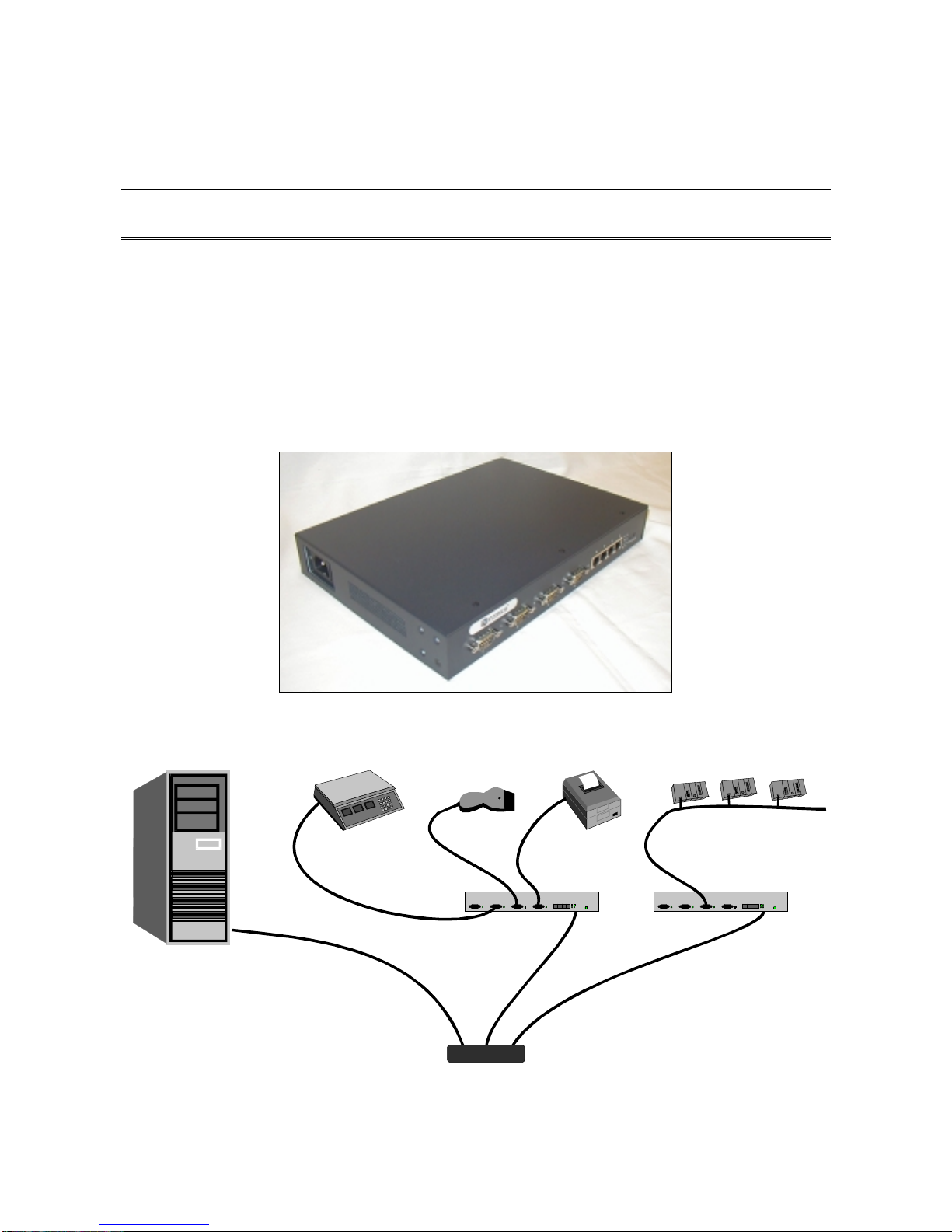
For example, the network diagram below shows how the iNS might be used to allow one or
more PCs to share expensive peripherals or to access peripherals that are located elsewhere
on the local or remote network.
Scale Scanner Printer Modbus PLCs
iNS
Serial
Serial
Ethernet Hub/Switch
Serial
iNS
Serial - 485
Server or
Workstation

iNS Features4
iNS Features
The iNS offers the following features and benefits:
•Easy web-based set up and configuration
•Open systems communications for multi-site data networks
•Can be used in a variety of data communications applications
•1, 2 or 4 serial ports
•DB9 connectors (with screw-down retainers) on all ports
•Removable screw terminal connectors on all ports
•RS-232 and RS-422/RS-485 software configurable on all ports
•Standard 15Kv ESD protection on ports
•Optional serial port 3Kv magnetic isolation (ixNS models)
•Extended temperature range: -40C to 85C
•Rugged, IP40-rated metal enclosure with multiple mounting options
•High-speed serial connections (up to 230.4K baud)
•Standard single RJ-45, 10/100 Base-TX Ethernet port
•1Kv isolation on Ethernet ports
•Optional four-port RJ-45, 10/100 Base-TX Ethernet switch
•Operating system independent
•Complete remote diagnostics
•LEDs for each port, signaling port status and error conditions
•Industry standard interoperability
•Modbus TCP to Modbus RTU gateway capability
•Supports NativeCOM, allowing serial ports to appear as local Windows COM ports
•Supports generic TCP/IP access to serial ports without requiring special protocols or
processing
•Standard support for LPR/LPD network printing under Windows and UNIX
•Telnet and reverse-telnet support for a variety of UNIX operating systems
Refer to the NDS Administrator's Guide for configuration and operation.

Overview 5
Description of iNS/ixNS Models
The iNS is available with a variety of port and power configurations and with standard
serial port protection (iNS) or extended serial port isolation (ixNS).
The model number describes the options included:
Model Number of
Serial Ports Serial Port
Isolation Ethernet
Connectors
iNS/3101 1 No One 10/100TX
iNS/3102 2 No One 10/100TX
iNS/3104 4 No One 10/100TX
iNS/3202 2 No Four 10/100TX
iNS/3204 4 No Four 10/100TX
------------------- ----------------- -------------------- ----------------------
ixNS/3101 1 Yes One 10/100TX
ixNS/3102 2 Yes One 10/100TX
ixNS/3104 4 Yes One 10/100TX
ixNS/3202 2 Yes Four 10/100TX
ixNS/3204 4 Yes Four 10/100TX
In addition, a suffix on the model number specifies the power option:
Power Suffix Description
-E External, 2.1 mm connector, Systech provided power supply –
Input: 100-240 VAC, 50-60 Hz
Output: 5 VDC, 2A
Connector can accept 5-59 VDC, minimum 10 watts
-I Internal, wide range input, AC power supply
Input: 100-240 VAC, 50-60 Hz, 0.8A
-S Screw terminal input
Accepts 5-59 VDC, minimum 10 watts

This manual suits for next models
1
Table of contents
Other Systech Corporation Server manuals