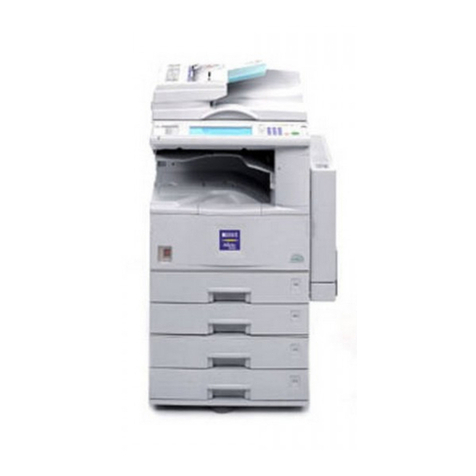
Ricoh RN-MF1 User manual

Model RN-MF1
Machine Codes: M016/M017
Field Service Manual
30 November, 2009


Safety Notices
Important Safety Notices
Prevention of Physical Injury
1. Before disassembling or assembling parts of the machine and peripherals, make sure that the machine
power cord is unplugged.
2. The wall outlet should be near the machine and easily accessible.
3. If any adjustment or operation check has to be made with exterior covers off or open while the main
switch is turned on, keep hands away from electrified or mechanically driven components.
4. The machine drives some of its components when it completes the warm-up period. Be careful to keep
hands away from the mechanical and electrical components as the machine starts operation.
5. The inside and the metal parts of the fusing unit become extremely hot while the machine is operating.
Be careful to avoid touching those components with your bare hands.
Health Safety Conditions
Toner is non-toxic, but if you get either of them in your eyes by accident, it may cause temporary eye
discomfort. Try to remove with eye drops or flush with water as first aid. If unsuccessful, get medical attention.
Observance of Electrical Safety Standards
The machine and its peripherals must be serviced by a customer service representative who has completed
the training course on those models.
Safety and Ecological Notes for Disposal
1. Do not incinerate toner bottles or used toner. Toner dust may ignite suddenly when exposed to an
open flame.
2. Dispose of used toner, the maintenance unit which includes developer or the organic photoconductor
in accordance with local regulations. (These are non-toxic supplies.)
3. Dispose of replaced parts in accordance with local regulations.
• To prevent a fire or explosion, keep the machine away from flammable liquids, gases, and aerosols.
A fire or an explosion might occur.
1

• The Controller board on the MF model contains a lithium battery. The danger of explosion exists if a
battery of this type is incorrectly replaced. Replace only with the same or an equivalent type
recommended by the manufacturer. Discard batteries in accordance with the manufacturer's
instructions and local regulations
Laser Safety
The Center for Devices and Radiological Health (CDRH) prohibits the repair of laser-based optical units
in the field. The optical housing unit can only be repaired in a factory or at a location with the requisite
equipment. The laser subsystem is replaceable in the field by a qualified Customer Engineer. The laser
chassis is not repairable in the field. Customer engineers are therefore directed to return all chassis and
laser subsystems to the factory or service depot when replacement of the optical subsystem is required.
• Use of controls, or adjustment, or performance of procedures other than those specified in this manual
may result in hazardous radiation exposure.
WARNING
WARNING:
Turn off the main switch before attempting any of the procedures in the Laser Optics Housing Unit section.
Laser beams can seriously damage your eyes.
CAUTION MARKING:
2

Symbols, Abbreviations and Trademarks
This manual uses several symbols and abbreviations. The meaning of those symbols and abbreviations are
as follows:
See or Refer to
Clip ring
Screw
Connector
Clamp
E-ring
SEF Short Edge Feed
LEF Long Edge Feed
Trademarks
Microsoft®, Windows®, and MS-DOS® are registered trademarks of Microsoft Corporation in the United
States and /or other countries.
PostScript® is a registered trademark of Adobe Systems, Incorporated.
PCL® is a registered trademark of Hewlett-Packard Company.
Ethernet® is a registered trademark of Xerox Corporation.
PowerPC® is a registered trademark of International Business Machines Corporation.
Other product names used herein are for identification purposes only and may be trademarks of their
respective companies. We disclaim any and all rights involved with those marks.
3

TABLE OF CONTENTS
Safety Notices.....................................................................................................................................................1
Important Safety Notices...............................................................................................................................1
Laser Safety.....................................................................................................................................................2
Symbols, Abbreviations and Trademarks.........................................................................................................3
Trademarks.....................................................................................................................................................3
1. Product Information
Specifications......................................................................................................................................................9
Machine Overview..........................................................................................................................................10
Component Layout.......................................................................................................................................10
Paper Path....................................................................................................................................................11
Drive Layout..................................................................................................................................................12
Machine Configuration....................................................................................................................................13
2. Installation
Installation Requirements.................................................................................................................................15
Environment..................................................................................................................................................15
Machine Level..............................................................................................................................................16
Machine Space Requirement.....................................................................................................................16
Power Requirements....................................................................................................................................16
Installation Procedure..................................................................................................................................17
3. Preventive Maintenance
PM Intervals......................................................................................................................................................19
PM Parts........................................................................................................................................................19
Yield Counter................................................................................................................................................19
4. Replacement and Adjustment
Before You Start...............................................................................................................................................21
Special Tools....................................................................................................................................................22
Exterior Covers.................................................................................................................................................23
Front Cover...................................................................................................................................................23
Left Cover......................................................................................................................................................24
Rear Cover...................................................................................................................................................27
Right Cover...................................................................................................................................................28
Top Cover.....................................................................................................................................................29
ADF....................................................................................................................................................................31
4

ADF Unit........................................................................................................................................................31
Original Tray................................................................................................................................................32
ADF Feed Unit..............................................................................................................................................32
ADF Separation Pad....................................................................................................................................33
ADF Front Cover .........................................................................................................................................33
ADF Rear Cover...........................................................................................................................................34
ADF Cover....................................................................................................................................................34
ADF Motor....................................................................................................................................................35
Original Set Sensor......................................................................................................................................36
ADF Cover Open Sensor............................................................................................................................37
ADF Feed Sensor.........................................................................................................................................38
ADF Drive Board..........................................................................................................................................39
Scanner Unit.....................................................................................................................................................40
Operation Panel...........................................................................................................................................40
Scanner Top Cover......................................................................................................................................41
Scanner Carriage Unit.................................................................................................................................42
Exposure Lamp.............................................................................................................................................44
Lamp Stabilizer Board.................................................................................................................................45
Scanner Motor.............................................................................................................................................46
Laser Unit..........................................................................................................................................................48
Caution Decal Locations.............................................................................................................................48
Laser Unit......................................................................................................................................................48
Polygon Mirror Motor.................................................................................................................................49
Paper Feed and Exit.........................................................................................................................................51
Paper Feed Roller........................................................................................................................................51
Friction Pad...................................................................................................................................................52
Paper End Sensor.........................................................................................................................................52
By-pass Feed Roller.....................................................................................................................................52
By-Pass Feed Roller Friction Pad.................................................................................................................54
By-pass Feed Sensor...................................................................................................................................55
Paper Feed Clutch.......................................................................................................................................55
Relay Clutch.................................................................................................................................................57
Registration Clutch.......................................................................................................................................57
5

Toner End Sensor.........................................................................................................................................57
Paper Exit Sensor.........................................................................................................................................58
Relay Sensor.................................................................................................................................................58
Inverter Sensor.............................................................................................................................................59
Registration Roller and Sensor....................................................................................................................59
Paper Transfer..................................................................................................................................................63
Transfer Roller..............................................................................................................................................63
Fusing................................................................................................................................................................64
Fusing Unit....................................................................................................................................................64
Thermostat....................................................................................................................................................66
Thermistor.....................................................................................................................................................67
Fusing Lamp..................................................................................................................................................68
Hot Roller......................................................................................................................................................69
Pressure Roller..............................................................................................................................................70
Hot Roller Stripper Pawls.............................................................................................................................70
Motors...............................................................................................................................................................72
Main Motor..................................................................................................................................................72
Duplex Motor (For M017)..........................................................................................................................72
Electrical Components.....................................................................................................................................74
Layout of PC Boards....................................................................................................................................74
PSU................................................................................................................................................................78
Charge Terminal Case................................................................................................................................82
Others................................................................................................................................................................83
Cooling Fan..................................................................................................................................................83
Speaker........................................................................................................................................................83
Quenching Lamp..........................................................................................................................................84
Image Adjustment.............................................................................................................................................85
Registration Adjustment...............................................................................................................................85
5. System Maintenance Reference
Service Program Mode....................................................................................................................................87
Overview......................................................................................................................................................87
Maintenance Mode Menu..........................................................................................................................87
Fax Service Test Menu..............................................................................................................................104
6

Configuration and Maintenance Page .......................................................................................................106
Overview....................................................................................................................................................106
Firmware Updating........................................................................................................................................108
Checking the Machine Firmware Version...............................................................................................108
Updating the Controller Firmware...........................................................................................................108
Updating the Engine Firmware.................................................................................................................110
Updating the Boot Loader Firmware.......................................................................................................112
Updating Failure........................................................................................................................................112
FW Update Tool Messages......................................................................................................................112
6. Troubleshooting
Service Call Conditions.................................................................................................................................117
Summary....................................................................................................................................................117
Engine SC...................................................................................................................................................117
Image Problems.............................................................................................................................................124
Overview....................................................................................................................................................124
Test Page Printing......................................................................................................................................124
Test Pattern Printing....................................................................................................................................125
Dark lines in halftone areas at 75mm Intervals.......................................................................................126
Jam..................................................................................................................................................................127
Jam Sensor Layout.....................................................................................................................................127
Jam Message List.......................................................................................................................................128
7. Energy Saving
Energy Save...................................................................................................................................................131
Energy Saver Modes................................................................................................................................131
Paper Save.....................................................................................................................................................133
Effectiveness of Duplex/Combine Function............................................................................................133
7

8
Table of contents
Other Ricoh All In One Printer manuals

Ricoh
Ricoh Ri 100 User manual

Ricoh
Ricoh M052 User manual

Ricoh
Ricoh SP C260SFNw User manual

Ricoh
Ricoh LD225 Instruction and safety manual

Ricoh
Ricoh Aficio MP 3010 User manual

Ricoh
Ricoh AFICIO 1055 User manual

Ricoh
Ricoh Priport DX 4545 User manual

Ricoh
Ricoh Toscana-P1 J007 User manual

Ricoh
Ricoh Aficio 470W User manual

Ricoh
Ricoh Pro C900 User manual

Ricoh
Ricoh TC-IIR User manual

Ricoh
Ricoh AC204 User manual

Ricoh
Ricoh Priport HQ9000 User manual

Ricoh
Ricoh Russian-C2a User manual

Ricoh
Ricoh SP C260SFNw User manual

Ricoh
Ricoh M 2701 User manual

Ricoh
Ricoh Aficio 3224C User manual

Ricoh
Ricoh Aficio SP C210SF User manual

Ricoh
Ricoh MP C306 series User manual

Ricoh
Ricoh Aficio SP 5210SF User manual