RED CAT RockSlide S10 XT User manual

1
WARNING

1. Before Using The RS10XT
2. Technical Data
3. Main Features
Thank you for purchasing the Redcat Racing RS10XT rock crawler.
The RS10XT is a hobby grade vehicle and is not a toy. Please read the entire manual before attempting to operate this
vehicle.
Before running the RS10XT, please look over the entire vehicle to ensure there are no damaged or loose parts. Once the
vehicle has been used, we can only assume broken parts are a result of improper use. Be sure to check the vehicle over
before use.
• Length: 450mm
• Width: 268mm
• Height: 148mm
• Wheelbase: 317mm-320mm (adjustable)
• Motor: Two RC390 motors
• Wheel Dia: 130mm
• Wheel Width: 55mm
• Servo: Two 15kg servos
• Gear Ratio: 1 :38.6 (10T motor pinion used),
1 :48.2 ( 8T motor pinion used)
• Battery: Ni-MH 7.2v, 1800mAH (stick battery)
This data is subject to change without notice as result of product improvement.
•Aluminum side plates
• Rigid radio plate
• Low C.O.G battery tray
(holds stick battery)
• Computer radio with four
wheel steering.
• Crawler ESC w/ Cooling Fan
• Lots of articulation enables the
RS10XT to maneuver the
toughest terrain.
• Updated 4-link suspension
design offers the ultimate in
crawling performance.
•Authentic aluminum bead-lock
rims secure the tires during
hard core off-road use.
•Adjustable wheel base provides
many setup options. There are
three mounting options on the
lower frame rail.
•Two 15KG Servos perform
reliable steering tasks,
Servo/Motor-on-axle design
puts the weight where you
need it.
• Shock location can also be
adjusted as desired. Unscrew
the lower mount and adjust it in
or out towards your desired
position. 2
3
4. Using the 2.4GHz radio system
-2.4GHz transmitter and receiver.
- Full functional, computer transmitter, with LCD screen.
- Four steering modes for extreme versatility.
-Always remove batteries from this product when not in use.
-Do not mix old and new batteries. Do not mix alkaline batteries,
standard (carbon-zinc) or rechargeable (nickel-cadmium) batteries.
-Slide out the battery cover to
expose the empty battery
compartment. Insert four AA
size batteries ensuring the (+)
side of each battery corresponds
with the (+) mark on the battery
tray.
-Do not damage or
deform the antenna on
the transmitter or
receiver, this may cause
signal loss.
Full functional 2.4GHz transmitter
Preparation before using
General information
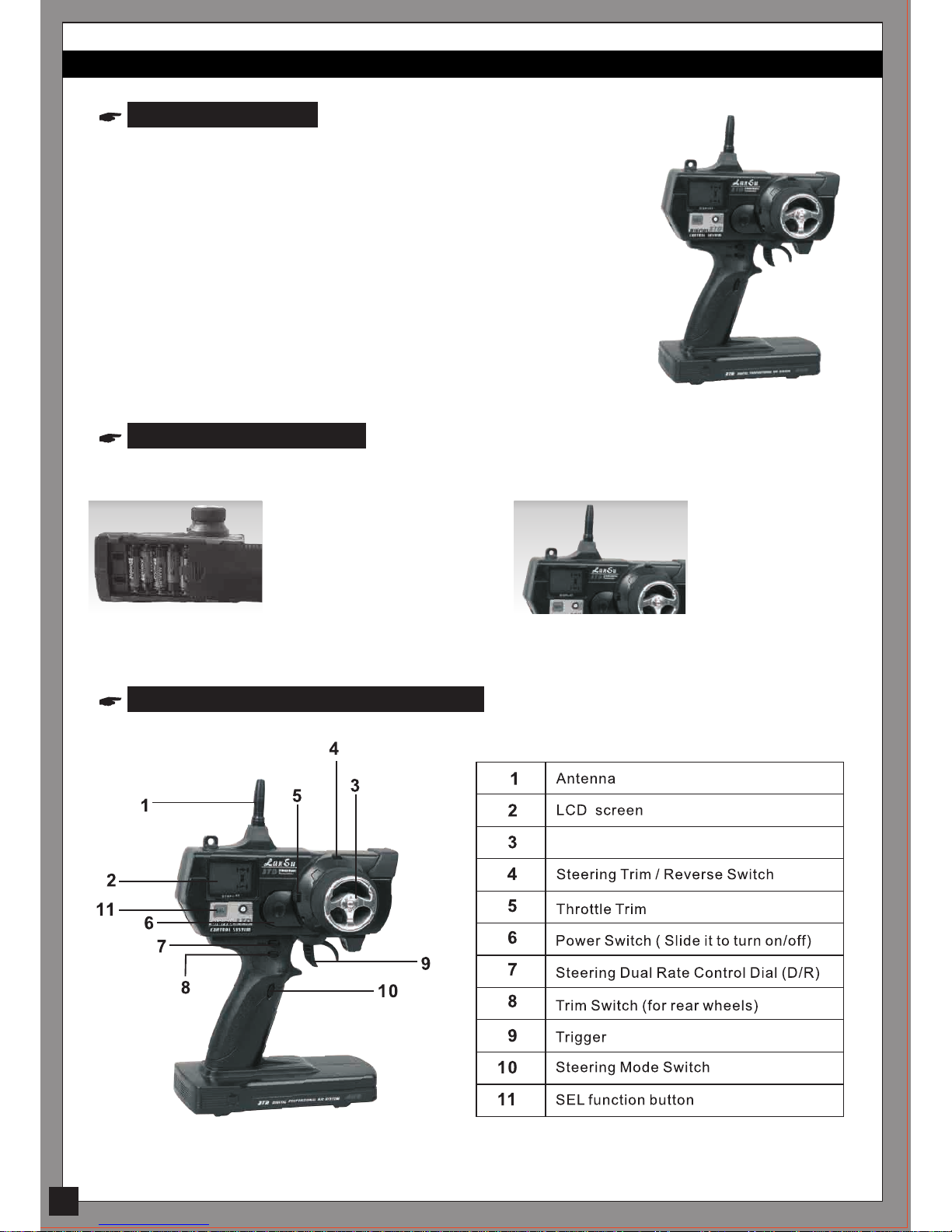
Steering Wheel

Full function steering modes
4
This 2.4GHz transmitter contains various steering
modes, which are perfect for the rock crawler.
Press this button to toggle
steering modes.
LCD screen on the transmitter LCD screen on the transmitter
LCD screen on the transmitter LCD screen on the transmitter
Front wheel steering Four wheel steering
- wheels in the same
direction
Mode 1 engages front wheel steering only.
The rear steering remains straight. Mode 2 engages front and rear wheel crab steer.
Both the front and rear wheels steer in the same
direction, allowing the RS10 to drive sideways.
Mode 3 engages 4-wheel steering.
The front and rear wheels steer in the opposite
direction, allowing the RS10 to turn in a tight radius.
Mode 4 engages rear wheel steering only.
The front steering remains straight.
Four wheel steering
- wheels in opposite
direction
Rear wheel steering

Steering Trim/Steering Reverse Function
Throttle Trim/Throttle Reverse Switch
LCD screen on the transmitter
LCD screen on the transmitter
TRM.ST (Steering Trim) range is around 0-100% for both left and right steering on the front wheels.
Toggle this switch to select your desired steering trim volume.
TRM. TH (Throttle Trim) range is around 0-100%. Toggle this switch to select the desired throttle trim
amount.
To Reverse Throttle:
Press SEL (Select Button) on your radio until the LCD display appears as Channel 2 (NOR.)
Toggle the SWITCH (Steering Trim /Reverse Switch) to change from NOR to REV as shown below:
To Reverse Steering:
Press SEL (Select Button) on your radio once, the LCD display appears as Channel 1 (NOR.)
Toggle the SWITCH (Steering Trim /Reverse Switch) to change from NOR to REV as shown below:
5
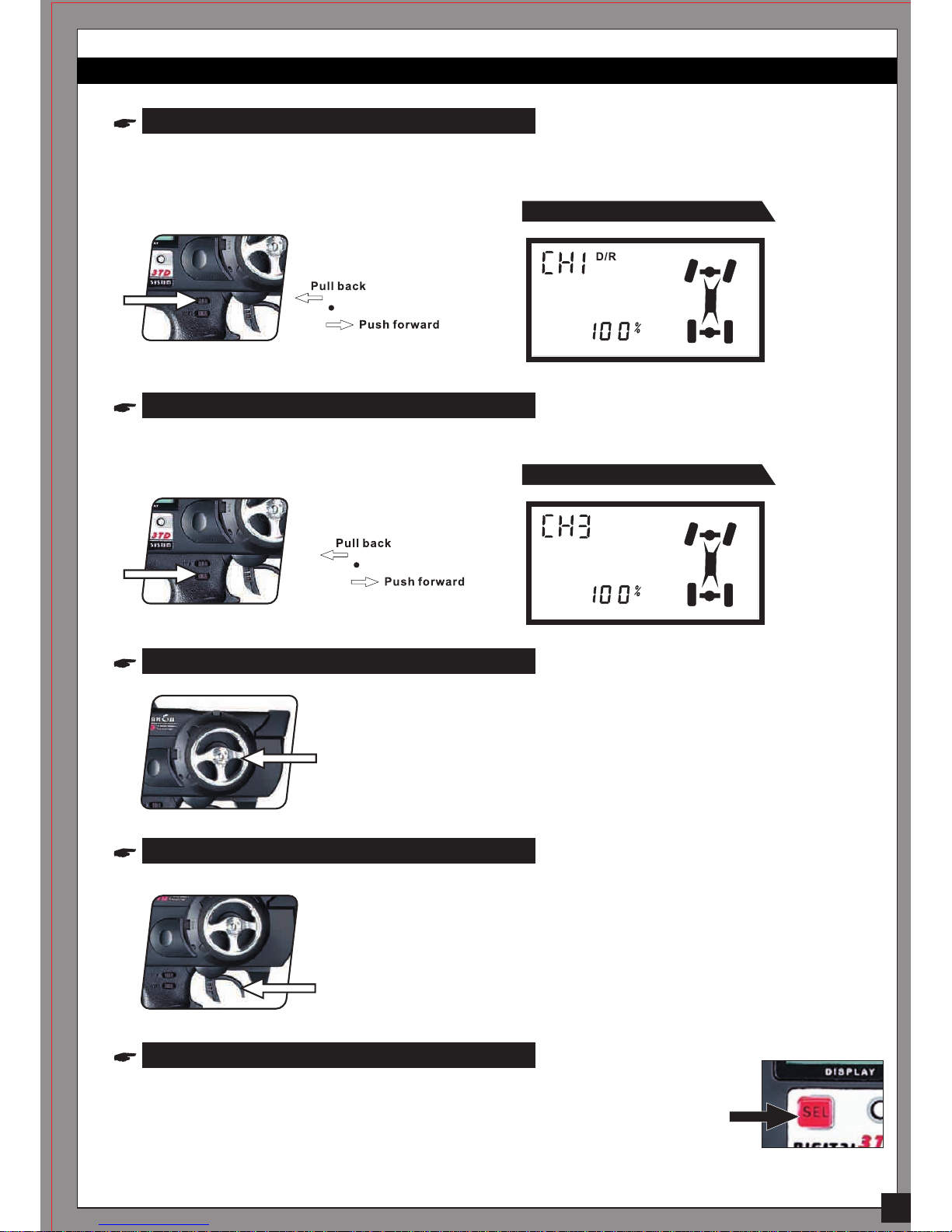
Steering Dual Rate (D/R)
Trim Switch (For Rear Wheels)
Steering Wheel
Throttle/Brake Trigger
SEL Function Button
LCD screen on the transmitter
LCD screen on the transmitter
This lever adjusts the overall travel of the steering servo, push the lever forward for maximum steering.
Pull the lever back to reduce steering travel. D/R adjustable range is around 5-100%.
This dial is to center the rear wheels. The range is 0-100% in either direction.
Controls steering. Turn the wheel to the right and the crawler turns right.
Turn the wheel to the left and the crawler turns left.
Controls forward motion, braking, and reverse. Pull the trigger to move forward,
release the trigger to decelerate, and push the trigger to brake.
Pushing the trigger a second time activates the reverse function.
This 2.4GHz transmitter contains various select functions. While pressing the
SEL button, the transmitter will cycle through the different functions with each
touch of the button.
6

5. ESC And Receiver Placement
The RS10XT is a fully assembled RTR vehicle. The following is intended to familiarize you with the placement of
electrical components.
The ESC is attached to the radio
tray with foam mounting tape. If you remove the ESC, clean off the
old tape residue and use a new piece
of foam mounting tape to re-install.
The power switch is secured with
two self tapping screws.
(2*6mm)- Screw No.: S093
7
Electronic Speed Controller (ESC)
Receiver
Splash-proof Receiver
The 2.4GHz receiver is attached to
the radio tray with foam mounting
tape.
If you remove the receiver, clean off the old
tape residue and use a new piece of foam
mounting tape to re-install.
Slide the receiver antenna through
the antenna mount (see the photo).
Install the antenna tube (found in the
package.) over the antenna and insert
into the antenna mount.
The new splash-proof 2.4Ghz receiver is provided with an extra
binding plug.
The binding plug (to Channel 4)
The motor connectors (front/rear motor) are secured to
the chassis with plastic ties. Be sure the yellow motor wire
is connected to the yellow ESC wire and blue to blue.

8
How to bind the receiver with the transmitter?
1) Insert the bind plug into Channel 4 before switching on the receiver.
2) Switch on the receiver. The LED light will flash.
4) Press and hold the SEL button on the transmitter.
The LED on the receiver will continue to flash. The radio is binding.
When the receiver's LED is lit solid, binding is complete.
Note: Repeat the above steps if binding fails.
5) Center the steering trim on the transmitter after binding is complete to set fail safe.
6) Remove the binding plug.
LED Indicator:
• RAPID FLASHING: BINDING IS IN OPERATION.
• SLOW FLASHING: NO SIGNAL WAITING FOR OPERATION
• SOLID LIGHT: IN OPERATION
• NO LIGHT: RECEIVER IS OFF, BATTERY IS DEAD OR MISSING, RECEIVER IS
DISCONNECTED OR BROKEN
6. Turning the vehicle on/off
Transmitter Power Switch
To turn the vehicle on:
1. Switch on the transmitter.
2. Switch on the ESC power switch.
To turn off the vehicle:
1. Switch off the ESC power switch.
2. Switch off the transmitter.
Remember to remove the batteries from the vehicle and transmitter
when not in use.
ESC power switch

7. Charging the NiMH battery
8. Troubleshooting Guide
PROBLEM CAUSE REMEDY
9
• Only use NiMH specific chargers to charge
Ni-MH battery packs.
• Never overcharge your Ni-MH battery packs.
• Never charge the battery pack unattended.
• Always use the battery after it is fully charged.
Never tempt to use this
charger to charge the
batteries of your
transmitter.
1) Transmitter or receiver is off.
2) Batteries are not placed correctly in the
transmitter.
3) Battery pack on the car is low.
4) Transmitter and receiver are not bound
correctly.
Your RS10XT rock crawler
fails to move.
Servo does not operate
normally.
Radio operates erratically.
Operating range is short.
Motor does not work.
The crawler moves when
turned on.
Steering works, but throttle
does not work.
1) Turn both transmitter and receiver on.
2) Correctly align batteries in the transmitter.
3) Charge the battery pack.
4) Bind the transmitter and receiver.
1) Transmitter and/or receiver batteries
are low.
2) Servo gears stripped or otherwise
damaged.
1) Replace/recharge transmitter and/or receiver
batteries.
2) Replace servo or servo gears.
1) Transmitter batteries are low.
2) Radio is damaged from dropping.
1) Replace transmitter batteries.
2) Replace transmitter/receiver.
1) Transmitter batteries are low. 1) Replace transmitter batteries.
1) Motor wires loose or damaged. 1) Double-check motor wires. Repair/replace
as necessary.
1) Throttle Trim is out of adjustment. 1) Adjust Throttle Trim again.
1) Motor wires are loose or damaged.
2) ESC is incorrectly plugged into the
receiver.
1) Check motor wires. Plug in correctly and/or
repair damage.
2) Plug the ESC into the receiver correctly.
Table of contents
Other RED CAT Toy manuals

RED CAT
RED CAT Backdraft 3.5 User manual

RED CAT
RED CAT Twister XTG User manual

RED CAT
RED CAT 1959 User manual

RED CAT
RED CAT Blackout XBE User manual

RED CAT
RED CAT EVEREST-10 User manual

RED CAT
RED CAT GEN9 User manual

RED CAT
RED CAT BLACKOUT XBE PRO User manual

RED CAT
RED CAT Volcano EPX PRO User manual

RED CAT
RED CAT F/A-18C User guide

RED CAT
RED CAT Backdraft3.5 User manual