
protech NSR-X412 User manual

OpticalFiberCableStudioSystem
光ファイバーケーブルスタジオシステム
OpticalFiberCameraAdaptor
光ファイバーカメラアダプター
OpticalFiberBaseStation
光ファイバーベースステーション
取扱説明書
ご使用の前に、この取扱説明書をよくお読みください。
また、お読みになった後は、大切に保管してください。
OperatingInstructions
Beforeoperatingthesystem,pleasereadthismanual
thoroughlyandkeepitforfuturereference.
NS-X4012GTS
NSR-X412

NSR-X412/NS-X4012GTSは、クラス1レーザーを使用しています。
光ファイバーコネクタの先端からはレーザー光が放射されていますので、
安全のため直接のぞきこまないでください。
本製品を使用しないときは、光ファイバーコネクタにダストキャップを
必ず装着してください。
02
Toensureproperusage,besuretoreadtheSafetyPrecautions
thoroughlybeforeusingtheproduct.
Alwayskeepthismanualavailableforfuturereference.
■Ifsomethingunusualhappens;forexample,
itemitssmoke,anunusualodororsound,
turnthepowerswitchoff.
■Donotplaceanycontainersoffluids
oranymetalobjectsonit.
■Donotinsertordropobjectsintoan
openingsuchasventholeinit.
■Donotwetitwithfluidssuchaswater,
perspirationorseawater.
Thefollowingdescrivesthemeaningofsafetysymbolsandsignalwords.
Indicatesapotentialyhazardous
operationthatcouldresultindeath
orseriousinjurytotheuser.
Indicatesapotentialyhazardousoperation
thatcouldresultinminorormoderate
injurytotheuserordamagetotheproperty.
■Ifitisdroppedorsubjectedtoexcessiveshock
orisdamaged,turnthepowerswitchoff.
■Ifwateroranyotherfluidentersit,turnthepower
switchoff.
■Ifaforeignbodyentersit,turnthepowerswitchoff.
Doingsomaycauseoverheating,fire,
electricshock,injuryormalfunction.
Takecareespeciallywhenusinginrainy
orsnowyweatheroratthewaterside.
■Donotdisassemble,modifyorrepairit.
Doingsomaycauseoverheating,fire,
electricshock,injuryormalfunction.
Forinspection,overhaulorrepair,
contactthepurchaseshoporPROTECHServicecenter.
■Donotsetuporleaveitwhereverwater
oranyotherfluidisused.
Doingsomaycauseoverheating,fire,
electricshock,injuryormalfunction.
※Failingtodosomaycauseoverheating,fire,electricshock,
injuryormalfunction.
Doingsomaycauseoverheating,fire,
electricshock,injuryormalfunction.
Doingsomaycauseoverheating,fire,
electricshock,injuryormalfunction.
NIPPONVIDEOSYSTEMacceptsnoliabilitywhateverforincidental
damagesarisingoutoftheuseorinabilitytousetheproduct,
including,butnotlimitedto,corruptionorlossofdata,lostbusiness
revenueorsuspensionofbusinessoperations.
※ そ の ま ま 使 用 す ると 感 電・事 故 を 起 こす 恐 れ が ありま す。
Caution
Warning 警告 “取扱いを誤った場合、使用者が死亡また
は重傷を負うことが想定されること”を
示します。
ご使用の前に、この『安全上の注意』をよくお読みのうえ、
正しくお使いください。また、お読みになった後は大切に
保管してください。
表示と図記号の意味は次のようになっています。
“取扱いを誤った場合、使用者が傷害を
負うことが想定されるか、または、物的
損害の発生が想定されること”を示します。
■煙が出ている、変なにおいや音がする等の異常が発生
した場合は、電源スイッチを切る!
■本機を落としたり、強い衝撃を与えたり、破損した場合は、
電源スイッチを切る!
■本機の内部に水などが入った場合は、電源スイッチを切る!
■本機の内部に異物などが入った場合は、電源スイッチを切る!
■本機の上に水の入った容器、小さな金属物を置かない!
こぼれて、本機内部に入ると、発熱や火災、感電など、
故障や事故を起こす恐れがあります。
■機器の開口部から異物を差し込んだり、落としこんだりしない!
発熱や火災、感電など、故障や事故を起こす原因となります。
雨天、降雪中、海岸、水辺でのご使用は特にご注意ください。
■機器が水、汗、海水などの液体で濡れたりしないようにする!
発熱や火災、感電など、故障や事故を起こす原因となります。
■水などの液体が使われたり、かかったりする場所で使用しない!
発熱や火災、感電など、故障や事故を起こす原因となります。
■本機を分解,改造,修理しない!
点 検・整 備・修 理 は 、
販売店またはPROTECHサポートセンターにご依頼ください。
発熱や火災、感電など、故障や事故を起こす原因となります。
この製品の使用 、または使用不能から生ずる付随的な損害
(情報内容の変化・消失、事業利益の損失、事業の中断など)
に関して、当社は責任を負いかねますのであらかじめご了承
ください 。
Prohibition
禁止
Prohibition
禁止
Keepwateraway
水ぬれ禁止
Nodisassembly
分解禁止
Keepwateraway
水場禁止
注意
NSR-X412andNS-X4012GTSareclass1laserproducts.
DonotdirectlylookintotheOpticalfiberconnector,since
thelaserlightisemittedfromitstips.
EnsurethatthedustcapisplacedovertheOpticalfiber
connectorwhenthisequipmentisnotinuse.
※ContacttheshopofpurchaseorPROTECHServicecenter. ※お買い上げの販売店またはPROTECHサービスセンター
にご相談ください。
NIPPONVIDEOSYSTEMacceptsnoliabilitywhateverfordamages
arisingfromimproperusenotconformingtotheinstructionsinthe
instructionmanuals.
Besuretofollowthesafetyinformationtopreventinjurytothe
userandotherpersons,aswellasdamagetoproperty.
取扱説明書の記載内容を守らないこと、あるいは取扱説明
書の記載内容の誤記、等により生じた損害に関して、当社
は責任を負いかねますのであらかじめご了承ください。
安全上の注意は、お使いになる人や、他の人への危害、財
産への損害を未然に防ぐための内容になっていますので、
必ずお守りください。
安全上の注意
WARNING

4
4
6
10
12
16
20
30
32
--------------------------------------------------
------------------------------------
----------------------------
-------------------------------------
------------------------------------
-------------------------------------
-------------------------------------------------------------------------------------------
-------------------------------------------------------------------------------------------
-------------------------------------------------------------------------------------
Contents目次
03
各部名称と働き
接続方法
外形寸法図
仕様
Mainpanel
Connectorpanel
Rearpanel
Frontpanel
Rearpanel
メインパネル
コネクタパネル
リアパネル
フロントパネル
リアパネル
OpticalFiberStudioSystemNSR-X412/NS-X4012GTS
NamesandFunctionsofParts
NSR-X412
NS-X4012GTS
Connection
Dimensions
Specifications
SIGNALINDICATOR
AUDIO-PGM
MIC
HP.LEVEL
INTERCOM
ON
OFF
04
①
②
③
④
⑤
Mainpanel
OpticalFiberCameraAdaptorNSR-X412
NamesandFunctionsofParts各部名称と働き
メインパネル
C.CCOM
TALLYFANON/OFF
TALLYOUTINTERCOM

Mainpanel メインパネル
05
インターカムにMIXするプログラム音声のボリューム。
インターカムにMIXするプログラム音声はインターカム
ヘッドセットでモニターできます。
OpticalFiberCameraAdaptorNSR-X412
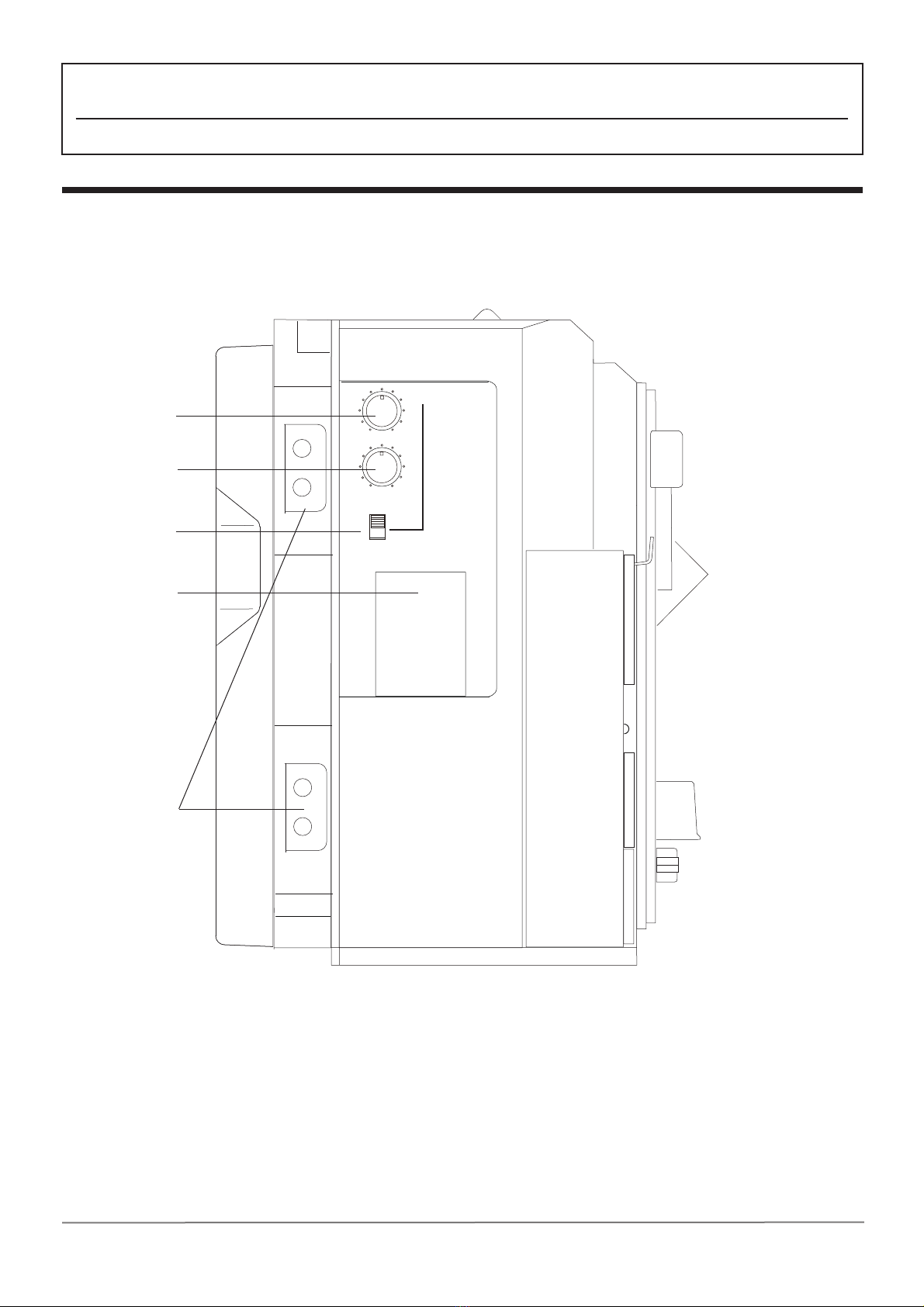
①INTERCOMAUDIO-PGM
IntercomPGMAudioVolumeControl
AdjuststhevolumelevelofthePROGRAM
audiowhichismixedtotheINTERCOMline.
TheAUDIOPROGRAMismixedtotheINTERCOM
tomonitorbyINTERCOMHEADSET.
Adjuststhevolumeoftheheadphoneofthe
INTERCOMHEADSET.
Indicatesthesignalstatus,theconnctionof
theconnectorsortheinput/outputofthesignals.
④SIGNALINDICATOR
SignalStatusIndicator
③INTERCOMMICON/OFF
IntercomMicrophoneSwitch
②INTERCOMHP.LEVEL
IntercomHeadsetHP.VolumeControl
Turnstheintercommicrophoneonoroff.
⑤DC15VOUT
DC15VOutputConnector
(CAMTAPfemalex2)
CanoutputtheDC15Vpowersuppliedfromthe
BaseStation.15V3.5A(50W)x2.
①INTERCOMAUDIO-PGM
インターカムPGM音声ボリューム
インターカム1/2で通話するヘッドセットの
ヘッドホン音声のレベルボリューム。
各コネクタの接続および信号の入出力/動作状態により
表示が点灯します。
④SIGNALINDICATOR
信号ステータス表示
③INTERCOMMICON/OFF
IntercomMicrophoneSwitch
②INTERCOMHP.LEVEL
インターカムヘッドセットボリューム
インターカムヘッドセットのマイクのON/OFFの切替え。
⑤DC15VOUT
DC15V出力コネクタ(CAMTAPメスx2)
ベースステーションからDC電源を供給され、DC15V
電源を出力します。15V3.5A(50W)2口。
OFF
H
L
REMOTE2
TCIN
B.BOUT SDIIN4
SDIIN3
SDIIN2
SDIIN1
TCOUT
REMOTE1
SDIIN5
RETOUT1
REMOTEL
OPTION
OPTION
RETOUT2
THROUGHOUT
06
⑫
⑦
⑯
⑥
⑧
⑰
⑱
⑮
⑩
⑪
⑬
⑭
⑨
Connectorpanel コネクタパネル
OpticalFiberCameraAdaptorNSR-X412

Connectorpanel コネクタパネル
07
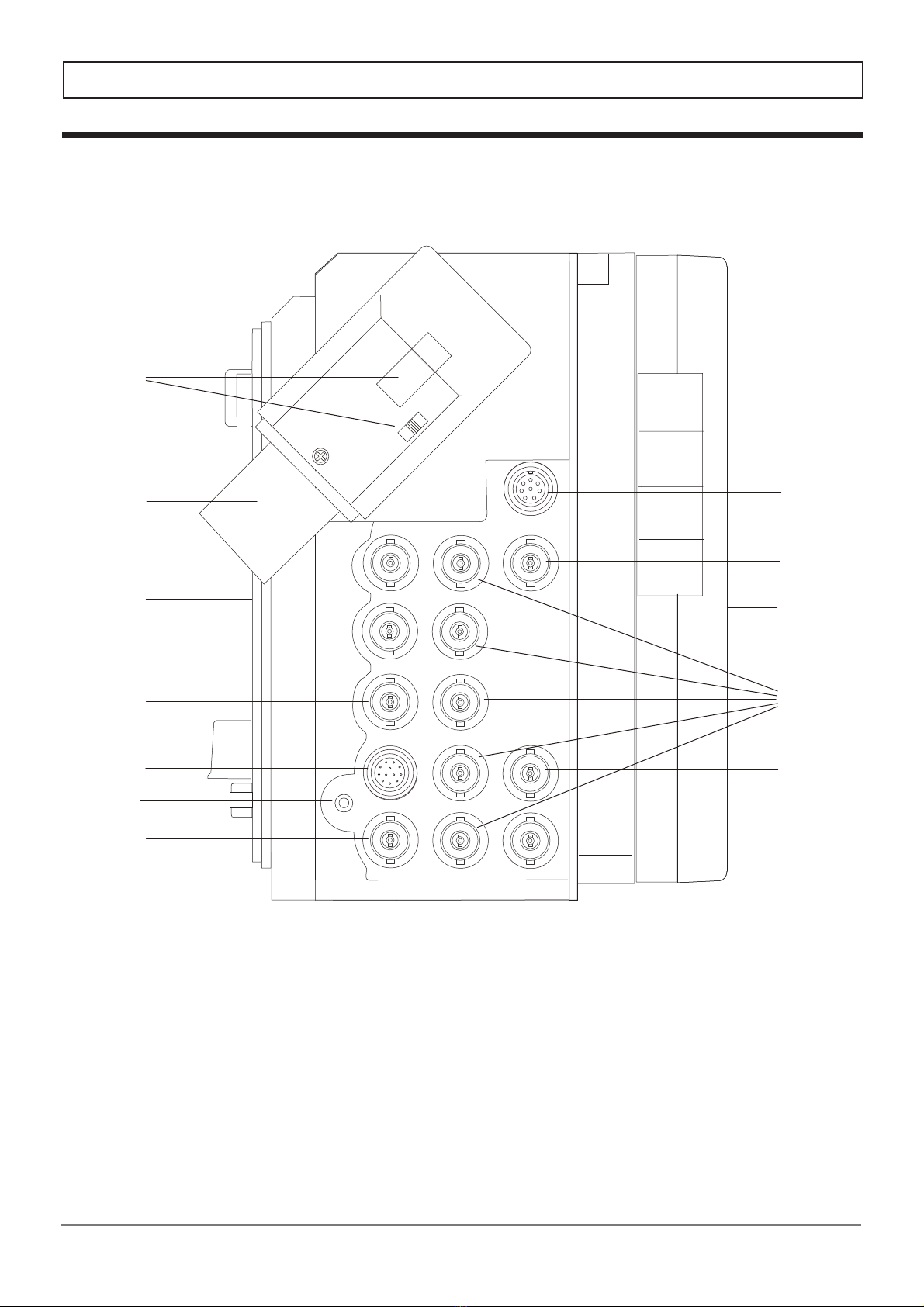
⑥SDIIN1-5
SDI1-5InputConnector(BNCx4)
UsedtoinputtheSDIsignalfromacamera.
TheSDIsignalinputtoSDIIN5connectorcan
beoutputbyloopthrough.
OutputstheSDIIN5inputasis(throughoutput).
OutputstheGENLOCKsignalinputtoB.BINofthe
BaseStation.
⑨B.BOUT
B.B(GENLOCK)SignalOutputConnector
(BNC)
⑧RETOUT1
ReturnSDIOutputConnector(BNC)
⑦SDIOUT
SDIOutputConnector(BNC)
(SDI5Throughoutput)
OutputsthereturnSDIsignalinputtotheRETIN
connectoroftheBaseStation.
カメラ等からのSDI信号を5系統入力できます。
IN51系統の入力のみが、ループスルーで出力されます。
SDIIN5入力信号が、そのままスルーで出力します。
ベースステーションのRETINに入力されたリターン
ビデオ信号を出力します。
ベースステーションのB.BINに入力されたGENLOCK
信号を出力します。
OpticalFiberCameraAdaptorNSR-X412
NSR-X412は、12G-SDI対応
NSR-X412iscompatiblewith12G-SDI.
Compatiblewith12G-SDI. 12G-SDI対応です。
⑩TCIN
TC(TimeCode)InputConnector(BNC)
タイムコードを入力します。
⑪TCOUT
TC(TimeCode)OutputConnector(BNC)
⑥SDIIN1-5
SDI1-5入力コネクタ(BNCx4)
⑦SDIOUT
SDI出力コネクタ(BNC)
(SDI5スルーアウト)
⑧RETOUT1
リターンSDI出力コネクタ(BNC)
⑨B.BOUT
B.B(GENLOCK)信号出力コネクタ(BNC)
⑩TCIN
タイムコード入力コネクタ(BNC)
⑪TCOUT
タイムコード出力コネクタ(BNC)
タイムコードを出力します。
UsetooutputtheTimeCode.
UsetoinputtheTimeCode.

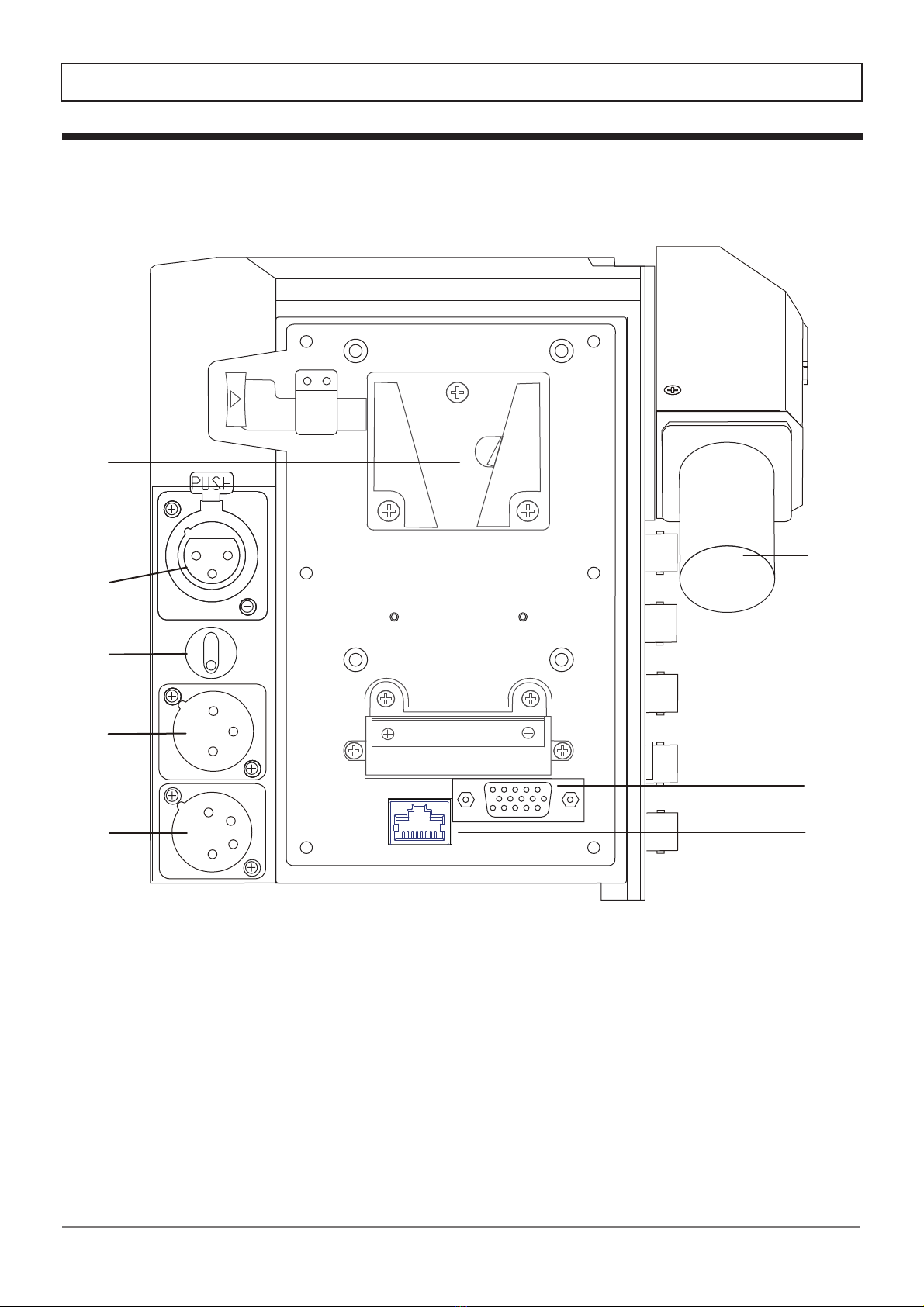
⑯V-mountCameraInterface
⑮V-mountBatteryInterface
(BatteryHolder)
⑫REMOTE1
REMOTE1Connector(8Pfemale)
Connectorpanel コネクタパネル
08
CompatiblewithRS-422orRS-232C.
Compatiblewiththe8-pinremotecontrol(forSONY).
Andcompatiblewiththe10-pinusingthe8P-10P
AdaptorCable(optional).
UsedforconnectionwiththeV-mountLi-ionbattery
(SONYtype),tooperatetheCameraAdaptorby
DCpower.
UsedtomounttheCameraAdaptortothecamera
tosupplytheDCpower.
RS-422/RS-232C対応.
8ピンに対応(SONY).
10ピンにも8P-10Pアダプター変換ケーブル(オプション)にて
対応。
VマウントLiイオンバッテリーパック(SONYタイプ)
を装着します。カメラアダプターをDC駆動します。
CameraAdaptorをカメラへマウント、DC電源を供給
します。
OpticalFiberCameraAdaptorNSR-X412
⑯Vマウントカメラインターフェース
⑮V-マウントバッテリーインターフェース
(バッテリーホルダー)
⑬REMOTE2
REMOTE2Connector(12Pfemale)
Fortheremotecontrol.
CompatiblewithRS-422orRS-232C.
リモートコントロール用。
RS-422/RS-232C対応。
Lightson(Redonly)whenreceivingthetally
signalfromtheBaseStation.
Theindicatorcanbeturnedon,offand
dimmedbytheH/L/OFFselectswitch.
⑰SideTALLYLED(Red)and
H/L/OFFSwitch
ベースステーションからの赤タリー信号により点灯します。
H/L/OFF切替スイッチにより明るさが切り替えられます。
⑰サイドタリー(赤)および明るさ切替スイッチ
⑭REMOTEL
REMOTELConnector(2.5φMinijack)
ForLANC. LANC用。
⑫REMOTE1
リモート1コネクタ(8Pメス)
⑬REMOTE2
リモート2コネクタ(12Pメス)
⑭REMOTEL
リモートLコネクタ(2.5φミニジャック)

⑱SMPTEOpticalFiberCableConnector
andCap
Connectorpanel コネクタパネル
09
ConnecttotheBaseStationwithanopticalfiber
cable.
BesuretoputthecapontheSMPTEopticalfiber
cableconnectorwhenthecableisnʼtconnected.
ベースステーションと光ファイバーケーブルで
接続します。
本機を使用しないとき、光ファイバーケーブルを接続
しないときは、必ずキャップを装着してください。
OpticalFiberCameraAdaptorNSR-X412
⑱光ファイバーケーブルコネクタおよびキャップ
10
Rearpanel リアパネル
OpticalFiberCameraAdaptorNSR-X412/X4/X1
LAN
⑮
⑱
⑲
⑳
21
○
22
○
23
○
22
○
Other manuals for NSR-X412
2
This manual suits for next models
1
Table of contents
Other protech Camera Accessories manuals


Popular Camera Accessories manuals by other brands

Viltrox
Viltrox EF-NEX Mount instructions

Calumet
Calumet 7100 Series CK7114 operating instructions

Ropox
Ropox 4Single Series User manual and installation instructions

Cambo
Cambo Wide DS Digital Series Main operating instructions

Samsung
Samsung SHG-120 Specification sheet

Ryobi
Ryobi BPL-1820 Owner's operating manual


