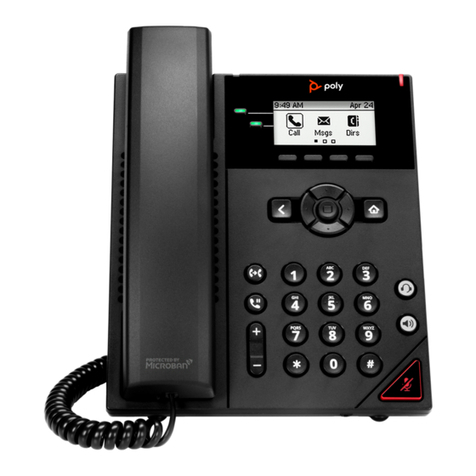
Poly VVX D230 User manual

7.0.0 |September 2019 |3725-49215-001A
USER GUIDE
GETTING HELP
For more information about installing, configuring, and
administering Poly/Polycom products or services, go to
Polycom Support.
Plantronics, Inc. (Poly – formerly Plantronics and Polycom)
345 Encinal Street
Santa Cruz, California
95060
© 2019 Plantronics, Inc. All rights reserved. Poly, the
propeller design, and the Poly logo are trademarks of
Plantronics, Inc. All other trademarks are the property of
VVX D230 DECT IP Phone

2
Table of Contents
Important Safety Instructions . . . . . . . . . . . . . . . . . . . . . . . . . . . . . . . . . . . . . . . . . 6
Replacing the Battery . . . . . . . . . . . . . . . . . . . . . . . . . . . . . . . . . . . . . . . . . . . . . . . . . . . . . 7
Disposal warning . . . . . . . . . . . . . . . . . . . . . . . . . . . . . . . . . . . . . . . . . . . . . . . . . . . . . . . . . 7
Introducing the VVX D230 DECT IP Phone . . . . . . . . . . . . . . . . . . . . . . . . . . . . . . . 8
Overview of the VVX D230 DECT IP Phone . . . . . . . . . . . . . . . . . . . . . . . . . . . . . . . . . . . . . . . 8
Overview of the VVX D230 Base Station . . . . . . . . . . . . . . . . . . . . . . . . . . . . . . . . . . . . . . . . . 9
VVX D230 DECT Base Station Status Indicator . . . . . . . . . . . . . . . . . . . . . . . . . . . . . . . . 10
Navigate the Handset Menus . . . . . . . . . . . . . . . . . . . . . . . . . . . . . . . . . . . . . . . . . . . . . . . . . 10
Return to the Home Screen . . . . . . . . . . . . . . . . . . . . . . . . . . . . . . . . . . . . . . . . . . . . . . . . . . . 11
Tips for Setting Up the Base Station . . . . . . . . . . . . . . . . . . . . . . . . . . . . . . . . . . . . . . . . . . . . 11
Getting Started with the VVX D230 DECT IP Phone . . . . . . . . . . . . . . . . . . . . . . 12
Register the Wireless Handset . . . . . . . . . . . . . . . . . . . . . . . . . . . . . . . . . . . . . . . . . . . . . . . . 12
Unregister the Wireless Handset . . . . . . . . . . . . . . . . . . . . . . . . . . . . . . . . . . . . . . . . . . . . . . . 12
Using Your VVX D230 DECT IP Phone . . . . . . . . . . . . . . . . . . . . . . . . . . . . . . . . . 13
Placing Calls . . . . . . . . . . . . . . . . . . . . . . . . . . . . . . . . . . . . . . . . . . . . . . . . . . . . . . . . . . . . . . 13
Place a Call Using the Default Line . . . . . . . . . . . . . . . . . . . . . . . . . . . . . . . . . . . . . . . . . . 13
Place a Call Using an Alternate Line . . . . . . . . . . . . . . . . . . . . . . . . . . . . . . . . . . . . . . . . . 13
Place a New Call During an Active Call . . . . . . . . . . . . . . . . . . . . . . . . . . . . . . . . . . . . . . 13
Forwarding Calls . . . . . . . . . . . . . . . . . . . . . . . . . . . . . . . . . . . . . . . . . . . . . . . . . . . . . . . . . . . 14
Enable Call Forwarding on a Particular Line . . . . . . . . . . . . . . . . . . . . . . . . . . . . . . . . . . . 14
Forward an Incoming Call . . . . . . . . . . . . . . . . . . . . . . . . . . . . . . . . . . . . . . . . . . . . . . . . . 14
Answering and Rejecting Calls . . . . . . . . . . . . . . . . . . . . . . . . . . . . . . . . . . . . . . . . . . . . . . . . 14
Answer an Incoming Call . . . . . . . . . . . . . . . . . . . . . . . . . . . . . . . . . . . . . . . . . . . . . . . . . 14
Answer an Incoming Call During a Call . . . . . . . . . . . . . . . . . . . . . . . . . . . . . . . . . . . . . . . 14
Reject an Incoming Call . . . . . . . . . . . . . . . . . . . . . . . . . . . . . . . . . . . . . . . . . . . . . . . . . . 15
Hold a Call . . . . . . . . . . . . . . . . . . . . . . . . . . . . . . . . . . . . . . . . . . . . . . . . . . . . . . . . . . . . . . . . 15
Resume a Call . . . . . . . . . . . . . . . . . . . . . . . . . . . . . . . . . . . . . . . . . . . . . . . . . . . . . . . . . . . . . 15
Placing Intercom Calls to Another Wireless Handset . . . . . . . . . . . . . . . . . . . . . . . . . . . . . . . 15
Place an Intercom Call When Not in a Call . . . . . . . . . . . . . . . . . . . . . . . . . . . . . . . . . . . . 15
Place an Intercom Call During a Call . . . . . . . . . . . . . . . . . . . . . . . . . . . . . . . . . . . . . . . . 16

VVX D230 Wireless Handset User Guide
3
Transferring Calls . . . . . . . . . . . . . . . . . . . . . . . . . . . . . . . . . . . . . . . . . . . . . . . . . . . . . . . . . . 16
Transfer a Call to Another Wireless Handset . . . . . . . . . . . . . . . . . . . . . . . . . . . . . . . . . . 16
Blind Transfer a Call . . . . . . . . . . . . . . . . . . . . . . . . . . . . . . . . . . . . . . . . . . . . . . . . . . . . . 16
Conference Calls . . . . . . . . . . . . . . . . . . . . . . . . . . . . . . . . . . . . . . . . . . . . . . . . . . . . . . . . . . . 16
Start a Conference Call . . . . . . . . . . . . . . . . . . . . . . . . . . . . . . . . . . . . . . . . . . . . . . . . . . . 16
Split a Conference Call . . . . . . . . . . . . . . . . . . . . . . . . . . . . . . . . . . . . . . . . . . . . . . . . . . . 17
Join Calls into a Conference Call . . . . . . . . . . . . . . . . . . . . . . . . . . . . . . . . . . . . . . . . . . . 17
Switch Between Calls . . . . . . . . . . . . . . . . . . . . . . . . . . . . . . . . . . . . . . . . . . . . . . . . . . . . . . . 17
Park Calls . . . . . . . . . . . . . . . . . . . . . . . . . . . . . . . . . . . . . . . . . . . . . . . . . . . . . . . . . . . . . . . . 17
Retrieve Parked Calls . . . . . . . . . . . . . . . . . . . . . . . . . . . . . . . . . . . . . . . . . . . . . . . . . . . . . . . 18
Shared Line Calls . . . . . . . . . . . . . . . . . . . . . . . . . . . . . . . . . . . . . . . . . . . . . . . . . . . . . . . . . . 18
Barge In . . . . . . . . . . . . . . . . . . . . . . . . . . . . . . . . . . . . . . . . . . . . . . . . . . . . . . . . . . . . . . . 18
Pick Up Held Calls . . . . . . . . . . . . . . . . . . . . . . . . . . . . . . . . . . . . . . . . . . . . . . . . . . . . . . 18
End a Call . . . . . . . . . . . . . . . . . . . . . . . . . . . . . . . . . . . . . . . . . . . . . . . . . . . . . . . . . . . . . . . . 18
Redial a Number . . . . . . . . . . . . . . . . . . . . . . . . . . . . . . . . . . . . . . . . . . . . . . . . . . . . . . . . . . . 19
Audio Adjustments . . . . . . . . . . . . . . . . . . . . . . . . . . . . . . . . . . . . . . . . . . . . . . . . . . . . . . . . . . 19
Switch Between the Earpiece and the Speakerphone . . . . . . . . . . . . . . . . . . . . . . . . . . . 19
Adjust the Volume . . . . . . . . . . . . . . . . . . . . . . . . . . . . . . . . . . . . . . . . . . . . . . . . . . . . . . 19
Mute or Unmute the Microphone . . . . . . . . . . . . . . . . . . . . . . . . . . . . . . . . . . . . . . . . . . . . 19
Access Voicemail Messages . . . . . . . . . . . . . . . . . . . . . . . . . . . . . . . . . . . . . . . . . . . . . . . . . . 19
Enable Do Not Disturb . . . . . . . . . . . . . . . . . . . . . . . . . . . . . . . . . . . . . . . . . . . . . . . . . . . . . . . 20
Disable Do Not Disturb . . . . . . . . . . . . . . . . . . . . . . . . . . . . . . . . . . . . . . . . . . . . . . . . . . . . . . 20
Directories and Speed Dial . . . . . . . . . . . . . . . . . . . . . . . . . . . . . . . . . . . . . . . . . . 21
Contact Directory . . . . . . . . . . . . . . . . . . . . . . . . . . . . . . . . . . . . . . . . . . . . . . . . . . . . . . . . . . . 21
Add a Contact to the Contact Directory . . . . . . . . . . . . . . . . . . . . . . . . . . . . . . . . . . . . . . . 21
View Contact Information . . . . . . . . . . . . . . . . . . . . . . . . . . . . . . . . . . . . . . . . . . . . . . . . . 21
Sort the Contact Directory . . . . . . . . . . . . . . . . . . . . . . . . . . . . . . . . . . . . . . . . . . . . . . . . . 22
Call a Contact from the Contact Directory . . . . . . . . . . . . . . . . . . . . . . . . . . . . . . . . . . . . . 22
Edit Contacts in the Contact Directory . . . . . . . . . . . . . . . . . . . . . . . . . . . . . . . . . . . . . . . 22
Delete a Contact from the Contact Directory . . . . . . . . . . . . . . . . . . . . . . . . . . . . . . . . . . 23
Enterprise Directory . . . . . . . . . . . . . . . . . . . . . . . . . . . . . . . . . . . . . . . . . . . . . . . . . . . . . . . . . 23
View Contact Information for Enterprise Directory Contacts . . . . . . . . . . . . . . . . . . . . . . . 23
Call a Contact from the Enterprise Directory . . . . . . . . . . . . . . . . . . . . . . . . . . . . . . . . . . . 23
Search the Enterprise Directory . . . . . . . . . . . . . . . . . . . . . . . . . . . . . . . . . . . . . . . . . . . . 24
Save Enterprise Directory Contacts to the Contact Directory . . . . . . . . . . . . . . . . . . . . . . 24
Speed Dial . . . . . . . . . . . . . . . . . . . . . . . . . . . . . . . . . . . . . . . . . . . . . . . . . . . . . . . . . . . . . . . . 24
Add a Speed Dial Entry . . . . . . . . . . . . . . . . . . . . . . . . . . . . . . . . . . . . . . . . . . . . . . . . . . . 24
Call a Speed Dial Entry . . . . . . . . . . . . . . . . . . . . . . . . . . . . . . . . . . . . . . . . . . . . . . . . . . . 25
Replace a Speed Dial Entry . . . . . . . . . . . . . . . . . . . . . . . . . . . . . . . . . . . . . . . . . . . . . . . 25

VVX D230 Wireless Handset User Guide
4
Delete a Speed Dial Entry . . . . . . . . . . . . . . . . . . . . . . . . . . . . . . . . . . . . . . . . . . . . . . . . . 25
Call Logs . . . . . . . . . . . . . . . . . . . . . . . . . . . . . . . . . . . . . . . . . . . . . . . . . . . . . . . . . 26
Missed Calls . . . . . . . . . . . . . . . . . . . . . . . . . . . . . . . . . . . . . . . . . . . . . . . . . . . . . . . . . . . . . . 26
Call a Missed Call Entry . . . . . . . . . . . . . . . . . . . . . . . . . . . . . . . . . . . . . . . . . . . . . . . . . . 26
View Details for a Missed Call Entry . . . . . . . . . . . . . . . . . . . . . . . . . . . . . . . . . . . . . . . . . 26
Delete a Missed Call Entry . . . . . . . . . . . . . . . . . . . . . . . . . . . . . . . . . . . . . . . . . . . . . . . . 26
Delete All Missed Call Entries . . . . . . . . . . . . . . . . . . . . . . . . . . . . . . . . . . . . . . . . . . . . . . 27
Add a Missed Call Entry to the Contact Directory . . . . . . . . . . . . . . . . . . . . . . . . . . . . . . . 27
Received Calls . . . . . . . . . . . . . . . . . . . . . . . . . . . . . . . . . . . . . . . . . . . . . . . . . . . . . . . . . . . . . 27
Call a Received Call Entry . . . . . . . . . . . . . . . . . . . . . . . . . . . . . . . . . . . . . . . . . . . . . . . . 27
View Details for a Received Call Entry . . . . . . . . . . . . . . . . . . . . . . . . . . . . . . . . . . . . . . . 28
Delete a Received Call Entry . . . . . . . . . . . . . . . . . . . . . . . . . . . . . . . . . . . . . . . . . . . . . . 28
Delete All Received Call Entries . . . . . . . . . . . . . . . . . . . . . . . . . . . . . . . . . . . . . . . . . . . . 28
Add a Received Call Entry to the Contact Directory . . . . . . . . . . . . . . . . . . . . . . . . . . . . . 28
Dialed Calls . . . . . . . . . . . . . . . . . . . . . . . . . . . . . . . . . . . . . . . . . . . . . . . . . . . . . . . . . . . . . . . 29
Call a Dialed Call Entry . . . . . . . . . . . . . . . . . . . . . . . . . . . . . . . . . . . . . . . . . . . . . . . . . . . 29
View Details for a Dialed Call Entry . . . . . . . . . . . . . . . . . . . . . . . . . . . . . . . . . . . . . . . . . 29
Delete a Dialed Call Entry . . . . . . . . . . . . . . . . . . . . . . . . . . . . . . . . . . . . . . . . . . . . . . . . . 29
Delete All Dialed Call Entries . . . . . . . . . . . . . . . . . . . . . . . . . . . . . . . . . . . . . . . . . . . . . . 30
Add a Dialed Entry to the Contact Directory . . . . . . . . . . . . . . . . . . . . . . . . . . . . . . . . . . . 30
Recent Calls . . . . . . . . . . . . . . . . . . . . . . . . . . . . . . . . . . . . . . . . . . . . . . . . . . . . . . . . . . . . . . 30
Call a Recent Calls Entry . . . . . . . . . . . . . . . . . . . . . . . . . . . . . . . . . . . . . . . . . . . . . . . . . 30
View Details for a Recent Calls Entry . . . . . . . . . . . . . . . . . . . . . . . . . . . . . . . . . . . . . . . . 30
Delete a Recent Call Entry . . . . . . . . . . . . . . . . . . . . . . . . . . . . . . . . . . . . . . . . . . . . . . . . 31
Delete All Recent Call Entries . . . . . . . . . . . . . . . . . . . . . . . . . . . . . . . . . . . . . . . . . . . . . . 31
Add a Recent Call Entry to the Contact Directory . . . . . . . . . . . . . . . . . . . . . . . . . . . . . . . 31
VVX D230 DECT IP Phone Settings . . . . . . . . . . . . . . . . . . . . . . . . . . . . . . . . . . . . 32
Set the Time and Date Format . . . . . . . . . . . . . . . . . . . . . . . . . . . . . . . . . . . . . . . . . . . . . . . . 32
Ring Type Settings . . . . . . . . . . . . . . . . . . . . . . . . . . . . . . . . . . . . . . . . . . . . . . . . . . . . . . . . . 32
Set the Ring Type for External Calls . . . . . . . . . . . . . . . . . . . . . . . . . . . . . . . . . . . . . . . . . 32
Set the Ring Type for Internal Calls . . . . . . . . . . . . . . . . . . . . . . . . . . . . . . . . . . . . . . . . . 32
Enable or Disable Keypad Tones . . . . . . . . . . . . . . . . . . . . . . . . . . . . . . . . . . . . . . . . . . . . . . 33
Set a Language . . . . . . . . . . . . . . . . . . . . . . . . . . . . . . . . . . . . . . . . . . . . . . . . . . . . . . . . . . . . 33
Name the Wireless Handset . . . . . . . . . . . . . . . . . . . . . . . . . . . . . . . . . . . . . . . . . . . . . . . . . . 33
Enable Call Forwarding . . . . . . . . . . . . . . . . . . . . . . . . . . . . . . . . . . . . . . . . . . . . . . . . . . . . . . 33
Outgoing Line Setup . . . . . . . . . . . . . . . . . . . . . . . . . . . . . . . . . . . . . . . . . . . . . . . . . . . . . . . . 34
View Wireless Handset Information . . . . . . . . . . . . . . . . . . . . . . . . . . . . . . . . . . . . . . . . . . . . . 34
View Wireless Base Station Information . . . . . . . . . . . . . . . . . . . . . . . . . . . . . . . . . . . . . . . . . 34

VVX D230 Wireless Handset User Guide
5
Reset the Wireless Handset to Factory Defaults . . . . . . . . . . . . . . . . . . . . . . . . . . . . . . . . . . . 34
Care and Maintenance . . . . . . . . . . . . . . . . . . . . . . . . . . . . . . . . . . . . . . . . . . . . . . 35
Take Care of Your VVX D230 DECT IP Phone . . . . . . . . . . . . . . . . . . . . . . . . . . . . . . . . . . . . 35
Cleaning Your Wireless Handset . . . . . . . . . . . . . . . . . . . . . . . . . . . . . . . . . . . . . . . . . . . . . . . 35
Troubleshooting . . . . . . . . . . . . . . . . . . . . . . . . . . . . . . . . . . . . . . . . . . . . . . . . . . . 36
VVX D230 Wireless Handset Range . . . . . . . . . . . . . . . . . . . . . . . . . . . . . . . . . . . . . . . . . . . . 36
VVX D230 Wireless Handset Registration . . . . . . . . . . . . . . . . . . . . . . . . . . . . . . . . . . . . . . . 36
Radio Frequency Interference . . . . . . . . . . . . . . . . . . . . . . . . . . . . . . . . . . . . . . . . . . . . . . . . . 36

6
Important Safety Instructions
When using your VVX D230 DECT IP Phone, follow basic safety precautions to reduce the risk of fire,
electric shock and injury, including the following:
●Read and understand all the instructions.
●Follow all warnings and instructions marked on the handset.
●Unplug the handset from the wall outlet before cleaning. Do not use liquid cleaners or aerosol
cleaners. Use a slightly damp cloth for cleaning.
●Do not use the handset near water, for example, near a bath tub, kitchen sink, or swimming pool.
●Do not expose the handset to direct sunlight or an extreme cold environment. Do not put the handset
close to heating sources such as radiators, heaters, or cookers.
●Do not overload wall outlets and extension cords to help avoid fire or electric shock.
●Unplug the handset from the wall outlet and refer servicing to the distributor under the following
conditions:
If the power supply cord or plug is damaged or frayed.
If the handset does not operate normally according to the operating instructions.
If the handset has been dropped and the casing has been damaged.
If the handset exhibits a distinct change in performance.
●Avoid using a telephone, other than a cordless type, during an electrical storm. There may be a
remote risk of electric shock from lightning.
●Electrical storms can sometimes cause power surges harmful to electronic equipment. For your own
safety, take caution when using electric appliances during storms.
●Do not use the handset to report a gas leak in the vicinity of the leak.
●Use only the supplied battery pack. The operation periods for the handsets are applicable only with
the default battery capacities.
●The use of other battery types or non-rechargeable batteries or primary cells can be dangerous,
causing interference and unit damages. The manufacturer is not held liable for damage arising from
such non-compliance.
●Do not use third-party charging bays as they can damage the battery.
●Note the correct polarity while inserting the batteries.
●The battery should not be exposed to excessive heat such as bright sunshine or fire.
●The battery should not be immersed in water.
Your wireless handset can be damaged if it gets wet. Do not use the wireless handset in the rain, and do
not handle it with wet hands. Do not install the base station near a sink, bathtub, or shower.

VVX D230 Wireless Handset User Guide Important Safety Instructions
7
Replacing the Battery
Dispose of used batteries according to local published guidelines.
Disposal warning
1When this crossed-out wheeled bin symbol is attached to a product, it means the product is covered
by the European Directive 2002/96/EC.
2All electrical and electronic products and batteries should be disposed of separately from the
municipal waste stream via designated collection facilities appointed by the government or the local
authorities.
3The correct disposal of your old appliance or battery helps prevent potential negative consequences
for the environment and human health.
For more detailed information about disposal of your old appliance or battery, contact your city office, waste
disposal service, or the reseller where you purchased the product.
If the base station falls into water, do not retrieve it until you unplug the power cord and
telephone line cords from the wall. Then pull the unit out by the unplugged cords.
Replacement with an incorrect battery can cause an explosion.

8
Introducing the VVX D230 DECT IP
Phone
The VVX D230 DECT IP Phone is a standalone IP based wireless phone that enables you to manage calls
to your line at any time while you’re away from your desk. The system consists of a base station with support
for up to 10 handsets. This section includes overview information on using the VVX D230 DECT IP Phone.
Overview of the VVX D230 DECT IP Phone
This following figure displays the hardware features on the VVX D230 DECT IP Phone. The table lists each
numbered feature shown in the following figure.
VVX D230 DECT IP Phone Hardware Features
VVX D230 DECT IP Phone Hardware Feature Descriptions
Reference
Number Feature Feature Description
1 Soft keys Select a menu item displayed above the key.
2 Navigation keys
/ OK button
Increase or decrease the ringer volume, scroll through menus, or move the cursor
within fields.
Press OK to enter the main menu, select a highlighted item, or save an entry or
setting while in a menu.
3 Call button Place a call, answer a call, or view recent calls.

VVX D230 Wireless Handset User Guide Introducing the VVX D230 DECT IP Phone
9
Overview of the VVX D230 Base Station
This following figure displays the hardware features on the VVX D230 DECT Base Station. The table lists
each numbered feature shown in the following figure.
VVX D230 DECT Base Station Hardware Features
4 End button Hang up during a call or cancel the handset software update.
Press and hold to power on or off the wireless handset.
5 Keypad Enter numbers or characters.
Press and hold * to turn on or turn off the ringer.
Press and hold # to lock or unlock the keypad.
Press and hold 0 to insert a plus sign (+) for international calls.
6 Speakerphone Place or answer a call using the wireless handset speakerphone.
Switch between the wireless handset speakerphone and the wireless handset
earpiece during a call.
7 Redial button Redial the last dialed number.
8 Mute button Mute or unmute the microphone during an active call.
9 Microphone Transmit your audio during a call.
10 LED Light Flashes to indicate an incoming call, missed call, or new voicemail.
11 Earpiece Enables you to hear audio from contacts during a call.
12 Headphone
port
Enables you to connect a headset to the phone.
VVX D230 DECT IP Phone Hardware Feature Descriptions
Reference
Number Feature Feature Description

VVX D230 Wireless Handset User Guide Introducing the VVX D230 DECT IP Phone
10
F
VVX D230 DECT Base Station Status Indicator
The following table shows the behavior of the status indicator on the base station.
Navigate the Handset Menus
The following table lists the menu structure on the VVX D230 DECT IP Phone.
To navigate the menu:
1On the wireless handset, press Menu.
VVX D230 DECT Base Station Hardware Feature Descriptions
Reference
Number Feature Feature Description
1 Find Press to locate the registered wireless handsets.
Press and hold for 5 seconds or more to register a wireless handset to the
base station.
2 Status Indicator See VVX D230 DECT Base Station Status Indicator.
3 Charging Cradle Place the wireless handset in the cradle to charge.
Base Station State Status Indicator Behavior
Powering On
On
Idle
Steady indicator.
Waiting for network to be ready Repeatedly flashes on for 1 second and off for 1 second.
Locating a handset Repeatedly flashes on for 1 second and off for 1 second.
Registering a handset Repeatedly flashes on for 2 seconds and off for 1 second.
Menu Structure
Call Log Message Intercom Directories DND Call
Forwarding
Preferences Settings
Missed
Calls
Received
Calls
Dialed
Calls
Recent
Calls
[List of
Lines]
List of
Handsets
Contact
Directory
Enterprise
Directory
Add New
Contact
Speed Dial
List
Select All
[List of
Lines]
List of Lines Ring Type
Keypad
Tones
Language
List
Time & Date
Outgoing Line
Handset
Name
Registration
Handset Info
Basestation
Info
Factory Reset
Other manuals for VVX D230
8
Table of contents
Other Poly IP Phone manuals

Poly
Poly Edge E Series User manual

Poly
Poly ROVE Assembly instructions

Poly
Poly VVX 600 Operating instructions

Poly
Poly Edge B Series Assembly instructions

Poly
Poly Edge B Series User manual

Poly
Poly CCX 500 User manual

Poly
Poly VVX 450 Series User manual

Poly
Poly Edge E Series User manual

Poly
Poly Edge E Series Assembly instructions

Poly
Poly Polycom VVX Series User manual