
Naruiger RG-001T User manual

RG-001T/R-US Manual
V-1.01
Dongguan i-chime electronic co.,ltd 2010-2021
1
RG-001T/R Belt DC doorbell
RG-001R RG-001T
Features
Power supply: RX 4.5V (AA1.5V x 3),TX 12V 23A
Transmission range:200m(inroom 150m).
Frequency: 433.92MHz ±150KHz Tolerance
Alarm mode:Music 16
Matching method: learning coding
Applications: Villas, hotels, apartments, office buildings, elderly and child care

RG-001T/R-US Manual
V-1.01
Dongguan i-chime electronic co.,ltd 2010-2021
2
Important
information
Take the time to read this user manual before using this control switch module
Recycling your old device Your device is designed and manufactured with high
quality materials and components that can be recycled and reused.
If a product or its packaging has this symbol with a crossed-out wheeled container,
this means that it is under the CE 2002/96 directive.
inform your municipality about the selective classification system implemented for
electrical and electronic equipment.
Observe current regulations and do not throw your appliances in the trash, the
disposal of your old appliance in accordance with these regulations helps to prevent
possible negative consequences for the environment and health. Batteries should
not be thrown away with domestic garbage. Return them to a collection point for
used batteries.
The <recycling materials> symbol on the plastic packaging elements indicates that
these components are recyclable.
Do not throw them away as normal household garbage.
This symbol on the carton packaging means that the company that has put this
product on the market is financially involved in the selective collection of packaging.

RG-001T/R-US Manual
V-1.01
Dongguan i-chime electronic co.,ltd 2010-2021
3
1.RG-001T/R Function diagram

RG-001T/R-US Manual
V-1.01
Dongguan i-chime electronic co.,ltd 2010-2021
4
2 .Installation and configuration
2.1.first time to use
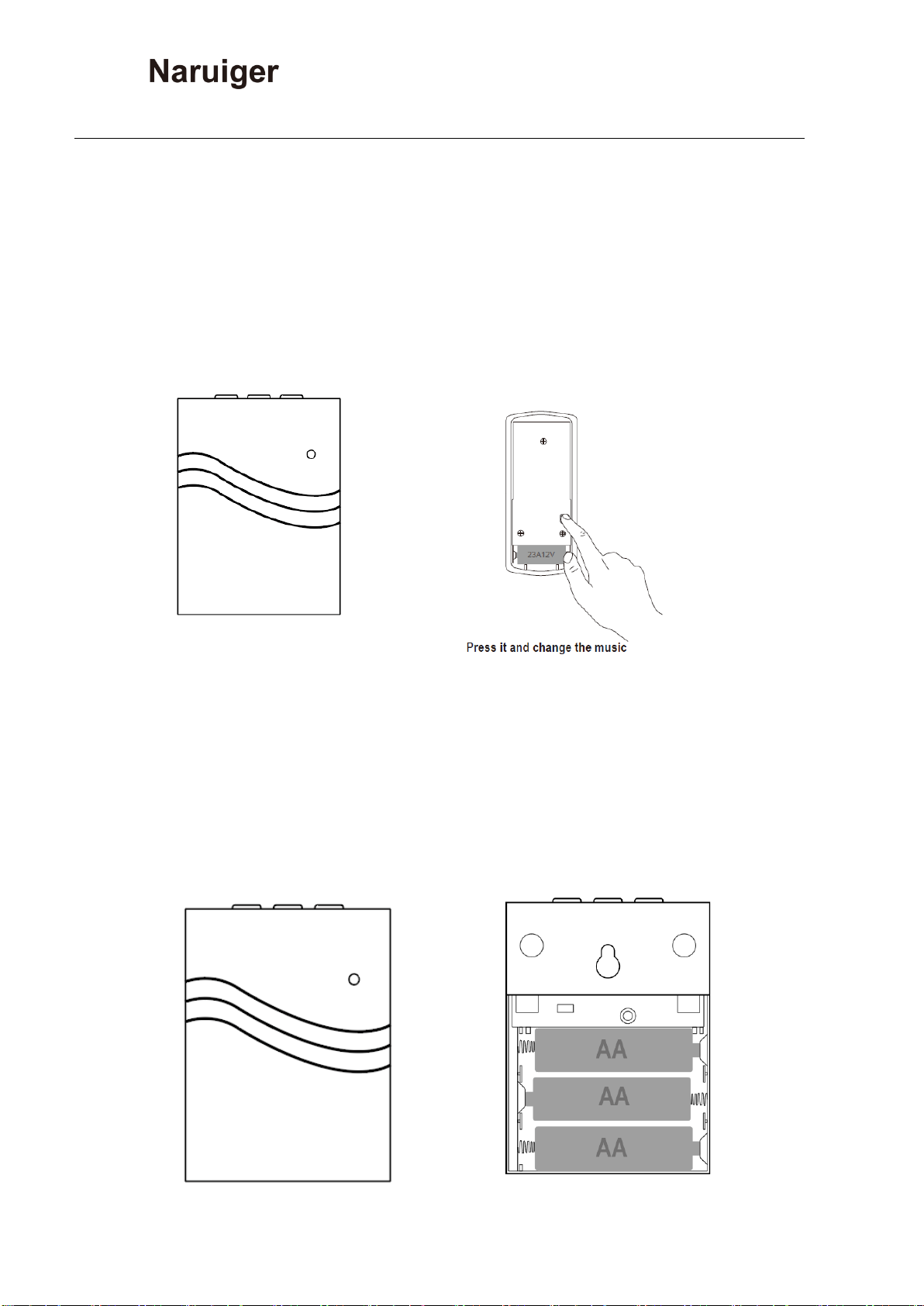
Open the RG-001R battery box, install AA1.5V×3, and then open the
RG-001 T control battery box (rear cover) to install 23A 12V batteries.
RG-001T/R-US Manual
V-1.01
Dongguan i-chime electronic co.,ltd 2010-2021
5
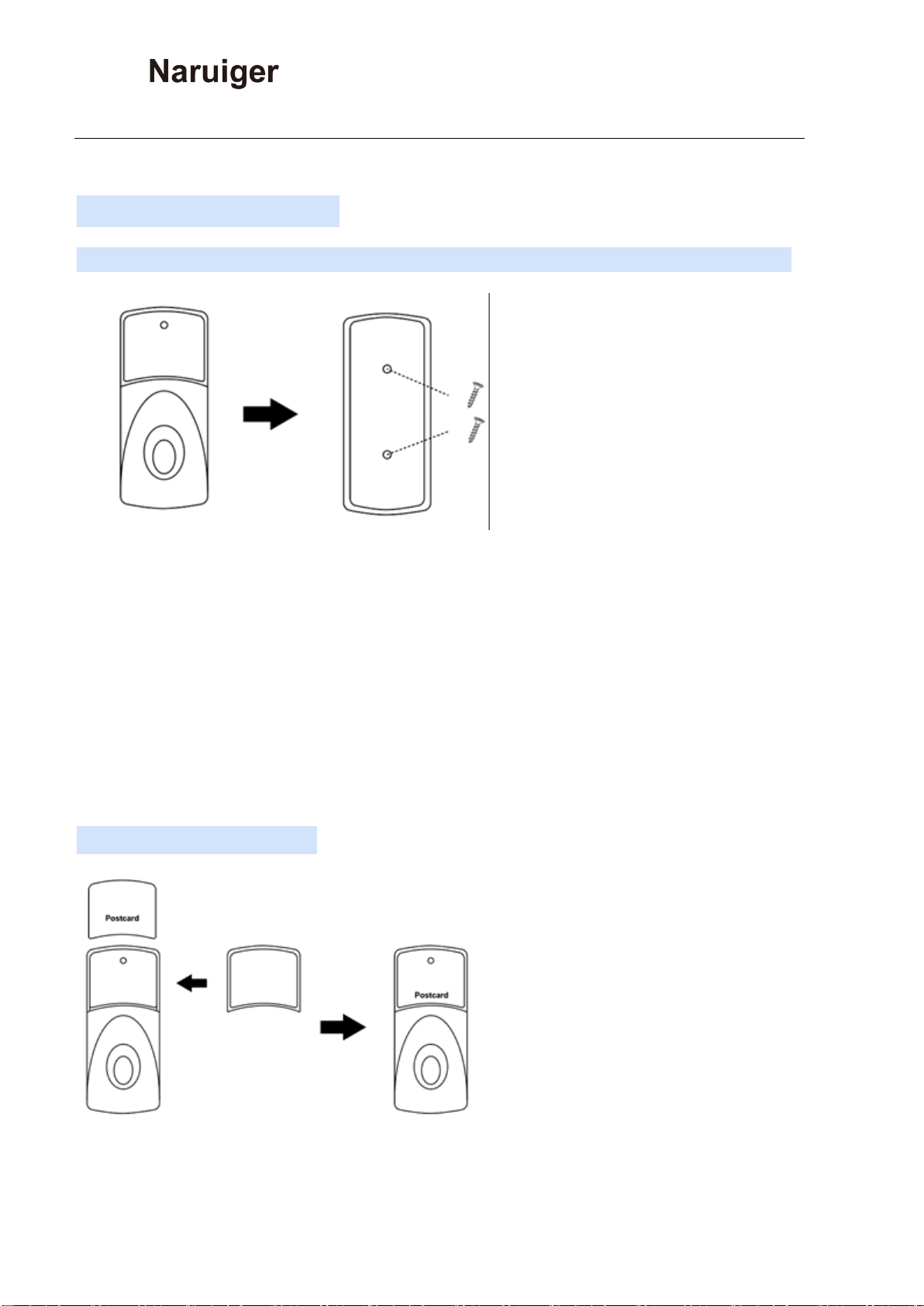
2.2 Fixed to the wall
Can be fixed on the wall with the included screws or double-sided stickers.
Note:
Please install the transmitter button one meter above the ground;
Don’t install the transmitter button directly on the iron door, but on the wall
next to it, so as not to affect the distance of the remote control;
Don't install the transmitter button next to other electrical appliances.
2.3 Postcard function:

RG-001T/R-US Manual
V-1.01
Dongguan i-chime electronic co.,ltd 2010-2021
6
The transparent cover can be removed and a business card can be inserted to let
visitors know that this is the doorbell of your home ,Fully show your personality
2.4 Reconfiguration of RG-001 receiver and transmitter。
Important note: The new factory RG-001T/R wireless doorbell
transceiver has been configured, so there is no need to re-configure,
you can skip this step.
2.4.1 Reconfiguration of RG-001
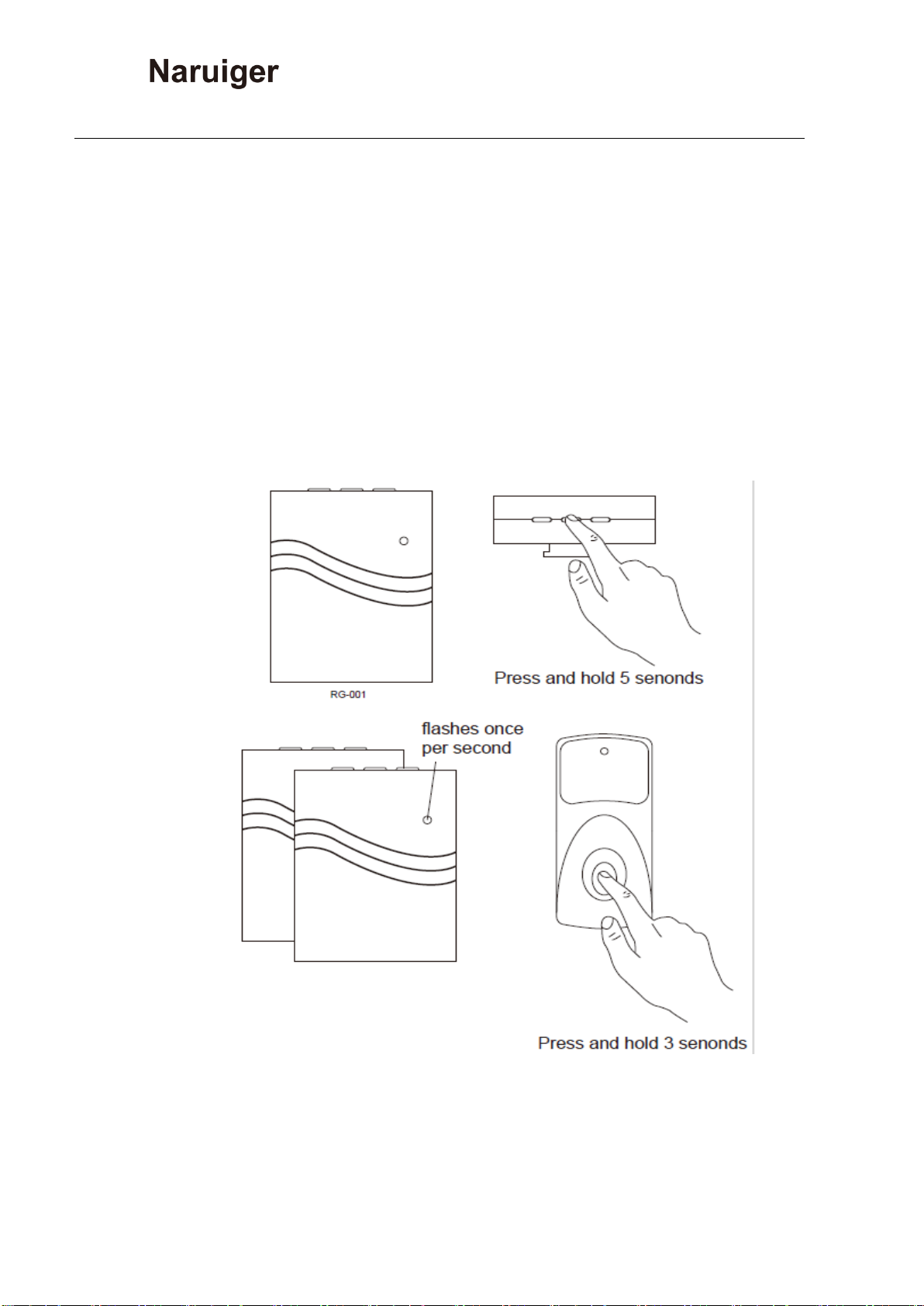
2.4.1.1 After installing the battery, press and hold the CODE button
of the RG-001R for 5 seconds, the receiver LED indicator flashes (once
per second), the receiver enters the waiting configuration state, and
then quickly press the transmitter button to configure with the receiver.
When the RG-001R LED indicator is off, the configuration is complete.
2.4.2 Reconfiguration of RG-001,Add second and
third receivers
After installing the battery, press and hold
RG-001T/R-US Manual
V-1.01
Dongguan i-chime electronic co.,ltd 2010-2021
7
the CODE button of the second RG-001 receiver (5 seconds), the
receiver LED indicator flashes (once per second), the receiver enters the
waiting configuration state, and then quickly press the RG-001T Button
to configure with the receiver. When the RG-001R LED indicator is off,
the second receiver configuration is complete. Repeat this step to
complete the third receiver configuration.
2.4.3 Reconfiguration of RG-001,Add Second and third transmitter .

RG-001T/R-US Manual
V-1.01
Dongguan i-chime electronic co.,ltd 2010-2021
8
After installing the battery, press and hold the CODE button of the RG-001R
(5 seconds), the receiver LED indicator flashes (once per second), the receiver
enters the waiting configuration state, and then quickly press the second RG-001
to send Button to configure with the receiver. When the RG-001R LED indicator is
off, the second receiver configuration is complete. Repeat this step to complete
the third transmitter button.
2.4.4 Reconfiguration of RG-001T/R,
RG-001T/R-US Manual
V-1.01
Dongguan i-chime electronic co.,ltd 2010-2021
9
Change music
Open the back cover (battery box) of the RG-001T, and change the music
every time you press the button on the PCB, There are 16 types of music. (When
the song selection button is pressed for the first time, the original music will be
played, and when it is pressed again, it will switch to the next song.)
2.5 RG-001T/R low voltage reminder
If the RG-001T is not working, when the indicator light of the RG-001R
flashes (twice in 5 seconds), the receiver battery needs to be replaced.

RG-001T/R-US Manual
V-1.01
Dongguan i-chime electronic co.,ltd 2010-2021
10
3 . Application
Villas, hotels, apartments
office buildings
elderly and child care
This manual suits for next models
1
Table of contents
Other Naruiger Accessories manuals












