
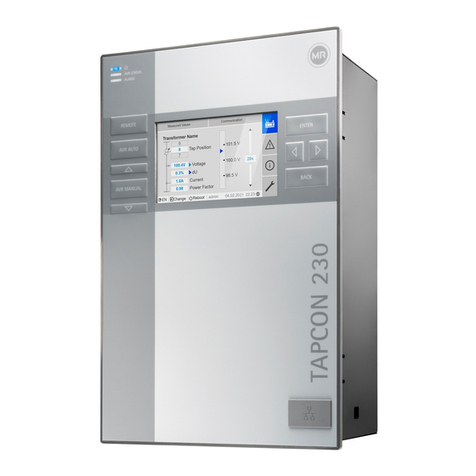
MR TAPCON 230 basic User manual

Voltage Regulator
TAPCON®230 basic
Operating Instructions
2117246/05 EN

© All rights reserved by Maschinenfabrik Reinhausen
Dissemination and reproduction of this document and use and disclosure of its content are strictly prohibited
unless expressly permitted.
Infringements will result in liability for compensation. All rights reserved in the event of the granting of patents,
utility models or designs.
The product may have been altered since this document was published.
We reserve the right to change the technical data, design and scope of supply.
Generally the information provided and agreements made when processing the individual quotations and orders
are binding.
The original operating instructions were written in German.

Table of contents
Maschinenfabrik Reinhausen GmbH 2019 32117246/05 EN TAPCON®230 basic
Table of contents
1 Introduction......................................................................................................................... 7
1.1 Manufacturer....................................................................................................................................... 7
1.2 Subject to change without notice........................................................................................................ 7
1.3 Completeness..................................................................................................................................... 7
1.4 Safekeeping........................................................................................................................................ 7
1.5 Notation conventions .......................................................................................................................... 7
1.5.1 Hazard communication system .............................................................................................................................8
1.5.2 Information system................................................................................................................................................9
1.5.3 Instruction system .................................................................................................................................................9
1.5.4 Typographic conventions ....................................................................................................................................10
2 Safety................................................................................................................................. 11
2.1 General safety information................................................................................................................ 11
2.2 Appropriate use ................................................................................................................................ 11
2.3 Inappropriate use.............................................................................................................................. 11
2.4 Personnel qualification...................................................................................................................... 11
2.5 Operator's duty of care ..................................................................................................................... 12
3 IT security.......................................................................................................................... 13
4 Product description.......................................................................................................... 14
4.1 Scope of delivery .............................................................................................................................. 14
4.2 Function description of the voltage regulation .................................................................................. 15
4.3 Performance features ....................................................................................................................... 16
4.4 Operating modes .............................................................................................................................. 17
4.5 Hardware .......................................................................................................................................... 17
4.5.1 Name plate..........................................................................................................................................................18
4.5.2 Operating controls...............................................................................................................................................19
4.5.3 Display elements.................................................................................................................................................20
4.5.4 Serial interface ....................................................................................................................................................22
4.5.5 MIO card module.................................................................................................................................................23
5 Packaging, transport and storage .................................................................................. 24
5.1 Packaging......................................................................................................................................... 24
5.1.1 Purpose...............................................................................................................................................................24
5.1.2 Suitability, structure and production ...................................................................................................................24

Table of contents
Maschinenfabrik Reinhausen GmbH 201942117246/05 ENTAPCON®230 basic
5.1.3 Markings..............................................................................................................................................................24
5.2 Transportation, receipt and handling of shipments........................................................................... 24
5.3 Storage of shipments........................................................................................................................ 26
6 Mounting ........................................................................................................................... 27
6.1 Preparation ....................................................................................................................................... 27
6.2 Mounting device................................................................................................................................ 27
6.2.1 Flush panel mounting..........................................................................................................................................29
6.2.2 Wall mounting with mounting brackets................................................................................................................30
6.2.3 Cap rail mounting ................................................................................................................................................31
6.2.4 Wall mounting .....................................................................................................................................................32
6.2.5 Removing the door..............................................................................................................................................33
6.3 Connecting device ............................................................................................................................ 34
6.3.1 Cable recommendation .......................................................................................................................................35
6.3.2 Information about laying fiber-optic cable ...........................................................................................................35
6.3.3 Electromagnetic compatibility..............................................................................................................................36
6.3.4 Connecting cables to the system periphery ........................................................................................................39
6.3.5 Supplying the voltage regulator using auxiliary voltage ......................................................................................40
6.3.6 Wiring device.......................................................................................................................................................40
6.3.7 Checking functional reliability..............................................................................................................................41
7 Commissioning................................................................................................................. 42
7.1 Setting the display contrast............................................................................................................... 42
7.2 Setting parameters ........................................................................................................................... 42
7.2.1 Setting the language ...........................................................................................................................................43
7.2.2 Setting further parameters ..................................................................................................................................43
7.3 Function tests ................................................................................................................................... 44
7.3.1 Checking control functions ..................................................................................................................................44
7.3.2 Checking additional functions .............................................................................................................................45
8 Operation........................................................................................................................... 49
8.1 Key lock ............................................................................................................................................ 49
8.2 General............................................................................................................................................. 49
8.2.1 Setting device ID .................................................................................................................................................49
8.2.2 Setting the baud rate...........................................................................................................................................50
8.2.3 Setting the switching pulse time..........................................................................................................................50
8.2.4 Setting operations counter ..................................................................................................................................52
8.2.5 Dimming display..................................................................................................................................................53

Table of contents
Maschinenfabrik Reinhausen GmbH 2019 52117246/05 EN TAPCON®230 basic
8.2.6 Activating/deactivating the automatic key lock....................................................................................................53
8.2.7 "Function monitoring" message for monitoring messages <30 V........................................................................54
8.2.8 Setting motor runtime monitoring ........................................................................................................................55
8.2.9 Activate manual mode/auto mode.......................................................................................................................57
8.2.10 Activating Local/Remote .....................................................................................................................................58
8.2.11 Setting the COM1 password ...............................................................................................................................58
8.2.12 Setting the password duration.............................................................................................................................59
8.3 NORMset.......................................................................................................................................... 59
8.4 Control parameters........................................................................................................................... 61
8.4.1 Setting desired value 1...3...................................................................................................................................63
8.4.2 Selecting a desired value ....................................................................................................................................64
8.4.3 Bandwidth ...........................................................................................................................................................65
8.4.4 Setting delay time T1 ..........................................................................................................................................66
8.4.5 Setting control response T1 ................................................................................................................................67
8.4.6 Setting delay time T2 ..........................................................................................................................................68
8.5 Limit values....................................................................................................................................... 69
8.5.1 Setting undervoltage monitoring U<....................................................................................................................69
8.5.2 Setting overvoltage monitoring U>......................................................................................................................72
8.5.3 Setting overcurrent monitoring I>........................................................................................................................74
8.5.4 Set undercurrent monitoring I<............................................................................................................................75
8.5.5 Activate/deactivate active power monitoring .......................................................................................................76
8.6 Compensation................................................................................................................................... 76
8.6.1 Line drop compensation......................................................................................................................................76
8.6.2 Z compensation...................................................................................................................................................79
8.7 Transformer data .............................................................................................................................. 81
8.7.1 Setting the primary transformer voltage ..............................................................................................................82
8.7.2 Setting the secondary transformer voltage .........................................................................................................82
8.7.3 Setting primary transformer current ....................................................................................................................83
8.7.4 Setting the current transformer connection .........................................................................................................84
8.7.5 Setting the phase difference for the current transformer/voltage transformer.....................................................84
8.8 Configurable inputs and outputs....................................................................................................... 88
8.8.1 Linking inputs with functions ...............................................................................................................................88
8.8.2 Linking outputs with functions .............................................................................................................................90
8.9 LED selection.................................................................................................................................... 91
8.10 Information about device .................................................................................................................. 93
8.10.1 Displaying info screen .........................................................................................................................................93

Table of contents
Maschinenfabrik Reinhausen GmbH 201962117246/05 ENTAPCON®230 basic
8.10.2 Displaying measured values ...............................................................................................................................93
8.10.3 Display calculated values....................................................................................................................................94
8.10.4 Carrying out LED test..........................................................................................................................................95
8.10.5 Displaying status of the MIO card .......................................................................................................................95
8.10.6 Resetting parameters..........................................................................................................................................96
8.10.7 Displaying memory overview ..............................................................................................................................97
8.10.8 Displaying event overview...................................................................................................................................97
9 Fault elimination ............................................................................................................... 98
9.1 No regulation in AUTO mode............................................................................................................ 98
9.2 Unexplained tap change................................................................................................................... 98
9.3 Man-machine interface ..................................................................................................................... 99
9.4 Incorrect measured values ............................................................................................................... 99
9.5 Customized GPIs/GPOs................................................................................................................. 100
9.6 General faults ................................................................................................................................. 100
9.7 Other faults ..................................................................................................................................... 101
10 Messages ........................................................................................................................ 102
11 Disposal........................................................................................................................... 104
12 Overview of parameters................................................................................................. 105
13 Technical data................................................................................................................. 108
13.1 Display elements ............................................................................................................................ 108
13.2 Electrical data ................................................................................................................................. 108
13.3 Dimensions and weight................................................................................................................... 108
13.4 Ambient conditions ......................................................................................................................... 110
13.5 Electrical safety............................................................................................................................... 110
13.6 Electromagnetic compatibility ......................................................................................................... 110
13.7 Environmental durability tests......................................................................................................... 111
13.8 Mechanical stability......................................................................................................................... 111
Glossary .......................................................................................................................... 112
List of key words ............................................................................................................ 113

1 Introduction
Maschinenfabrik Reinhausen GmbH 2019 72117246/05 EN TAPCON®230 basic
1 Introduction
This technical file contains detailed descriptions on the safe and proper in-
stallation, connection, commissioning and monitoring of the product.
It also includes safety instructions and general information about the prod-
uct.
This technical file is intended solely for specially trained and authorized per-
sonnel.
1.1 Manufacturer
The product is manufactured by:
Maschinenfabrik Reinhausen GmbH
Falkensteinstraße 8
93059 Regensburg, Germany
Tel.: (+49) 9 41/40 90-0
Fax: (+49) 9 41/40 90-7001
E-mail: [email protected]
Further information on the product and copies of this technical file are avail-
able from this address if required.
1.2 Subject to change without notice
The information contained in this technical file comprises the technical speci-
fications approved at the time of printing. Significant modifications will be in-
cluded in a new edition of the technical file.
The document number and version number of this technical file are shown in
the footer.
1.3 Completeness
This technical file is incomplete without the supporting documentation.
1.4 Safekeeping
Keep this technical file and all supporting documents ready at hand and ac-
cessible for future use at all times.
1.5 Notation conventions
This section contains an overview of the symbols and textual emphasis
used.

1 Introduction
Maschinenfabrik Reinhausen GmbH 201982117246/05 ENTAPCON®230 basic
1.5.1 Hazard communication system
Warnings in this technical file are displayed as follows.
1.5.1.1 Warning relating to section
Warnings relating to sections refer to entire chapters or sections, sub-sec-
tions or several paragraphs within this technical file. Warnings relating to
sections use the following format:
WARNING Type of danger!
Source of the danger and outcome.
► Action
► Action
1.5.1.2 Embedded warning information
Embedded warnings refer to a particular part within a section. These warn-
ings apply to smaller units of information than the warnings relating to sec-
tions. Embedded warnings use the following format:
DANGER! Instruction for avoiding a dangerous situation.
1.5.1.3 Signal words and pictograms
The following signal words are used:
Signal word Meaning
DANGER Indicates a hazardous situation which, if not avoided, will result in
death or serious injury.
WARNING Indicates a hazardous situation which, if not avoided, could result
in death or serious injury.
CAUTION Indicates a hazardous situation which, if not avoided, could result
in injury.
NOTICE Indicates measures to be taken to prevent damage to property.
Table1: Signal words in warning notices

1 Introduction
Maschinenfabrik Reinhausen GmbH 2019 92117246/05 EN TAPCON®230 basic
Pictograms warn of dangers:
Pictogram Meaning
Warning of a danger point
Warning of dangerous electrical voltage
Warning of combustible substances
Warning of danger of tipping
Table2: Pictograms used in warning notices
1.5.2 Information system
Information is designed to simplify and improve understanding of particular
procedures. In this technical file it is laid out as follows:
Important information.
1.5.3 Instruction system
This technical file contains single-step and multi-step instructions.
Single-step instructions
Instructions which consist of only a single process step are structured as fol-
lows:
Aim of action
üRequirements (optional).
► Step 1 of 1.
ðResult of step (optional).
ðResult of action (optional).

1 Introduction
Maschinenfabrik Reinhausen GmbH 201910 2117246/05 ENTAPCON®230 basic
Multi-step instructions
Instructions which consist of several process steps are structured as follows:
Aim of action
üRequirements (optional).
1. Step 1.
ðResult of step (optional).
2. Step 2.
ðResult of step (optional).
ðResult of action (optional).
1.5.4 Typographic conventions
The following typographic conventions are used in this technical file:
Typographic convention Purpose Example
UPPERCASE Operating controls, switches ON/OFF
[Brackets] PC keyboard [Ctrl] + [Alt]
Bold Software operating controls Press Continue button
…>…>… Menu paths Parameter > Control parameter
Italics System messages, error messages,
signals
Function monitoring alarm triggered
[► Number of pages]. Cross reference [► 41].
Table3: Typographic conventions
Other manuals for TAPCON 230 basic
2
Table of contents
Other MR Controllers manuals




Popular Controllers manuals by other brands

Digiplex
Digiplex DGP-848 Programming guide

YASKAWA
YASKAWA SGM series user manual

Sinope
Sinope Calypso RM3500ZB installation guide

Isimet
Isimet DLA Series Style 2 Installation, Operations, Start-up and Maintenance Instructions

LSIS
LSIS sv-ip5a user manual

Rockwell Automation
Rockwell Automation 1769-L31 installation instructions


