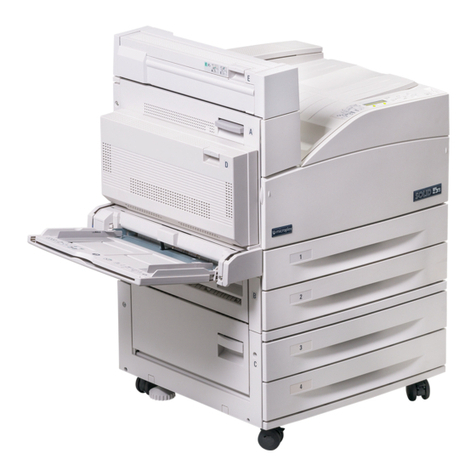
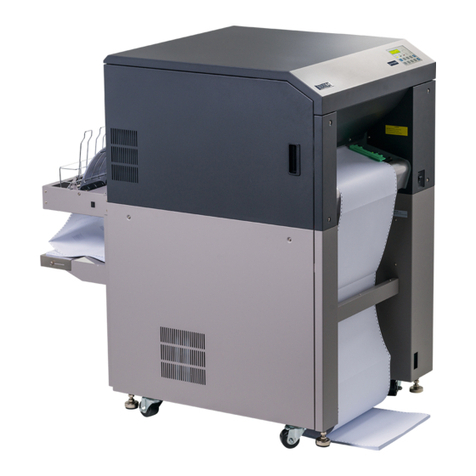
Microplex SOLID 60E-2 User manual

________________________________________________________________________________
________________________________________________________________________________
SOLID 60E-2
Operator’s Manual
Edition 2.1M
Mantenimiento Periféricos Informáticos SL C/Canteras, 15 28860 Paracuellos de Jarama Tel: 00 34 917481604 WEB: https://mpi.com.es

2
_______________________________________________________________________________________________
_______________________________________________________________________________________________
MICROPLEX Operator’s Manual SOLID 60E-2 Edition 2.1
Protected Rights
In MICROPLEX documentations (Operator’s Manuals, Service Manuals etc.) product names are
generally given without any mention of existing patents, registered designs or trademarks. The
absence of a corresponding remark does not give any implication that the name can be used at
will. All trademarks are recognised as protected.
Alterations
No liability is assumed for the accuracy of the contents of the documentations. MICROPLEX
reserves the right to alter technical or other specifications with no prior notice. Deviations in the
documentations from prevailing conditions do not represent an obligation to redeliver.
Product Properties
Due to continuous updating of the products deviations between the documentations and the
relating product can occur.
The manufacturer does not guarantee the existence or non-existence of properties with the
description of subject contents in the documentations. Nor does the manufacturer give any express
or tacit guarantee declarations whatsoever.
Mantenimiento Periféricos Informáticos SL C/Canteras, 15 28860 Paracuellos de Jarama Tel: 00 34 917481604 WEB: https://mpi.com.es

Table of Contents 3
_______________________________________________________________________________________________
_______________________________________________________________________________________________
MICROPLEX Operator’s Manual SOLID 60E-2 Edition 2.1
Table of Contents
Chapter Page
1. Introduction 7
1.1. General Description 7
1.2. Conventions 9
1.3. CE –Conformity 10
1.4. General Safety Instructions 11
2. Installation 13
2.1. Check List 13
2.2. Printer Installation 14
2.3. Printer Components 17
3. Handling of Consumables 21
3.1. Loading Paper 21
3.2. Replacing the Toner Cartridge 27
3.3. Replacing the Waste Toner Bottle 31
4. Operation and Menu Structure 35
4.1. Attaching the Printer to a Network/Computer 35
4.2. Printer Power on 35
4.3. Control Panel View 36
4.4. Function of the Control Panel Elements 37
4.5. Configuration via the Control Panel 40
4.6. Menu Structure 42
4.7. Syntax of Diagrams 46
Mantenimiento Periféricos Informáticos SL C/Canteras, 15 28860 Paracuellos de Jarama Tel: 00 34 917481604 WEB: https://mpi.com.es

4Table of Contents
_______________________________________________________________________________________________
_______________________________________________________________________________________________
MICROPLEX Operator’s Manual SOLID 60E-2 Edition 2.1
Chapter Page
5. Panel Functions 47
5.1. Printing the Status Sheet 47
5.2. Printing the Font List 49
5.3. Choosing Print Resolution 50
5.4. Hexdump Mode Activation 52
5.5. Normal Print Mode Activation (incl. FORM FEED) 53
5.6. Clearing the Input Buffer (Cancel Job) 54
5.7. Printing the Menu Page 55
5.8. Generating Test Prints (Sliding Pattern) 56
5.9. Page Length Adjustment 58
5.10. Selecting the Number of Printpages per Page Format (Two-Up Mode) 60
5.11. Paper Width Adjusting (Format Width) 62
5.12. Print Direction Selection 63
5.13. Data Interface Configuration 64
5.14. Emulation Selection 65
5.15. Display Language Selection 67
5.16. Transparent Code Adjustment 68
5.17. Selection of Memory Distribution (Input Buffer) 69
5.18. Setting to Factory Default 70
5.19. Font Selection 71
5.20. Text Orientation Selection 74
5.21. Symbol Code Selection 75
5.22. Configuration of Text Margins 76
5.23. Image Shifting to the X-Direction 77
5.24. Image Shifting to the Y-Direction 79
5.25. Lines per Inch Setting (Line Spacing) 81
5.26. Number of Characters per Inch Setting (Character Spacing) 82
5.27. Print Density Setting 83
5.28. Configuration of Network Parameters (IP Address, e.g.) 84
6. Printer Cleaning 87
6.1. Cleaning the Elements behind the Front Cover 88
6.2. Cleaning the Transport Unit 91
6.3. Cleaning the Paper Feed Unit 94
6.4. Cleaning the Paper Near End Sensor 95
6.5. Cleaning the Power Stacker 96
Mantenimiento Periféricos Informáticos SL C/Canteras, 15 28860 Paracuellos de Jarama Tel: 00 34 917481604 WEB: https://mpi.com.es

Table of Contents 5
_______________________________________________________________________________________________
_______________________________________________________________________________________________
MICROPLEX Operator’s Manual SOLID 60E-2 Edition 2.1
Chapter Page
7. Operator Maintenance 97
7.1. Charger Cleaning 97
7.1.1. Main Charger Cleaning 98
7.1.2. Pre-Charger Cleaning 101
7.1.3. Transfer-/Separator Charger Cleaning 103
7.2. Developer Unit Cleaning 105
7.3. Developer Unit Refurbish, Developer Powder Exchange 110
7.4. Main Charger Replacing 117
7.5. Pre-Charger Replacing 118
7.6. Transfer-/Separator Charger Replacing 119
7.7. Photoreceptor Drum Exchange 121
8. Troubleshooting 131
8.1. Reduced Print Quality 132
8.2. Error Messages 133
8.2.1. Error Codes 135
8.3. Paper Jam 137
8.3.1. Paper Jam inside the Tractor 137
8.3.2. Paper Jam inside the Print System 138
8.3.3. Paper Jam within the Power Stacker 143
8.4. Print Repetition after an Error 144
9. Measures for Transport and Shipping (Repacking) 145
10. Specifications 147
11. Index 151
Mantenimiento Periféricos Informáticos SL C/Canteras, 15 28860 Paracuellos de Jarama Tel: 00 34 917481604 WEB: https://mpi.com.es

6Table of Contents
_______________________________________________________________________________________________
_______________________________________________________________________________________________
MICROPLEX Operator’s Manual SOLID 60E-2 Edition 2.1
Mantenimiento Periféricos Informáticos SL C/Canteras, 15 28860 Paracuellos de Jarama Tel: 00 34 917481604 WEB: https://mpi.com.es
Introduction 7
_______________________________________________________________________________________________
_______________________________________________________________________________________________
MICROPLEX Operator’s Manual SOLID 60E-2 Edition 2.1
1. Introduction
1.1. General Description
The print system SOLID 60E-2 works on an electrophotographical
base employing an LED array as exposure unit. The maximum
resolution of 600 dots per inch is corresponding to about 24 pixels
per mm.
The print speed is up to 60 A4 pages (landscape) per minute.
Exclusively continuous media with sprocket holes can be used for the
tractor guiding. The maximum material width is 16 inches, the
printable width is 14.6 inches. A stacker is included in the standard
device.
The non-contact Xenon flash fusing system in combination with the
straight paper flow enables you to use the most different paper types
and label materials with a weight from 60 to 204 g/m². Even
demanding media like plastic, PVC etc. can be used.
Consequently there is a multitude of scopes for this print system. It is
suitable for high-speed printing with excellent print quality using
different types of materials.
The high functionality of the MICROPLEX controller specially qualifies
the SOLID 60E-2 also for form printing.
The printer is capable of using most of the page description
languages used in the industrial field and also the business standards
known in connection with laser printers can be used.
The capabilities featured include the MICROPLEX page description
language IDOL. Using this language, complex tasks such as the
creation of forms can be carried out by simple software commands
(see separate IDOL manual).
Data can be sent from almost any software platform, because printer
drivers are already available for this.
Mantenimiento Periféricos Informáticos SL C/Canteras, 15 28860 Paracuellos de Jarama Tel: 00 34 917481604 WEB: https://mpi.com.es

8Introduction
_______________________________________________________________________________________________
_______________________________________________________________________________________________
MICROPLEX Operator’s Manual SOLID 60E-2 Edition 2.1
The MICROPLEX printer controller has its integrated website, this allows
a printer configuration via Ethernet. See Networking Features of
MICROPLEX Printers for more information.
Consequently there is a multitude of scopes for this print system. It is
suitable for high-speed printing with excellent print quality using different
types of materials.
Printing Basics
The MICROPLEX printer controller enables the connection of this print
system to EDP systems whereby several interfaces, emulations and fonts
are available.
The digital information (e.g. a text file) is transferred from the computer
into the printer memory. The printer’s electronic component (the
controller) combined with the page description language, defines the
letters, numbers, graphics, etc. into bit patterns and posts them into the
controller’s frame store.
In this way, a “pattern“ of the future print page (generated by dots) is
created.
The electronically controlled LED (Light Emitting Diode Array) plots the
dot pattern in rows onto the light-sensitive surface of a rotating pre-
charged drum. Toner is caused to adhere to the electrostatic latent
image formed on the drum surface. This image consisting of toner
particles is electrically transferred onto the paper, that is guided past the
drum.
When transported further, the toner particles, which are affected by the
Xenon flash fusing, are combined resistantly with the paper. The drum is
discharged and cleaned.
Mantenimiento Periféricos Informáticos SL C/Canteras, 15 28860 Paracuellos de Jarama Tel: 00 34 917481604 WEB: https://mpi.com.es

Introduction 9
_______________________________________________________________________________________________
_______________________________________________________________________________________________
MICROPLEX Operator’s Manual SOLID 60E-2 Edition 2.1
1.2. Conventions
ONLINE
blue colored text
[ Menu Level 1 ]
The following conventions should help you to find information
and to understand instructions more easily:
This symbol refers to a possible source of danger. Disregarding
the information identified by this symbol could result in injuries,
a reduction of printer functionality, or damage to the printer or
other objects.
This symbol indicates important hints and suggestions on using
the printer. Disregarding the hints might cause problems with
the printer or within the environments.
This symbol shows a control panel key. Such symbols will be
used in this manual whenever keys have to be pressed in order
to activate certain functions.
Link to another chapter or a different document. By clicking the
blue colored text you'll enter the concerning chapter or
document.
This symbol represents messages shown in the display (panel).
This symbol is used to show a shining LED (light emitting diode).
The SOLID 60E-2 printer panel is provided with several LEDs.
The real shape of the LEDs differs from the shape of this symbol
(compare figure in section 4.3).
This symbol will be used in this manual to show a non-shining
LED.
Mantenimiento Periféricos Informáticos SL C/Canteras, 15 28860 Paracuellos de Jarama Tel: 00 34 917481604 WEB: https://mpi.com.es
10 Introduction
_______________________________________________________________________________________________
_______________________________________________________________________________________________
MICROPLEX Operator’s Manual SOLID 60E-2 Edition 2.1
1.3. CE –Conformity
Mantenimiento Periféricos Informáticos SL C/Canteras, 15 28860 Paracuellos de Jarama Tel: 00 34 917481604 WEB: https://mpi.com.es
This manual suits for next models
1
Table of contents
Other Microplex Printer manuals

Microplex
Microplex SOLID 166E User manual

Microplex
Microplex PP 803 User manual

Microplex
Microplex SOLID F44 User manual

Microplex
Microplex SOLID T11 DT User manual

Microplex
Microplex SOLID F40 User manual

Microplex
Microplex LOGIJET TC8 User manual

Microplex
Microplex PP 404 User manual

Microplex
Microplex SOLID 50 A3 - 3 User manual

Microplex
Microplex iF60C User manual

Microplex
Microplex LOGIJET TC8 User manual