Medion MD 88122 User manual

ID: #07177
m
y
h
a
n
s
e
c
o
n
t
r
o
l
.
c
o
m
C
E
R
T
I
F
I
E
D
User-friendly
Manual
User Manual
Manual
del usuario
English .....03
Español .....17
WIRELESS KEYBOARD
& MOUSE SET
JUEGO DE MOUSE Y TECLADO
INALÁMBRICOS

1 2 3
55 4
6 7 8
912
11
10
13 14
15 16

C
ontents
3
Contents
1Number lock indicator
2Caps lock indicator
3Low battery indicator
4Battery compartment cover (keyboard)
5Support feet
6Left button
7Scroll wheel/middle button
8Right button
9DPI button
10 Operation indicator
11 Battery compartment cover (mouse)
12 Optical sensor
13 On/off switch
14 USB receiver (stored inside the battery compartment)
15 AAA battery
16 AA battery

C
ontent
s
4
Contents
Contents................................................................................................................3
General information .............................................................................................5
Reading and storing the user manual.................................................................5
Proper use................................................................................................................5
Explanation of symbols ........................................................................................5
Safety ................................................................................................................... 6
Signal symbol/word definitions............................................................................6
General safety instructions....................................................................................6
Product description ............................................................................................. 9
First use................................................................................................................ 9
Checking the product and package contents.....................................................9
Basic cleaning........................................................................................................ 10
Setup...................................................................................................................10
Installing or replacing the batteries................................................................... 10
Installing the USB receiver................................................................................... 10
Operation.............................................................................................................11
Before using the product...................................................................................... 11
Using the keyboard................................................................................................ 11
Using the mouse .................................................................................................... 11
Faults and troubleshooting................................................................................ 12
Cleaning and maintenance ................................................................................ 13
Cleaning ..................................................................................................................13
Storage ....................................................................................................................13
Technical data.....................................................................................................14
FCC statement......................................................................................................14
Disposal............................................................................................................... 15
Disposing of the packaging................................................................................. 15
Disposing of the product...................................................................................... 15

General
i
nformat
i
on
5
General information
Reading and storing the user manual
This user manual accompanies this wireless keyboard & mouse set
(hereafter referred to as the “product”), and contains important
information on setup and handling.
Before using the product, read the user manual carefully. This
particularly applies to the safety instructions. Failure to do so may result in
personal injury or damage to the product.
Store the user manual for further use. Make sure to include this user manual
when passing the product on to third parties.
Proper use
The product is exclusively designed as input devices for a computer. It is only
intended for personal use and not suitable for commercial purposes.
Only use the product as described in this user manual. Any other use is
considered improper and may result in damage to property or persons.
The manufacturer or supplier cannot be held liable for damages or injury
incurred through improper or incorrect use.
Explanation of symbols
The following symbols are used in this user manual, on the product or on the
packaging.
This symbol provides you with useful additional information on
setup and handling.
This FCC mark certifies that the electromagnetic interference
from the device is under the limits approved by the Federal
Communications Commission in the US.
Safet
y
6
Safety
Signal symbol/word definitions
The following symbols and signal words are used in this user manual.
WARNING! This signal symbol/word designates a hazard
with moderate risk, which may result in
death or severe injury if not avoided.
NOTICE! This signal word warns of possible damage
to property.
General safety instructions
WARNING!
Risk of injury!
Improper handling of the product may increase the risk of injury.
− This product can be used by children aged from 8 years
and above and persons with reduced physical, sensory or
mental capabilities or lack of experience and knowledge
if they have been given supervision or instruction
concerning the use of the product in a safe way and
understand the hazards involved. Children shall not play
with the product. Cleaning and user maintenance shall
not be made by children without supervision.
− Keep the product away from children. Small parts are
included. They may cause suffocation if swallowed or
inhaled.
− To avoid injury to the eyes, do not look directly into the LED
light source of the optical sensor. Do not look at the LED
light source using optical instruments.
− Turn the product off when on board of an aircraft, in
a hospital, in an operating room or in the vicinity of
electronic medical equipment. The RF signals may
interfere with the functionality of sensitive devices.
S
a
f
et
y
7
− Keep the product at least 8 inches (20 cm) away from
pacemakers, as the RF signals could interfere with its
functionality.
− Do not use the product near flammable gases or in a
potentially explosive area (e.g. a paint shop).
− Make sure that children do not play with the plastic
wrapping. They may get caught in it when playing and
suffocate.
WARNING!
Health hazards!
Children and animals may swallow and choke on batteries.
− Store batteries in places that are out of reach of children
and animals.
− Dispose of any discharged batteries immediately
according to locally applicable regulations.
− Immediately consult a physician if a child or animal has
swallowed a battery.
WARNING!
Risk of leaking or explosion!
Improper handling of batteries may increase the risk of leaking
or explosion.
− Store batteries in a cool, dry place. Do not expose batteries
to excessive heat (e.g. direct sunlight) and do not throw
them into fire.
− Replace the batteries only with batteries of the same type.
− Make sure that the batteries are inserted the right way
around by checking if the polarity (+ and –) is correct.
− Always use high-quality batteries. Low quality batteries
could leak and cause damage.

Safet
y
8
− Before inserting the batteries, ensure that the contacts
in the battery compartments and on the batteries
themselves are clean and intact. Clean these if necessary.
− Remove the batteries from the product when they
are dead. Likewise, remove the batteries if you do not
intend to use the product for a prolonged period of time.
Otherwise the batteries may leak and cause damage.
− Remove the batteries before disposing of the product.
− Non-rechargeable batteries are not to be recharged.
− Different types of batteries or new and used batteries are
not to be mixed.
− The supply terminals are not to be short-circuited.
− If the batteries leak, do not remove battery fluid with
your bare hands. Do not allow battery fluid to come
into contact with skin, eyes or mucous membranes. Use
normal household washing gloves. If, however, your
skin has come into contact with battery fluid, wash the
corresponding area of your skin immediately and consult
a physician if necessary.
− Wipe the leaked battery fluid up with a damp cloth. You
can wash the cloth and reuse it or dispose of it with your
household trash.
NOTICE!
Risk of damage!
Improper handling of the product may result in damage to the
product.
− Stop using the product if its plastic parts exhibit cracks or
breaks or become deformed.
− Always place the product on a stable and level surface. It
can be damaged if dropped.
− Keep the product away from open fire and hot surfaces.

Product descr
i
pt
i
on
9
− Do not expose the product to splashing and/or dripping
water and do not place objects filled with liquids, such as
vases or drinks, on or next to the product.
− Never submerge the product in water or other liquids.
− Do not open the housing; instead, have a qualified
professional perform repairs.
Product description
The product is exclusively designed as input devices for a computer.
A
First use
Checking the product and package contents
NOTICE!
Risk of damage!
If you are not cautious when opening the packaging with a
sharp knife or other pointed object, you may quickly damage
the product.
− For this reason, be very careful when opening it.
1. Take the product out of the packaging.
2. Check to make sure that all parts are included (see chapter “Contents”).
3. Check whether the product or individual parts are damaged. If this is the
case, do not use the product. Contact the manufacturer via the service
address indicated on the warranty card.
S
etu
p
10
Basic cleaning
1. Remove the packaging material and all plastic wrappings.
2. Clean all parts of the product before first use as described in the chapter
“Cleaning and maintenance”.
Setup
Installing or replacing the batteries
Keyboard
1. Remove the battery compartment cover 4on the underside of the
keyboard.
2. Insert the provided AAA battery 15 into the battery compartment. Make
sure the polarity (+/–) is correct.
For battery replacement, remove the old battery first.
3. Close the battery compartment cover.
Mouse
1. Slide open the battery compartment cover 11 on the underside of the
mouse.
2. Insert the provided AA battery 16 into the battery compartment. Make
sure the polarity (+/–) is correct.
For battery replacement, remove the old battery first.
3. Close the battery compartment cover.
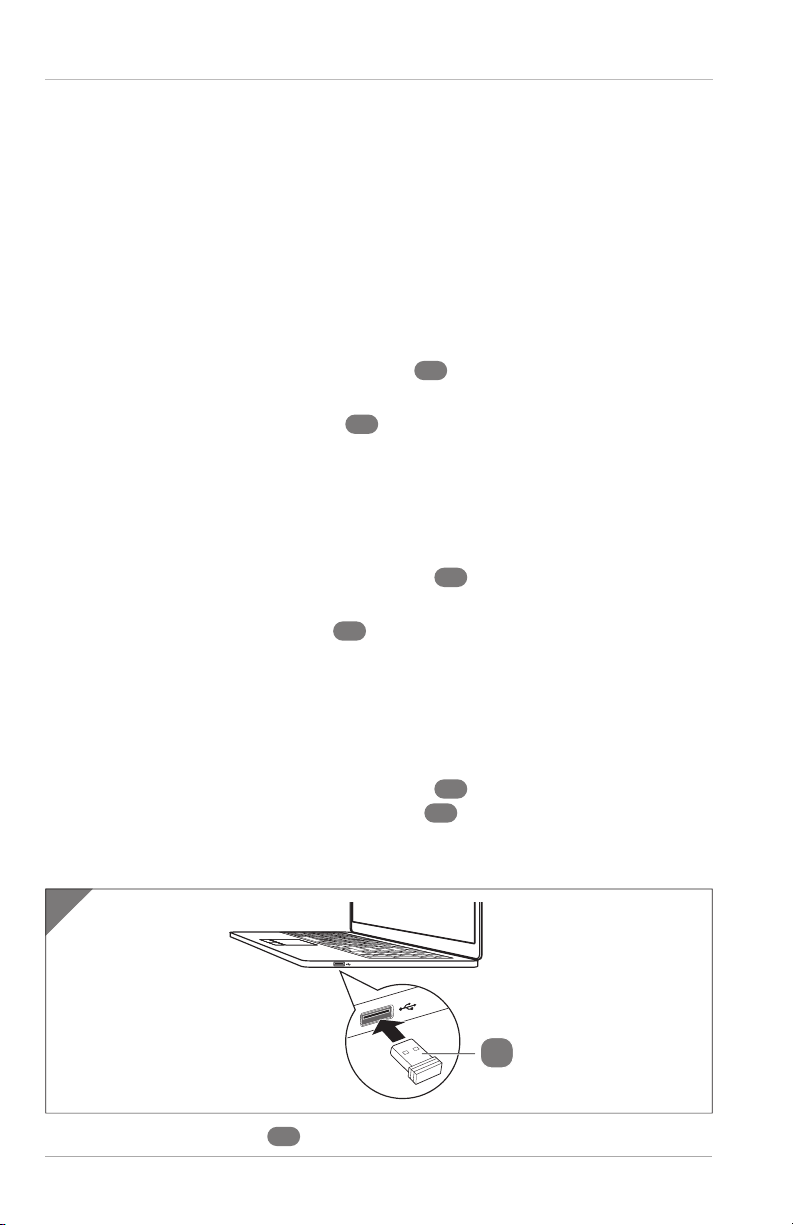
Installing the USB receiver
1. Slide open the battery compartment cover 11 on the underside of the
mouse and then remove the USB receiver 14 from the battery
compartment.
2. Close the battery compartment cover.
1
14
3. Insert the USB receiver 14 into the USB port of your computer (see Fig. 1).
Table of contents
Languages:
Other Medion Keyboard manuals