
M-Life ML0529.1 User manual

Mobile phone
ML0529.1
PL
ENOwner’s manual
Instrukcja obsługi


EN
3
1 General information
1.1 Prole
Please read this pamphlet carefully in order to make your phone in perfect condi-
tion.
Perfectly combining humanized design and ne art, this mobile phone provides
a streamlined outlook, comfortable hand-feeling, pleasant sounds and MP3 player
which bring convenience and fun to your work.
Our company may change this mobile phone without prior written notice and re-
serves the nal right to interpret the performance of this mobile phone.
Due to different software and network operators, display on your phone may be
different, refer to your phone for details.
1.2 Safety information
If your phone has lost or been stolen, notify the telecommunication ofce the SIM
card is disabled (network support is required). This can avoid economic loss caused
by unauthorized use.
Please take measures as following to avoid your phone being unauthorized use:
• Set PIN code of SIM card
• Set phone password

EN
4
1.3 Safety warning and attentions
• ROAD SAFETY COMES FIRST
Do not use a hand-held phone while driving. Use hands-free ttings when calls are
unavoidable while driving. In some countries, dialing or receiving calls while driving
is illegal!
• SWITCH OFF IN AIRCRAFT
Wireless devices can cause interference in aircraft. Using a mobile phone in ight is
illegal and risky. Please make sure that your mobile phone is powered off in ight.
• SWITCH OFF BEFORE ENTERING RISKY AREAS
Strictly observe the relevant laws, codes, and regulations on the use of mobile
phones in risky areas. Turn off your mobile phone before entering a place suscep-
tible to explosion, such as an oil station, oil tank, chemical plant or a place where a
blasting process is under way.
• OBSERVE ALL SPECIAL REGULATIONS
Follow any special regulations in force in any area such as hospitals and always
switch off your phone whenever it is forbidden to use it or, when it may cause inter-
ference or danger. Properly use your mobile phone near medical apparatuses, such

EN
5
as pacemakers, hearing aids and some other electronic medical devices, as it may
cause interference to such apparatuses.
• INTERFERENCE
The conversation quality of any mobile phone may be affected by radio interference.
An antenna is built inside the mobile phone and located below the microphone. Do
not touch the antenna area during a conversation, lest that the conversation quality
deteriorate.
• QUALIFIED SERVICE
Only qualied personnel may install or repair phone equipment. Installing or repair-
ing the mobile phone on your own may bring great danger and violates the warranty
rules.
• ACCESSORIES AND BATTERIES
Use only approved accessories and batteries.
• USE SENSIBLY
Use only in a normal and proper manner.

EN
6
• EMERGENCY CALLS
Ensure the phone is switched on and in service, enter the emergency number, e.g.
112, then press the Dial key. Give your location and state your situation briey. Do
not end the call until told to do so.
Note: Just like all other mobile phones, this mobile phone does not necessarily sup-
port all the features described in this manual due to network or radio transmission
problems. Some networks even do not support the emergency call service. There-
fore, do not rely solely on the mobile phone for critical communications such as rst
aid. Please consult the local network operator.
Precautions
This mobile phone is well designed with ne art. Please exercise special care when
using it. The following suggestions will help your mobile phone survive the warranty
period and extend its service life:
• Keep the mobile phone and all its ttings beyond children’s reach.
• Keep the mobile phone dry. Keep away from rain, moisture, liquid or other sub-
stances that may corrode electronic circuits.
• Do not use or store the mobile phone in dusty places, lest that active parts of the
mobile phone be damaged.

EN
7
• Do not store the mobile phone in a high-temperature place. High temperature will
shorten the life of electronic circuits and damage the battery and some plastic parts.
• Do not store the mobile phone in a chilly place. Otherwise, moistures will be formed
inside the mobile phone to damage electronic circuits when the mobile phone is
moved to a constant temperature place.
• Do not throw, knock or shock the mobile phone, as that will destroy the internal
circuits and high-precision components of the mobile phone.
EN
8
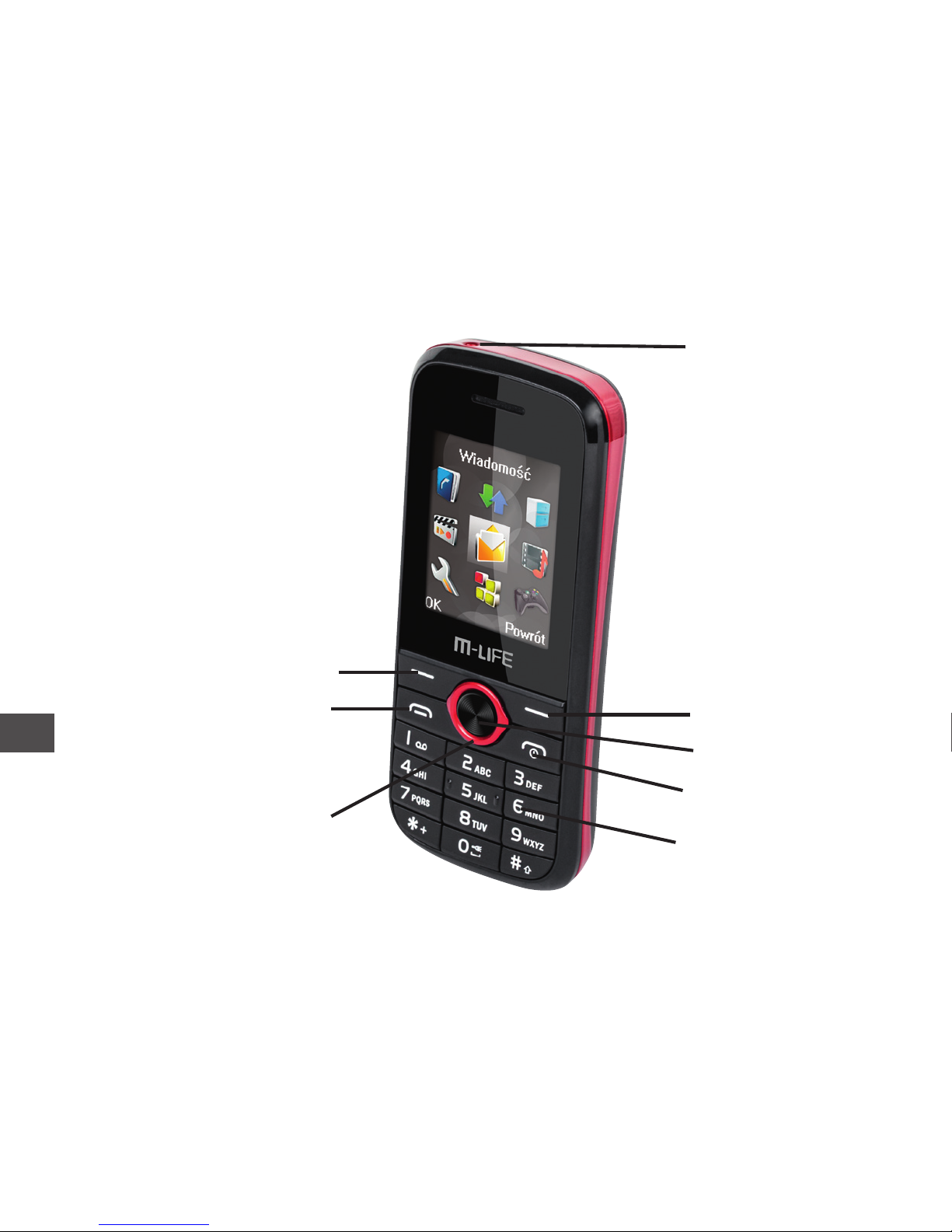
Flashlight
Right key
OK key
End key
Number keys
Left key
Dial key
Direction key
2 Your phone

EN
9
3 Getting started
3.1 Installing the SIM cards and the battery
An SIM card carries useful information, including your mobile phone number, PIN
(Personal Identication Number), PIN2, PUK (PIN Unlocking Key) , PUK2(PIN2
Unlocking Key), IMSI(International Mobile Subscriber Identity), network information,
contacts data, and short messages data.
Note:
After powering off your mobile phone, wait for a few seconds before removing or in-
serting an SIM card.
Exercise caution when operating an SIM card, as friction or bending will damage
the SIM card.
Properly keep the mobile phone and its ttings such as the SIM cards beyond chil-
dren’s reach.
Installation
• Hold the End key for a while to power off the mobile phone
• Push the back cover above the battery and remove it.
• Pull the left battery buckle outward and then lift the battery away.

EN
10
• Insert the SIM card into the SIM card slot lightly with the corner cutting of the card
aligning to the notch of the slot and the gold plate of the card facing download, till the
SIM card cannot be further pushed in.
• Aim the positive pole and negative pole of the battery at the battery connector of
the mobile phone, and press the left of the battery to install the battery into the bat-
tery tank.
Using code
The mobile phone and the SIM cards support sorts of passwords, in order to prevent
the phone and the SIM cards from being misused. When you are prompted to input
any of the codes mentioned below, just input the correct code and then press the OK
key. If you input a wrong code, press the Right soft key to clear it and then input the
correct code. To modify the PIN, PIN2, and/or phone lock code, choose Settings >
Security setup > Change password.
Phone lock code
The phone lock code may be set to prevent your mobile phone from being misused.
In general, this code is provided along with the mobile phone by the manufacturer.
The initial phone lock code is set to 0000 by the manufacturer. If the phone lock code
is set, you need to input the phone lock code when powering on the mobile phone.
Table of contents
Languages:
Other M-Life Cell Phone manuals


