
LG TONE ACTIVE PLUS HBS-A100 User manual

ESPAÑOLENGLISH
User’s Guide
Bluetooth®Wireless Stereo Headset
LG TONE ACTIVE
PLUS
Please read the Important Safety Information for the proper use of this product.
After reading, store this User’s Guide in an easily accessible place for all users.
NOTE: Please read all information carefully prior to using the HBS-A100 in order to enjoy
the best performance and prevent damage to the product.
WARNING: This product contains chemicals known to the State of California to cause cancer
and birth defects or other reproductive harm. Call (800) 243-0000 for more information.
Wash hands after handling.
HBS-A100 www.lg.com
Rev 1.0 US
All rights reserved.
© 2016 LG Electronics Inc.
™

ENGLISHENGLISH
Contents
Safety Cautions....................................................................................................................1
HD Speaker.............................................................................................................................1
Qualcomm® aptX™ / Qualcomm® aptX™ HD audio.........................................2
Product Components........................................................................................................2
Product Description ..........................................................................................................3
Replacing the Stabilizer Tips .........................................................................................4
HBS-A100 Pairing and Connecting...........................................................................5
Indicator Lamp ......................................................................................................................6
Mobile Calling Functions..................................................................................................7
Playing Music.........................................................................................................................8
Speaker Mode........................................................................................................................8
Vibration Alert Settings...................................................................................................8
Out of Range..........................................................................................................................9
Find Me .....................................................................................................................................9
LG Tone & Talk™ ................................................................................................................10
LG Health..............................................................................................................................11
Summary of HBS-A100 Functions.........................................................................11
Troubleshooting.................................................................................................................13
4QFDJŻDBUJPOTBOE'FBUVSFT........................................................................................13
%FDMBSBUJPOPG$POŻSNBUJPO.......................................................................................14
Additional Information...................................................................................................15
Limited Warranty..............................................................................................................17
Important Safety Information ...................................................................................17

1
ENGLISHENGLISH
The LG TONE ACTIVE PLUS (HBS-A100) is a lightweight wireless headset that uses Bluetooth
technology.
This product can be used as an audio accessory for devices supporting either the A2DP or
Hands-Free Bluetooth1SPŻMF
Safety Cautions
!CAUTION
!WARNING
NOTE
HD Speaker
If the communication network of the device you are connecting to supports HD Voice Calling, you
DBOFOKPZNBLJOHWPJDFDBMMTBOEMJTUFOJOHUPNVTJDJOIJHIEFŻOJUJPO
Do not disassemble, adjust, or repair the product arbitrarily.
%POPUQMBDFUIFQSPEVDUOFBSFYDFTTJWFIFBUPSżBNNBCMFNBUFSJBM
Do not arbitrarily replace the battery as it may explode.
The product may be damaged if an incompatible charger is used.
Make sure that any infant or child does not swallow a magnet or a small component of the product.
If you have a medical device implanted, contact your doctor before use.
Do not pull the earphone cable with excessive force.
Do not drop the product from a high place.
Make sure there is no water, alcohol, or benzene in contact with the product.
Do not store the product in a wet or dusty place.
Do not place any heavy objects on the product.
This product is not waterproof. Avoid humidity and water.
If the product is exposed to excessive sweat, clean the product.
Keep the earbud of the earphone always clean.
2
ENGLISH
Qualcomm® aptX™ / Qualcomm® aptX™ HD audio
LG HBS-A100 is powered by Qualcomm aptX / Qualcomm aptX HD audio. Qualcomm aptX /
Qualcomm aptX HD audio is Bluetooth wireless technology that provides clearer audio for listening
to music and watching movies.
Qualcomm aptX / Qualcomm aptX HD audio is automatically enabled when a mobile phone or audio
device supports it.
Qualcomm aptX HD audio supports 24-bit audio, so you can wirelessly enjoy studio-quality sound.
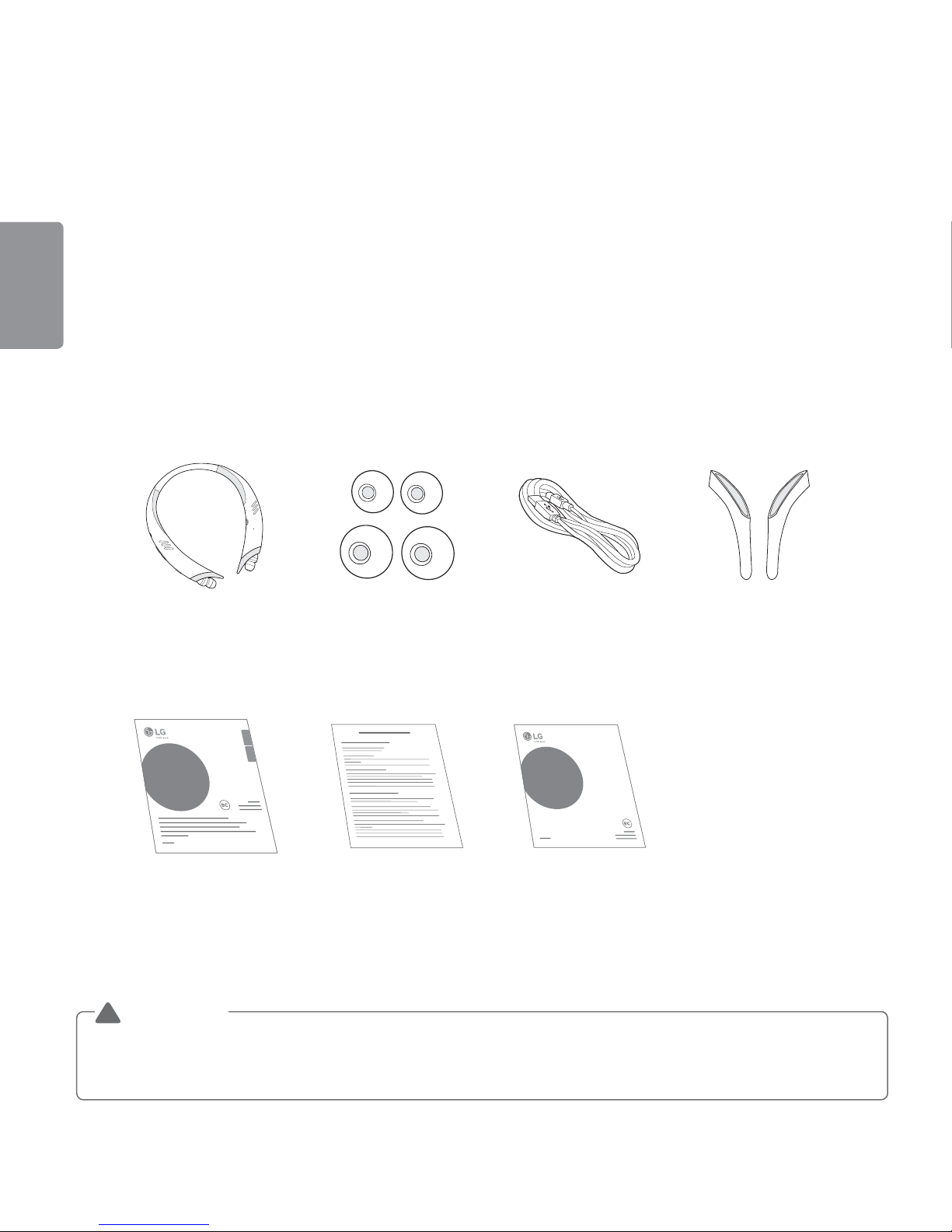
Product Components
TONE ACTIVE PLUS
HBS-A100
(Medium ear gels & Small
Stabilizer tips installed)
Extra Ear Gels
(small & large)
Micro USB Charging
Cable Extra Stabilizer Tips
(large)
LG TONE ACTIVE
PLUS
TM
User’s Guide
Bluetooth® Wireless Stereo Headset
ENGLISH ESPAÑOL
LG TONE ACTIVE
PLUS
TM
Quick Start Guide
Bluetooth® Wireless Stereo Headset
User’s Guide Warranty Card Quick Start Guide
NOTE: Actual product design may differ from images shown in manual.
Make sure authentic LG Electronics components are used. Using a non-authentic component
may damage the product and thus void the warranty.
!CAUTION

3
ENGLISH
Product Description
ONOFF
NOTE: When you control the volume (level 15), you will hear a control sound two times or as a
long sound from volume level 10 and higher.
Indicator lamp
Speaker/
Earphones
mode switch
Power switch
Volume
button
Previous/
Next button
Play/Pause/Stop
button
Earbud (right)
Earbud (left)
Stabilizer Tip (right)
Speaker (right)
Speaker (left)
Stabilizer Tip (left)
Charging port
Call button
Microphone

4
ENGLISH
Replacing the Stabilizer Tips
One extra set of stabilizer tips is included with the product.
:PVDBOSFQMBDFUIFDVSSFOUTUBCJMJ[FSUJQTXJUIBOPUIFSTJ[FJGUIFZEPOPUŻUCZ
Removing the stabilizer tips
Replacing the stabilizer tips
Battery Charging and Alerts
Open the Charging port cover and connect the charger to the Charging
port.
Indicator Lamp Red Purple Blue
Battery Status Charging 80% Completed
Press and hold the (ű) side of the Volume button for 2 seconds to check the battery level using
voice prompts and the Indicator lamp.
Battery Status 4VGŻDJFOU Normal *OTVGŻDJFOU
Indicator Lamp #MVFżBTIFTUISFFUJNFT 1VSQMFżBTIFTUISFFUJNFT 3FEżBTIFTUISFFUJNFT

5
ENGLISH
HBS-A100 Pairing and Connecting
If you start the process after putting in your earbuds, you can easily pair and
connect following the voice prompts.
*GZPVIFBSUIBUUIFCBUUFSZJTJOTVGŻDJFOUSFDIBSHFUIFCBUUFSZCFGPSF
proceeding with pairing.
If pairing is not completed within 3 minutes, the power automatically turns off.
When the power automatically turns off, slide the Power switch from the OFF
to the ON position to turn the power on.
Connecting Quickly
1 Slide the Power switch towards the ON position to turn on the power.
2 The blue Indicator lamp turns on and the HBS-A100 switches to Search mode.
3 From the mobile phone or device list, select LG HBSA100 to connect.
4 A voice message will indicate that the connection is completed.
5 Use the same process to pair the HBS-A100 with other devices.
Connecting Manually
1 Press and hold the Call button and slide the Power switch to the ON position to turn it on.
2 The blue Indicator lamp turns on and the HBS-A100 switches to Search mode.
3 Select LG HBSA100 from the device list to connect.
ON
OFF
ON OFF
ON
OFF
ON OFF
LG HBSA100
Phone
Search for devices
AVAILABLE DEVICES
Allow other Bluetooth devices to nd
my phone
MAKE PHONE VISIBLE

6
ENGLISH
Multiple Connections
The HBS-A100 can be connected to a mobile phone and a PC simultaneously.
NOTE: If simultaneously connected to two devices, the main functions work based on the
“Main Connected Device.”
1 Press and hold the Call button and slide the Power switch to the ON position to turn it on.
2 Perform Steps 2 to 4 in “Connecting Quickly.” This device becomes the “Main Connected
Device.”
3 Try to connect to HBS-A100 using a previously connected device. This device becomes the
“Sub Connected Device.”
Automatic Reconnection
If you turn on the product, it automatically searches for and connects to the devices (“Main
Connected Device” and “Sub Connected Device”) to which it was previously connected. (If the
QSPEVDUDBOOPUŻOEUIFEFWJDFUPXIJDIJUXBTDPOOFDUFEMBTUUJNFUIFQSPEVDUTXJUDIFTUP
Search mode.)
If the product does not automatically connect to the device you want, search for your product in
the device you want to connect to and connect it manually.
Indicator Lamp
HBS-A100 Status Description
Power On 5IFCMVF*OEJDBUPSMBNQżBTIFTGPVSUJNFT
Power Off 5IFCMVF*OEJDBUPSMBNQżBTIFTGPVSUJNFT
Search Mode The blue Indicator lamp is on.
Headset/Hands-free
1SPŻMF$POOFDUFE 5IFJOEJDBUPSMBNQXJMMżBTICMVFPODFFWFSZTFDPOET
Call Connected 5IFJOEJDBUPSMBNQXJMMżBTICMVFPODFFWFSZTFDPOET
LG Health Feature On 5IFJOOFSHSFFOJOEJDBUPSMBNQżBTIFTFWFSZTFDPOET

7
ENGLISH
Mobile Calling Functions
Functions Description
Receiving a Call/
Hanging Up
#SJFżZQSFTTUIFCall button.
To turn the vibration off, press the (ű) side of the Volume button.
Making a Call
If you make a call using a mobile phone, the call is automatically connected to
the HBS-A100.
'PSTPNFNPCJMFQIPOFTZPVTIPVMECSJFżZQSFTTUIFPlay/Pause/Stop button
two times to switch calls.
Redial Press and hold the Call button for more than 1 second to place a call to the last
number you called.
Voice Dial
#SJFżZQSFTTUIFCall button.
If the mobile phone does not support the Voice Dial function, you can use the
Redial function.
Switching Calls
#SJFżZQSFTTUIFPlay/Pause/Stop button two times during a call.
(Every time you press one of these buttons, the call switches to the mobile phone
or the HBS-A100.)
Receiving a Call
While on the
Phone
You can receive another call while on the phone by pressing and holding the
Call button for 1 second.
The existing call switches to a call waiting status. Press and hold the Call button
again for 1 second to switch back to the previous call.
#SJFżZQSFTTUIFCall button to hang up in the middle of a call or to hang up
both calls.
(It works differently depending on the mobile phone settings.)
Rejecting a Call Press and hold the Call button for 2 seconds.
Enabling/
Disabling Mute During a call, simultaneously press and hold the (+) side of the Volume button and
the side of the Previous/Next button for 1 second.
CAUTION: Do not disable/enable the Mute function while driving, as you need to use both hands.
NOTE: The Voice Dial and Redial functions work on the Main Connected Device or on the device
on which you made the last call. (The Voice Dial and Redial functions may work differently
depending on the mobile phone being used.)

8
ENGLISH
Playing Music
Functions Description
Play #SJFżZQSFTTUIFPlay/Pause/Stop button.
Music will play from the activated player of the connected device.
Pause #SJFżZQSFTTUIFPlay/Pause/Stop button.
Stop Press and hold the Play/Pause/Stop button for 1 second.
Play Previous/Next Song Press the or side of the Previous/Next button.
Fast Rewind/Forward Press and hold the or side of the Previous/Next button until you
reach the desired part.
Change Equalizer Mode #SJFżZQSFTTUIFPlay/Pause/Stop button twice. Changes modes with a
beeping sound in the following order:
Bass Boost (default) > Normal > Treble Boost.
Switching Music Players
If you stop in the middle of playback and then play music on either of the two connected devices,
the HBS-A100’s music playback and control changes to that device.
Speaker Mode
Slide the Speaker mode switch to the ON position to play audio
through the speakers on the HBS-A100.
(Only the right speaker will work during a voice call.)
Vibration Alert Settings
Press and hold the (+) side of the Volume button for 2 seconds when the HBS-A100 is not in use
(for playing music, etc.).
If you turn off the vibration alerts, it will not vibrate even when a call is being received or you are
out of communication range.
NOTE: The vibration alert is automatically set to the ON position when you turn on the power.
Table of contents
Languages:
Other LG Headset manuals

LG
LG TONE FREE TONE-DT60Q User manual

LG
LG TONE Studio HBS-W120 User manual

LG
LG HBM-210 User manual

LG
LG HBM-260 User manual

LG
LG TONE Active HBS-A80 User manual

LG
LG TONE FREE User manual

LG
LG BLUETOOTH HBS-250 User manual

LG
LG TONE-FP9 User manual

LG
LG HBM-560 User manual

LG
LG TONE Free TONE-UFP9 User manual

LG
LG TONE ACTIVE+ User manual

LG
LG TONE-FP5 User manual

LG
LG TONE PRO HBS-781 User manual

LG
LG TONE PRO HBS-770 User manual

LG
LG Tone Free HBS-FL7 User manual

LG
LG TONE Free T60Q User manual

LG
LG TONE PLATINUM SE HBS-1120 User manual

LG
LG TONE Free HBS-FN6 User manual

LG
LG TONE Free HBS-FN5W User manual

LG
LG TONE Free HBS-FN6 User manual








