
LG Tone Free HBS-FL7 User manual

ENGLISH ESPAÑOL
Please read the Important Safety Information for the proper
use of this product. After reading, store this User Manual in
an easily accessible place for all users.
NOTE:
Please read all information carefully prior to using the
headset in order to enjoy the best
performance and prevent
damage to the product.
Rev 1.0 US
HBS-FL7
www.lg.com
Copyright © 2019 LG Electronics Inc. All rights reserved.
USER MANUAL
Bluetooth®Wireless Stereo Headset

Contents
Safety Cautions...............................................................................................................................1
Precautions When Using the Product.................................................................................2
HD Speaker........................................................................................................................................2
Product Components...................................................................................................................3
Product Description ......................................................................................................................4
Pairing and Connecting ...............................................................................................................5
Indicator Lamp .................................................................................................................................6
Mobile Calling Functions.............................................................................................................6
Playing Music....................................................................................................................................7
The Google Assistant...................................................................................................................7
Battery Status...............................................................................................................................11
UVnano Description....................................................................................................................11
Out of Range..................................................................................................................................11
LG Tone & Talk™...........................................................................................................................12
Troubleshooting............................................................................................................................12
Specications and Features...................................................................................................13
Declaration of Conrmation..................................................................................................14
Additional Information..............................................................................................................15
Limited Warranty.........................................................................................................................17
Important Safety Information ..............................................................................................18
Open Source Software Notice..............................................................................................18
ENGLISH

1
ENGLISH
LG TONE FREE(HBS-FL7) is wireless headset headset that uses Bluetooth technology.
This product can be used as an audio accessory for devices supporting either the A2DP or Hands-Free
Bluetooth Prole.
Safety Cautions
!CAUTION
Do not disassemble, adjust, or repair the product arbitrarily.
Do not place the product near excessive heat or ammable material.
The product may be damaged if an incompatible charger is used.
Make sure that an infant or child does not swallow a magnet or a small component of the
product.
Make sure that foreign objects do not enter the charger’s connectors (charging port and power
plug). Failure to do so may result in re or electric shock.
If you have a medical device implanted, contact your doctor before using this device.
This product has a built-in battery, and the battery cannot be removed or replaced arbitrarily.
For your safety, do not remove the battery incorporated in the product.
If you arbitrarily replace the battery or don’t replace it correctly, it may explode.
The lithium-ion polymer battery is a hazardous component that can cause injury.
Battery replacement by an unqualied professional can cause damage to your device.
Do not discard the battery arbitrarily. Follow the local procedure for discarding batteries.
In order to prevent unnecessary energy consumption, disconnect the device when fully charged.
Always use an easily accessible power outlet for charging your device.
!WARNING
Do not drop the product from a high place.
Make sure there is no water, alcohol, or benzene in contact with the product.
Do not store the product in a wet or dusty place.
Do not place heavy objects on the product.
This product is waterproof to the IPX4 level (daily life waterproof).
(The IPX4 waterproof rating applies to the earbud product only.)
Do not put the product under the water or use it in a humid location such as a bathroom.

2
ENGLISH
Precautions When Using the Product
Refer to the following to use the product for its normal life span.
If the product is exposed to excessive sweat, clean the product.
Keep the earbuds clean.
HD Speaker
If the communication network of the device you are connecting to supports HD Voice Calling,
you can enjoy making voice calls and listening to music in high denition.

3
ENGLISH
Product Components
LG TONE Free™
Earbuds (small eargels installed)
UV Charging Case
Extra Eargels
(medium & large)
USB Type C™ Charging Cable
User Manual Warranty Card
NOTE: Actual product design may differ from images shown in manual.
Make sure authentic LG Electronics components are used. Using a non-authentic component
may damage the product and thus void the warranty.
Use the USB Type C™ cable provided with the product.
!CAUTION
The complete manual is available for download from the LG Electronics website.
www.lg.com > Support > Manuals & Documents > Browse by Product > Mobile Devices >
LG Bluetooth Devices
!NOTE
4
ENGLISH
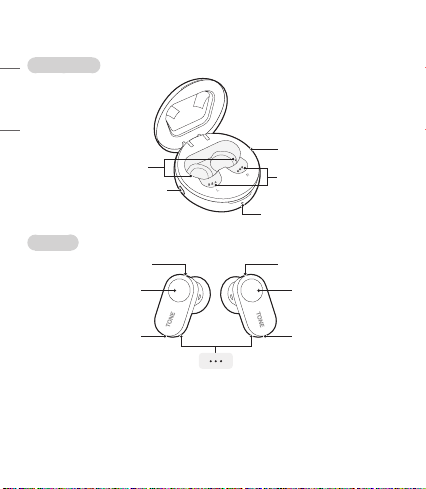
Product Description
Charging Case
Earbuds
*The appearance and specications of the actual product may differ depending on the model.
NOTE: The left earbud is connected to the main (right) earbud and is used as a sub earbud.
Sub earbud (left) Main earbud (right)
Microphone Microphone
MicrophoneMicrophone
UV-C LED
Pairing / Battery check button
Charging port
Charging terminals
TouchpadTouchpad
Charging indicator lamp
Charging terminals

5
ENGLISH
Pairing and Connecting
Initial Pairing
Open the charging case lid.
With the earbuds mounted on the charging case, plug a
type C™ cable into the charging port of the charging case
and connect it to a power source.
The earbuds enter pairing mode (The blue LED on the
charging case blinks).
* You need to plug a cable into the charging port and
connect it to a power source only for the initial pairing.
Fast Pair
-(
-(
#MVFUPPUI 0/
1 Activate Bluetooth on your phone or device.
2 While the earbud is mounted on the charging case, open the charging case lid and press the
pairing button until the blue indicator lamp blinks.
-(
-(
-()#4'-
-(
-(
-()#4'-
#MVFUPPUI
3 When the Fast Pair connection pop-up appears on the top area of the mobile phone screen,
tap it to connect.
4 If the pop-up does not appear, select [HBS-FL7] from the Bluetooth menu on the mobile phone
and connect it (for users of iOS or Android™ 5.0 or lower versions).
NOTE: If connecting for the rst time, follow the initial pairing instructions. It only supports
Android 5.0 or higher. Before connecting the headset, congure the mobile device or the device
to be connected to use the location information.
~39 inch, ~1m

6
ENGLISH
Automatic Reconnection
The earbuds are connected automatically when you open the cover of the charging case. If you close
the cover of the charging case with both earbuds mounted on the charging case, the earbuds are
disconnected.
Indicator Lamp
Status Description
Search Mode The blue status Indicator Lamp ashes.
When there is a problem while charging The red and blue status Indicator Lamps ash alternately.
Mobile Calling Functions
Function Status Description
Answering Calls Ringing Touch the left or right earbud once.
Making Calls Idle If you make a call using a mobile phone, the call is automatically
connected to the headset.
Voice Dial Idle/
Music on
Touch the left or right earbud twice.
Note: To use this function, you need to deactivate the Google
Assistant settings.
Receiving Calls
while on the
Phone
Talking
If you touch the left or right earbud once, the current call will go
on hold, and you will be able to answer an incoming call.
If the previous call is on hold, you can nish the current call on
the mobile phone.
(It works differently depending on the mobile phone settings.)
Rejecting Calls Ringing Touch and hold the left or right earbud.
NOTE: The Voice Dial function works on the Main Connected Device or on the device on which you
made the last call. (The Voice Dial function may work differently depending on the mobile
phone being used.)

7
ENGLISH
Playing Music
-(
Function Status Description
Play Idle Touch the left or right earbud once.
Pause Music on Touch the left or right earbud once.
Change Equalizer
Mode Music on
Touch the left or right earbud three times quickly, and the sound
mode changes in the following order:
Normal (default setting) > Bass Boost > Flat Mode > Treble Boost
The Google Assistant
Using the touchpad of the earbud, you can do what you want quickly without looking at the screen of
your mobile or connected device.
The Google Assistant can perform various commands as follows:
Play some jazz
Text Mom, “see you in 5”
Tell me about my day
Set a 15 minute timer
Take a sele
Will I need an umbrella today?

8
ENGLISH
Installation and Usage Requirements of the Google Assistant
To use this feature, your device must be connected to the Internet and logged into your Google account.
The Google Assistant feature may not be supported for some countries and languages. Make sure you
are in a country where the Google Assistant is available.
The language that is set to your mobile device is set and used as the default language of the Google
Assistant.
NOTE: To learn more about the Google Assistant, visit: g.co/headphones/help
If you change the language that is used to speak to the Google Assistant, the language of your
mobile phone is also changed accordingly.
Android iOS
• Android 5.0 or higher
• On tablets, you need Android 6.0-7.0
• Google app 6.13 or higher
• Google Play services
(The latest version of the Google app)
• A Google account
• 1.4 GB of memory and 720p screen resolution
• iPhone with iOS 10 or higher
• Google Assistant app
• A Google account
• The latest version of the Google app
Set up the Google Assistant
1 Connect the device you want to connect to the headset.
2 Congure the Google Assistant using the mobile device or the device that is connected to.
- In the case of an Android device, the Google Assistant notication pop-up appears after the
connection is established for conguring the Google Assistant of the mobile device. Select the
pop-up and congure the Google Assistant according to the guideline on the screen.
- In the case of an iOS device, download and execute the latest version of the Google Assistant,
and then congure the headset according to the guideline on the screen.
Table of contents
Languages:
Other LG Headset manuals








