
LG LS-K2464HL User manual

Room Air Conditioner
OWNER'S MANUAL
• Please read carefully and thoroughly this
manual before operating this unit.
• Contact the authorized SVC man for repair or
maintenance of this unit.
• Contact the installer for installation of this unit.
• The appliance is not intended for use by young
children or infirm persons without supervision.
• Young children should be supervised to ensure
that they do not play with the appliance.
Prior to installation, this air-conditioning
unit must be submitted for approval by the
utility service which provides electricity
(EN 61000-3 Norm).

2
Safety PrecautionsOperating InstructionsCare and MaintenanceTroubleshooting Tips
WARNING
WARNING
WARNING
WARNING
CAUTION
CAUTION
WARNING
WARNING
Safety precautions
Safety Precautions
Warning ................................2
Caution .................................3
Operating Instructions
Preparation before operation
..4
Remote Control Features .....5
Operation Mode Selection ......7
Additional features..............13
Care and Maintenance
Care and Maintenance .......16
Operation Tips....................18
Troubleshooting tips
Before You
Call For Service...............19
To prevent injury to the user or other people and property damage, the
following instructions must be followed.
■Incorrect operation due to ignoring of instruction will cause harm or
damage, the seriousness is classified by the following indications.
This symbol indicates the possibility of death or serious injury.
This symbol indicates the possibility of injury or damage to
properties only.
Plug in the power plug
properly.
• Otherwise, it will cause
electrical shock or fire due to
heat generation.
Do not operate or stop the
unit by inserting or pulling
out the power plug.
• It will cause electrical shock
or fire due to heat
generation.
Do not damage or use an
unspecified power cord.
• It will cause electrical shock or fire.
• If the supply cord is damaged, it
must be replaced by the
manufacturer or its service agent
or a similarly qualified person in
order to avoid a hazard.
Do not modify power cord
length or share the outlet
with other appliances.
• It will cause electrical shock
or fire due to heat
generation.
Do not operate with wet
hand.
• It may cause electrical
shock.
Do not insert anything into the
air inlet/air outlet.
• Since the fan rotates at high
speed, this may cause an
injury or damage the unit.
Do not expose the skin
directly to cool air for long
periods of time.
• This could damage your
health.
When an abnormality (smell of burning, etc)
occurs, stop the air conditioner, and disconnect
the power plug or turn off the breaker.
• If the unit continues to be operated
in an abnormal condition, it may
cause a fire, damage, etc. In this
case, consult your dealer.
Repair or relocation should
not be done by the
customer.
• If this is done incorrectly, it may
cause a fire, electric shock, injury
by dropping of the unit, water
leakage, etc. Consult your dealer.
■
Do not install, remove and reinstall the unit by yourself.
• Improper installation will cause water leakage, electrical
shock, or fire. Please consult authorized dealer or specialist
for the installation work. Please note fault caused by
improper installation is not covered by warranty.
• Unit must be installed in an easily accessible area. Any
additional cost required to hire a special equipment to
service the unit will be the responsibility of the customer.
Installation precautions
3
Safety Precautions Operating Instructions Care and Maintenance Troubleshooting Tips
CAUTION
CAUTION
When the air filter is to be
removed, do not touch the
metal parts of the indoor unit.
•It may cause an injury.
•Should be disconnected from
supply
Do not clean the air
conditioner with water.
•Water may enter the unit and
degrade the insulation. It may
cause an electric shock.
Ventilate well when used
together with a stove, etc.
•An oxygen shortage may
occur.
•Contact the authorized Service technician for repair or maintenance of this unit.
•Contact the installer for installation of this unit.
•The air conditioner is not intended for use by young children or infirm persons
without supervision.
•Young children should be supervised to ensure that they do not play with the air
conditioner.
CAUTION
When the unit is to be
cleaned, switch off, and turn
off the circuit breaker.
•Since the fan rotates at high
speed during operation, it
may cause an injury.
Do not put a pet or house
plant where it will be
exposed to direct air flow.
•This could injure the pet or
plant.
Do not leave on installation
stand which is damaged.
•The unit may drop or fall
down and cause an injury.
Do not apply an insecticide
or flammable spray.
•It may cause a fire or
deformation of the cabinet.
Do not put a stove, etc.
where is exposed to direct
air flow.
•
It may affect combustion.
Do not step on the
indoor/outdoor unit and do
not put anything on it.
•It may cause an injury
through dropping or falling
down.
Do not insert hands through
vanes when the air conditioner
is operationg
•It will cause an injury by the
rotating blower.
When the unit is not going to
be used for a long time, turn
off the circuit breaker.
•If not, dirt may collect and
cause a fire.
Do not step onto an unstable
bench when cleaning and/or
maintaining the unit.
•It may cause an injury, etc.
by falling down.
Do not use for special
purposes.
•Do not use this air conditioner
to preserve precision devices,
food, animal, plants, and art
objects.
It may cause deterioration of
quality, etc.
Do not operate for a long time in
high humidity, e.g. leaving a
door or window open.
•In the cooling mode, if it is
operated in a room with high
humidity (80%RH or more) for
a long time, water condensed
in the air conditioner may drop
and may wet and spoil
furniture, etc.
4
Safety PrecautionsOperating InstructionsCare and MaintenanceTroubleshooting Tips
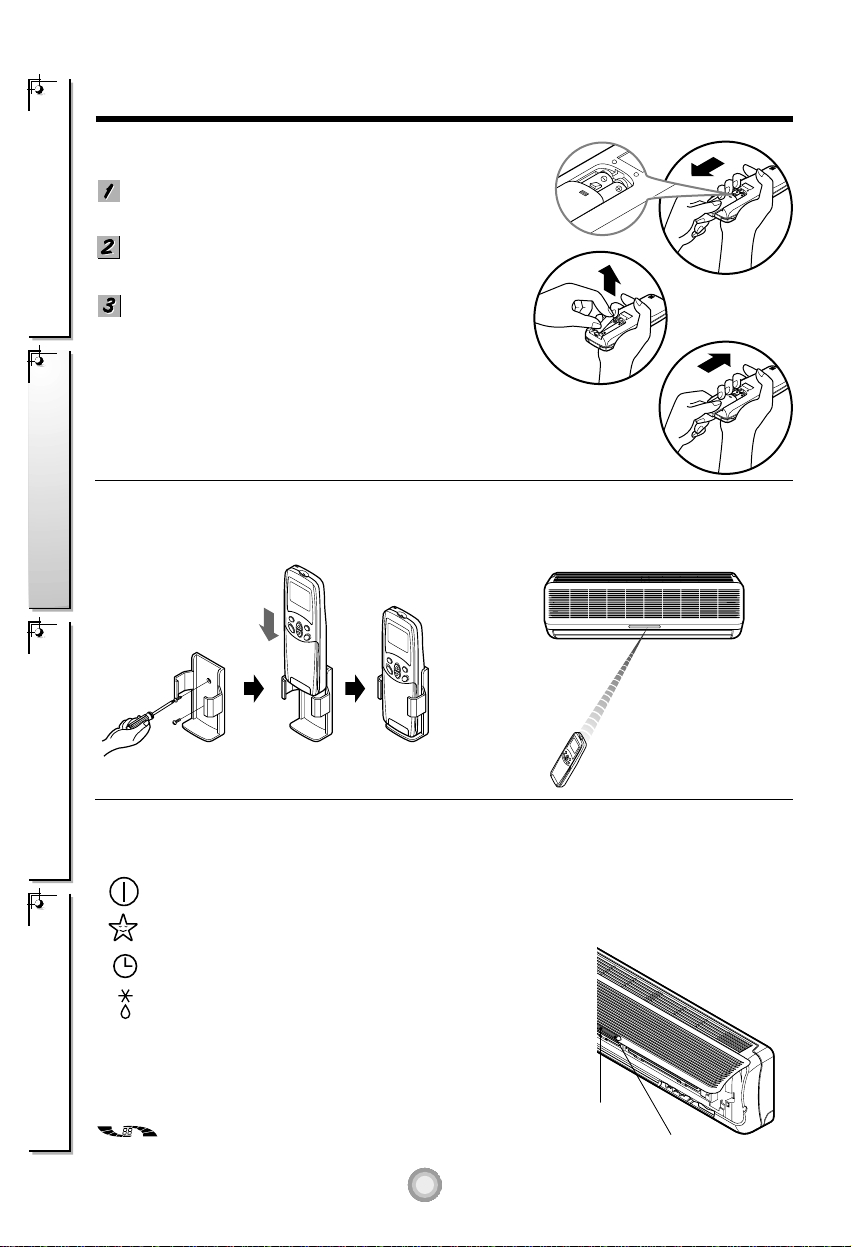
Signal
receptor
Operation indication lamps
Preparation before operation
Storage and Tips For Using the Remote Control
•The remote control may be stored mounted on a
wall. •To operate the room air conditioner, aim the
remote control at the signal receptor.
How to Insert the Batteries
Remove the battery cover by pulling it according to the
arrow direction.
Insert new batteries making sure that the (+) and (-) of
battery are installed correctly.
Reattach the cover by sliding it back into position.
NOTES:
• Use 2 AAA(1.5volt) batteries. Do not use rechargeable
batteries.
Signal Receptor
Receives the signals from the remote control.(Signal receiving sound: two short beeps or one long beep.)
Operation Indication Lamps
On/Off : Lights up during the system operation.
Sleep Mode : Lights up during Sleep Mode Auto operation.
Timer : Lights up during Timer operation.
Defrost Mode : Lights up during Defrost Mode or Hot
Start operation (Heat pump model only)
: Lights up during outdoor unit operation.
(Cooling model only)
: Indicates the setting temperature and the
operating frequency of compressor.(5 steps)
OUT
DOOR
OUTDOOR UNIT
OPERATION
Power Display
(Inverter only)

6
1
3
5
4
2
Cooling Operation
Auto Operation
Healthy Dehumidification Operation
Heating Operation
(Heat Pump Model)
Cooling Operation
Auto Operation
Healthy Dehumidification Operation
(Cooling Model)
5
Safety Precautions Operating Instructions Care and Maintenance Troubleshooting Tips
Flip-up door
(closed)
About the remote control on the system
The remote control transmits the signals to the system.
Features of the Remote Control- Door Closed
START/STOP BUTTON
Operation starts when this button is
pressed and stops when the button is
pressed again.
OPERATION MODE
SELECTION BUTTON
Used to select the operation mode.
ROOM TEMPERATURE
SETTING BUTTONS
Used to select the room temperature.
INDOOR FAN SPEED
SELECTOR
Used to select fan speed in four steps
low, medium, high, or CHAOS.
JET COOL
Used to start or stop the speed
cooling. (Speed cooling operates
super high fan speed in cooling mode.)
CHAOS SWING BUTTON
Used to stop or start louver movement and
set the desired up/down airflow direction
.
1
2
3
4
5
6
Operation Mode

ON OFF
PLASMA
SET
CANCEL
Signal transmitter
4
5
6
7
9
1
2
3
6
Safety PrecautionsOperating InstructionsCare and MaintenanceTroubleshooting Tips
8
Features of the Remote Control- Door Opened
ON/OFF TIMER BUTTONS
Used to set the time of starting and stopping
operation.
TIME SETTING BUTTONS
Used to adjust the time. (See page 13)
TIMER SET/CANCEL BUTTONS
Used to set the timer when the desired time is
obtained and to cancel the Timer operation.
(See page 13)
SLEEP MODE AUTO BUTTON
Used to set Sleep Mode Auto operation.
(See page 13)
AIR CIRCULATION BUTTON
Used to circulate the room air without cooling
or heating (turns indoor fan on/off).
(See page 14)
ROOM TEMPERATURE
CHECKING BUTTON
Used to check the room temperature.
PLASMA
Used to start or stop the plasma-purification
function. (See page 12)
HORIZONTAL AIRFLOW
DIRECTION CONTROL BUTTON
(NOT ON ALL MODELS)
Used to set the desired horizontal airflow
direction. (See page 14)
RESET BUTTON
Used prior to resetting time or after replacing
batteries.
1
2
3
4
5
6
7
8
9
7
Safety Precautions Operating Instructions Care and Maintenance Troubleshooting Tips
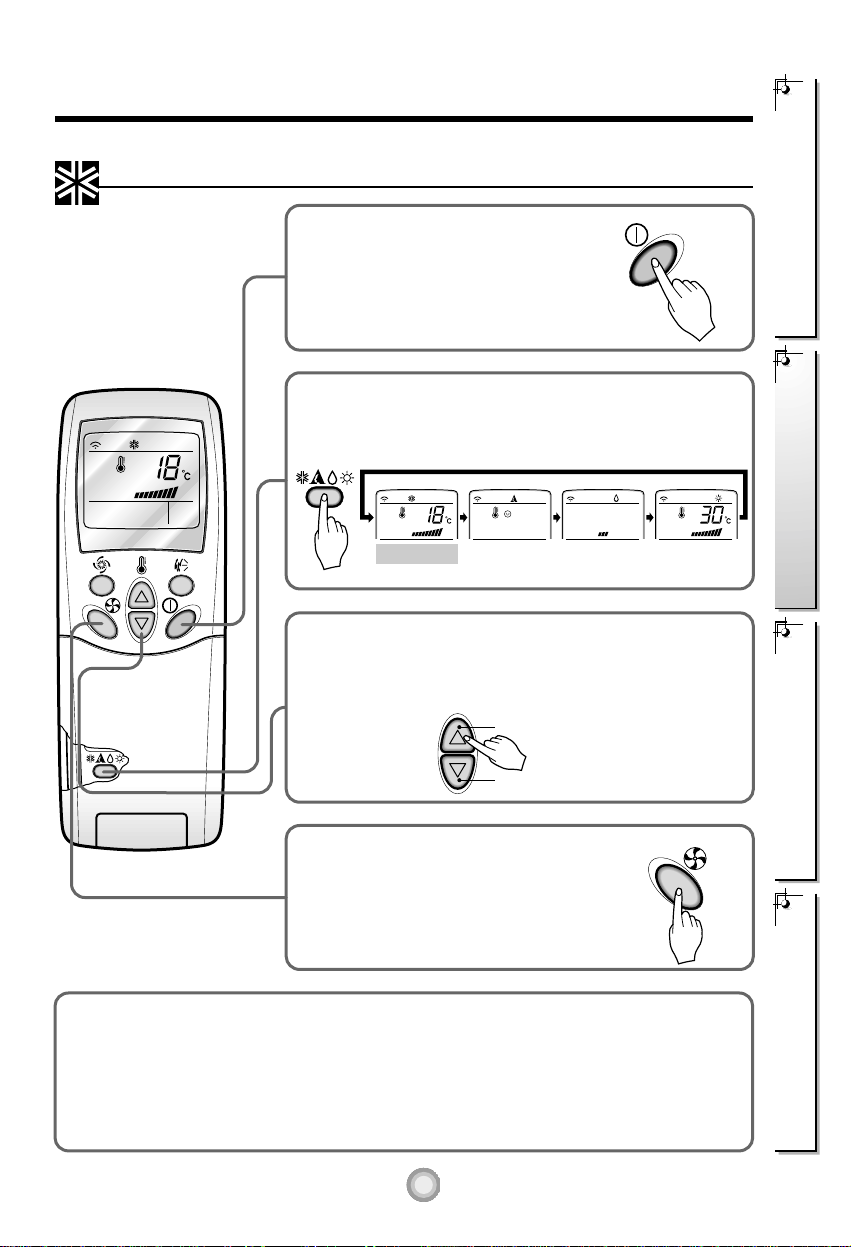
Cooling
Healthy
Dehumidification
Auto
Heating
(Heat pump model only)
To raise the temperature
To lower the temperature
How to use the Operation Mode Selection button
Press the Start/Stop button.
The unit will respond with
a beep.
Open the door on the remote control. To select Cooling
Operation, press the Operation Mode Selection button.
Each time the button is pressed, the operation mode is
shifted in the direction of the arrow.
Close the door on the remote control. Set the temperature
lower than the room temperature. The temperature can be
set within a range of 18°C~30°C in 1°C increments.
Set the fan speed again with the door
of the remote control still closed. You
can select the fan speed in four steps-
low, medium, high, or CHAOS. Each
time the button is pressed, the fan
speed mode is shifted.
Cooling Operation
1
2
3
4
Natural wind by the CHAOS logic
❏For more fresh feeling than other fan speed, press the Indoor Fan Speed Selector and set to
CHAOS mode. In this mode, the wind blows like natural breeze by automatically changing fan
speed according to the CHAOS logic.

8
Safety PrecautionsOperating InstructionsCare and MaintenanceTroubleshooting Tips
Cooling
Healthy
Dehumidification
Auto
Heating
(Heat pump model only)
Cooling
Healthy
Dehumidification
Auto
Heating
(Heat pump model only)
To raise the temperature
To lower the temperature
Press the Start/Stop button.
The unit will respond with
a beep.
Open the door on the remote control. To select Auto
Operation, press the Operation Mode Selection button.
Each time the button is pressed, the operation mode is
shifted in the direction of the arrow.
The temperature and fan speed are automatically set by the
electronic controls based on the actual room temperature. If
you want to change the set temperature, close the door on
the remote control and press the Room Temperature Setting
buttons. The cooler or warmer you feel, the more times (up to
two times) you should press the button. The set temperature
will then be changed automatically.
During Auto Operation:
❏You cannot switch the indoor fan speed. It has already been set by the Fuzzy rule.
❏If the system is not operating as desired, manually switch to another mode. The system will not
automatically switch from the cooling mode to the heating mode, or from heating to cooling, it must be
done by manually resetting.
❏During Auto Operation, pressing the chaos swing button makes the horizontal louvers swing up and
down automatically. If you want to stop auto-swing, press the chaos swing button again.
Auto Operation
1
2
3

9
Safety Precautions Operating Instructions Care and Maintenance Troubleshooting Tips
Cooling
Healthy
Dehumidification
Auto
Heating
(Heat pump model only)
Press the Start/Stop button.
The unit will respond with
a beep.
Open the door on the remote control. To select Healthy
Dehumidification Operation, press the Operation Mode
Selection button.
Each time the button is pressed, the operation mode is
shifted in the direction of the arrow.
During Healthy Dehumidification Operation:
❏If you select the dehumidification mode on the operation selection button, the A/C starts to run the
dehumidification function, automatically setting the room temp. and airflow volume to the best condition
for dehumidification based on the sensed current room temp.
In this case, however, the setting temp. is not displayed in the remote control and you are not able to
control the room temp. either.
❏During the healthy dehumidification function, the airflow volume is automatically set according to the
optimization algorithm responding to the current room temp. status and makes the room condition
healthy and comfortable even in the high humidity season.
Healthy Dehumidification Operation
1
2
Set the fan speed again with the door
of the remote control still closed. You
can select the fan speed in four steps-
low, medium, high, or CHAOS. Each
time the button is pressed, the fan
speed mode is shifted.
3
Natural wind by the CHAOS logic
❏For more fresh feeling than other fan speed, press the Indoor Fan
Speed Selector and set to CHAOS mode. In this mode, the wind
blows like natural breeze by automatically changing fan speed
according to the CHAOS logic.

10
Safety PrecautionsOperating InstructionsCare and MaintenanceTroubleshooting Tips
Cooling
Healthy
Dehumidification
Auto
To raise the temperature
To lower the temperature
Heating
(Heat pump model only)
Press the Start/Stop button.
The unit will respond with
a beep.
Open the door on the remote control. To select Heating
Operation, press the Operation Mode Selection button.
Each time the button is pressed, the operation mode is
shifted in the direction of the arrow.
Close the door on the remote control.
Set the temperature higher than the room temperature.
The temperature can be set within a range of 16°C~30°C in
1°C increments.
Set the fan speed again with the door of the
remote control still closed. You can select
the fan speed in four steps–low, medium,
high, or CHAOS. Each time the button is
pressed, the fan speed mode is shifted.
Heating Operation(Heat pump model only)
1
2
3
4
Natural wind by the CHAOS logic
❏For more fresh feeling than other fan speed, press the Indoor Fan Speed Selector and set to
CHAOS mode. In this mode, the wind blows like natural breeze by automatically changing fan
speed according to the CHAOS logic.
Table of contents
Other LG Air Conditioner manuals


Popular Air Conditioner manuals by other brands






Fujitsu
Fujitsu Inverter ASBA30JFC operating manual

Toshiba
Toshiba RAS-M10SMUV-E installation manual

Daikin
Daikin FXLQ20MAVE Operation manual

Hitachi
Hitachi RAS-E24CAK instruction manual

CIAT
CIAT Magister 2 Series Installation, Operation, Commissioning, Maintenance

Bestron
Bestron AAC6000 instruction manual





