
LG HSN12IVP User manual

OWNER’S MANUAL
AIR CONDITIONER
Please read this manual carefully before operating
your set and retain it for future reference.
P/NO : MFL67215107 www.lge.com
TYPE : WALL MOUNTED
*MFL67215107*
2TIPS FOR SAVING ENERGY
TIPS FOR SAVING ENERGY
Here are some tips that will help you minimize the power consumption when you use the air
conditioner. You can use your air conditioner more eciently by referring to the instructions
below:
• Do not cool excessively indoors. This may be harmful for your health and may consume more
electricity.
• Block sunlight with blinds or curtains while you are operating the air conditioner.
• Keep doors or windows closed tightly while you are operating the air conditioner.
• Adjust the direction of the air ow vertically or horizontally to circulate indoor air.
• Speed up the fan to cool or warm indoor air quickly, in a short period of time.
• Open windows regularly for ventilation as the indoor air quality may deteriorate if the air con-
ditioner is used for many hours.
• Clean the air lter once every 2 weeks. Dust and impurities collected in the air lter may block
the air ow or weaken the cooling / dehumidifying functions.
For your records
Staple your receipt to this page in case you need it to prove the date of purchase or for warranty
purposes. Write the model number and the serial number here:
Model number :
Serial number :
You can nd them on a label on the side of each unit.
Dealer’s name :
Date of purchase :
SAFETY PRECAUTIONS
IMPORTANT SAFETY INSTRUCTIONS
READ ALL INSTRUCTIONS BEFORE USINGTHE APPLIANCE.
Always comply with the following precautions to avoid dangerous situations and ensure peak
performance of your product
WARNING
It can result in serious injury or death when the directions are ignored
CAUTION
It can result in minor injury or product damage when the directions are ignored
WARNING
• Installation or repairs made by unqualied persons can result in hazards to you and others.
• Installation MUST conform with local building codes.
• The information contained in the manual is intended for use by a qualied service technician
familiar with safety procedures and equipped with the proper tools and test instruments.
• Failure to carefully read and follow all instructions in this manual can result in equipment mal-
function, property damage, personal injury and/or death.
Installation
• Use a standard circuit breaker and fuse conforming with the rating of the air conditioner. Fail-
ure to do so may result in electric shock or product failure.
• Contact an authorized service center when you install or relocate the air conditioner. Failure to
do so may result in serious injury or product failure.
• Always use a power plug and socket with a ground terminal.Failure to do so may result in
electric shock or product failure
• Install the panel and the cover of the control box safely. Failure to do so may result in explo-
sion or re.
• Install a dedicated electric outlet and circuit breaker before you use the air conditioner. Failure
to do so may result in electric shock or product failure.
• Use a standard circuit breaker and fuse conforming with the rating of the air conditioner. Fail-
ure to do so may result in electric shock or product failure.
• Do not modify or extend the power cable. If the power cable or cord has scratches or skin
peeled off or deteriorated then it must be replaced. It may result in re or electric shock.
• Be cautious when you unpack or install the air conditioner. Failure to do so may result in seri-
ous injury or product failure.
• Contact an authorized service center when you install or relocate the air conditioner. Failure to
do so may result in serious injury or product failure.
• Do not install the air conditioner on an unstable surface or where there may be a danger of it
falling. It may result in death, serious injury, or product failure.
!
!
!
3

4SAFETY PRECAUTIONS
Operation
• Do not let the air conditioner run for a long time when the humidity is very high or when a door or
window has been left open. Failure to do so may result in product failure.
• Make sure that the power cord is not pulled or damaged while the air conditioner is operating. Fail-
ure to do so may result in re, electric shock, or product failure.
• Do not place any objects on the power cord. It may result in electric shock or product failure.
• Do not turn on or off the air conditioner by plugging in or unplugging the power plug. It may result in
re or electric shock.
• Do not touch, operate or repair the air conditioner with wet hands. It may result in electric shock or
product failure.
• Do not place a heater or other heating appliances near the power cable. It may result in re, electric
shock, or product failure.
• Do not allow water to run into the air conditioner. It may result in explosion or re.
• Do not leave ammable substances such as gasoline, benzene and thinner near the air conditioner.
It may result in explosion or re.
• Do not use the air conditioner for an extended period of time in a small place without ventilation.
Ventilate the place regularly. Failure to do so may result in explosion or re.
• When there is a gas leak, ventilate sufficiently before using the air conditioner again. Failure to do so
may result in explosion or re.
• Unplug the power plug if there is a noise, smell or smoke coming from the air conditioner. Failure to
do so may result in explosion or re.
• Stop operating and close the window in strom or hurricane.If possible remove the product from the
window before hurricane arrives
• Do not touch the electrostatic lter after opening the front grille. Failure to do so may result in elec-
tric shock or product failure.
• Contact an authorized service center when the air conditioner is submerged into water due to ood-
ing. Failure to do so may result in explosion or re.
• Be cautious water could not enter the product
• Make sure to ventilate sufficiently when this air conditioner and a heating appliance such as a heater
are used simultaneously. Failure to do so may result in re, serious injury, or product failure.
• Turn the main power off and unplug the power plug when you clean or repair the air conditioner.
Failure to do so may result in death, serious injury, or product failure.
• Unplug the power plug when the air conditioner is not used for an extended period of time. Failure
to do so may result in product failure.
• Do not place any objects on the air conditioner. It may result in product failure.

SAFETY PRECAUTIONS
CAUTION
Installation
• Make sure to check if there is a refrigerant leak after you install or repair the air conditioner. Failure
to do so may result in product failure.
• Install the drain hose properly for smooth drainage of condensed water. Failure to do so may result
in product failure.
• Keep level even when installing the product.
• Install the air conditioner where the noise from the outdoor unit or the exhaust gas will not incon-
venience the neighbors. Failure to do so may result in conict between neighbors.
• When transporting the equipment, there should be at least 2 or more people, or a forklift. It may re-
sult in serious injury.
• Do not install the air conditioner where it will be exposed to sea wind (salt spray) directly. It may re-
sult in product failure.
Operation
• Do not expose people, animals or plants to the cold or hot wind from the air conditioner. It may re-
sult in serious injury.
• Do not use the product for special purposes, such as preserving foods, works of art, etc. It is a con-
sumer air conditioner, not a precision refrigeration system. It may result in death, re or electric
shock.
• Do not block the inlet or outlet of air ow. It may result in explosion or product failure.
• Do not use strong cleaning agents or solvents when you clean the air conditioner, or spray water.
Use a smooth cloth. It may result in serious injury or product failure.
• Never touch the metal parts of the air conditioner when you remove the air lter. It may result in se-
rious injury or product failure.
• Do not place any objects on the air conditioner. It may result in product failure.
• Always insert the lter securely after cleaning. Clean the lter every two weeks or more often if
necessary.
• Do not insert hands or other objects through the air inlet or outlet while the air conditioner is operat-
ing. It may result in electric shock.
• Do not drink the water drained from the air conditioner. It may result in serious health complications.
• Use a sturdy stool or ladder when you clean, maintain or repair the air conditioner at a height. Failure
to do so may result in serious injury or product failure.
• Do not mix the batteries for the remote control with other types of batteries or mix new batteries
with used batteries. Failure to do so may result in product failure.
• Do not recharge or disassemble the batteries. Failure to do so may result in explosion, re or serious
injury.
• Stop using the remote control if there is a battery uid leak. If your cloth or skin is exposed to the
battery uid from a leak, wash it off with clean water. Failure to do so may result in serious injury.
• If you swallow the battery uid from a leak, wash out the inside of your mouth thoroughly and then
consult a doctor. Failure to do so may result in serious health complications.
!
5
TABLE OF CONTENTS
2
TIPS FOR SAVING ENERGY
3IMPORTANT SAFETY
INSTRUCTIONS
7BEFORE USE
7Components
8Using the remote control
9- Inserting batteries
9- Installing the remote control holder
10 BASIC FUNCTIONS
10 Cooling your room
10 Removing humidity
11 Airing your room
11 Adjusting the fan speed
11 Adjusting the air flow direction
11 Setting the timer
11 - Setting the current time
12 - Turning on the air conditioner
automatically at a set time
12 - T
automatically at a set time
12 - Canceling the timer setting
12 - Setting sleep mode
13 ADVANCED FUNCTIONS
13 Changing room temperature quickly
13 Indoor air purification
13 Plasmaster Auto Clean operation
13 Skin Care Mode
14 Plasma Purification operation (Optional)
14 Auto operation (Optional)
15 Auto Changeover operation (Optional)
15 Energy saving cooling mode
15 Display screen brightness
16 Operating the air conditioner without the
remote control
16 Restarting the air conditioner
automatically
17 MAINTENANCE
18 Cleaning the air filter
18 Cleaning the anti-allergy filter and triple
filter (Optional)
18 Cleaning the plasma filter (Optional)
19 TROUBLESHOOTING
19 Self-diagnosis function
19 Before requesting service
TABLE OF CONTENTS
6

Air Inlet
Piping
Drain Hose
B ase Plate
Connecting
Wires
Air Outlet
BEFORE USE
Components
Outdoor unit
NOTE
!
The number of operation lamps and their locations may vary, depending on the model of the
air conditioner.
7
BEFORE USE
Indoor unit
* The feature can be changed according to type of model.
* The feature can be changed according to type of model.
Operation lamp Signal Receiver
ON/OFF button
Air inlet
Plasma filter (Optional)
Air filter
Front grille
Vertical louver Allergy free filter (Optional)
Air outlet
Plasmaster Ionizer
Horizontal vane
Triple filter (Optional)
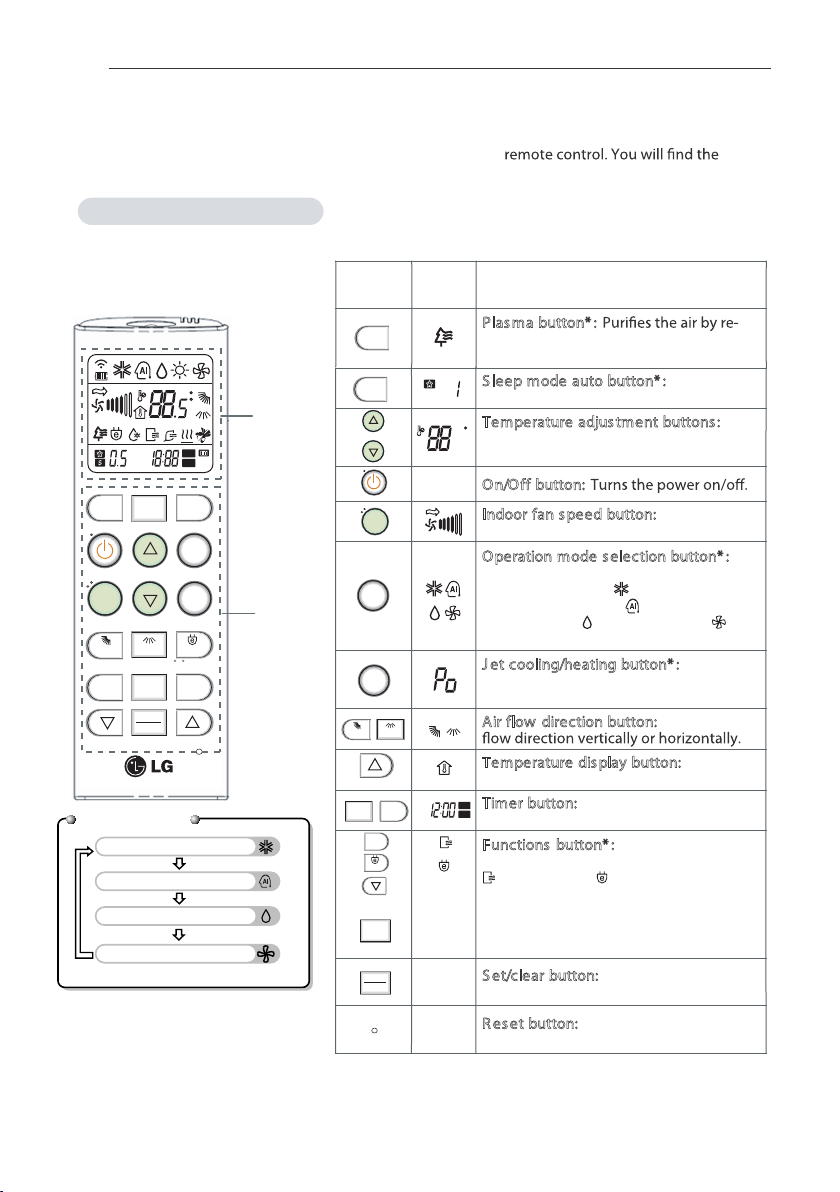
Using the remote control
You can operate the air conditioner more conveniently with the
buttons for the additional functions under the cover of the remote control.
Wireless remote control
-
-
-
-
-
Control
panel
Display
screen Description
Plasma button* :
moving particles that enter the indoor
unit.
Sleep mode auto button* : Sets the
sleep mode auto operation.
Temperature adjustment buttons : Ad-
justs the room temperature when cool-
ing and heating.
On/Off button:
Indoor fan speed button: Adjusts the
fan speed.
Operation mode s election button* : Se-
lects the operation mode.
Cooling operation ( ) / Auto operation
or auto changeover ( ) / Dehumidify-
ing operation ( )
/ Air circulation( )
Jet cooling/heating button* : Warms up
or cools down the indoor temperature
within a short period of time.
Air flow direction button: Adjusts the air
Temperature display button: Displays
the room temperature.
Timer button: Sets the current time and
the start / end time.
Functions button* : Adjusts the time
and sets the special functions.
: Auto clean / : Operates energy
saving cooling / Adjusts the brightness
SKIN CARE : keeps skin moisturized.
of the indoor unit display
Set/clear button: Time sets and cancels
functions.
Reset button: Initialize the air condi-
tioner settings.
BEFORE USE
8
* Some functions may not be supported, depending on the
model.
Display
screen
Control
panel
TEMP
JET
COOL
MODE
FAN
SPEED
OFF
SLEEP
LIGHT TIME [3SEC] ROOM TEMP
ROOM TEMP
TIMER
SWING
A/CLEANPLASMA SKIN
CARE
ON
SET
CLEAR
SWING
OFF
ON
AM
PM
hr.
C
F
123
C/ F [5SEC]
PLASMA
SLEEP
JET
COOL
MODE
TEMP
FAN
SPEED
SWING SWING
OFF
ON
A/CLEAN
SAVING
SAVING
LIGHT
SET
CLEAR
SKIN
CARE
hr
C
OFF
ON
AM
PM
TIME [3SEC]
Cooling Operation
Artificial Intelligence or Auto changeover
Healthy Dehumidification Operation
Air Circulation
Operation Mode
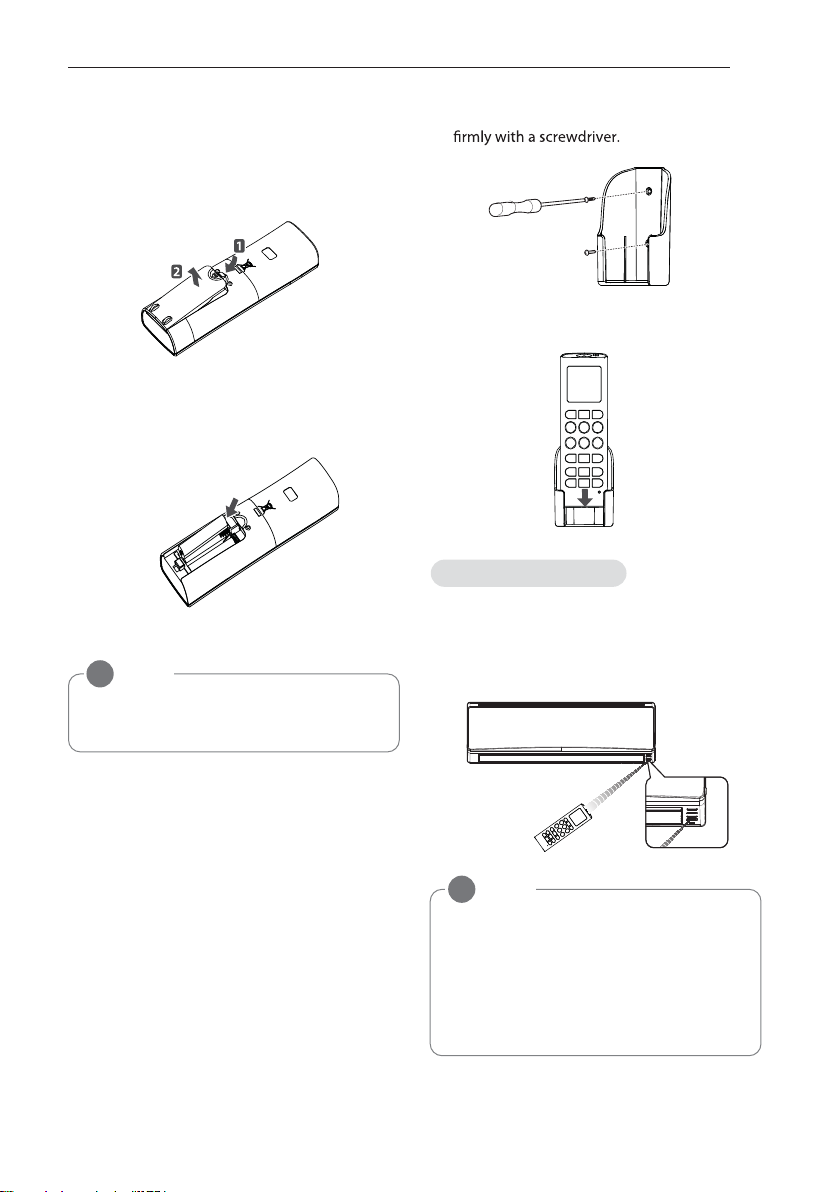
Inserting batteries
Insert batteries before using the remote
control. The battery type used is AAA (1.5 V).
1 Remove the battery cover.
2Insert the new batteries and make sure
that the + and - terminals of the batteries
are installed correctly.
3Reattach the battery cover.
Installing the remote control holder
Install the holder where there is no direct sun-
light to protect the remote control.
1Choose a safe and easily-accessible place.
2Fix the holder by fastening the 2 screws
3Slide the remote control into the holder.
Point the remote control towards the signal
receiver at the bottom of the air conditioner to
operate it.
NOTE
!
If the display screen of the remote control
starts to fade, replace the batteries.
NOTE
!
• The remote control may operate other
electronic devices if pointed towards
them. Make sure to point the remote
control towards the signal receiver of
the air conditioner.
• For proper operation, use a soft cloth to
clean the signal transmitter and receiver.
Operating method
9
BEFORE USE
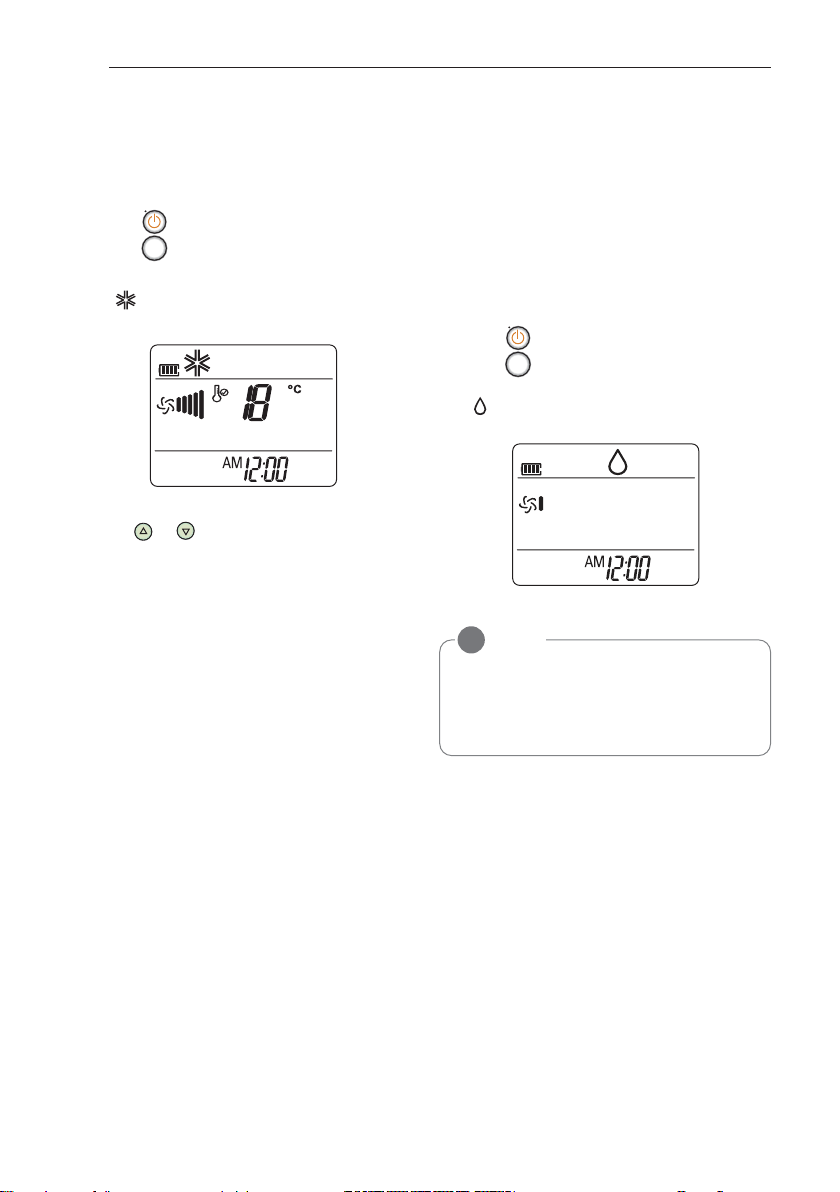
BASIC FUNCTIONS
Cooling your room
(Cooling operation)
1 Press to turn on the power.
2 Press repeatedly to select the cooling
operation.
- is displayed on the display screen.
3Press or to set the desired tempera-
ture.
- The temperature range is 18°C (64.4°F)-
30°C (80°F).
Removing humidity
(Dehumidifying operation)
This mode removes excess moisture from an
environment with high humidity or in the rainy
season, in order to prevent mold from setting
in. This mode adjusts the room temperature
and the fan speed automatically to maintain
the optimal level of humidity.
1 Press to turn on the power.
2 Press repeatedly to select the dehu-
midifying operation.
- is displayed on the display screen.
NOTE
!
• In this mode you cannot adjust the room
temperature, as it is adjusted automati-
cally. Also, the room temperature is not
displayed on the display screen.
BASIC FUNCTIONS
10
MODE
MODE
This manual suits for next models
4
Table of contents
Other LG Air Conditioner manuals


LG
LG T182 SC0 Series User manual

LG
LG ARNU12GTRB4 User manual

LG
LG WR-8030 User manual

LG
LG LWC183MGMJ1 User manual

LG
LG PDI Premium PQNUD1S40 Operating instructions

LG
LG MC07AH User manual

LG
LG MA09AH1.NF1 User manual

LG
LG LW7013HR Assembly instructions
LG
LG Multi-Type User manual

LG
LG AVNQ18GJLA2 User manual


Popular Air Conditioner manuals by other brands






Fujitsu
Fujitsu Inverter ASBA30JFC operating manual

Toshiba
Toshiba RAS-M10SMUV-E installation manual

Daikin
Daikin FXLQ20MAVE Operation manual

Hitachi
Hitachi RAS-E24CAK instruction manual

CIAT
CIAT Magister 2 Series Installation, Operation, Commissioning, Maintenance

Bestron
Bestron AAC6000 instruction manual





