
KATA S50 User manual
1
Kata S50 User manual

2
CONTENTS
I. SAFETY AND PRECAUTIONS ...……………………………………………………………………………3
II. CELL PHONE
OUTLINE ...…………………………………………………………………………………ERROR!
BOOKMARK NOT DEFINED.
III. PREPARATIONS…………………………………………………………………………………………….5
IV. DESCRIPTION OF CELL PHONE ...….…………………………………………………………………11
V. BASIC OPERATION OF CELL
PHONE..………….. .……………………………………………………15
VI. OPERATION MENU FUNCTION. .….. .…………………………………………………………………19
VII. OPERATING INSTRUCTIONS OF EDITOR..…………………………………………………………44
VIII. APPLICATION OF USB STORAGE
FUNCTION…..…………………………………………………45
IX. APPENDIX 1...………………………………………………………………………………………………46
X. APPENDIX
2...……………………………………………...……………………………………………...…48

3
I. Safety and Precautions
To use your cell phone safely and effectively, please read the following information before use:
Please turn off your phone when you are near a chemical plant, a gas station, an oil depot or other
explosives.
Please keep your phone out of the reach of children.
To ensure safety, please use earphone during driving; Otherwise, unless emergency, you should make a call
after parking your car by the roadside. Do NOT use the phone during driving at high speed.
Do NOT use your cell phone while in a plane. Please check whether Auto Power On is set or not before
board.
Do not use your cell phone in a hospital to avoid interference with the normal operation of medical
equipment which may result in a medical accident. If the cell phone is used near a pacemaker, audi phone
and some medical electronic equipment, you should pay special attention to that the cell phone may
interfere with these devices.
Auxiliaries and accessories not provided by us are excluded from the guarantee.
Do not dismantle your cell phone by yourself. In case of a failure, please contact the service station
specified by us.
Do NOT charge your phone with no battery. Please turn off your phone before removing the battery;

4
otherwise, the phone memory may be damaged.
The phone should be charged in the environment which is well-ventilated, and should be kept away from
the inflammables and explosives.
To avoid demagnetization, please keep your phone away from magnetic substances, such as magnetic disk,
credit card, etc.
Please be sure the phone isn't exposed to any liquid. If this situation occurs, please remove the battery and
contact the service station specified by us.
Please use your phone in the environment which is neither too hot nor too cold, and do not expose your
phone to the strong sunlight or use in high-humidity environment.
Do NOT use liquid or wet cloth with strong detergent to clean your phone.
Your cell phone has photo and record functions, so please use these functions following the related laws and
regulations. You may violate the law and regulation if taking photo and record without authorization.
Do not throw, drop or hit the cell phone during use to avoid damage to the housing or the elements inside
the phone.
Do NOT dispose the worn battery as common domestic rubbish. Please dispose the worn battery according
to the specified instructions where the disposal of a worn battery is clearly specified.
〈Note〉: 1. The Company won't undertake any responsibility for any consequences caused by failure to
observe the above-mentioned suggestions or improper applications.
2. The provided cables are only applicable to this type of mobile phone and the provided charge;
you can also connect the phone to the PC by a USB cable to charge the phone. Do not charge the phone by
any other mode.
If any content described in this manual goes against that of your cell phone, please subject to the real cell
phone.
The original factory is entitled to modify the manual at any time without further notice.

5
6
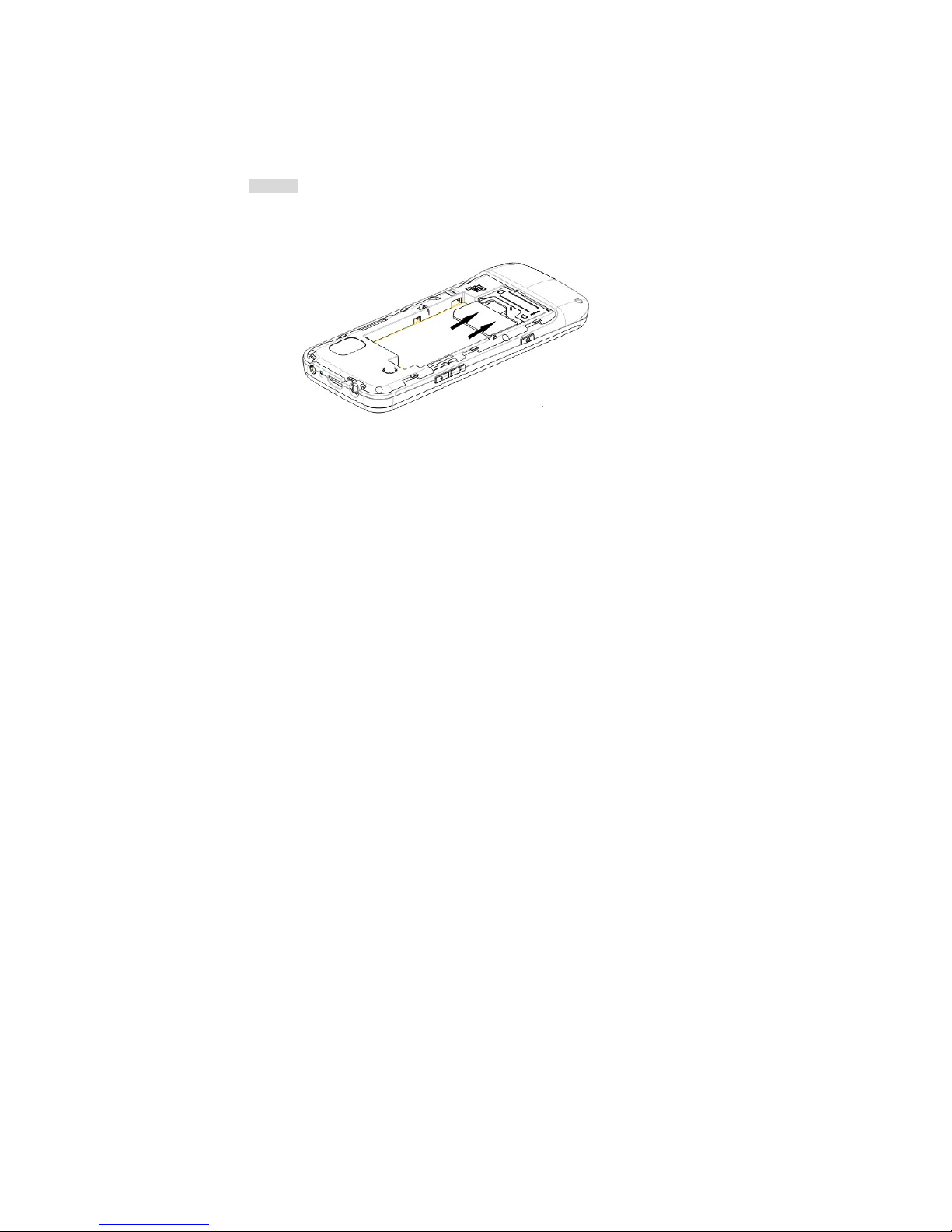
II. Cell Phone Outline
The following is the view of the phone:
7
III. Preparations
Installation of your SIM card
You can apply for two different numbers offered by two network providers and get two SIM cards (users
identify cards).
With those two SIM cards, you can use various functions of this cell phone. Many parameters required for
communications are stored in the SIM cards. Personal data, including the PIN (personal identification number),
phonebook, SMS and other extra system services can also be stored in the SIM cards.
Warning:Do NOT twist or scratch the SIM card and expose it to static electricity, dust or water. If you lost
your SIM card, please contact your network operator for help.
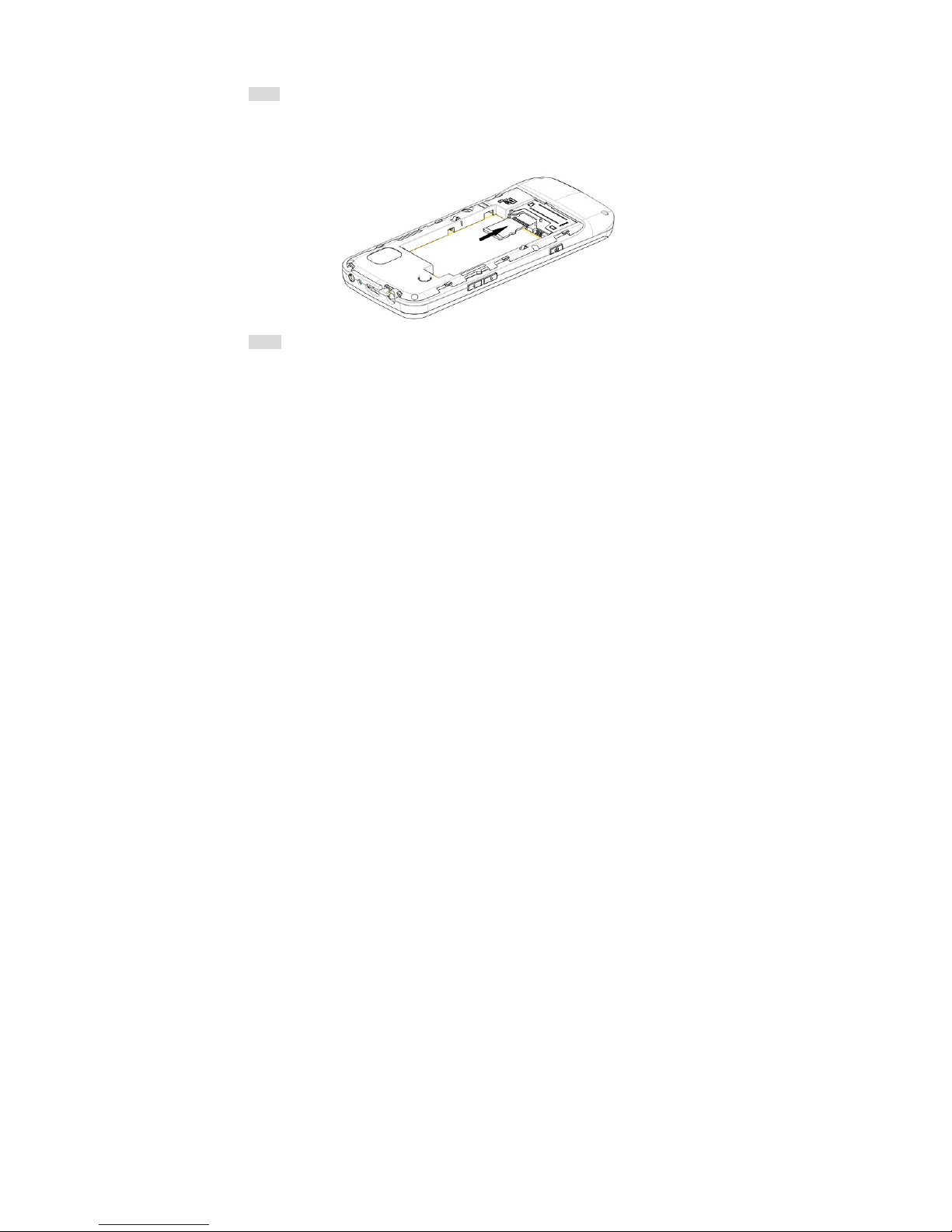
To install your SIM cards, please turn off your cell phone first, remove the back cover, and insert the SIM
cards into the SIM card slots at the back of the phone.
Please install the SIM cards as shown below:
8
Note:The SIM card is a small object, please keep the card out of the reach of the child to avoid swallowing
the card by accident!
Installation of memory card
The phone supports T-FLASH card as to expand the memory space. Please install or take out the memory card
as per the following picture after shutting down the phone.
Note:The T-FLASH card is a small object, please keep the T-FLASH card out of the reach of the child to
avoid swallowing the card by accident!
9
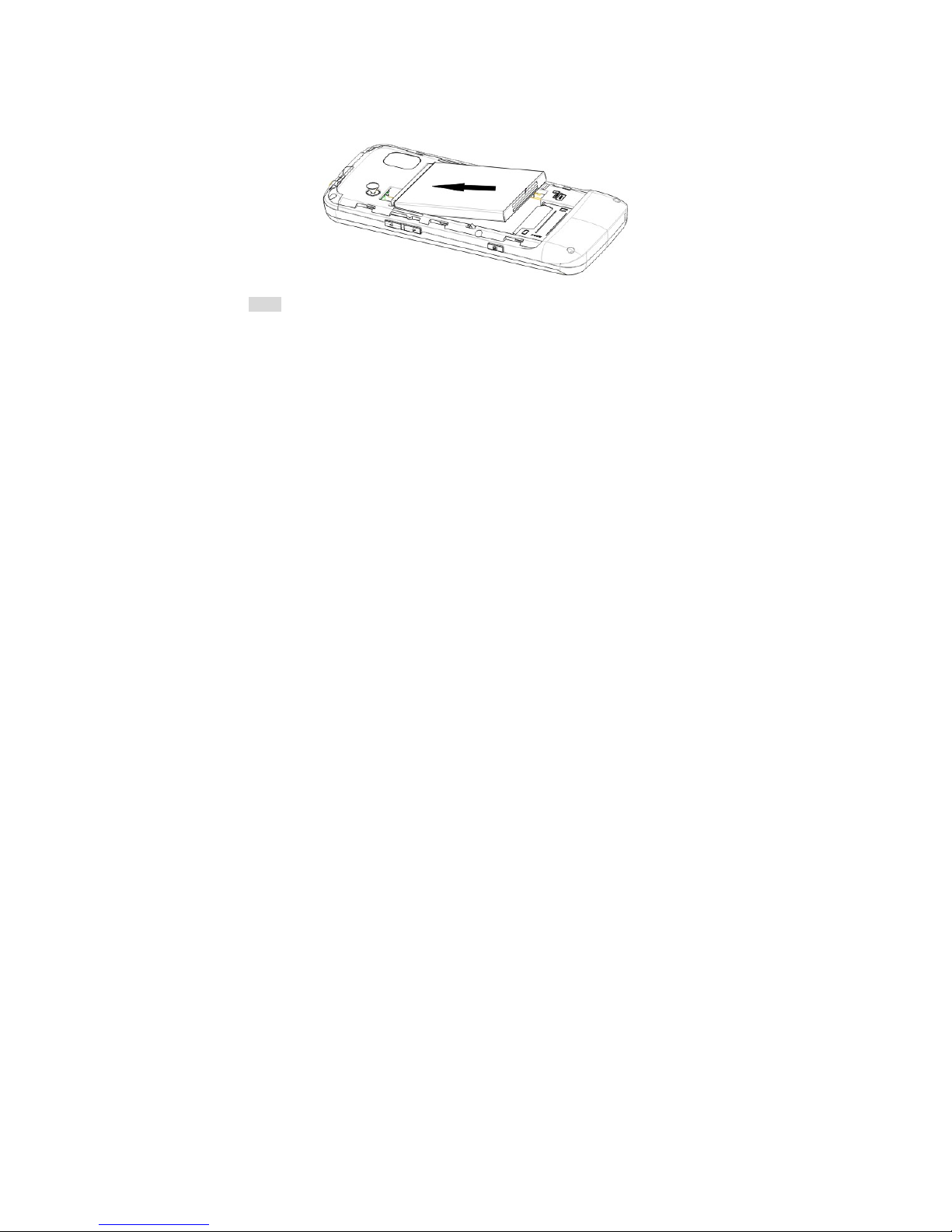
Installation of battery
Please use the original-packaging battery and accessories. Store the battery well if it is not used.
Please install the battery at shut down status.
Note:Please follow the correct procedures as shown in the figure to prevent damage to the battery contact
points.
Charge the battery
The new battery must be fully charged and discharged for several times to reach its best performance.
Charge as soon as possible when the power is used up as over-discharge will damage your battery.
Disconnect the charger and the power supply and then disconnect the mobile phone when the battery is
fully charged.
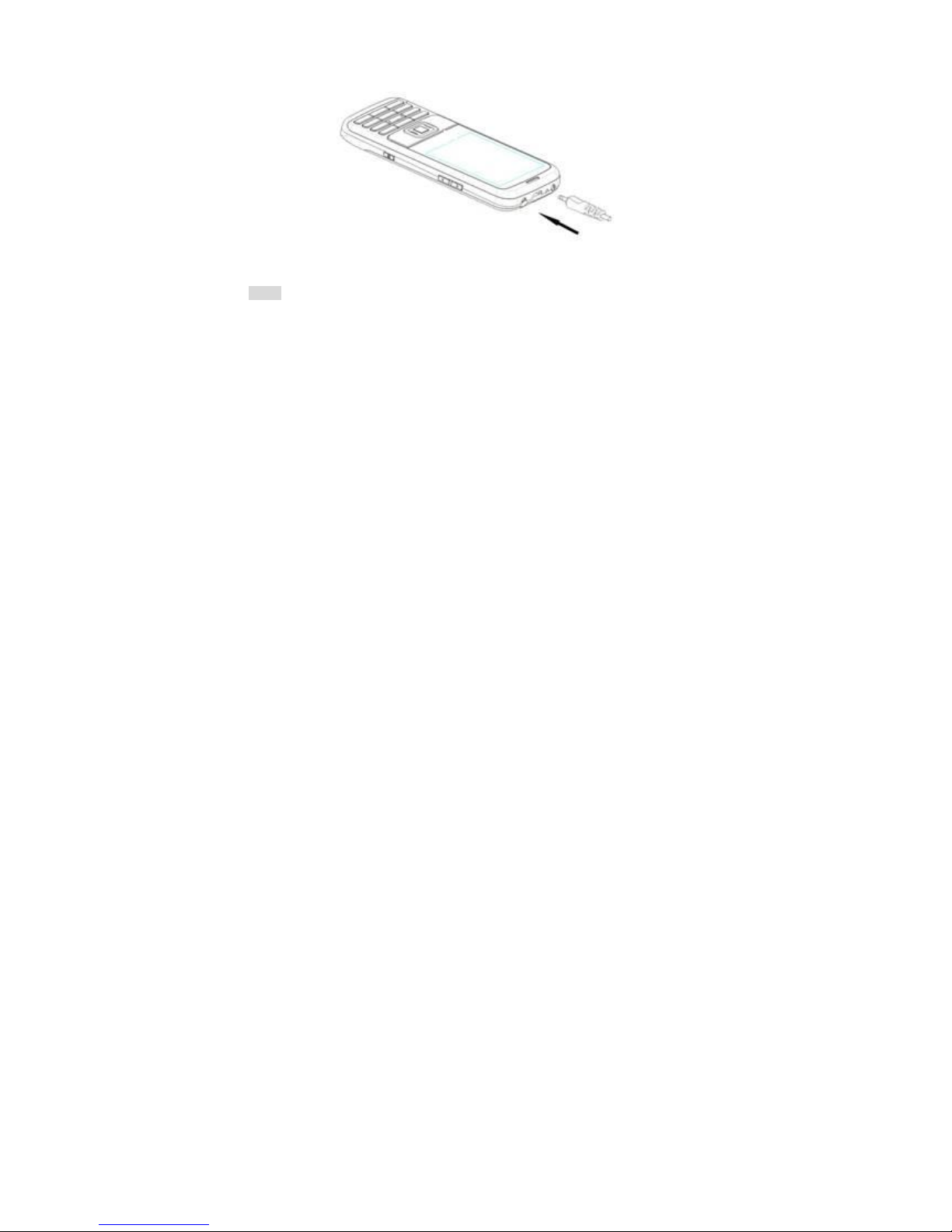
Connect your phone to the charger as per the drawing.
10
When charging, if the phone is switched on, the power quantity icon at the top right corner of the screen
will twinkle and will stop twinkling and fully display when the battery is fully charged. If the phone is switch off,
an icon will appear at the screen to show the battery is in charging.
Note:A little heating while charging is normal.
Use of battery
The performance of the battery is affected by multiple factors including your wireless loading network
configuration, signal intensity and temperature when using the phone, the function or settings you selected, the
accessories adopted for cell phone and other applied program modes.
To optimize the performance of the battery, please do as following regulations:
New battery or a battery is left unused for a long time should be charged for a long time;
Keep the temperature at or near room temperature when charging;
Table of contents
Other KATA Cell Phone manuals


