
iHome iBN26A User manual

iBN26
instruction manual
iBN26AIB-r
Size: 153mm x 120mm
Printing color: Black
July 23, 2012
P16 P1
NFC Bluetooth Wireless
Stereo Speaker System
with Speakerphone
and USB Charging

iBN26
Introduction
Thank you for purchasing the iHome iBN26. This product is designed to provide high quality wireless
sound for your iPad, iPhone, iPod, computer, or other Bluetooth audio device.
Along with the included Quick Bluetooth Connection Guide this instruction booklet explains the basic
operation and care of the unit. Please read them carefully and keep for future reference.
This unit features NFC (near field communication) technology which allows you to wirelessly connect your
NFC–enabled device to instantly ‘pair and play’. See your device’s user manual for details on how to
interact with NFC devices. If your Bluetooth device does not support NFC, you can pair it manually with
this unit.
Maintenance
UÊ *>ViÊÌiÊÕÌÊÊ>ÊiÛiÊÃÕÀv>ViÊ>Ü>ÞÊvÀÊÃÕÀViÃÊvÊ`ÀiVÌÊÃÕ}ÌÊÀÊiÝViÃÃÛiÊi>Ì°
UÊ *ÀÌiVÌÊÞÕÀÊvÕÀÌÕÀiÊÜiÊ«>V}ÊÞÕÀÊÕÌÊÊ>Ê>ÌÕÀ>ÊÜ`Ê>`Ê>VµÕiÀi`ÊvðÊÊVÌÊÀÊÌiÀÊ
protective material should be placed between it and the furniture.
UÊ i>ÊÞÕÀÊÕÌÊÜÌÊ>ÊÃvÌÊVÌÊÃÌii`ÊÞÊÜÌÊ`ÊÃ>«Ê>`ÊÜ>ÌiÀ°Ê-ÌÀ}iÀÊVi>}Ê>}iÌÃ]Ê
such as benzene, thinner or similar materials can damage the surface of the unit.
P2

7*/* (
iBN26
FCC Information
This device complies with Part 15 of the FCC Rules, operation is subject to the following two conditions: (1) This device may not cause harmful
interference, and (2) this device must accept any interference received, including interference that may cause undesired operation.
P3
FCC Radiation Exposure Statement
This equipment complies with FCC RF radiation exposure limits set forth for an uncontrolled environment.
This Device complies with RSS-210 of the IC Rules; Operation is subject to the following two conditions:
(1) This device may not cause interference and
(2) This device must accept any interference received, including interference that may cause undesired operation
UÊ 7>À}\Ê>}iÃÊÀÊ`vV>ÌÃÊÌÊÌÃÊÕÌÊÌÊiÝ«ÀiÃÃÞÊ>««ÀÛi`ÊLÞÊÌiÊ«>ÀÌÞÊÀiëÃLiÊvÀÊV«>ViÊVÕ`ÊÛ`ÊÌiÊÕÃiÀ½ÃÊ>ÕÌÀÌÞÊÌÊ«iÀ>ÌiÊ
the equipment.
UÊ "/\Ê/ÃÊiµÕ«iÌÊ>ÃÊLiiÊÌiÃÌi`Ê>`ÊvÕ`ÊÌÊV«ÞÊÜÌÊÌiÊÌÃÊvÀÊ>Ê>ÃÃÊÊ`}Ì>Ê`iÛVi]Ê«ÕÀÃÕ>ÌÊÌÊ*>ÀÌÊ£xÊvÊÌiÊÊ,Õið
These limits are designed to provide reasonable protection against harmful interference in a residential installation. This equipment generates, uses and can
radiate radio frequency energy and, if not installed and used in accordance with the instructions, may cause harmful interference to radio communications.
However, there is no guarantee that interference will not occur in a particular installation. If this equipment does cause harmful interference to radio or television
reception, which can be determined by turning the equipment off and on, the user is encouraged to try to correct the interference by one or more of the following
measures:
UÊ ,iÀiÌÊÀÊÀiV>ÌiÊÌiÊÀiViÛ}Ê>Ìi>°
UÊ VÀi>ÃiÊÌiÊÃi«>À>ÌÊLiÌÜiiÊÌiÊiµÕ«iÌÊ>`ÊÀiViÛiÀ°
UÊ iVÌÊÌiÊiµÕ«iÌÊÌÊ>ÊÕÌiÌÊÊ>ÊVÀVÕÌÊ`vviÀiÌÊvÀÊÌ>ÌÊÌÊÜVÊÌiÊÀiViÛiÀÊÃÊViVÌi`°
UÊ ÃÕÌÊÌiÊ`i>iÀÊÀÊ>ÊiÝ«iÀiVi`ÊÀ>`É/6ÊÌiVV>ÊvÀÊi«°
/ÃÊ>ÃÃÊÊ`}Ì>Ê>««>À>ÌÕÃÊV«iÃÊÜÌÊ>>`>Ê-ääΰ
Cet appareil numérique de la classe B est conforme à la norme NMB-003 du Canada.
IC Statement
This device complies with Industry Canada RSS-210. Operation is subject to the following two conditions: (1) this device may not cause interference,
and (2) this device must accept any interference, including interference that may cause undesired operation of the device.
Le présent appareil est conforme aux CNR d'Industrie Canada applicables aux appareils radio RSS-210. L'exploitation est autorisée aux deux
conditions suivantes : (1) l'appareil ne doit pas produire de brouillage, et (2) l'utilisateur de l'appareil doit accepter tout brouillage radioélectrique
subi, même si le brouillage est susceptible d'en compromettre le fonctionnement.
/iÊ`iÛViÊiiÌÃÊÌiÊiÝi«ÌÊvÀÊÌiÊÀÕÌiÊiÛ>Õ>ÌÊÌÃÊÊÃiVÌÊÓ°xÊvÊ,--Ê£äÓÊ>`ÊV«>ViÊÜÌÊ,--£äÓÊ,ÊiÝ«ÃÕÀi]ÊÕÃiÀÃÊV>Ê
obtain Canadian information on RF exposure and compliance.
Le dispositif rencontre l'exemption des limites courantes d'évaluation dans la section 2.5 de RSS 102 et la conformité à l'exposition de RSS-102
rf, utilisateurs peut obtenir l'information canadienne sur l'exposition et la conformité de rf.
FCC ID:EMOIBN26
IC:986B-IBN26
FCC ID:EMOiBN26A
IC:986B-iBN26A

iBN26
P4
Table of Contents
VÕ`i`ÉÊiiÌÊ9ÕÀÊ ÓÈ °°°°°°°°°°°°°°°°°°°°°°°°°°°°°°°°°°°°°°°°°°°°°°°°°°°°°°°°°°°°°°°°°°°°°°°°°°°°°°°°°°°°°°°°°°° £Ó
-iÌÌ}Ê1«ÊÌiÊ1ÌÉÊ/ÕÀ}ÊÌiÊ1ÌÊ" Ê>`Ê"°°°°°°°°°°°°°°°°°°°°°°°°°°°°°°°°°°°°°°°°°°°°°°°°°°°°°°°°°°°°°°°°°Î
1Ã}ÊÕiÌÌ\Ê*>À}Ê9ÕÀÊiÛViÊ1Ã}Ê °°°°°°°°°°°°°°°°°°°°°°°°°°°°°°°°°°°°°°°°°°°°°°°°°°°°°°°°°°°°°°°°°°°°{
*>À}Ê9ÕÀÊiÛViÊÕÃ}ÊÕiÌÌ°°°°°°°°°°°°°°°°°°°°°°°°°°°°°°°°°°°°°°°°°°°°°°°°°°°°°°°°°°°°°°°°°°°°°°°°°°°°°°°°°°°°°°x
*>Þ}ÊÕ`Ê6>ÊÕiÌÌ°°°°°°°°°°°°°°°°°°°°°°°°°°°°°°°°°°°°°°°°°°°°°°°°°°°°°°°°°°°°°°°°°°°°°°°°°°°°°°°°°°°°°°°°°°°°°°°°È
Using the Speakerphone feature..........................................................................................7
*>Þ}ÊÕ`Ê6>ÊÕÝÊi °°°°°°°°°°°°°°°°°°°°°°°°°°°°°°°°°°°°°°°°°°°°°°°°°°°°°°°°°°°°°°°°°°°°°°°°°°°°°°°°°°°°°°°°°°°°°°Ç
>À}}Ê6>Ê1-Ê*ÀÌ°°°°°°°°°°°°°°°°°°°°°°°°°°°°°°°°°°°°°°°°°°°°°°°°°°°°°°°°°°°°°°°°°°°°°°°°°°°°°°°°°°°°°°°°°°°°°°°°°°°°°°n
Consumer Product Safety Guide..................................................................................... 9-10
Troubleshooting..............................................................................................................11
7>ÀÀ>ÌÞ°°°°°°°°°°°°°°°°°°°°°°°°°°°°°°°°°°°°°°°°°°°°°°°°°°°°°°°°°°°°°°°°°°°°°°°°°°°°°°°°°°°°°°°°°°°°°°°°°°°°°°°°°°°°°°°°°°°°°°£Ó

iBN26
1
Included
UÊ ÓÈÊ-«i>iÀ
UÊ £ää6Ó{ä6ÊÕÛiÀÃ>ÊÊ>`>«ÌÀ
UÊ -ÌiÀiÊΰxÊÊ>Õ`ÊV>Li
P5
audio
cable
iBN26 Speaker power adaptor
iBN26
2
P6
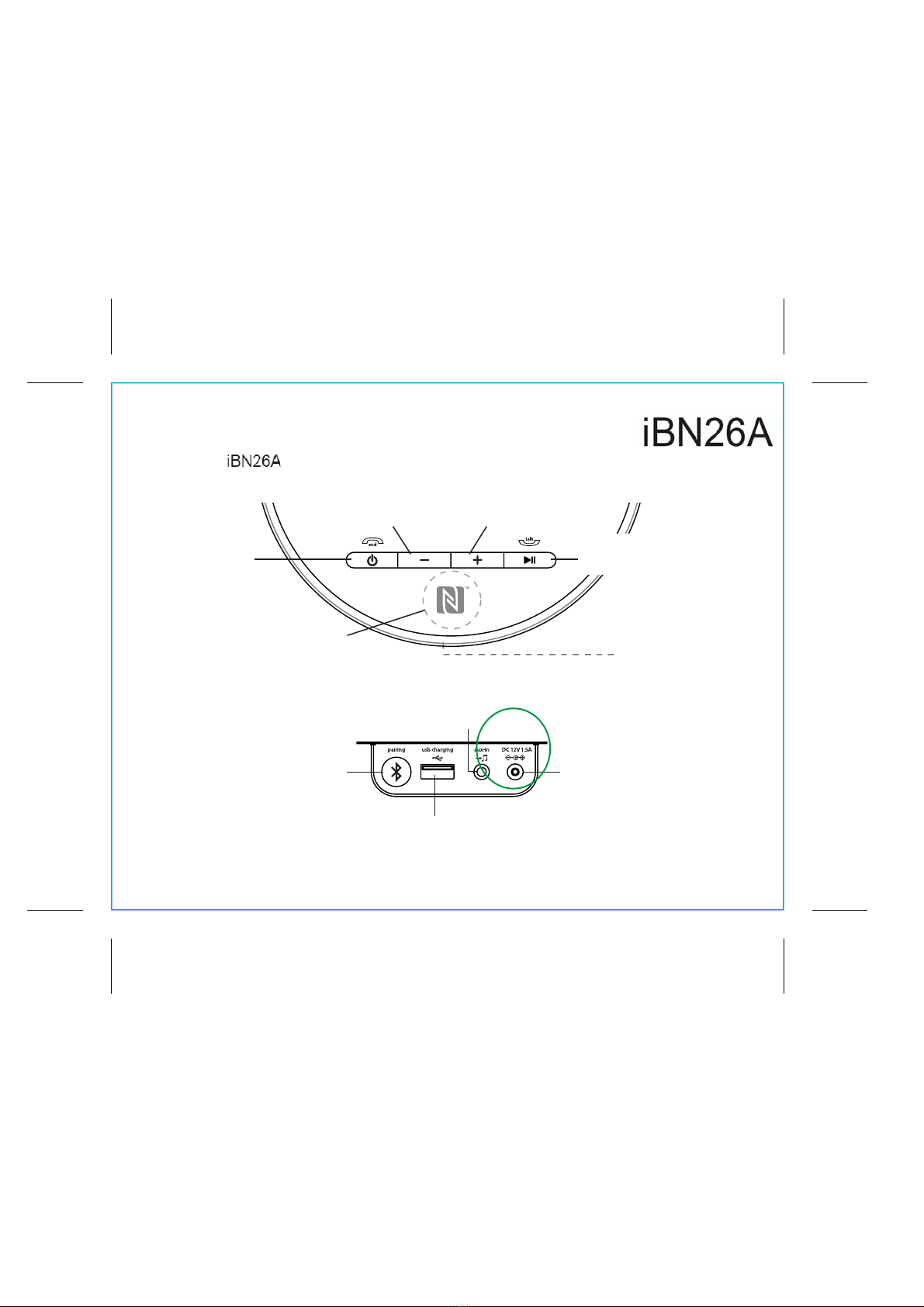
Meet Your iBN26
*ÜiÀÊ"É"vvÉ
`Ê>ÊÕÌÌ
NFC
Area
`ÕÃÌÉ-iÌÌ}ÃÉ
6ÕiÊ1«ÊÕÌÌ
`ÕÃÌÉ-iÌÌ}ÃÉ
6ÕiÊÜÊÕÌÌ
Pairing Button
Aux-in Jack
DC Jack
ÀÌÊ*ÜiÀÉ*>À}Ê
Indicator (located
behind speaker grille)
USB Charging Port
Top
Back
*>ÞÉ*>ÕÃiÉ
/>ÉÃÜiÀÊ>ÊÕÌÌ

iBN26
Using the
Î
P7
Setting Up the Unit
1.Connect the included AC adaptor to the DC
jack located on the back of the unit and
connect the other end to a working wall outlet.
Turning the Unit ON and OFF
1.Once the AC adaptor is properly connected,
press the Power Button located on top of the
unit to turn the unit ON. The power indicator
ÊÌiÊvÀÌÊÊEÊÌ«ÊLÕÌÌÃÊvÊÌiÊÕÌÊÜÊ
light and ascending tones will sound.
2. Press the Power Button to turn the unit OFF.
Descending tones will sound.
outlet
DC 12V 1.5A

iBN26
Using the
{
P8
Using Bluetooth: Pairing and Playing Your Device Using NFC
This unit features wireless NFC pairing, which allows playing NFC–enabled devices to pair and play
ÃÌ>ÌÞ°ÊÀÊ«>À}Ê Ê`iÛViÃ]Ê«i>ÃiÊÃiiÊÌiÊvÜ}ÊÃiVÌʺ*>À}Ê9ÕÀÊiÛViÊ>Õ>Þ»°
£°ÊÊ/ÕÀÊÊÞÕÀÊÕiÌÌqi>Li`É qi>Li`Ê`iÛViÊ>`ÊÌÕÀÊÊÕiÌÌÊV>«>LÌÞÊ>ÃÊ`iÃVÀLi`ÊÊ
the device’s user manual.
2. Place your NFC–enabled device in play mode.
Î°Ê /ÕVÊÌiÊÊÊÊÊÊ>Ài>ÊvÊÞÕÀÊ«>Þ}Ê Ê`iÛViÊ>}>ÃÌÊÌiÊÊÊÊÊÊ>Ài>ÊÊÌ«ÊvÊÌiÊÕÌ°ÊThe unit will turn
on and enter automatic pairing mode, tones will sound and the light will flash blue while the unit attempts
to pair. ºiÊ ÓÈ»ÊÃÕ`Ê>««i>ÀÊÊÞÕÀÊ`iÛVi½ÃÊiÕ°ÊvÊÞÕÀÊ`iÛViÊ>ÃÃÊvÊÞÕÊÜÃÊÌÊ«>À]Ê
>VVi«ÌÊÃiiVÌʺ9iûÊÀÊÃ>À®°Ê
Once paired with a device, the blue indicator light will glow steadily, a
confirmation tone will sound and your music will play through the unit.
{°Ê
Use the controls on your device to play or pause audio and navigate tracks.
x°Ê *ÀiÃÃ the –Button or +ButtonÊÌÊ>`ÕÃÌÊÌiÊÛÕiÊÊÌiÊÕÌ°Ê9ÕÊV>Ê>ÃÊ>`ÕÃÌÊÛÕiÊÊÞÕÀÊ
device.
È°Ê 7iÊ`iÊÃÌi}]Êpress the Power Button to turn the unit OFF. Remember to turn off your audio
device, too.
NOTE: To disconnect your device, simply touch it again on the area of the unit. To pair a device manually,
«i>ÃiÊÃiiÊÌiÊvÜ}ʺ*>À}Ê9ÕÀÊiÛViÊ>Õ>Þ»ÊÃiVÌ°Ê

iBN26
Using the
x
P9
Using Bluetooth: Pairing Your Device Manually
NOTE: See the iBN26 Bluetooth Connection Guide for complete pairing details.
1. Turn on your Bluetooth-enabled device and turn on Bluetooth capability as described in the device’s user
manual.
2. Press and hold the Pairing Button (located on the back of the unit) for 2 seconds. The unit will turn on and
enter pairing mode, 2 tones will sound and the indicator light on front of the unit will flash blue while the
unit attempts to pair. ºiÊ ÓÈ»Ê ÃÕ`Ê >««i>ÀÊ Ê ÞÕÀÊ `iÛVi½ÃÊ iÕ°Ê vÊ º ÌÊ *>Ài`]Ê º ÌÊ
iVÌi`»ÊÀÊÃ>ÀÊiÃÃ>}iÊ>««i>ÀÃ]ÊÃiiVÌʺiÊ ÓÈ»ÊÊ`iÛViÊÌÊLi}ÉV«iÌiÊ«>À}°Ê
If your device asks for a password, enter 1234 on the keyboard of your device. If no device is paired
ÜÌÊÓÊÕÌiÃ]ÊÌiÊÕÌÊÜÊÀiÛiÀÌÊÌÊÌÃÊ«ÀiÛÕÃÊÃÌ>Ìi°Ê/ÊÀiÌÀÞÊ«>À}]ÊvÜÊÃÌi«ÃÊ£ÊEÊÓ°
ΰÊ
Once paired with a device, the blue indicator light will glow steadily and a confirmation tone will sound.
There should be an indication on your device that pairing is complete. On some devices, you must then
ÃiiVÌʺ1ÃiÊ>ÃÊÕ`ÊiÛViÊÃÌiÀi®»ÊÀÊÃ>ÀÊÊÌiÊ`iÛVi½ÃÊÕiÌÌÊiÕ°Ê"ViÊ«>Ài`]ÊÞÕÀÊ`iÛViÊ
should link to the iBN26 whenever within range.

6
iBN26
Using the
P10
Pairing with a Different Device
Ê 7iÊ ÞÕÊ «ÜiÀÊ " Ê ÌiÊ Ã«i>iÀ]Ê ÌÊ ÜÊ >ÕÌ>ÌV>ÞÊ Ê ÜÌÊ ÌiÊ «ÀiÛÕÃÞÊ «>Ài`Ê
ÕiÌÌÊ`iÛViÊ>ÃÊ}Ê>ÃÊÌ>ÌÊ`iÛViÊÃÊÃÌÊÜÌÊÀ>}iÊ>LÕÌÊÎäÊviiÌ®°ÊTo pair with a
`vviÀiÌÊ`iÛVi]ÊvÜÊÃÌi«ÃÊ£EÊÓÊÊ«>}iÊx°
Playing Audio Via Bluetooth
1. Press the Power Button to turn on the unit. The light on front of the unit will flash blue and
ascending tones will sound and the unit will search for a previously paired device. The light
will turn solid blue once a previously paired device is detected. 9ÕÊV>ÊÌiÊÃÌiÊÌÊ>Õ`Ê
streamed wirelessly from your paired iPad, iPhone, iPod or other Bluetooth device.
2. Press the Play Pause Button on the unit to play audio from your linked Bluetooth device.
7iÊ>Õ`ÊÃÊ«>Þ}]Ê«ÀiÃÃÊÌÊ«>ÕÃiÊ«>Þ]Ê>`Ê>}>ÊÌÊÀiÃÕiÊ«>Þ°
ΰÊÊÊ`ÕÃÌÊÌiÊÛÕiÊÊÌiÊÕÌÊLÞÊ«ÀiÃÃ}ÊÌiÊ–Button or +Button°Ê/iÊvÀÌÊ«>iÊÊLÃÊ
ÎÝÊÜiÊÕÌÊÃÊ>ÌÊ>ÝÕÊÛÕi°Ê9ÕÊV>Ê>ÃÊ>`ÕÃÌÊÛÕiÊÊÞÕÀÊ`iÛVi°Ê
{°Ê 7iÊ`iÊÃÌi}]Êpress the Power Button to turn the unit OFF.
Note: Audio playing through the unit via the Bluetooth will be interrupted whenever the aux in
audio is detected.
Other iHome Speakers manuals

iHome
iHome iBT371 User manual

iHome
iHome iBT78 User manual

iHome
iHome iHRK-400MOBC-PR User manual

iHome
iHome iBN16 User manual

iHome
iHome iWBT1 User manual

iHome
iHome iHM7 User manual

iHome
iHome Voice iGV1 User manual

iHome
iHome POWERCLOCK GLOW iBT295 User manual

iHome
iHome PLAYGLOW MINI iBT800 User manual

iHome
iHome aquio User manual

iHome
iHome iW1 air series User manual

iHome
iHome iBN19 User manual

iHome
iHome iBT16 User manual

iHome
iHome iW1 air series User manual

iHome
iHome TIMEBOOST iBTW41 User manual

iHome
iHome iBT63 User manual

iHome
iHome iHome iDM8N1 User manual

iHome
iHome PLAYFADE iBT400 User manual

iHome
iHome iDM11 User manual

iHome
iHome iBT68 User manual









