
Huawei WS7206 User manual

Quick Start Guide
Guide de démarrage rapide
Краткое руководство пользователя
Panduan Mulai Cepat
快速入門指南
WS7206
96727628_01

3
XXXXXXXX
Wi-Fi
Wi-Fi
https://192.168.3.1
1
2
3
Modem
Internet
LAN
Any port
XXXXXXXX
Wi-Fi Name:

Quick Start Guide.............................................................. 1
Guide de démarrage rapide..............................................1
Краткое руководство пользователя............................ 1
.................................................................2
Panduan Mulai Cepat........................................................ 3
快速入門指南.......................................................................3
Safety Information.............................................................4
Informations relatives à la sécurité................................. 5
Инструкции по технике безопасности......................... 6
.............................................................10
Informasi Keselamatan................................................... 12
安全資訊............................................................................14
i

English
Before using the device, review and download the latest Quick Start
Guide at https://consumer.huawei.com/en/support/.
Getting Started
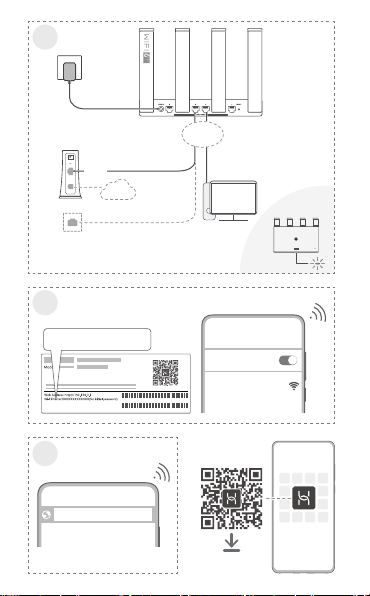
1. Connect the power adapter to the router, then connect the WAN port
or WAN/LAN auto-adaptation port of the router to the LAN port of the
optical/broadband modem or a wall-mounted network port using a
network cable.
2. Connect your mobile phone or computer to the router’s Wi-Fi
network (no password required). Check for the Wi-Fi name on the
bottom of the router.
3. Open the browser, then enter 192.168.3.1 in the address bar. Follow
the instructions to set up your router.
Indicator
Steady green Connected to the network
Steady red Not connected to the network
Flashing The router has detected a pairable device
Français
Avant toute utilisation de l'appareil, veuillez prendre connaissance du
Guide de démarrage rapide le plus récent, que vous pouvez
télécharger depuis https://consumer.huawei.com/fr/support/.
Prise en main
1. Connectez l'adaptateur secteur au routeur, puis connectez le port
WAN ou le port d'adaptation automatique WAN/LAN du routeur au
port LAN du modem optique/haut débit ou à un port réseau mural à
l'aide d'un câble réseau.
2. Connectez votre téléphone portable ou votre ordinateur au réseau
Wi-Fi du routeur (aucun mot de passe n'est nécessaire). Vériez le
nom du Wi-Fi en bas du routeur.
3. Ouvrez le navigateur, puis entrez 192.168.3.1 dans la barre
d'adresse. Laissez-vous guider par les instructions qui s'achent pour
congurer votre routeur.
Voyant
Vert xe Connecté au réseau
Rouge xe Non connecté au réseau
Clignotant Le routeur a détecté un appareil pouvant être
associé
Русский
Перед использованием устройства посетите веб-сайт
https://consumer.huawei.com/ru/support/ для клиентов в РФ,
1

https://consumer.huawei.com/by/support/ для клиентов в РБ, в
поисковой строке введите название устройства и загрузите для
него последнюю версию
Краткое руководство пользователя
.
Начало работы
1. Подключите адаптер питания к роутеру, затем с помощью
сетевого кабеля подключите порт WAN или самонастраиваемый
порт WAN/LAN роутера к порту LAN оптического модема или
модема широкополосного доступа либо к сетевому порту на
стене.
2. Подключите мобильный телефон или компьютер к сети Wi-Fi
роутера (пароль не требуется). Посмотрите имя сети Wi-Fi (Wi-Fi
name) на нижней панели роутера.
3. Откройте браузер и в адресной строке введите 192.168.3.1.
Настройте роутер, следуя инструкциям.
Индикатор
Горит зеленым Подключено к сети.
Горит красным Нет подключения к сети.
Мигает Роутер определил устройство, с которым
можно установить сопряжение.
https://consumer.huawei.com/th/support/
1.
WAN WAN/LAN
LAN
/
2.
Wi-Fi ()
Wi-Fi
3. 192.168.3.1
2

Indonesia
Sebelum menggunakan perangkat, tinjau dan unduh Panduan
Memulai Cepat terbaru di https://consumer.huawei.com/id/support/.
Cara Memulai
1. Hubungkan adaptor daya ke router, lalu hubungkan port WAN
atau port adaptasi otomatis WAN/LAN router tersebut ke port LAN
modem broadband/optik atau port jaringan terpasang di dinding
menggunakan kabel jaringan.
2. Hubungkan telepon seluler atau komputer Anda ke jaringan Wi-Fi
router tersebut (tidak diperlukan kata sandi). Periksa nama Wi-Fi di
bagian bawah router.
3. Buka browser, lalu masukkan 192.168.3.1 di bilah alamat. Ikuti
perintah untuk menyiapkan router Anda.
Indikator
Menyala hijau Terhubung ke jaringan
Menyala
merah
Tidak terhubung ke jaringan
Berkedip Router telah mendeteksi perangkat yang dapat
disandingkan
繁體中文
在使用裝置前,請從以下網址下載對應的快速入門以瞭解相關資訊:
https://consumer.huawei.com/hk/support/。
立即體驗
1. 將電源配接器連接至路由器,然後使用網路線將路由器的 WAN 連接埠
或 WAN/LAN 自適應連接埠連接至光纖數據機或寬頻數據機的 LAN 連接
埠或牆上網路連接埠。
2. 手機或電腦連線路由器 Wi-Fi(無需密碼),請查看路由器底部以取得
Wi-Fi 名稱。
3. 開啟瀏覽器,在網址列輸入192.168.3.1,然後根據畫面指示設定路由
器。
指示燈
綠色恆亮 可以上網
紅色恆亮 無法上網
3

閃爍 路由器已偵測到可配對的裝置
English
Safety Information
• Please consult your doctor and the device manufacturer to
determine if using your device may interfere with the operation of
your medical device.
• Avoid using the device in a dusty, damp, or dirty place, or near a
magnetic field.
• Ideal temperatures: 0°C to 40°C for operating, -40°C to +70°C for
storage.
• When charging, an adapter should be plugged into a socket nearby
and easily accessible. Use approved power adapters and chargers.
• Do not touch the device or the charger with wet hands. Doing so
may lead to short circuits, malfunctions, or electric shocks.
• Ensure that the power adapter meets the requirements of Annex Q
of IEC/EN 62368-1 and has been tested and approved according to
national or local standards.
Disposal and recycling information
The symbol on the product, battery, literature, or packaging
means that the products and batteries should be taken to separate
waste collection points designated by local authorities at the end of the
lifespan. This will ensure that EEE waste is recycled and treated in a
manner that conserves valuable materials and protects human health
and the environment. For more information, please contact your local
authorities, retailer, or household waste disposal service or visit the
website https://consumer.huawei.com/en/.
RF Exposure Information
This device is not a portable radio equipment, it is designed to be used
at a distance larger than 20 cm between the user and/or bystander and
the antenna and/or radiating element of the device.
EU Regulatory Conformance
Hereby, Huawei Device Co., Ltd. declares that this device WS7206 is in
compliance with the following Directive: RED 2014/53/EU, RoHS
2011/65/EU, ErP 2009/125/EC. The full text of the EU declaration of
conformity, the detailed ErP information and most recent information
about accessories & software are available at the following internet
address: https://consumer.huawei.com/certification.
4

Frequency Bands and Power (Egypt)
The frequency bands and transmitting power (radiated and/or
conducted) nominal limits applicable to this radio equipment are as
follows: Wi-Fi 2.4G: 20 dBm, Wi-Fi 5G: 5150-5350 MHz: 23 dBm.
Version Update
In order to improve the security of the product and provide you with a
better user experience, we will push version update information to you
on a regular basis when an important update is released.
End User License Agreement
Please read and agree to the End User License Agreement (HUAWEI
EULA) on the product’s management page before using the product.
Français
Informations relatives à la sécurité
•Veuillez consulter votre médecin ainsi que le fabricant de
l'appareil pour déterminer si l'usage de votre appareil est
susceptible d'aecter le fonctionnement de votre dispositif
médical.
•Évitez d'utiliser l'appareil dans un endroit poussiéreux, humide ou
sale, ou à proximité d'un champ magnétique.
•Températures idéales : 0 °C à 40 °C en fonctionnement, -40 °C à
+70 °C pour le stockage.
•Lors de la charge, l'adaptateur doit être branché sur une prise à
proximité et être facilement accessible. Utilisez des adaptateurs et
chargeurs approuvés.
•Ne touchez pas l'appareil ou le chargeur si vous avez les mains
mouillées. Cela pourrait provoquer des courts-circuits, des
dysfonctionnements ou des électrocutions.
•Assurez-vous que l'adaptateur électrique répond aux exigences de
l'annexe Q de la norme CEI/EN 62368-1 et qu'il a été testé et
approuvé conformément aux normes nationales ou locales.
Informations relatives à l'élimination et au recyclage
Le symbole sur le produit, la batterie, la documentation ou
l'emballage indique que les produits et les batteries arrivés en n de
vie doivent être placés dans des points de collecte de déchets
distincts désignés à cet eet par les autorités locales. De la sorte, les
déchets EEE seront recyclés et traités de manière à préserver des
matériaux précieux et à protéger la santé humaine et
l'environnement. Pour en savoir plus sur les lieux de collecte et la
manière de mettre au rebut vos déchets électriques et électroniques,
contactez les autorités locales, votre détaillant ou le service des
5

ordures ménagères, ou rendez-vous sur le site
https://consumer.huawei.com/en/.
Exposition aux radiofréquences
Cet appareil n'est pas un équipement radio portable ; il est conçu
pour être utilisé à une distance de plus de 20 cm séparant
l'utilisateur et/ou le spectateur d'une part et, d'autre part, l'antenne
et/ou l'élément rayonnant de l'appareil.
Conformité réglementaire UE
Par la présente, Huawei Device Co., Ltd. déclare que cet appareil
WS7206 est conforme à la directive suivante : RED 2014/53/UE,
RoHS 2011/65/UE, ErP 2009/125/CE. Le texte intégral de la
déclaration de conformité UE, les informations détaillées ErP et les
informations les plus récentes sur les accessoires et logiciels sont
disponibles à l'adresse Internet suivante :
https://consumer.huawei.com/certication.
Mises à jour de versions
An d'améliorer la sécurité du produit et de vous fournir une
meilleure expérience utilisateur, nous vous enverrons régulièrement
des informations lors de la sortie d'une mise à jour importante.
Contrat de licence utilisateur nal (EULA)
Avant toute utilisation du produit, veuillez lire et accepter le contrat
de licence utilisateur nal (EULA HUAWEI) qui se trouve dans la
page d'administration du produit.
Русский
Инструкции по технике безопасности
•По вопросу безопасного взаимодействия данного устройства с
медицинским оборудованием обратитесь к вашему лечащему
врачу или производителю оборудования.
•Не используйте устройство в пыльной, влажной или
загрязненной среде либо рядом с источником магнитного
поля.
•Оптимальная температура: от 0 °C до 40 °C для эксплуатации,
от -40 °C до +70 °C для хранения. Оптимальная температура
адаптера питания: от 0 °C до 40 °C для эксплуатации, от -10 °C
до +45 °C для хранения. Эксплуатация или хранение
устройства и его аксессуаров при температуре выше или ниже
указанных рекомендованных значений может привести к их
повреждению.
•Во время зарядки устройство должно быть подключено к
ближайшей штепсельной розетке и к нему должен быть
обеспечен беспрепятственный доступ. Используйте
сертифицированные адаптеры питания или зарядные
устройства.
6
Table of contents
Other Huawei Network Router manuals

Huawei
Huawei B535-333 User manual

Huawei
Huawei E173 User manual

Huawei
Huawei EG8147X6 User manual

Huawei
Huawei E5172As-22 Technical specifications

Huawei
Huawei DG8045-50 User manual

Huawei
Huawei AR1200-S Series Guide

Huawei
Huawei B315 LTE CPE User manual

Huawei
Huawei AR1200 Series User manual

Huawei
Huawei WiFi Mesh 3 User manual

Huawei
Huawei HG659 User manual

Huawei
Huawei E5180s-22 Technical specifications

Huawei
Huawei A280 User manual

Huawei
Huawei AR150 series User manual

Huawei
Huawei AF23 User manual

Huawei
Huawei 31010GAS User manual

Huawei
Huawei Quidway S3000-EI Series User manual

Huawei
Huawei E5186 User manual

Huawei
Huawei B683 User manual

Huawei
Huawei SVN5630 User manual

Huawei
Huawei HG532D User manual





