
Havit SK835BT User manual

Portable outdoor wireless
speaker SK835BT
User Manual • Uživatelský manuál •
Užívateľský manuál • Használati utasítás •
Benutzerhandbuch

2
Dear customer,
Thank you for purchasing our product. Please read the following instructions carefully
before first use and keep this user manual for future reference. Pay particular attention
to the safety instructions. If you have any questions or comments about the device,
please contact the customer line.
✉www.alza.co.uk/kontakt
✆+44 (0)203 514 4411
Importer
Alza.cz a.s., Jankovcova 1522/53, Holešovice, 170 00 Praha 7, www.alza.cz
3
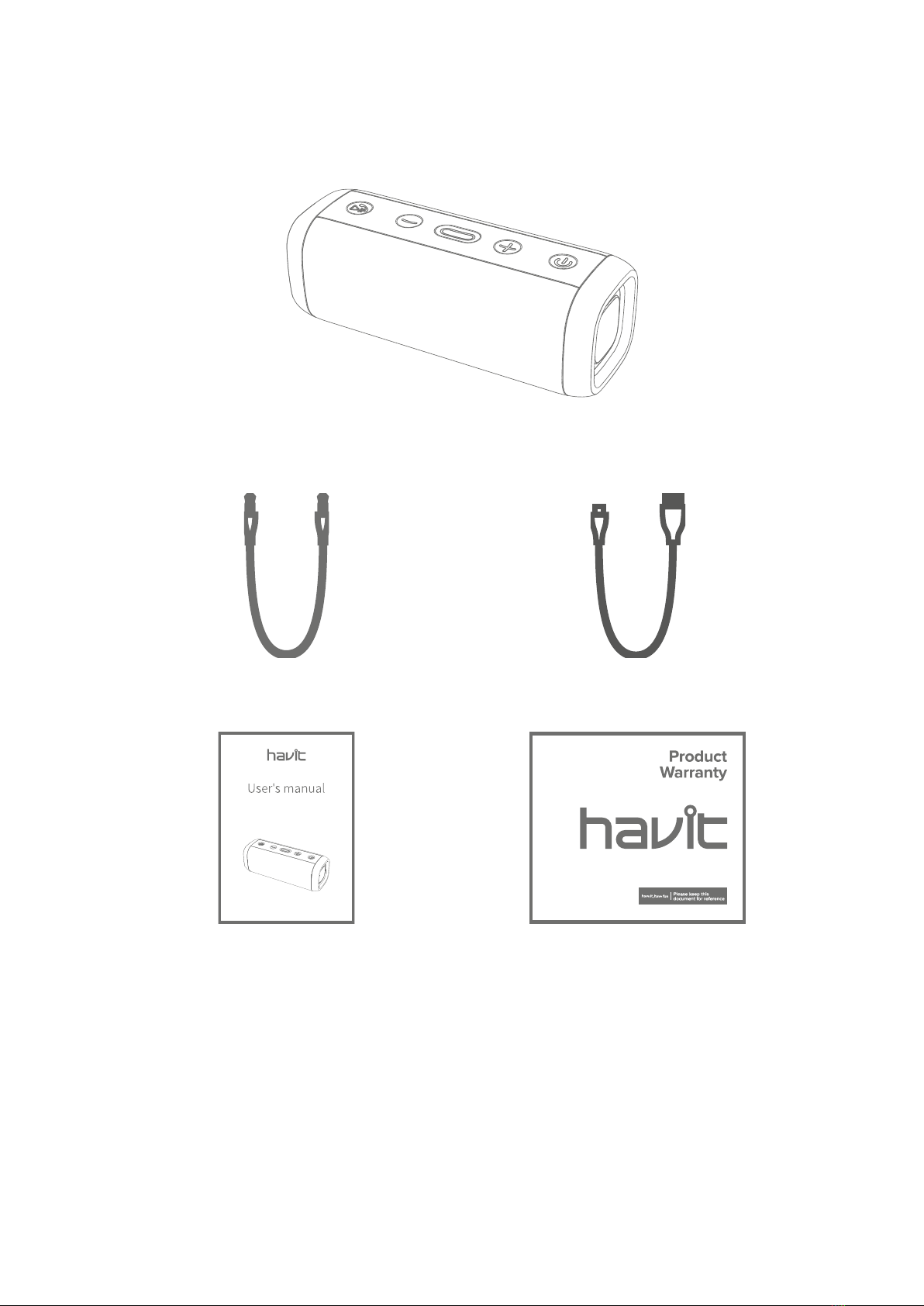
Packing list:
Bluetooth speaker * 1
Dual 3.5mm audio cable*1
Charging cable*1
User manual *1
Certificate of quality x1
4
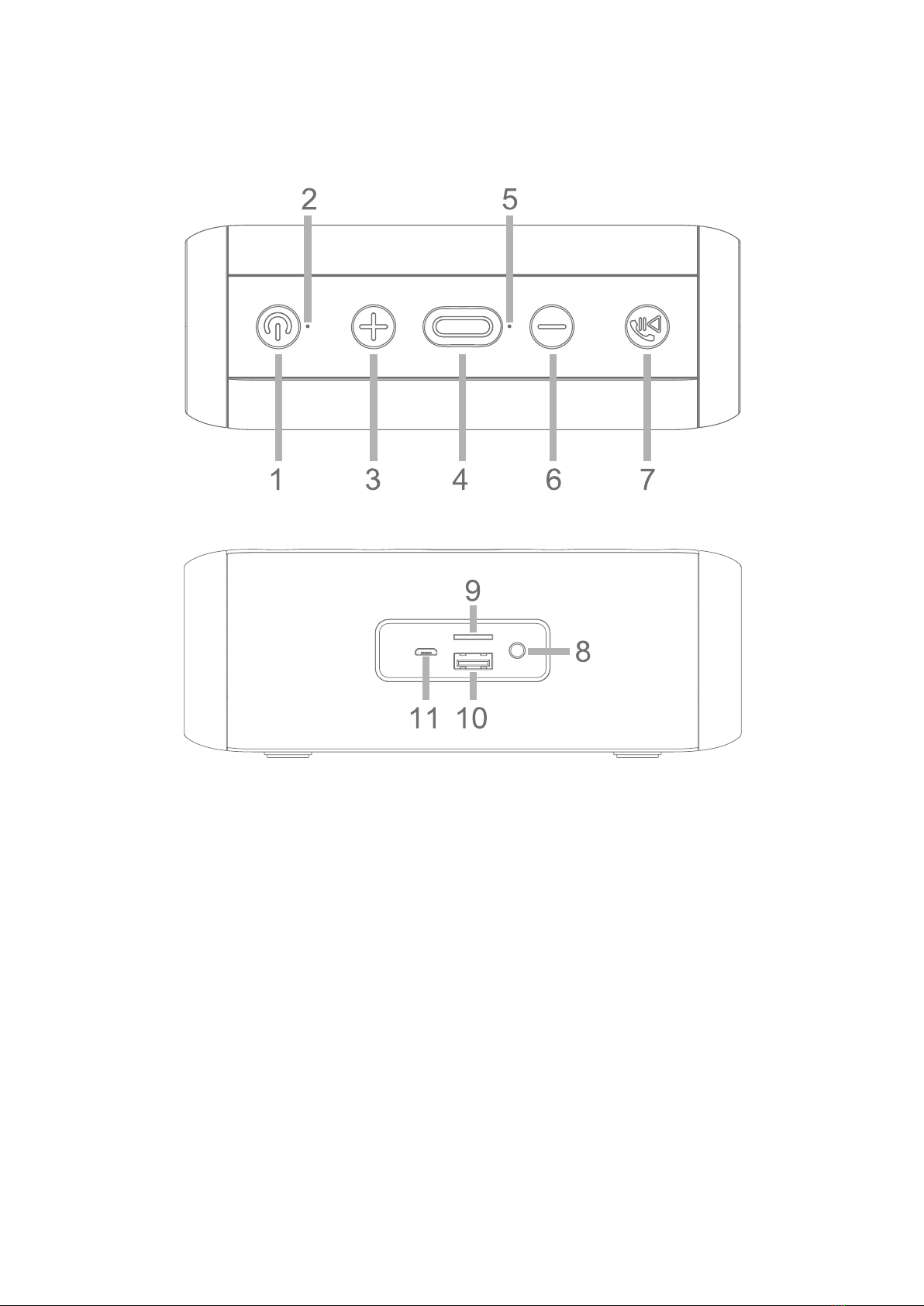
Product structure:
1. Power switch
7. Play/pause
2. Power LED indicator
8. AUX in
3. NEXT/VOL+
9. Micro SD card slot
4. Multi-function button (MFB)
10. USB slot
5. MIC
11. Micro USB charging interface
6. PREVIOUS/VOL-

5
Power ON/OFF
1. Long press the power switch for 2 seconds to turn on, the power LED indicator turns
blue for 4 seconds.
2. Long press the power switch for 2 seconds to turn off, the power LED indicator goes
off.
Bluetooth connection
1. Turn on the Bluetooth speaker, the power LED indicator flashes blue continuously
while waiting for pairing.
2. Then active the Bluetooth of your phone and search for “HAVIT SK835BT”. Click
manually to connect. If the connection is successful, the LED indicator will turn steady
blue.
3. Since the speaker can automatically reconnect to the last paired device. When the
Bluetooth of your device turns on, (Just turn on the speaker), it will automatically
reconnect.
Bluetooth disconnection
Dual press the MFB button to cut off the Bluetooth connection.
Answer incoming calls
Press the Play/pause button once to answer incoming calls.
Tip: Since some mobile phones default to answer calls via their own receiver, please
refer to the instruction of your phone and set on your phone.
End the call
Press the Play/Pause button once to end the current call.

6
Refuse incoming calls
Long press the Play/pause button for 1s to reject when there comes a call.
Last number redial
Dual press the Play/pause button to redial the last calling number.
Mode switching
Short MFB button to select mode. (Bluetooth/Micro SD card/AUX in/USB disk/FM)
AUX mode
Connecting your music player/phone to the speaker via the provided dual 3.5mm audio
cable, then the speaker will automatically recognize.
Micro SD card mode
Insert a micro-SD card, the speaker will automatically recognize and automatically
broadcasts MP3 format music in it.
USB mode
Insert a USB disk and the speaker will automatically broadcast music in it.

7
FM mode
1. Short press the MFB button to switch to FM mode;
2. Short press the play/pause button to auto search channels and record channels;
3. Long press +/-to select channel; Short press +/-for VOL +/-;
Music playing
1. Short press the Play/pause button to play/pause
2. Long press the “-“ for PREV;
3. Long press the “+” for NEXT.
4. Short press the “-“for VOL -;
5. Short press the “+” for VOL+.
True Wireless Stereo (TWS) Fit for two SK835BT speakers
You can connect two SK835BT speakers as a pair for stronger stereo and surrounding
effect.
1. Make sure the Bluetooth function is OFF on your Bluetooth player;
2. Turn on two speakers;
3. Long press MFB button for 2 seconds on one of the speakers (and it will bet he main
speaker), when a voice prompt is heard which means the two speakers are in TWS
pairing status. Until LED of the main channel speaker flashes and the LED of the
accessory channel speaker turns blue, the TWS connection is successful.
4. Then active the Bluetooth of your phone and search for “HAVIT SK835BT”. Click
manually to connect.

8
Charging
1. As product has built in non-removable and rechargeable battery, please use the
provided micro USB cable to charge.
2. Charging voltage and current is 5V/1A, please charge the speaker with the input
power below 5V/1A.
3. Please choose the charger that is certified by the regular manufacturer.
4. The battery performance may decrease as repeating charging and using the speaker.
It’s a normal phenomenon for all rechargeable batteries.
5. The LED indicator turns red when charging, and the LED indicator goes out when the
battery is fully charged.
Specification
IPX5 waterproof
Bluetooth Version:
V5.0
Output power:
5W*2
Size:
180*70*70
Connection Range:
10M
Speaker Size:
52mm
Frequency range:
40Hz-15KHz
Input voltage:
DC5V/1A
Battery:
1200 mAh
Play Time:
5H
Charging time:
3H
Support:
BT, USB, Micro USD, FM, AUX, TWS
Material:
ABS+Fabric

9
Warnings
•Please follow the instruction to operate.
•Please charge the product with input power below 5V/1A, in order to protect the
battery;
•Please do not use this product in the near water. Do not immerse this product in
any liquid or splash any liquid on this product.
•Please store or use the product in a normal temperature environment.
•Please keep the product from heat source, such as radiators, hot air regulators,
stoves, or other heat generating instruments. As it is not anti-high temperature.
•Don’t jam the ports of the product, such as charger port and microphone etc..
•In order to protect your hearing and extend the speaker service life, it is not
recommended to adjust the volume to the maximum level for a long time.

10
Warranty Conditions
A new product purchased in the Alza.cz sales network is guaranteed for 2 years. If you
need repair or other services during the warranty period, contact the product seller
directly, you must provide the original proof of purchase with the date of purchase.
The following are considered to be a conflict with the warranty conditions, for which the
claimed claim may not be recognized:
•Using the product for any purpose other than that for which the product is intended
or failing to follow the instructions for maintenance, operation and service of the
product.
•Damage to the product by a natural disaster, the intervention of an unauthorized
person or mechanically through the fault of the buyer (e.g. during transport, cleaning
by inappropriate means, etc.).
•Natural wear and aging of consumables or components during use (such as
batteries, etc.).
•Exposure to adverse external influences, such as sunlight and other radiation or
electromagnetic fields, fluid intrusion, object intrusion, mains overvoltage,
electrostatic discharge voltage (including lightning), faulty supply or input voltage and
inappropriate polarity of this voltage, chemical processes such as used power
supplies, etc.
•If anyone has made modifications, modifications, alterations to the design or
adaptation to change or extend the functions of the product compared to the
purchased design or use of non-original components.
Table of contents
Languages:
Other Havit Speakers manuals









