G-Tek CYBORG 1000 TKL User manual

G-TEK CYBORG 1000 TKL
MECHANICAL GAMING KEYBOARD
Manual
GA-CBKB87TRI & GA-CBKB87TRIW
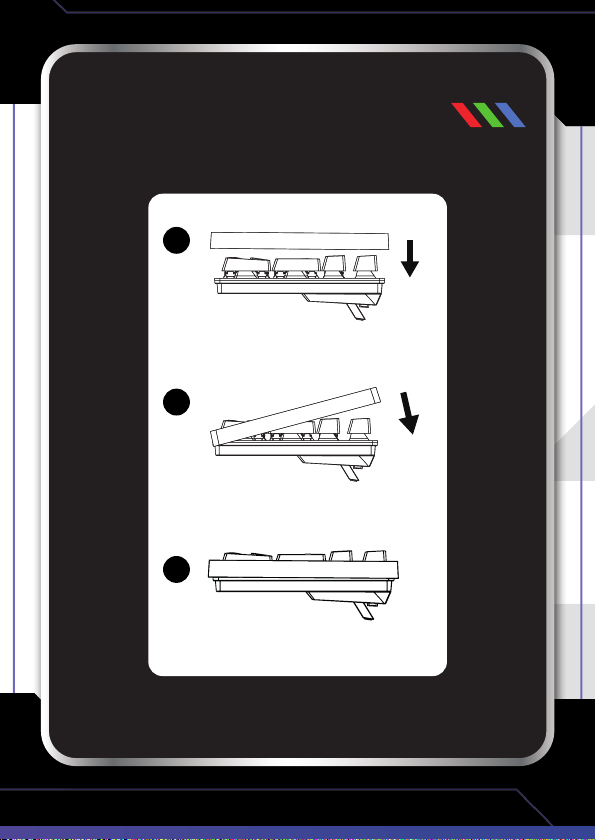
INSTALLING
THE COVER
1
2
3
CONNECTING YOUR
KEYBOARD
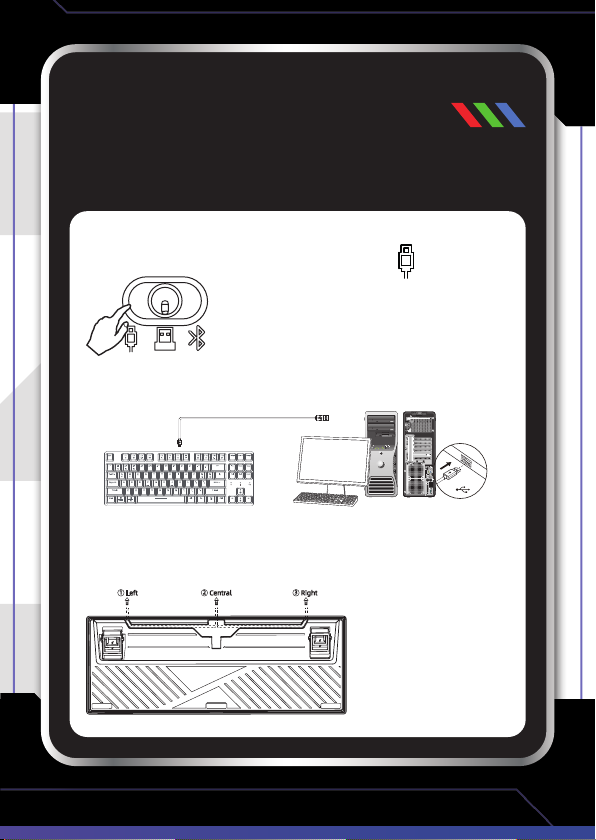
The G-Tek Cyborg 1000 TKL Mechanical Gaming Keyboard can
connect to your PC in 3 different ways.
Wired Connection
- Move the switch on the back of the keyboard to the position.
- Connect the USB cable to the keyboard, then connect the other end
to a USB port on your PC
- Your keyboard is now ready to use.
- The grooves underneath the keyboard are used for cable management.
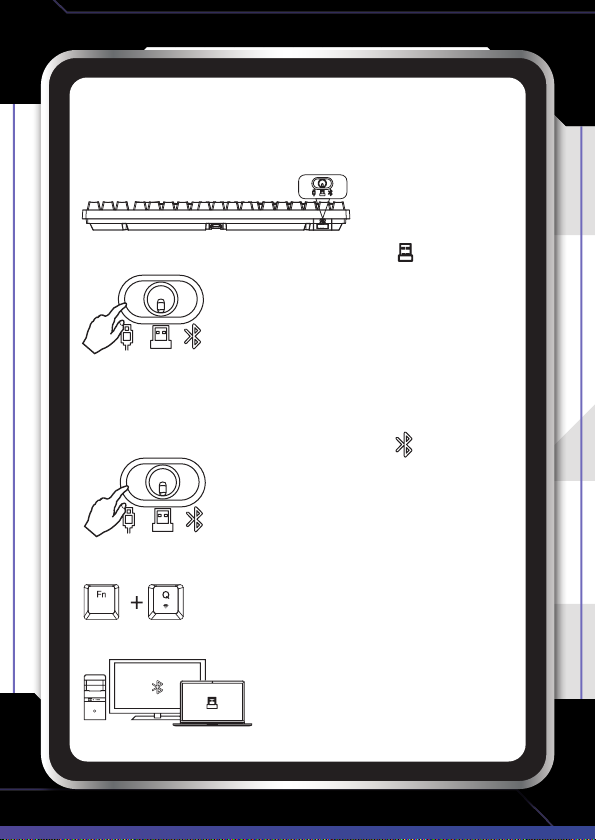
Wireless 2.4GHz Connection
- Remove the Nano Dongle from the back of the keyboard and plug into
a USB port on your PC.
- Move the switch on the back of the keyboard to the position.
- Your keyboard is now ready to use.
Bluetooth Connection
- Move the switch on the back of the keyboard to the position.
- Press and hold the Fn + Q keys for 3 seconds to put the keyboard into
Bluetooth pairing mode.
- On your PC, search for and select Bluetooth name GA-CBKB87TRI.
- Your keyboard is now ready to use.
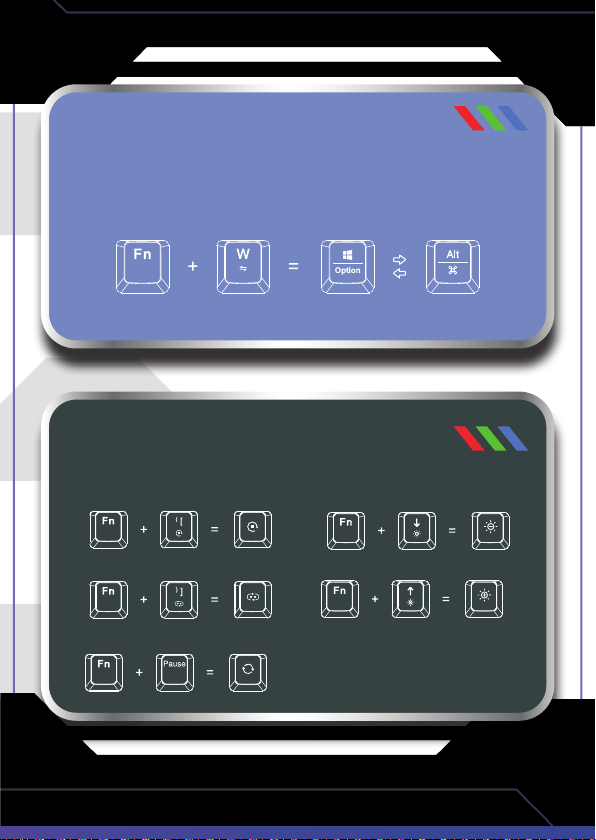
CHANGING KEY FUNCTIONS
BETWEEN WINDOWS AND MAC OS
Press the Fn + W keys simultaneously to toggle the
Windows and Alt keys to Option and Command.
FN KEY LED LIGHT
CONTROLS
- Change light mode
- Change light colours
- Reset the settings to factor y default
- Decrease light brightness
- Increase light brightness

FN KEY
MULTIMEDIA CONTROLS
FN + F1 = Decrease monitor brightness
FN + F2 = Increase monitor brightness
FN + F3 = Toggle between Windows
FN + F4 = Show all Windows
FN + F5 = Search
FN + F6 = Switch input method
FN + F7 = Previous track
FN + F8 = Play/Pause track
FN + F9 = Next track
FN + F10 = Mute
FN + F11 = Decrease volume
FN + F12 = Increase volume

KEYBOARD
SPECIFICATIONS
Power Consumption: 50mA (no LED) - 300mA (brightest LED)
Battery: 2000mAh Li-Ion
Weight: 950g (with wire)
Keyboard Dimensions (without cover): 38 x 359.1 x 136.2mm
Keyboard Cover Dimensions: 137 x 360x 38mm
LED: Customizable RGB Lighting
Number of Keys: 87
Rollover : NKey
Keycaps: PBT Double Shot
KEY SWITCH
SPECIFICATIONS
Switch Type: Cherry MX Red (linear)
Actuation force: 45 ± 15 cN
Total Travel: 3.7mm
Pre-travel: 1.9mm
Bounce Time: < 5ms
Durability: > 50 million actuations

WARRANTY AGAINST DEFECTS
For more
helpful guides
visit us at
LASER
www.youtube.com/LasercoAu
www.laserco.com.au
Laser warrants your new product to be free from defects in materials and workmanship
for 12 months, from the date of purchase, provided that the product is used in accordance
with accompanying recommendations or instructions where provided. The benet of this
warranty is in addition to your rights under the Australian Consumer Law and to other rights
and remedies of the consumer under a law in relation to the goods or services to which the
warranty relates.
Through a network of retailers and resellers, Laser will provide you with your choice of a
refund, repair, or exchange (where possible) for this product if it becomes defective within
the warranty period. This warranty will no longer apply where the defect is a result of
alteration, accident, misuse, abuse, normal wear and tear, neglect, or improper storage.
Please retain your receipt as proof of purchase
How to make a product warranty claim:
1. Find your receipt with date of purchase. If this is not available, Laser will make an
assessment based on the date of manufacture, condition of the product and type of defect.
2. Please contact your original place of purchase. They will assess the nature of the fault and
refund or replace the product as per their store refund or warranty policy.
3. If your original place of purchase cannot be contacted, please contact Laser with a
description of the fault. To assist our team in providing you with a quick resolution, please
include any photos and/or a short video demonstrating the fault with your product.
• Phone: (02) 9870 3355
• Email: [email protected]
• Online: www.laserco.net/support/warranty and follow the website instructions
• Business Address: U1 6-8 Byeld Street, Macquarie Park, 2113, NSW, Australia
4. Laser will review your claim and in the rst instance, attempt to troubleshoot and resolve
the issue for you without the need to return the product.
5. If it is determined via troubleshooting that your product may be faulty, our team will
provide instructions to have the product returned for assessment. If the product does
need to be returned within the warranty period, Laser will arrange return shipping at no
cost to you.
6. Once we receive the product, our experienced technicians will assess it and determine how
best to resolve the issue.
Our goods come with guarantees that cannot be excluded under the Australian Consumer
Law. You are entitled to a replacement or refund for a major failure and compensation for
any other reasonably foreseeable loss or damage. You are also entitled to have the goods
repaired or replaced if the goods fail to be of acceptable quality and the failure does not
amount to a major failure.
This manual suits for next models
2
Table of contents
Other G-Tek Keyboard manuals