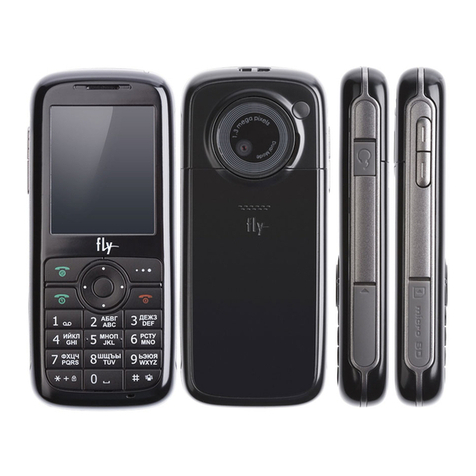
FLY mx200i User manual

1
Contents
FOR YOUR SAFETY ....................................................2
UNPACKING ................................................................7
YOUR PHONE .............................................................9
GETTING STARTED ...................................................21
GENERAL FUNCTIONS..............................................28
IN-CALL OPTIONS.....................................................32
TEXT INPUT TIPS.......................................................34
USING PHONEBOOK.................................................36
MESSAGES ...............................................................38
CALL HISTORY..........................................................50
SETTINGS..................................................................55
MULTIMEDIA..............................................................65
TOOLS.......................................................................83
SERVICES..................................................................87
FILE MANAGER.........................................................90
USING BATTERIES ....................................................96
MENU MAP ...............................................................98

2
For Your Safety
For your safety, please refer to the guideline prior to using
the phone. Failure to comply with the guidelines may
cause malfunctions or be hazardous to the user.
ROAD SAFETY COMES FIRST
Please be careful not to use the phone while driving. In
case you need to use the phone, please pull over your
vehicle first. In some countries, it is illegal to use a wireless
phone while driving. Also, it is recommended to avoid using
a mobile phone while refueling at a gas station
SWITCH OFF IN AIRCRAFT
Mobile phones may cause interference to the aircrafts
navigation system. Please make sure the phone is in
switch off mode while in the airplanes.
RESPECT SPECIAL REGULATIONS
Please follow special regulations in any areas wherever it is
applicable. It is recommended to switch off your phone
whenever it is illegal to use, or when it may cause
interferences, such as hospitals.
INTERFERENCE
All mobile phones may be subject to radio interference,
which may affect the performance during calling and
receiving.
QUALIFIED SERVICE
It is highly recommended to have a repair service by

3
qualified service personnel. Use only the approved
accessories and batteries.
USE PROPERLY
Use only in the normal position (hold to the ear). Avoid
unnecessary contact with the antenna when the phone is
switched on.
EMERGENCY CALLS
When making an emergency calls, please ensure that the
phone is switched on and is in service. Enter the
emergency number (Official Emergency Number or
another official emergency number) and press the [Send
Key]. Inform your current location. Do not end the call until
given permission to do so. You may end the call by
pressing the [End Key].
OPERATING ENVIRONMENT
Remember to follow any special regulations in force in
any area and always switch off your phone whenever it
is forbidden to use it, or when it may cause interference
or danger (in a hospital for example).
Operation of any radio-transmitting equipment, including
cellular phones, may interfere with inadequately
protected medical devices. Consult a doctor or the
manufacturer of the medical device if you have any
questions. Other electronic equipment may also be
subject to interference.
As with other mobile radio-transmitting equipment, you

4
are advised that for satisfactory operations and personal
safety, the equipment should only be used in the normal
operating position.
Always switch off the phone when refueling (service
station). You are reminded of the need to observe
restrictions on the use of radio equipment in fuel depots
(fuel storage and distribution areas), chemical plants or
where blasting operations are in progress.
Do not store or carry flammable liquids, gases or
explosive materials in the same compartment as the
phone, its parts or accessories.
Switch off your cellular phone when in aircraft. The use
of cellular phones in aircraft is illegal and may be
dangerous to the operation of the aircraft or disrupt the
cellular network. Failure to observe these instructions
may lead to the suspension or denial of cellular
telephone services to the offender, legal action or both.
CARE AND MAINTENANCE
Your phone is a product of superior design and
craftsmanship and should be treated with care. The
suggestions below will help you fulfill the warranty
obligations and enjoy this product for many years.
Keep the phone and all its parts and accessories out of
the reach of small children.
Keep the phone dry. Precipitation, humidity and liquids
containing minerals will corrode the electronic circuits.
Do not use or store the phone in dusty, dirty areas as its

5
components may get damaged.
Do not store the phone in warm areas. High
temperatures can shorten the life of electronic devices,
damage batteries and warp or melt certain plastics.
Do not store the phone in cold areas. When the phone
warms up to its normal temperature, moisture can form
inside the phone, which may damage the electronic
circuits.
Do not attempt to open the phone’s casing. Non-expert
handling of the phone may cause damages to your
phone.
Do not drop or knock the phone. Rough handling may
damage the internal circuits.
Do not use harsh chemicals, cleaning solvents or strong
detergents to clean the phone. Wipe out with a soft cloth
slightly dampened in mild, soapy water.
If the phone or any of its accessories are not working
properly, take them to your nearest qualified service
center. The personnel there will assist you, and if
necessary, arrange for the phone to be repaired.
Using the earpieces or stereo headset for extended time
can cause a serious damage to your hearing. Exposing
sound higher than 100db for a long time, you will get
possible ear damage that could results from extensive
usage of audio playback. You are strongly advised to
check the volume level to medium before using.
Use only Fly branded original chargers intended for use
with your mobile phone. Other chargers may not be

6
designed to the same safety and performance
standards. (The use of any other types may invalidate
any approval or warranty, and may be dangerous.)
Do not use the phone while charging the phone. You
may be electric-shocked if you use the phone while
charging the phone with the USB data cable or the
battery charger. Make sure to disconnect the USB data
cable or the charger before using the phone.
CHARGER OPERATION
Please, read this manual before using the charger, for the
correct operation of the appliance.
IMPORTANT SAFETY INSTRUCTIONS
The charger should be used for Li-Ion accumulators
charging only.
Do not charge other types of accumulators with this
charger.
Do not expose the charger to moisture or rain.
Do not disassemble the charger or the network adapter.
Unplug the network adapter when not in use.
Do not connect this charger with the appliances or
peripheral devices, which are not indicated in this booklet.
It is not recommended to discharge the Li-Ion
accumulator before charging.
SPECIFICATIONS OF THE CHARGER
The charger consists of:

7
Main charger
Adapter plates (the compatibility list is cited on the
reverse side of the package)
Network adapter 220V alternating/direct current
Car electric cigar lighter adapter
ADVICES CONCERNING USAGE
For 220/110V alternating current:
Connect the charger with the network adapter
– insert the adapter into the charger jack.
Plug the network adapter to the wall outlet
For 12V car electric cigar lighter adapter (option):
Connect the charger with the car electric cigar lighter
adapter - insert the adapter into the charger jack, marked
as “Input 12-18V DC”.
Plug the adapter into yours car electric cigar lighter
(warning: this charger works under 12V connectors only:
passenger cars).
Recycling of accumulators
Accumulators should be disposed in accordance with
established rules.
It is forbidden to throw away accumulators along with
domestic garbage. If possible, use specialized
organizations services for accumulators recycling.
Unpacking
Thank you for purchasing this product. Please check the

8
product contents to see if you have all the available items
as below. (*Images may vary from the actual product in your
package.)
Handset
Battery
User Manual
Ear/Microphone
micro SD (T-Flash) Card
(optional)
Travel Charger
PC Sync Manager CD & USB Data Cable

9
Your Phone
PHONE LAYOUT

10
KEY DEFINITION
Soft Keys
Perform functions identified by left/right
display prompt.
Right button: Cancel numbers & letters
when you make a call or input letter for
phonebook, message or WAP.
Navigation Keys
Scroll through the menu options.
Move the cursor up and down in the
normal editing mode.
Move the cursor to left and right in all
editing mode.
Send Key
Dial or answer a call.
Recall the last 10 numbers in the idle
mode.
Table of contents
Other FLY Cell Phone manuals