Fantec P3700 Web User manual

ENGLISH

Table of Contents
1. Introduction.......................................................................................................................... 3
1.1 Preface......................................................................................................................... 3
1.2 Packing List.................................................................................................................. 5
1.3 Cautions ....................................................................................................................... 5
1.4 Connection ................................................................................................................... 7
1.5 View............................................................................................................................ 12
1.6 Menu Language ......................................................................................................... 13
1.7 HDD Format ............................................................................................................... 13
2. About the Player ................................................................................................................ 14
2.1 Remote Control .......................................................................................................... 14
3. Main Functions .................................................................................................................. 16
3.1 Setup Menu................................................................................................................ 16
3.2 Movie Library.............................................................................................................. 26
3.3 Photo Library.............................................................................................................. 28
3.4 Music Library.............................................................................................................. 30
3.5 File Manager............................................................................................................... 32
3.6 Playlist Management.................................................................................................. 36
3.7 Copy und Delete Function.......................................................................................... 37
3.8 Internet Media............................................................................................................. 39
3.9 SAMBA Server and Client.......................................................................................... 43
3.10 FTP Server............................................................................................................... 44
3.11 Virtual Remote Control ............................................................................................. 46
4. Upgrading the Firmware................................................................................................... 48
5. Appendixes......................................................................................................................... 49
6. Frequently Asked Questions............................................................................................ 51
7. Copyrights and Trademarks............................................................................................. 53
8. Warranty ............................................................................................................................. 53
9. GPL Statement................................................................................................................... 54
ENGLISH
2 / 59

1. Introduction
1.1 Preface
Thank you very much for purchasing FANTEC P3700 Web. We hope you will enjoy using it as
a great home entertainment partner. This player has the following functionality.
A/V Output
•HDMI V1.3 for high-definition video and digital audio
•Composite & component video and stereo audio for analog audio-visual connection
•S/PDIF optical and coaxial interface for high-fidelity digital audio
•Adjustable video output resolution (NTSC, PAL, 480p, 576p, 720p, 1080i, 1080p)
Movie Playback
•Movie format: AVI, VOB, MKV, MOV, MP4, MPG, TS, WMV, DAT, IFO, RM, RMVB, ISO
(DVD & BluRay), AVCHD, MTS, M2TS, M4V, ASF, FLV, XviD, DivX 3/4/5, DVD menu
playback, H.264, resolution up to 720p/1080i/1080p
•Supports major audio formats (1080p HD video decoding)
•Fast forward/rewind
•View subtitle
•Subtitle control: color/offset/size
•Unicode (UTF8), BIG5 (Traditional Chinese), Western, Turkish, Central European, Greek,
Cyrillic, SE European, Russian, Hebrew, Arabic, Japanese, Thai
Music Playback
•Music format: MP3, OGG, WMA, WAV, AAC, FLAC, PCM, LPCM, MS-ADPCM, LC-AAC,
HE-AAC, COOK, RA-Lossless
•Stereo/Dolby Digital AC3 5.1(pass-through & downmix to stereo)
•Dolby Digital Plus 7.1(pass-through)
•Dolby TrueHD 7.1(pass-through & downmix to stereo)
•DTS Digital Surround 5.1(pass-through & downmix to stereo)
•AAC 7.1 (passthrough & downmix to stereo)
•Fast forward/rewind
•Shuffle
•Repeat
Photo Playback
•Photo format: HD JPEG, JPG, BMP, GIF, TIF, PNG
•You can view photos in slide show mode with background music.
•Zoom in/out, Rotate
ENGLISH
3 / 59

Network Feature
•A/V streaming/transmission via Ethernet (10M/100M/1000M) & Wi-Fi (802.11b/g/n,
optional)
•File sharing via Samba server
•FTP server
•A/V streaming via UPnP Media Server
•BitTorrent download
•Internet Radio (Please visit www.shoutcast.com for available stations)
•Video podcast subscribe and download
•Web-based remote control for smart phones, iPhone & PC
Media Library
•Quick-Search, search files by keywords.
•A powerful search engine, allows you to browse multimedia files in most easy ways
File Copy
•Supports copying & moving files among USB devices, Local HDD, and Network
USB 3.0 & USB 2.0 Support
•USB 3.0 DEVICE port (for computer connection, compatible to USB 2.0/1.1 )
•USB HOST port x 5 (for USB storage devices),for connection of an USB DVD drive, an
USB Y-cable is recommended
•1 x SD / SDHC / MMC / MS / MS pro Card Reader
Note: All the information contained in this manual was correct at the time of publication.
However, as our engineers are always updating and improving the product, your device’s
software may have a slightly different appearance or modified functionality than presented in
this manual.
ENGLISH
4 / 59

1.2 Packing List
Part Quantity
Player 1
USB cable 1
Remote Control 1
Remote Control Battery 2
AC/DC adaptor 1
Quick start guide 1
Driver CD (with User Manual) 1
Warranty card 1
Note: The actual contents in the package might be different from the packing list in the manual.
1.3 Cautions
The FANTEC P3700 Web design and manufacture has your safety in mind. In order to safely
and effectively use this player, please read the following before usage.
1.3.1 Usage Cautions
User should not modify this player. If commercial hard disk is being used, the environmental
temperature should be within +5℃~ +35℃.
1.3.2 Power
The player’s power voltage: DC 12V.
When using this player, please connect the supplied AC adapter or AC adapter cable to the
player’s power jack. When placing the adapter cable, make sure it can not get damaged or be
subject to pressure. To reduce the risk of electric shock, unplug the adapter first before
cleaning it. Never connect the adapter to the player in a humid or dusty area. Do not replace
the adapter or cable’s wire or connector.
1.3.3 Radio Interference
- If not properly shielded, almost all electronic devices will get radio interference. Under some
conditions, your player might get interference.
- The design of this player has followed the FCC/CE standard, and has followed the following
rules:
(1) This player may not cause harmful interference;
(2) This player could accept some interference received including interference that may cause
undesired operation.
1.3.4 Repair
If the player has a problem, you should take it to an appointed repair center and let the
specialists do the repair, never repair the player yourself, you might damage the player or
endanger yourself or your data.
ENGLISH
5 / 59

1.3.5 Disposing of the Player
When you dispose of the player, be sure to dispose it appropriately. Some countries may
regulate disposal of electrical device, please consult with your local authority.
1.3.6 Hard Disk Cautions
The player uses an internal hard disk for data storage, in normal case, format or repair is not
required.
You should carefully read the < Frequently Asked Questions > chapter, and check our website
for latest information before formatting the hard disk.
- Physical impact may create bad sector in the hard disk, you can use CHKDSK to fix the
problem.
- All data stored in the player may be lost due to physical impact, electrical shock, power lost,
HDD format etc. Please backup your data.
- It is suggested to do defragment after a long period of usage.
- Regularly backup the data in the hard disk so that it can be recovered in the event of data
corruption or loss. Our company takes no responsibility for loss of data stored on the hard disk.
1.3.7 Others
When using this player, please do not let the player come into contact with water or other liquid,
if water is accidentally spilled on the player, please use a dry cloth to absorb the spillage.
Electronic products are vulnerable, when using please avoid shaking or hitting the player, and
do not press the buttons too hard.
Do not let the player come into contact with water or other liquid.
Do not disassemble the player, repair the player or change the design of the player, any
damage done will not be included in the repair policy.
Do not press the buttons of the player too hard.
Avoid hitting the player with hard object, avoid shaking the player, and stay away from
magnetic fields.
During electrostatic discharge and the strong electromagnetic field, the product will
malfunction, then unplug the power cable and the product will return to normal performance
next time it is powered on.
ENGLISH
6 / 59

1.4 Connection
1.4.1 Connecting the Power Supply
(1) Follow the picture and connect theAC adaptor to the player’s DC IN jack;
(2) Follow the picture and plug in theAC adaptor to the power outlet.
1.4.2 Connecting to a PC
(1) Make sure the player is powered on;
(2) Plug in the squarish connector of the USB cable to this player’s USB DEVICE port;
(3) Plug in the rectangular connector of the USB cable to computer.
In this way, you can manage content on the built-in HDD of the player on your local PC.
ENGLISH
7 / 59

1.4.3 Connecting a USB Device
(1) Make sure the player is powered on;
(2) Plug in the USB stick, USB DVD or USB HDD etc. to the USB HOST port of this player.
In this way, you can browse contents on the USB device.
1.4.4 Connecting a Memory Card
Memory card can be used by inserting to the card slot
(1) Follow the picture to insert the memory card to the card slot properly;
(2) Insert the card by following the arrow pointer in the picture.
In this way, you can browse contents on the memory card.
1.4.5 Connecting to a TV
1.4.5.1 A/V OUT
(1) Follow the picture and plug in the 3 color connector to the player’s A/V OUT jack;
(2) Follow the picture and plug in the 3 color connector to the TV’s A/V IN jack.
In this way, you can enjoy the content in the player on TV or other display devices.
ENGLISH
8 / 59

1.4.5.2 SCART OUT
(1) Follow the picture and plug one connector on the SCART cable to the player’s SCART
socket;
(2) Follow the picture and plug the other connector on the SCART cable to the TV’s SCART
socket.
1.4.5.3 Y/Pb/Pr Component OUT
(1) Follow the picture and plug in the 3 color connector to the player’s Y/Pb/Pr jack;
(2) Follow the picture and plug in the 3 color connector to the TV’s Y/Pb/Pr jack.
Audio Connection while using Y/Pb/Pr Video out:
First method: use the audio output from theA/V OUT jack;
Second method: use the audio output from the S/PDIF Coaxial or Optical jack.
ENGLISH
9 / 59

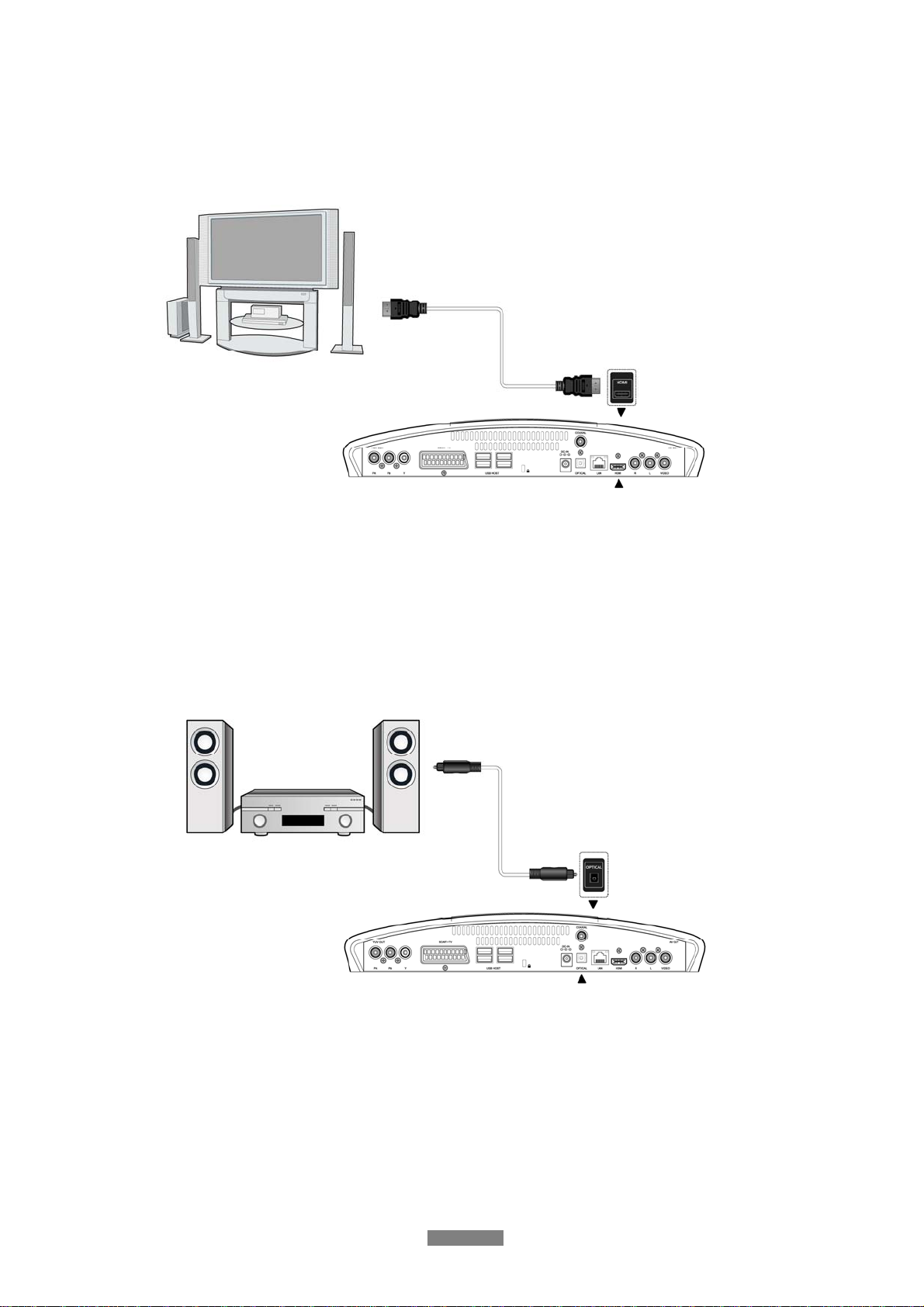
1.4.5.4 HDMI OUT
(1) Follow the picture and plug one connector on your HDMI cable to the player’s HDMI jack;
(2) Follow the picture and plug the other connector on your HDMI cable to the TV’s HDMI jack.
Note: The HDMI cable is an optional accessory sold separately.
In this way, you can have the highest quality video and audio via a single cable.
1.4.6 Connecting to an Digital Amplifier
(1) Follow the picture and plug in the Toslink connector of your optical fiber to the player’s
S/PDIF optical jack;
(2) Follow the picture and plug in the other connector on your optical fiber to the digital audio
device (digital amplifier or decoder).
Note: Optical fiber cable is not supplied.
In this way, you can enjoy powerful Dolby Digital/ Dolby Digital Plus/ Dolby TrueHD/ DTS or
MPEG sound. DTS-HD sound is transferred via HDMI cable and an amplifier with HDMI
interface is needed. (Please refer to ‘3.1.2 Changing Audio Settings’ for configuration)
ENGLISH
10 / 59
Table of contents
Other Fantec Media Player manuals

Fantec
Fantec TV-LHD User manual

Fantec
Fantec MM-HDBTL User manual

Fantec
Fantec 4KS7800Air User manual

Fantec
Fantec 4KS7000 User manual

Fantec
Fantec 4KS7700Air User manual

Fantec
Fantec S3600 Web User manual

Fantec
Fantec QB-35US3 User manual

Fantec
Fantec 3DFHDN User manual

Fantec
Fantec MM-HDRL User manual

Fantec
Fantec 4KS7000 User manual

Fantec
Fantec XMP600 + WiFi User manual

Fantec
Fantec Full HD Media player User manual

Fantec
Fantec 3DS4600 User manual

Fantec
Fantec MM-CR35US User manual

Fantec
Fantec RayPlay U3 User manual

Fantec
Fantec MM-FHDL User manual

Fantec
Fantec MM-CH26US User manual

Fantec
Fantec R2700 User manual

Fantec
Fantec P2700 User manual

Fantec
Fantec 3DAluPlay User manual