D-Link DPH-850S User manual


1
Contents
1 INTRODUCTION........................................................................ 4
1.1 ANDROID IP VIDEO PHONE DPH-850S OVERVIEW....................................................... 4
1.2 PHONE COMPONENT DESCRIPTIONS ........................................................................... 5
1.3 THE INSTALLATION OF BACKPLANE ............................................................................. 7
1.4 INTERFACE INTRODUCTION....................................................................................... 7
1.5 TOUCH SCREEN DESCRIPTION ................................................................................... 9
1.6 UPDATE OF THE PHONE ......................................................................................... 11
2 BASIC FUNCTION.....................................................................12
2.1 SCREEN KEYBOARD .............................................................................................. 12
2.2 STATUS BAR ....................................................................................................... 12
2.3 MAIN SCREEN .................................................................................................... 14
2.4 THE APPLICATION OF DPH-850S’S FUNCTION: ......................................................... 16
2.5 DESKTOP WIDGETS.............................................................................................. 18
3 SETTINGS ................................................................................21
3.1 SYSTEM INFO...................................................................................................... 21
3.2 NETWORK ......................................................................................................... 22
3.2.1 Network........................................................................................................................22
3.2.2 PPPoE ...........................................................................................................................24
3.2.3 QoS...............................................................................................................................25
3.2.4 Port...............................................................................................................................28
3.2.5 Stun ..............................................................................................................................28
3.3 ACCOUNT.......................................................................................................... 29
3.4 CALL ................................................................................................................ 32
3.4.1 General.........................................................................................................................32
3.4.2 Dial plan .......................................................................................................................34
3.4.3 Accounts.......................................................................................................................35
3.5 DISPLAY ............................................................................................................ 35
3.5.1 Screen...........................................................................................................................36
3.5.2 Hibernate .....................................................................................................................36
3.5.3 Display..........................................................................................................................37
3.6 TONE ............................................................................................................... 38
3.6.1 Tone..............................................................................................................................38
3.6.2 Volume .........................................................................................................................39
3.7 LANGUAGE ........................................................................................................ 39
3.8 DATE TIME......................................................................................................... 40
3.9 MAINTAIN ......................................................................................................... 41
3.9.1 Update..........................................................................................................................41

2
3.9.2 Web server ...................................................................................................................45
3.9.3 Menu password............................................................................................................46
3.9.4 Factory reset.................................................................................................................47
3.9.5 Reboot..........................................................................................................................47
3.10 AUDIO ............................................................................................................ 48
3.10.1Audio...........................................................................................................................48
3.10.2 Audio param...............................................................................................................48
3.11 VIDEO ............................................................................................................ 49
3.11.1 Video param...............................................................................................................49
3.11.2 Bandwidth ..................................................................................................................50
3.12 CALL FIREWALL ................................................................................................. 51
4 PHONE APPLICATION...............................................................53
4.1 PHONE ............................................................................................................. 53
4.2 CONTACTS ......................................................................................................... 58
4.3 CALL LOGS ......................................................................................................... 63
4.4 MEMORY KEY..................................................................................................... 65
4.5 NETWORK PHONEBOOK .........................................................................................67
4.6 MWI ............................................................................................................... 69
4.7 MULTI-LINE OPERATION ........................................................................................ 69
5 OTHER APPLICATION ...............................................................70
5.1 EMAIL ...............................................................................................................70
5.2 CALCULATOR .......................................................................................................72
5.3 NOTE PAD...........................................................................................................74
5.4 BROWSER.......................................................................................................... 75
5.5 RECORDER......................................................................................................... 75
5.6 DIGITAL CLOCK.................................................................................................... 77
5.7 ALARM CLOCK.................................................................................................... 77
5.8 GALLERY ............................................................................................................78
5.9 FILE MANAGER................................................................................................... 79
5.10 CAMERA ......................................................................................................... 80
5.11 MUSIC............................................................................................................ 81
5.12 CALIBRATION.................................................................................................... 83
5.13 CALENDAR ....................................................................................................... 83
5.14 PINGBOX ........................................................................................................ 83
6 ANDROID SETTINGS ................................................................85
6.1 BASIC SETTINGS .................................................................................................. 85
6.1.1 WAN .............................................................................................................................85
6.1.2 Sound & display............................................................................................................86
6.1.3 Configuration management .........................................................................................88

3
6.1.4 Language & keyboard...................................................................................................89
6.1.5 Date & time..................................................................................................................89
6.2 VOIP SETTINGS................................................................................................... 90
6.3 CALL SETTINGS.................................................................................................... 94
6.4 ADVANCED SETTINGS............................................................................................ 96
6.4.1 Location & security.......................................................................................................96
6.4.2 Privacy..........................................................................................................................96
6.4.3 Applications..................................................................................................................97
6.4.4 Accounts & sync ...........................................................................................................97
6.4.5 SD card and memory....................................................................................................97
6.4.6 Search...........................................................................................................................98
6.5 ABOUT PHONE.................................................................................................... 98
7 WEB PAGE CONFIGURATION DESCRIPTION.............................100
7.1 BASIC.............................................................................................................101
7.2 NETWORK .....................................................................................................102
7.3 VOIP ..............................................................................................................105
7.4 PHONE ..........................................................................................................111
7.5 MAINTENANCE..............................................................................................114
7.6 SECURITY.......................................................................................................120
7.7 LOGOUT ........................................................................................................122

4
1 Introduction
1.1 Android IP Video Phone DPH-850S Overview
Item Description
DPH-850S Phone DPH-850S IP Video Phone with display and
keypad.
Power Adapter Power supply for telephone.
Network Cable Used to access network for the phone.
Handset Make phone calls with the phone’s basic
functions.
Handset Cord Connected with the handset and the phone.
Quick Installation Guide Quick install the DPH-850S guide.
CD Containing manual and quick installation guide.
Warranty Safety
Information
Warranty Safety Information for DPH-850S.

5
1.2 Phone component descriptions
Key Function
Search key. Tap the key and you can enter the search
interface.
Menu key. You can browse and accomplish all functions
of the phone through pressing this key.
Return key. Press this button in the detailed interface, it
will return to the previous interface; If it is pressed in the
application program interface, the current program will be
closed.
Home key. Press this key, the phone will return to the idle
screen.
Volume control key. Turn down or turn up all kinds of
volume by pressing these two keys.
Mute key. In the call mode, press this key in calling mode,
you can hear the other side, and the other side cannot hear
you; press this button again to leave this mode.

6
When the phone call is ringing, press this button to turn
off the ring tips.
Confirm key.
Delete key.
R/Send key. Use the key to dial the last call number. It
also could be used to make a phone call by sending a
phone number.
Navigation key.
Menu key.
Phone book. Tap to enter the contacts interface.
Call log. Tap to see call log.
Headset key.
Digital keyboard.
The hands-free key.

7
1.3 The Installation of backplane
Set the telephone
The back plate is horizontally placed in the telephone at the bottom, and makes
the phone and joint part of the two screws tightened, right now its steady
placed on the desktop.
1.4 Interface introduction
Name Meaning
(Left first)
SD Card interface Connect SD Card for saving
data.

8
(Left second)
DC Power Interface Input: 220V AC
Output: 12V DC
(Left third)
LAN Network interface
Specification RJ45, connect it
computer.
(Right third)
WAN Internet interface Specification RJ45, connect it
to network.
(Right second)
PSTN Normal phone
interface
Specification RJ11, connect the
general public telephone
network. (Option)
(Right first)
Handset interface
Specification RJ9, used to
connect the handset to the
phone.

9
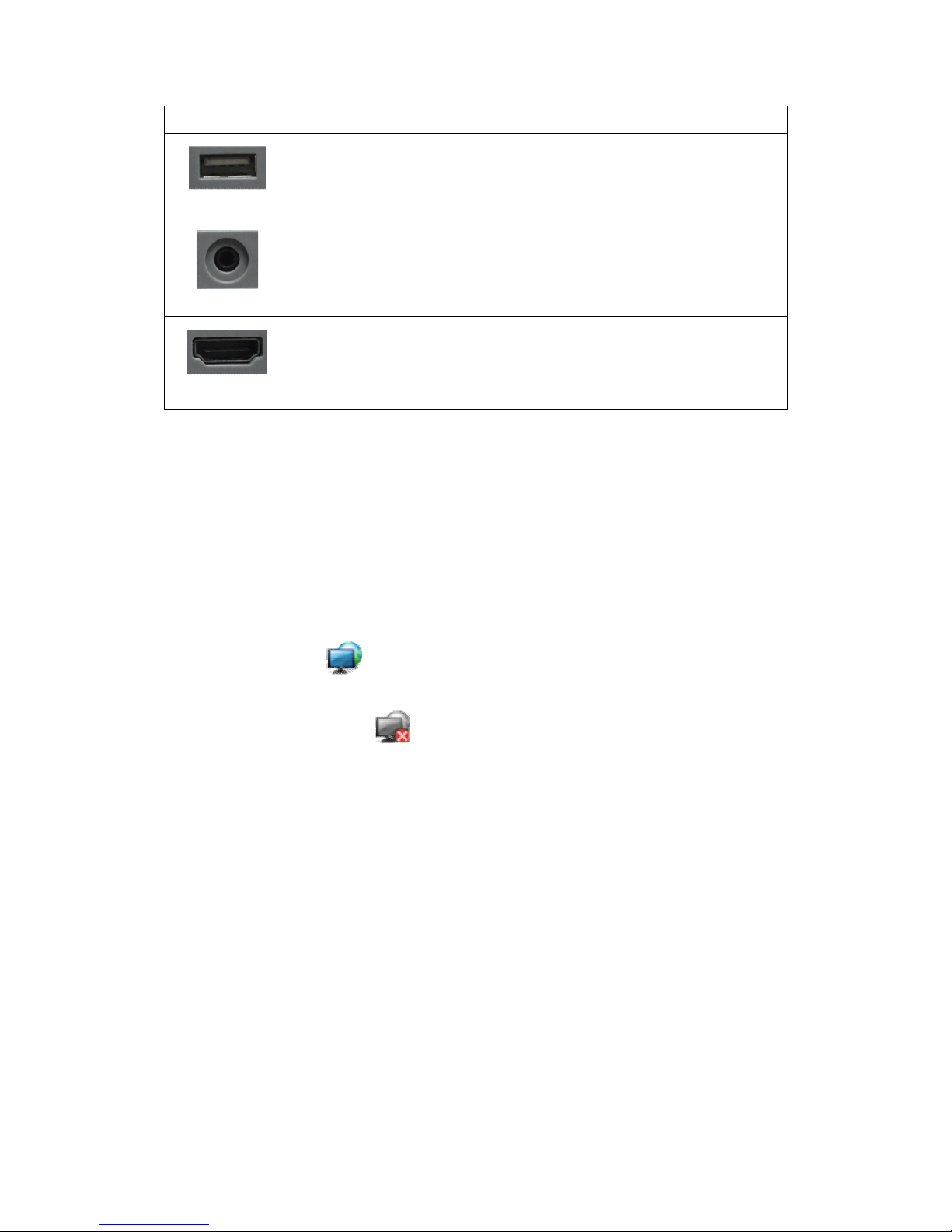
Name Meaning
(Left first)
USB interface. Connect it to USB disk.
(Center)
Handset interface. Connect the handset.
(Right first)
HDMI interface.
Interface for high-definition
audio and video. A-A interface,
A to A interface.
Note:
1. Put the handset line into the handset interface according to the interface
illustration picture.
2. Install the backplane to the bottom of the phone with the above method.
3. Plug the power adapter into the DC port; poke the other side of the power
adapter into an electric socket.
4. Insert one end of RJ45 network cable into the phone’s WAN port (Please
refer to the interface illustration picture 1) and put the other end into the
network equipment. After that, if the network connection status on the status
bar is displayed as , actions such as making some telephone calls and
surfing the internet could be done. If the network connection status on the
status bar is displayed as , please verify whether the network was
configured correctly and the network cable was plugged in correctly.
1.5 Touch Screen Description
You can touch the screen manually to complete the corresponding operation.
Here are three ways to use:
Click: Any icon or button can be clicked to realize its function.
Table of contents
Other D-Link IP Phone manuals

D-Link
D-Link DWR-920/PW User manual

D-Link
D-Link DPH-150S User manual

D-Link
D-Link GLV-540 User manual

D-Link
D-Link DPH-125MS - VoiceCenter VoIP Phone User manual

D-Link
D-Link DPH-100 User manual

D-Link
D-Link DPH-80 User manual

D-Link
D-Link DPH-70L User manual

D-Link
D-Link DPH-130S User manual

D-Link
D-Link DWR-720/PW User manual

D-Link
D-Link Telkom DWR-720/PW User manual

D-Link
D-Link DPH-80 User manual

D-Link
D-Link DPH-540 User manual

D-Link
D-Link DPH-C160S User manual

D-Link
D-Link DPH-150S User manual

D-Link
D-Link DPH-100 User manual

D-Link
D-Link DPH-10U Instruction manual

D-Link
D-Link DPH-100H User manual

D-Link
D-Link DPH-70 User manual

D-Link
D-Link DPH-120S User manual

D-Link
D-Link DPH-400S User manual