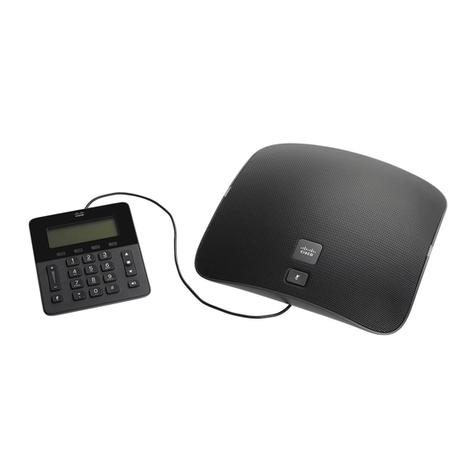
Cisco 8831 User manual

Cisco Unified IP Conference Phone 8831 User Guide for Cisco Unified
Communications Manager 9.0
First Published: June 21, 2013
Last Modified: August 27, 2013
Americas Headquarters
Cisco Systems, Inc.
170 West Tasman Drive
San Jose, CA 95134-1706
USA
http://www.cisco.com
Tel: 408 526-4000
800 553-NETS (6387)
Fax: 408 527-0883

THE SPECIFICATIONS AND INFORMATION REGARDING THE PRODUCTS IN THIS MANUAL ARE SUBJECT TO CHANGE WITHOUT NOTICE. ALL STATEMENTS,
INFORMATION, AND RECOMMENDATIONS IN THIS MANUAL ARE BELIEVED TO BE ACCURATE BUT ARE PRESENTED WITHOUT WARRANTY OF ANY KIND,
EXPRESS OR IMPLIED. USERS MUST TAKE FULL RESPONSIBILITY FOR THEIR APPLICATION OF ANY PRODUCTS.
THE SOFTWARE LICENSE AND LIMITED WARRANTY FOR THE ACCOMPANYING PRODUCT ARE SET FORTH IN THE INFORMATION PACKET THAT SHIPPED WITH
THE PRODUCT AND ARE INCORPORATED HEREIN BY THIS REFERENCE. IF YOU ARE UNABLE TO LOCATE THE SOFTWARE LICENSE OR LIMITED WARRANTY,
CONTACT YOUR CISCO REPRESENTATIVE FOR A COPY.
The following information is for FCC compliance of Class A devices: This equipment has been tested and found to comply with the limits for a Class A digital device, pursuant to part 15
of the FCC rules. These limits are designed to provide reasonable protection against harmful interference when the equipment is operated in a commercial environment. This equipment
generates, uses, and can radiate radio-frequency energy and, if not installed and used in accordance with the instruction manual, may cause harmful interference to radio communications.
Operation of this equipment in a residential area is likely to cause harmful interference, in which case users will be required to correct the interference at their own expense.
The following information is for FCC compliance of Class B devices: This equipment has been tested and found to comply with the limits for a Class B digital device, pursuant to part 15
of the FCC rules. These limits are designed to provide reasonable protection against harmful interference in a residential installation. This equipment generates, uses and can radiate radio
frequency energy and, if not installed and used in accordance with the instructions, may cause harmful interference to radio communications. However, there is no guarantee that interference
will not occur in a particular installation. If the equipment causes interference to radio or television reception, which can be determined by turning the equipment off and on, users are
encouraged to try to correct the interference by using one or more of the following measures:
•Reorient or relocate the receiving antenna.
•Increase the separation between the equipment and receiver.
•Connect the equipment into an outlet on a circuit different from that to which the receiver is connected.
•Consult the dealer or an experienced radio/TV technician for help.
Modifications to this product not authorized by Cisco could void the FCC approval and negate your authority to operate the product
The Cisco implementation of TCP header compression is an adaptation of a program developed by the University of California, Berkeley (UCB) as part of UCB’s public domain version
of the UNIX operating system. All rights reserved. Copyright ©1981, Regents of the University of California.
NOTWITHSTANDING ANY OTHER WARRANTY HEREIN, ALL DOCUMENT FILES AND SOFTWARE OF THESE SUPPLIERS ARE PROVIDED "AS IS" WITH ALL FAULTS.
CISCO AND THE ABOVE-NAMED SUPPLIERS DISCLAIM ALL WARRANTIES, EXPRESSED OR IMPLIED, INCLUDING, WITHOUT LIMITATION, THOSE OF
MERCHANTABILITY, FITNESS FOR A PARTICULAR PURPOSE AND NONINFRINGEMENT OR ARISING FROM A COURSE OF DEALING, USAGE, OR TRADE PRACTICE.
IN NO EVENT SHALL CISCO OR ITS SUPPLIERS BE LIABLE FOR ANY INDIRECT, SPECIAL, CONSEQUENTIAL, OR INCIDENTAL DAMAGES, INCLUDING, WITHOUT
LIMITATION, LOST PROFITS OR LOSS OR DAMAGE TO DATA ARISING OUT OF THE USE OR INABILITY TO USE THIS MANUAL, EVEN IF CISCO OR ITS SUPPLIERS
HAVE BEEN ADVISED OF THE POSSIBILITY OF SUCH DAMAGES.
Any Internet Protocol (IP) addresses and phone numbers used in this document are not intended to be actual addresses and phone numbers. Any examples, command display output, network
topology diagrams, and other figures included in the document are shown for illustrative purposes only. Any use of actual IP addresses or phone numbers in illustrative content is unintentional
and coincidental.
Cisco and the Cisco logo are trademarks or registered trademarks of Cisco and/or its affiliates in the U.S. and other countries. To view a list of Cisco trademarks, go to this URL: http://
www.cisco.com/go/trademarks. Third-party trademarks mentioned are the property of their respective owners. The use of the word partner does not imply a partnership
relationship between Cisco and any other company. (1110R)
©2013 Cisco Systems, Inc. All rights reserved.

CONTENTS
CHAPTER 1
Preface 1
Introduction 1
Additional information 2
Safety and performance information 2
Power outage 2
External devices 2
Cisco product security overview 3
Accessibility Features 3
CHAPTER 2
Features of your Cisco Unified IP Conference Phone 5
Buttons and hardware 5
LED state definitions 6
Display Control Unit 7
Sound Base 8
Wireless extension microphone and charger kit 9
Wired extension microphone kit 12
Phone screen 13
Phone screen cleaning 14
Phone connections 14
Connect mini-USB cable to DCU 15
Install ferrite bead on network cable 16
General IP Phone information 17
Power-saving mode 17
Feature availability 18
CHAPTER 3
Applications 19
Services 19
Access Services 19
Cisco Unified IP Conference Phone 8831 User Guide for Cisco Unified Communications Manager 9.0
iii

Call History 19
View call history 20
View call record details 20
Dial from Call History 21
Edit phone number 21
Clear call history 21
Delete call record 22
Preferences 22
Ringtones 22
Change Ringtone 22
Contrast 23
Adjust Contrast 23
Linked Mode 23
Link Conference Phones 24
IP Phone Information 24
Administrator Settings 25
CHAPTER 4
Contacts 27
Corporate Directory 27
Dial Contact from Search 27
Dial Contact from Search during an active call 28
Personal Directory 28
Personal Directory options 29
Sign In and Out of Personal Directory 29
Add Personal Directory entry 30
Search for entry in Personal Directory 30
Dial number from Personal Directory 31
Delete Personal Directory entry 31
Edit Personal Directory entry 31
Fast-Dial codes with Personal Directory 32
Assign fast-dial code to PAB from the phone 32
Assign fast-dial code to PAB from User Options web page 32
Place call using fast-dial code 33
Delete fast-dial code 33
Cisco Unified IP Conference Phone 8831 User Guide for Cisco Unified Communications Manager 9.0
iv
Contents

CHAPTER 5
Messages 35
Access voicemail 35
Voice message identification 35
Access voice messages 35
CHAPTER 6
Calling features 37
Softkey feature map 38
Survivable Remote Site Telephony overview 39
Answer 41
Call Back 42
Set Up Call Back notification 42
Call Forward 42
Forward calls 43
Call Park 43
Park call 43
Call Pickup 44
Answer call using Pickup 44
Answer call using Group Pickup and Group Pickup Number 44
Answer call using Group Pickup and phone number 45
Answer call using Other Pickup 45
cBarge 45
Join conference on shared line 45
Conference 45
Add third party to conference 46
View conference participants 46
Remove conference participants 46
Divert 47
Divert call 47
Do Not Disturb 47
Turn DND on and off 47
Enhanced Room Coverage 48
Wireless Microphone menu 49
Pair wireless microphone 49
Unpair wireless microphone 50
Cisco Unified IP Conference Phone 8831 User Guide for Cisco Unified Communications Manager 9.0
v
Contents

Cisco Extension Mobility 51
Enable Extension Mobility 51
Fast Dial 51
Place call using Fast Dial 52
Hold 52
Hold active call 52
Switch between active and multiple holding calls 53
Hold active call and answer new incoming call 53
Hold Reversion 53
Respond to Hold Reversion notification 53
Meet Me conference 53
Host Meet Me conference 54
Join Meet Me Conference 54
Mobile Connect 54
Enable Mobile Connect 55
Switch IP phone call to mobile phone 55
Switch mobile call to IP phone 55
Monitoring and Recording 56
Multiple calls per line 56
Multiple incoming calls 56
Call ended on line with multiple calls 56
Outbound call maximum 56
Answer second call on same line 56
Switch between calls on same line 57
Create conference with two calls on same line 57
Transfer two calls on same line 57
Shared Line 58
Mute 58
Mute IP phone sound base 58
Mute IP phone DCU 59
On-Hook dialing 59
Dial number on-hook 59
Plus Dialing 59
Dial international number 59
Privacy 60
Cisco Unified IP Conference Phone 8831 User Guide for Cisco Unified Communications Manager 9.0
vi
Contents

Enable privacy on shared line 60
Quality Reporting Tool 60
Report IP phone problems 61
Redial 61
Redial number 61
Shared lines 61
Speed Dial 62
Place call using speed dial codes 62
Transfer 62
Transfer call to another number 62
Cisco WebDialer 63
Use WebDialer with Cisco directory 63
Use WebDialer with another online corporate directory 63
Change WebDialer preferences 64
CHAPTER 7
User Options web pages 65
Sign in and out of User Options web pages 65
Select device from User Options web page 66
Features and services setup on web 66
Personal directory on web 66
Personal Address Book on web 66
Add new Personal Address Book entry 67
Search Personal Address Book entry 67
Edit Personal Address Book entry 67
Delete Personal Address Book entry 67
Fast Dials on web 68
Assign Fast-Dial code to Personal Directory entry 68
Assign Fast-Dial code to phone number 68
Search for Fast-Dial entry 69
Edit Fast-Dial phone number 69
Delete Fast-Dial Personal Address Book entry 69
Address book synchronization tool 69
Speed Dial setup on web 70
Set up speed-dial codes 70
Set up Abbreviated Dialing codes 70
Cisco Unified IP Conference Phone 8831 User Guide for Cisco Unified Communications Manager 9.0
vii
Contents

Phone services setup on web 71
Subscribe to service 71
Search for services 71
Change or end services 72
Change service name 72
Access service on phone 72
User settings on web 72
Change browser password 73
Change PIN 73
Change user options web page language setting 73
Change phone display language 74
Line settings on web 74
Set up Call Forward per line 74
Change voice message indicator setting per line 75
Change audible voice message indicator setting per line 75
Change ring type 75
Update line text label displayed on called party phone 76
Cisco WebDialer 76
Use WebDialer with User Options directory 77
Use WebDialer with another online corporate directory (not User Options
directory) 77
Log out of WebDialer 77
Set up, view, or change WebDialer preferences 77
CHAPTER 8
Additional options 79
CHAPTER 9
Troubleshooting 81
General troubleshooting 81
Phone administration data 82
Quality Reporting Tool 83
CHAPTER 10
Cisco one-year limited hardware warranty terms 85
View Cisco information packet 85
Cisco one-year limited hardware warranty terms 86
Cisco Unified IP Conference Phone 8831 User Guide for Cisco Unified Communications Manager 9.0
viii
Contents

CHAPTER 1
Preface
Cisco Unified IP Conference Phone 8831 User Guide for Cisco Unified Communications Manager describes
how to install and use your Cisco Unified IP Conference Phone 8831.
•Introduction, page 1
•Additional information, page 2
•Safety and performance information, page 2
•Accessibility Features, page 3
Introduction
This guide provides you with an overview of the features available on your Cisco Unified IP Conference
Phone 8831. You can read it completely for a solid understanding of the capabilities of your phone or refer
to the table below for pointers to commonly used sections.
Then...If you want to...
See Safety and performance information, on page 2.Review safety information
See Phone connections, on page 14.Connect the phone
Start with Features of your Cisco Unified IP Conference Phone, on
page 5.
Use the phone after it is installed
See Buttons and hardware, on page 5.Learn what the phone buttons mean
See Phone screen, on page 13.Learn about the display screen
See Calling features, on page 37.Make calls
See Hold, on page 52.Put calls on hold
See Mute, on page 58.Mute calls
Cisco Unified IP Conference Phone 8831 User Guide for Cisco Unified Communications Manager 9.0
1

Then...If you want to...
See Transfer, on page 62.Transfer calls
See Conference, on page 45.Make conference calls
See Speed Dial, on page 62.Set up speed dialing
See Shared lines, on page 61.Share a phone number
See Ringtones, on page 22.Change the ring volume or type
See Call History, on page 19.View your missed calls
See Messages, on page 35.Listen to your voice messages
Additional information
You can access the most current Cisco documentation at this URL:
http://www.cisco.com/en/US/products/ps12965/tsd_products_support_series_home.html
You can access the Cisco website at this URL:
http://www.cisco.com/
You can access the most current licensing information at this URL:
http://www.cisco.com/en/US/products/ps12965/products_licensing_information_listing.html
Safety and performance information
The following sections provide information about the impact of power outages and external devices on your
Cisco Unified IP Phone.
Power outage
Your access to emergency service through the phone depends on the phone being powered. If there is a power
interruption, Service and Emergency Calling Service dialing will not function until power is restored. In case
of a power failure or disruption, you may need to reset or reconfigure the equipment before using the Service
or Emergency Calling Service dialing.
External devices
Cisco recommends using good quality external devices such as headsets, cables, and connectors that are
shielded against unwanted radio frequency (RF) and audio frequency (AF) signals.
Cisco Unified IP Conference Phone 8831 User Guide for Cisco Unified Communications Manager 9.0
2
Preface
Additional information
Other manuals for 8831
12
Table of contents
Other Cisco Conference Phone manuals

Cisco
Cisco 7832 User manual

Cisco
Cisco 7832 User manual

Cisco
Cisco IP Conference Phone 7832 User manual

Cisco
Cisco 8831 Instruction Manual

Cisco
Cisco 8832 User instructions

Cisco
Cisco 7832 Operating instructions

Cisco
Cisco 8832 User manual

Cisco
Cisco 8832 User manual

Cisco
Cisco 7832 User manual

Cisco
Cisco 8832 Instruction Manual

Cisco
Cisco 8800 Series User manual

Cisco
Cisco 8832 User manual

Cisco
Cisco CP-8832 User manual

Cisco
Cisco 8832 User manual

Cisco
Cisco Webex Room Kit User manual

Cisco
Cisco 8832 User manual

Cisco
Cisco TANDBERG?150MXP User manual

Cisco
Cisco EX60 User manual

Cisco
Cisco 7832 User manual

Cisco
Cisco Webex Room Kit User manual