
CareTech CareIP User manual
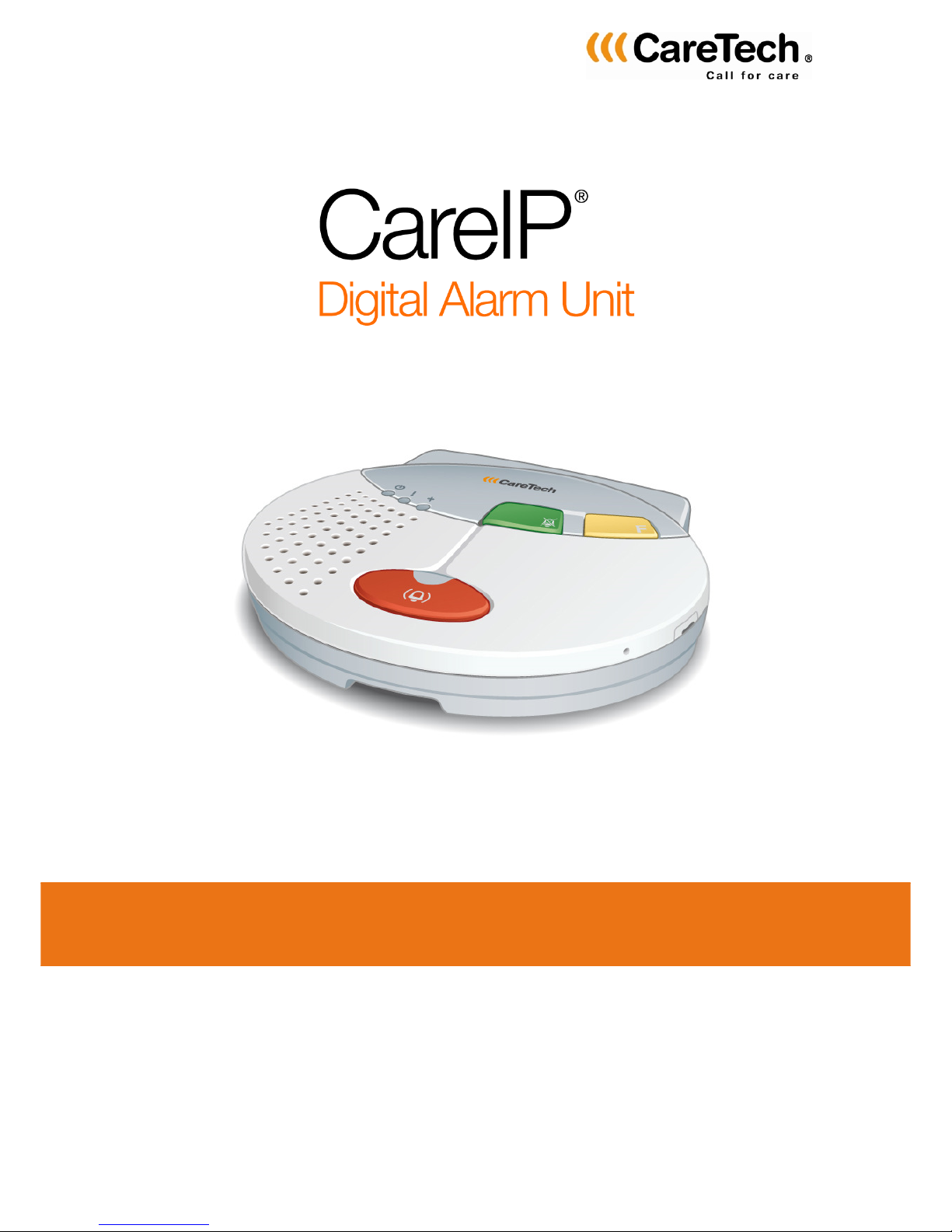
Service manual / Technical Handbook

2
© 2014 Copyright CareTech AB, Rev H

3
Table of contents
1
11
1
REVISIO S
REVISIO SREVISIO S
REVISIO S
................................
................................................................
................................................................
................................................................
................................................................
................................................................
..........................................
....................
..........
5
55
5
2
22
2
TECH ICAL TERMS
TECH ICAL TERMSTECH ICAL TERMS
TECH ICAL TERMS
................................
................................................................
................................................................
................................................................
.............................................................
..........................................................
.............................
5
55
5
3
33
3
SAFETY I FORMATIO
SAFETY I FORMATIOSAFETY I FORMATIO
SAFETY I FORMATIO
................................
................................................................
................................................................
................................................................
........................................................
................................................
........................
6
66
6
4
44
4
OVERVIEW CareIP
OVERVIEW CareIPOVERVIEW CareIP
OVERVIEW CareIP
................................
................................................................
................................................................
................................................................
................................................................
................................................................
................................
7
77
7
4.1
CareIP front ................................................................................................................ 7
4.1.1
Indicator lights ..................................................................................................... 7
4.2
CareIP back ............................................................................................................... 8
4.2.1
Connection terminals ........................................................................................... 8
5
55
5
DESCRIPTIO OF FU CTIO S
DESCRIPTIO OF FU CTIO SDESCRIPTIO OF FU CTIO S
DESCRIPTIO OF FU CTIO S
................................
................................................................
................................................................
................................................................
.............................................
..........................
.............
9
99
9
5.1
Activating an alarm ..................................................................................................... 9
5.2
Different types of alarm triggers .................................................................................. 9
5.3
Alarm receivers ........................................................................................................... 9
5.4
Alarm process ............................................................................................................ 9
5.5
Log alarm ................................................................................................................. 10
5.6
Test alarm ................................................................................................................ 10
5.7
Inactivity alarm .......................................................................................................... 11
5.7.1
Home/Away function .......................................................................................... 11
5.8
Call-back after alarm ................................................................................................ 11
5.9
Automatic answer on incoming calls ......................................................................... 12
5.10
Intruder alarm ........................................................................................................ 12
5.11
VoIP – Telephone call over internet ........................................................................ 13
5.12
Heartbeat - activity message ................................................................................. 13
6
66
6
I STALLATIO
I STALLATIOI STALLATIO
I STALLATIO
................................
................................................................
................................................................
................................................................
................................................................
................................................................
...................................
......
...
14
1414
14
6.1
Connection ............................................................................................................... 14
6.2
Connecting external equippment .............................................................................. 14
6.2.1
Inputs ................................................................................................................ 15
6.2.2
Output 1, relay output ........................................................................................ 15
6.2.3
Output 2, transistor output ................................................................................. 15
6.2.4
Output 3, connection to hearing loop systems ................................................... 16
6.3
Installing the SIM card .............................................................................................. 17
6.3.1
GSM Only .......................................................................................................... 17
6.3.2
GSM signal strength check ................................................................................ 17
6.4
PoE .......................................................................................................................... 18
6.4.1
Installing PoE module ......................................................................................... 18
7
77
7
PROGRAMMI G
PROGRAMMI GPROGRAMMI G
PROGRAMMI G
................................
................................................................
................................................................
................................................................
................................................................
................................................................
................................
19
1919
19
7.1
Programming of radio unit ........................................................................................ 19
7.1.1
Programming of radio transmitter ....................................................................... 19
7.1.2
Check radio coverage ........................................................................................ 19
7.1.3
Erase programmed radio units ........................................................................... 19
7.2
Recording of speech message (ID) ........................................................................... 19
7.3
i-care Online ............................................................................................................. 20
7.4
Local programming .................................................................................................. 21
7.5
Service Mode ........................................................................................................... 22
7.5.1
Activate Service Mode ....................................................................................... 22
7.5.2
Service Mode functions ...................................................................................... 22
7.5.3
avigate in Service Mode ................................................................................... 23
7.6
CareIP settings ......................................................................................................... 24
7.6.1
IP settings .......................................................................................................... 24
7.6.2
SIP Settings ....................................................................................................... 26
7.6.3
GSM/GPRS settings .......................................................................................... 27

4
7.6.4
Alarm handling ................................................................................................... 28
7.6.5
Function settings................................................................................................ 29
7.6.6
Settings buttons/inputs/output ........................................................................... 33
7.6.7
Configuration of programmed radio units ........................................................... 34
8
88
8
ALARM TYPES
ALARM TYPESALARM TYPES
ALARM TYPES
................................
................................................................
................................................................
................................................................
................................................................
................................................................
...................................
......
...
35
3535
35
9
99
9
MAI TE A CE
MAI TE A CEMAI TE A CE
MAI TE A CE
................................
................................................................
................................................................
................................................................
................................................................
................................................................
..................................
....
..
37
3737
37
9.1
Cleaning ................................................................................................................... 37
9.2
Replacing the battery ................................................................................................ 37
10
1010
10
ACCESSORIES
ACCESSORIESACCESSORIES
ACCESSORIES
................................
................................................................
................................................................
................................................................
................................................................
................................................................
................................
38
3838
38
11
1111
11
TECH ICAL DATA
TECH ICAL DATATECH ICAL DATA
TECH ICAL DATA
................................
................................................................
................................................................
................................................................
...........................................................
......................................................
...........................
39
3939
39
12
1212
12
E VIRO ME TAL I FORMATIO
E VIRO ME TAL I FORMATIOE VIRO ME TAL I FORMATIO
E VIRO ME TAL I FORMATIO
................................
................................................................
................................................................
................................................................
.....................................
..........
.....
40
4040
40

5
1REVISIONS
Rev
Dat
e
Fil
e
nam
e
ote
s
A
08/02/2010
Th_CareIP_
En
_01
F
irst
release
B
16/04/2010
Th_CareIP_En_02
CareIP Mobile
functions
added
C
13/09/2010
Th_CareIP_En_03
Additional
information CareIP Mobile
added
D
18/01/2011
Th_CareIP_En_04
For V1.1.2.0 and newer
E
2011
-
11
-
14
Th_CareIP_En_05
Minor clarifications
F
2013
-
11
-
20
Th_CareIP_En_06
F
or V1.2.3.0 and newer
G
201
3
-
1
2
-
1
6
Th_CareIP_En_0
7
Minor
additions
H
2014
-
02
-
24
Th_CareIP_Sv_08
Description for outputs added
2TECHNICAL TERMS
Abbreviation
Meaning
DHCP
Dynamic Host Configuration Protocol
–
Dynami
c assignment of
IP-addresses
SIP
Session Initiation Protocol
–
Proto
c
ol
for initiation of int
eractive
multimedia sessions
RTP
Real
-
time Transport Protocol
–
Proto
c
ol specifie
d
f
or carrying
data streams in real time e.g. audio or video
VoIP
Voice over Internet Protocol
–
Transfer of voice calls via networks
based in the Internet protocol (IP)
D
S
Domain ame System
-
S
ystem
that translates
”nam
es
” (FQD )
to IP-addresses
FQD
Fully Qualified Domain ame
S TP
Simple etwork Time Protocol
–
S
erver
s that provides a
”ti
me
service”
Peer
-
to
-
peer
Two equal units that communicates with each other.
Gat
eway
A network node that connects two different networks that can
use different network protocols or topologies.
etmask
et mask
-
“Mask”
that together with the
IP
-
a
d
dres
s defines the
local network number and ”host”-address
URI
Uniform Resource
Identifi
er
–
string that is used to identify a
resource.
CIP
CareTech IP
–
Proto
c
ol
for digital alarm transfer
Proxyserver
Server
that acts as an intermediary for requests
from units that
are seeking resources from other servers

6
3SA ETY IN ORMATION
The compartment covers on the reverse may be opened only by authorized
person.
Only use recommended battery type as stated under accessories. CAUTIO –
Risk of explosion if battery is replaced by an incorrect type. Dispose of used
batteries shall be done in an environmental friendly way. See environmental
information.
Only use power supply recommended in accessories.
Important information
All systems using radio and network communication are subject to interference
beyond the user’s control.
Products from CareTech are designed to minimise the impact of such
interference. evertheless, the user must be aware that system components can
be subjected to interference or other influences that may cause malfunction.
It is therefore important to regularly check that every part of the system works in
all areas, especially radio communications. Contact your supplier immediately in
case of any suspected malfunction.
Users should pay particular attention to the risk of disruption from products which
communicate using the same or adjacent frequencies.
When connecting or disconnecting external accessories, CareIP shall be turned
OFF and the power supply shall be disconnected from the unit.
For further information, please contact your supplier.
Always read and follow the safety information accompanied by this
symbol
7
4 OVERVIEW CareIP
4.1 CareIP front
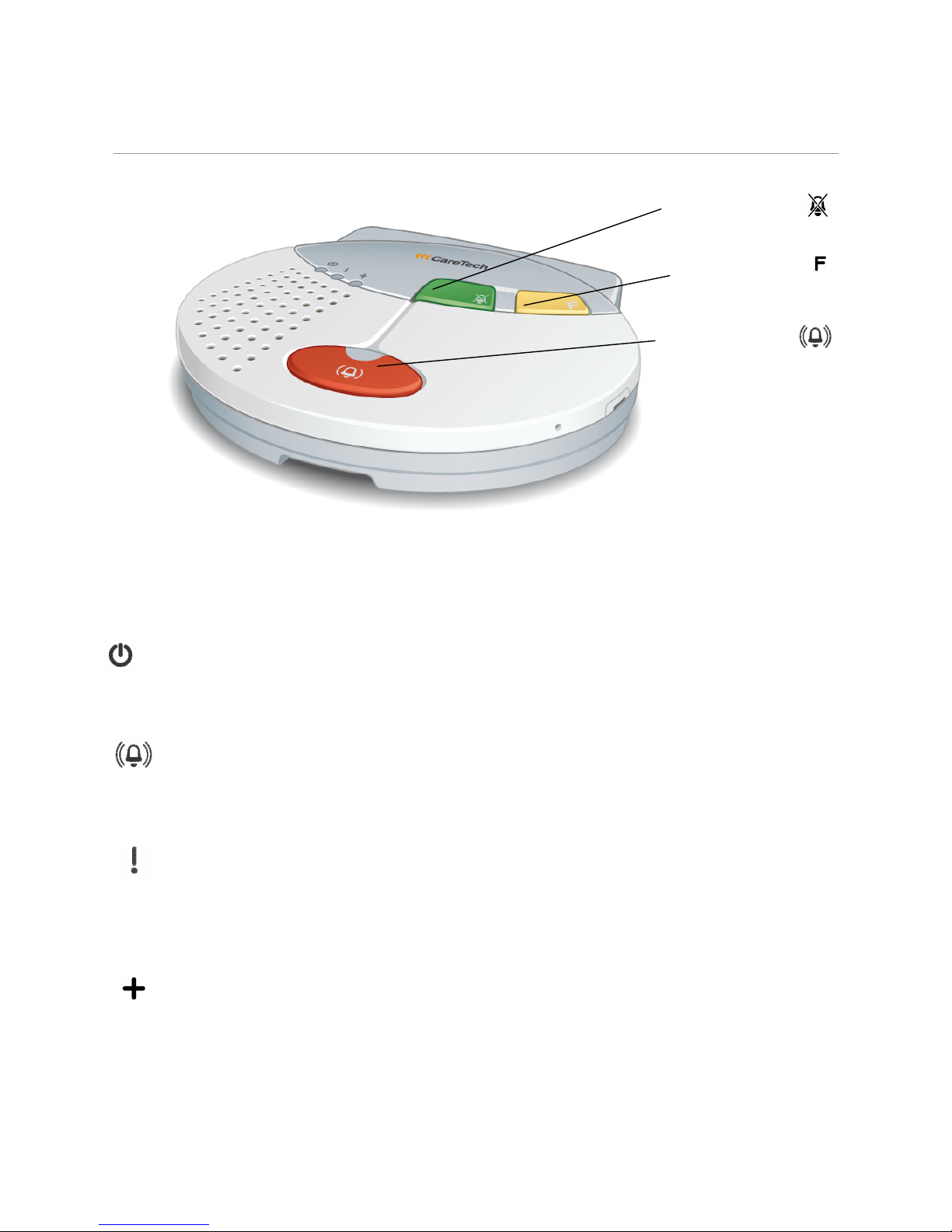
4.1.1 Indicator lights
On, (Green)
Steady light: Mains power.
Flashing light: Mains failure or radio programming mode.
Alarm, (Red)
Steady light: Idle mode.
Slow flashing: Alarm state.
Error, (Red)
Off: Idle mode.
Steady light: Problem with Ethernet link or IP configuration.
Slow flashing: Registration to SIP server failed.
Status, (Red/Green)
Off: Idle mode.
Steady red light: o connection to GSM network.
Alternating Red/Green: Away mode
Green button
(CA CEL)
stops the alarm
Red button
activates the alarm
Yellow button
(Function button)
8
4.2 CareIP back
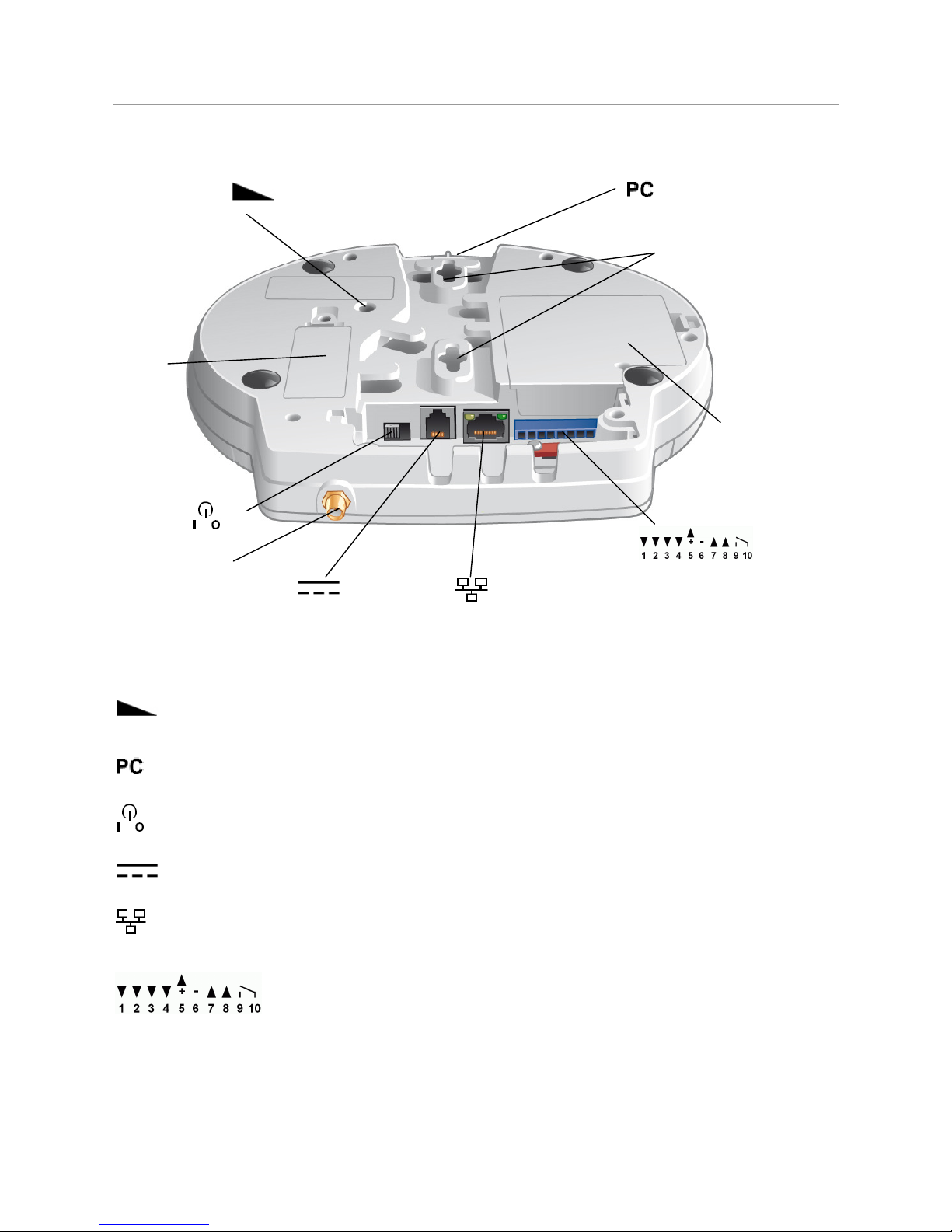
4.2.1 Connection terminals
Volume control: Loudspeaker volume adjustable in eight levels.
Pull cord: Attachment for pull cord when wall mounted.
Power switch: Turns CareIP O and OFF.
DC I : Connection for power supply 7,5VDC
Ethernet port: Connection for cable from broadband/network.
I/O connectors (wired).
Hole for wall mounting
Battery
compartment
SIM
card
Antenna connector

9
5DESCRIPTION O UNCTIONS
CareIP is a digital alarm unit that uses SIP protocol for communication. SIP is a
standard protocol for transfer of speech and video over broadband connections.
If CareIP are connected to a ”Firewall” following UDP ports must be open for
outgoing traffic.
Port 5060 SIP protocol.
Port 10000-10999 RTP protocol.
Port 69 TFTP protocol (programming).
Port 123 S TP
Port 53 D S.
5.1 Activating an alarm
Activation of an alarm can be done by.
•The red button on CareIP.
•Radio unit that is programmed to CareIP.
•Trigger connected to input.
•Pull cord, when wall mounted.
5.2 Different types of alarm triggers
Ten radio transmitters can be programmed with the CareIP, e.g. a radio trigger
and four wired triggers.
5.3 Alarm receivers
Up to ten Contacts and five different call sequences can be programmed. Alarm
against alarm centre is identified by an alarm code that’s programmed in CareIP,
Alarm to telephone is identified through a recorded speech message (ID). The
receiver can establish a speech connection with the person that has activated the
alarm and take appropriate actions.
5.4 Alarm process
CareIP has ten programmable contacts (alarm receivers), the receivers can be a
SIP telephone, mobile telephone or an Alarm centre (in this case a alarm code
must be set).
The unit has five alarm sequence lists that are programmable to call the contacts
in any order, as default all alarm types uses sequence one, any of the alarm types
are programmable to use any of the five sequences.

10
The default setting for each alarm sequence list is: contact 1 -> contact 2 ->
contact 3 -> ….. contact 10.
When an alarm is activated, CareIP first checks which call sequence shall be
used, after that CareIP calls the alarm receivers according to the programmed
order in the call sequence until the alarm is acknowledged or the maximum
number of call attempts is reached.
With acknowledgement means that the receiver confirms that the alarm is
received, this is made with the ”4” key if the receiver is a SIP telephone/ mobile
phone or if the receiver is an alarm centre by sending an acknowledgement
message to CareIP.
If the receiver is a SIP telephone or a mobile phone at e.g. neighbour or relative,
CareIP identifies itself with a recorded speech message. When an alarm is
received at an alarm centre the information (alarm code and alarm type) is sent
digitally to the receiver and no synthetic speech is sent.
If the alarm is a so-called speech connected alarm e.g. Emergency alarm, there is
possibility to establish a two way speech connection. If the alarm is a so-called
technical alarm e.g. Battery alarm there will not be any speech connection.
Disconnection of an alarm is made with the”0” key if the receiver is a telephone or
by a disconnection command from a alarm centre. Care IP automatically
disconnects the call after that the programmed connection time has elapsed
(default set to 150 sec), this time can be extended with the ”4” key on the
telephone or by a command from the alarm centre.
5.5 Log alarm
If the function for log alarm (acknowledgement message, alarm type 89) is
activated, the unit automatically sends a log alarm to a alarm central after that an
alarm is received on a telephone. This function is used to get documentation on
alarms that are received on telephone. The log alarm is called out according to
the call sequence for alarm type 89.
5.6 Test alarm
Test alarm is used to monitor the unit’s functionality and that the connection
works correctly. If the test alarm function is activated a silent alarm will be sent
according to the call sequence for alarm type 26. The time interval for test alarms
can be set between 1 and 999 hours.
Other manuals for CareIP
1
Table of contents
Other CareTech Security System manuals


Popular Security System manuals by other brands






EDM
EDM Solution 6+6 Wireless-AE installation manual

Highway Safety Group
Highway Safety Group EA401 user manual

Siren
Siren LED GSM operating manual
Detection Systems
Detection Systems 7090i Installation and programming manual

Se-Kure Controls
Se-Kure Controls MicroMini SK-4841 instructions

Siemens
Siemens FDM273 manual