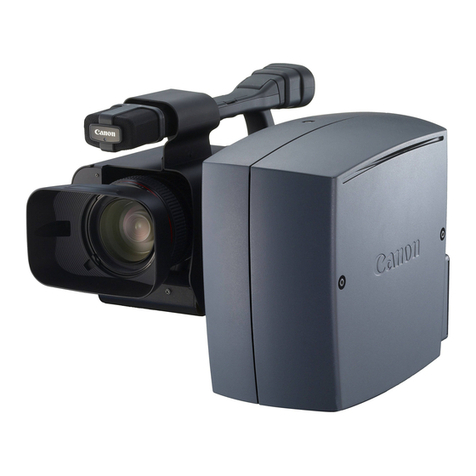
Canon VB-C300 User manual

Beforeusingtheproduct,besuretoreadtheStartGuideandthisOperationGuide.
NETWORKCAMERA
OperationGuide

ii
Introduction
Thank you for purchasing the Canon Network Camera VB-C300 (hereafter referred to as the
VB-C300).
This User’s Manual describes how to set up and use the VB-C300. Read this manual carefully
before using the VB-C300 to ensure effective operation. Make sure that you read the ReadMe file
on the Setup CD-ROM.
For the latest information (firmware, software, manuals and the hardware and software
requirements, etc.), please refer to our WebView Product web page: canon.com/webview
Usage Notice of Audio
●The audio and video may be out of sync.
●The audio stream may be interrupted according to the performance of your PC and the
network environment.
●You can send audio and video to up to 15 clients. However, if there are a large number
of clients, the audio stream may be interrupted.
●The audio stream may be interrupted if you use anti-virus software.
●Disconnecting the LAN cable also disconnects audio. Reconnect to the camera from
the NC Viewer.
On Copyrights
Videos, images or sounds taken or recorded with your VB-C300 may not be utilized or
published, without consent of copyright holders, under relevant copyright law.
Notes
1. The unauthorized transfer of all or any part of the contents of this Manual is forbidden.
2. The contents of this Manual are subject to change without notice.
3. Every effort has been made to ensure that this Manual is flawless. However, if you find
any oversights, please let us know.
4. Notwithstanding the above, Canon accepts no responsibility for any effects resulting
from the use of this Manual.
Trademark Notice
●Canon and Canon logo are registered trademarks of Canon Inc.
●Microsoft and Windows are registered trademarks of Microsoft Corporation in the United
States and other countries.
●Windows is legally recognized as Microsoft Windows Operating System.
●Other brand or product names in this Manual may be trademarks or registered trademarks
of their respective companies.
Request concerning disclosure of videos and audio
With respect to the disclosure of videos and audio, we request that sufficient consideration
be given to matters of privacy and rights not to be photographed.
<Reference>
●We locate camera so that people cannot make special specifications.
●When videos are taken of specific buildings, interiors and the like, we install the camera
only after receiving approval from the administrator.
Please note that the operator of the camera site and not Canon has full responsibility
regarding the disclosure of videos and audio.
Legal Notice
In some countries or regions, monitoring via a camera is banned by the law or regulation,
and the law or regulation depends on the country or region.
Before using the VB-C300, check the law or regulation of the country or region where the
camera is used.

iii
Contents
Introduction ...................................................................................................... ii
Contents .......................................................................................................... iii
How to Read Manuals ...................................................................................... v
About User’s Manuals .................................................................................................. v
Icons Used in this Manual ............................................................................................ v
Chapter 1 Detailed Settings
What Can I Do on Each of the Settings Pages? ......................................... 1-2
Accessing the Settings Title Page ............................................................... 1-3
Settings Title Page ................................................................................................... 1-5
Setting Up the Administrator Password and Network
(System and Network) .................................................................................. 1-6
Setting Image Size, Quality and Camera Control
(Video and Camera) ...................................................................................... 1-8
Setting HTTP Server, Video Server, and Audio Server
(Server) ........................................................................................................ 1-12
Setting User Access Privileges (Access Control) ................................... 1-15
Setting the Date and Time (Date and Time) .............................................. 1-16
Setting Up DNS and LED, etc. (Miscellaneous) ........................................ 1-18
Using the Administration Tools (Administration Tools) .......................... 1-20
Chapter 2 VBAdminTools
Starting the VBAdmin Tools ......................................................................... 2-2
Panorama Creation Tool ............................................................................... 2-4
Panorama Creation Tool Display Screen ................................................................. 2-5
Capturing Panorama Image ..................................................................................... 2-6
Registering/Deleting Panorama Image .................................................................... 2-7
Reconnecting ........................................................................................................... 2-8
Opening/Saving Panorama Image from/to Image File ............................................. 2-8
Preset Setting Tool ........................................................................................ 2-9
Preset Setting Tool Display Screen ........................................................................ 2-10
Setting Presets ....................................................................................................... 2-12
Log Viewer ................................................................................................... 2-15
Downloading Log Files ........................................................................................... 2-15
Viewing Logs .......................................................................................................... 2-16
NC Viewer .................................................................................................... 2-18

iv
Contents
Chapter 3 NC Viewer and Viewer Switcher
Overview of the NC Viewer........................................................................... 3-2
Administrator and Authorized User .......................................................................... 3-3
Starting NC Viewer ........................................................................................ 3-4
Starting the NC Viewer ............................................................................................ 3-4
Terminating the NC Viewer ...................................................................................... 3-4
Connecting to Camera ................................................................................. 3-5
Connecting to a Specified Camera .......................................................................... 3-5
Connecting to Registered Camera ........................................................................... 3-6
Disconnecting .......................................................................................................... 3-6
NC Viewer Operation .................................................................................... 3-7
NC Viewer’s Display Screen ..................................................................................... 3-7
Starting Camera Control .......................................................................................... 3-9
Controlling Camera ................................................................................................ 3-10
Saving, Printing, and Copying still image ............................................................... 3-17
Displaying Information and Video .......................................................................... 3-18
Adding and Changing Camera List ........................................................................ 3-22
Operating and Setting Camera as Administrator .................................... 3-25
Setting White Balance ............................................................................................ 3-25
Displaying External Device Input ........................................................................... 3-27
Operating External Device Output ......................................................................... 3-27
Setting Administrator Control ................................................................................. 3-28
Shade Correction ................................................................................................... 3-29
Transmitting Audio .................................................................................................. 3-29
Setup Properties .................................................................................................... 3-31
Using Viewer Switcher ................................................................................ 3-34
Chapter 4 Appendix
Troubleshooting ............................................................................................ 4-2
Log Messages ............................................................................................... 4-4
The VB-C300 Log Messages ................................................................................... 4-4
Restoring the Factory Default Settings ...................................................... 4-8
Restoring the Factory Default Settings via the Administration Tools Page using
Web Browser ........................................................................................................... 4-8
Initializing the Camera from the Reset Switch ......................................................... 4-9
Initializing the Camera Head Position ....................................................... 4-10
Factory Default Settings ............................................................................ 4-12
Index ............................................................................................................ 4-13

v
How to Read Manuals
About User’s Manuals
The VB-C300 is provided with two documents; Start Guide and Operation Guide (this manual)
stored on the supplied Setup CD-ROM.
This document
explains the safety
precautions,
operating environ-
ment, configuration
and options,
initialization,
software installa-
tion, mounting, and
specifications of
the VB-C300.
Start Guide is
supplied with the
camera.
Start Guide
(Manual_sg_E.pdf)
This document
explains how to
configure the basic
settings of the
camera, how to use
the VBAdmin Tools
and NC Viewer,
how to troubleshoot
the VB-C300,
specifications and
detailed operation
method of the VB-
C300.
Operation Guide is
stored on the
supplied Setup CD-
ROM.
For information about
installation and initial set up
of the VB-C300
For detailed information
about how to use the VB-C300
Icons Used in this Manual
This guide uses the following icons to attract the reader’s attention to text which is particularly
important.
Operation Guide
(Manual_og_E.pdf)
(this document)
Icon Explanation
Note
This icon indicates important information that must be observed or actions that are
prohibited during an operation. These notes must be read to prevent possible faults
or damage to the equipment.
Tip
This icon indicates supplementary information or a reference to an operation. Users
are advised to read these memos.
Refer to the Start Guide on the supplied Setup CD-ROM.
d

vi

Detailed Settings
This chapter describes the detailed settings for the VB-C300
such as network connection, camera control, date, time,
access control, etc.
Chapter

1-2
What Can I Do on Each of the Settings Pages?
Proceed to each of the settings pages from the Settings Title Page where you can perform various
settings for the VB-C300. The settings you can perform on each of the pages are shown below.
For more details, see the reference pages.
●Settings Title Page
●System and Network
Set up the Administrator password, network and connectivity (→P.1-6).
●Video and Camera
Set up the video (Capture size, quality), camera (shutter speed, focus, Day & Night mode, digital
zoom, installation, etc.) and camera name (→P.1-8).
●Server
Set up the HTTP Server, Video Server and Audio Server (→P.1-12).
●Access Control
Specify Authorized user accounts (→P.1-15).
●Date and Time
Display and set up the current time of the camera and set up the time zone (→P.1-16).
●Miscellaneous
Set up the DNS, external device names and LED (→P.1-18).
●Administration Tools
Display and execute the Administration Tools (display Log Events, display the current settings,
reboot the camera, and restore the factory default settings) (→P.1-20).
Note
Note on Windows XP SP2
●If the Windows Security Alert dialog appears, click “Unblock”.
Once you click “Unblock”, the dialog box will not be displayed again.
●If a dialog appears and blocks popup display when you click the “help” on each
settings page or “View Log Events”, “View Current Settings” on Administration
Tools settings page, follow the instruction displayed on the information bar to allow
popup display.

1-3
Detailed Settings
Accessing the Settings Title Page
Configure various settings of the VB-C300 by accessing the Settings Pages of the camera from a
Web browser.
1. Start your Web browser and access to http://192.168.100.1/admin/.
2. Enter the user name and password.
The factory default settings are as follows:
User name: root
Password: VB-C300 (case sensitive)
(→P.4-12)
User name “root” is the Administrator account of the Camera.
*The default password is “VB-C300”. Be sure to change
the password on the System and Network Page (→
P.1-6).
The Settings Title Page appears.
Settings Title Page
Note
In this manual, the IP address “192.168.100.1” (factory default setting) is used to
explain how to set up the camera. Please use the actual IP address that is set in your
VB-C300.

1-4
Accessing the Settings Title Page
Tip
●You can also click “Settings” from the VB Initial Setup Tool to display the top page
of the camera, and then click “Settings“ to move to the Setting Title Page (→dStart
Guide P.2-10).
●The Settings Title Page cannot login with an authorized user account. Please enter
with root account.
Other manuals for VB-C300
10
This manual suits for next models
1
Table of contents
Other Canon Security Camera manuals

Canon
Canon VB-M40 User manual

Canon
Canon VB-C300 Guide

Canon
Canon VB-S30D MKII User manual

Canon
Canon VB-C50I User manual

Canon
Canon VB-S30D MKII User manual

Canon
Canon VB-C10 User manual

Canon
Canon BU-51H User manual

Canon
Canon Vb-C60 - Ptz Network Camera User manual

Canon
Canon VB-S900F MkII User manual

Canon
Canon VB-R13VE User manual

Canon
Canon VB-R13VE User manual

Canon
Canon VB-C300 User manual

Canon
Canon CR-N300 User manual

Canon
Canon VK-16 Manual

Canon
Canon VB-M700F User manual

Canon
Canon VB-M700F User manual

Canon
Canon VB-C50FSi User manual

Canon
Canon VB-C300 User manual

Canon
Canon VB-M600VE User manual

Canon
Canon VB-R13VE H2 User manual