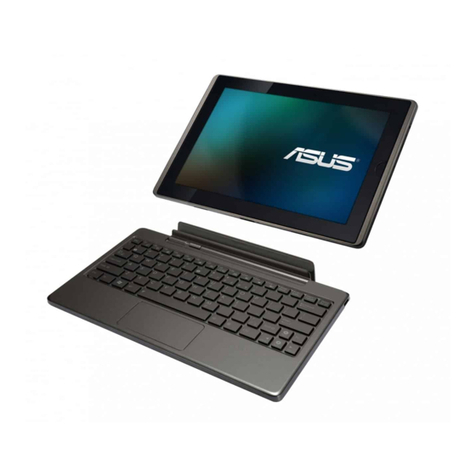
Asus T103HAF User manual

E13440
Revised Edition V2 / August 2017
User Guide
E13440_T103HAF_2-in-1_UM_V2_20pages.indd 1
2017/8/22 �� 01:58:26

2
ASUS Tablet User Manual
Hardware Setup
Front View
Camera indicator
Front camera
Back View
MicroSD card slot (hidden)
Kickstand
Touch screen panel
E13440_T103HAF_2-in-1_UM_V2_20pages.indd 2
2017/8/22 �� 01:58:26

ASUS Tablet User Manual
3
Top and bottom sides
Left and right sides
ASUS Pen (on selected models)
Hinge hole
Dock port
Hinge hole
Power button
Power indicator
Array microphones
Micro USB 2.0 port
Audio speakers Headphone/Headset jackUSB 3.0 port
Volume button Audio speakers
Micro HDMI port
Right-click button Eraser button
NOTE: Certain USB 3.0 devices may cause interference with wireless transmission.
E13440_T103HAF_2-in-1_UM_V2_20pages.indd 3
2017/8/22 �� 01:58:26

4
ASUS Tablet User Manual
ASUS Mobile Dock (optional)
NOTE:
• Thekeyboard’slayoutmayvarypermodel,region,orcountry.
• TheASUSMobileDockmaybesoldseparately.
Touchpad
Keyboard
Latch hook Latch hook
Dock connector
Hinge
Top View
E13440_T103HAF_2-in-1_UM_V2_20pages.indd 4
2017/8/22 �� 01:58:27

ASUS Tablet User Manual
5
WARNING! Keep the magnetic attachment away from external storage drives and
cards with magnetic strips to prevent demagnetization. Refer to E-Manual for details.
E13440_T103HAF_2-in-1_UM_V2_20pages.indd 5
2017/8/22 �� 01:58:27

6
ASUS Tablet User Manual
2. Powering on your ASUS Tablet
NOTE: Thepoweradaptermayvaryinappearance,dependingonmodelsandyour
region. Use only the bundled power adapter for charging.
Charge the ASUS Tablet before using it in battery mode for the rst time.
Getting started
1. Charge your ASUS Tablet
A. Connect the micro USB cable to the power adapter.
B. Plug the micro USB connector into your ASUS Tablet.
C. Plug the power adapter into a grounded power outlet.
E13440_T103HAF_2-in-1_UM_V2_20pages.indd 6
2017/8/22 �� 01:58:28

ASUS Tablet User Manual
7
CAUTION!
• ThisASUSTabletshouldonlybeusedinenvironmentswithambienttemperaturesbetween
5°C (41°F) and 35°C (95°F).
• RefertotheratinglabelonthebottomofyourASUSTabletandensurethatyourpower
adapter complies with this rating.
• Thepoweradaptermaybecomewarmtohotwhileinuse.Donotcovertheadapterandkeep
it away from your body while it is connected to a power source.
• DonotleaveyourASUSTabletonyourlapornearanypartofyourbodytoprevent
discomfort or injury from heat exposure.
• Donotusedamagedpowercords,accessories,andotherperipheralswithyourASUSTablet.
IMPORTANT!
• Locatetheinput/outputratinglabelonyourASUSTabletandensurethatitmatchesthe
input/output rating information on your power adapter. Some ASUS Tablet models may have
multiple rating output currents based on the available SKU.
• EnsurethatyourASUSTabletisconnectedtothepoweradapterbeforeturningitonforthe
rst time. We strongly recommend that you use a grounded wall socket while using your
ASUS Tablet on power adapter mode.
• ThesocketoutletmustbeeasilyaccessibleandnearyourASUSTablet.
• TodisconnectyourASUSTabletfromitsmainpowersupply,unplugyourASUSTabletfrom
the power socket.
• Thepoweradaptervarieswithmodeltype.Useonlythebundledpoweradapter.
• Poweradapterinformation:
-Inputvoltage:100-240Vac
-Inputfrequency:50-60Hz
-Ratingoutputcurrent:2A(18W)
-Ratingoutputvoltage:9V
Safety notices for your ASUS Tablet
E13440_T103HAF_2-in-1_UM_V2_20pages.indd 7
2017/8/22 �� 01:58:28

8
ASUS Tablet User Manual
WARNING!
ReadthefollowingprecautionsforyourASUSTablet’sbattery.
• OnlyASUS-authorizedtechniciansshould
remove the battery inside the device
(for non-removable battery only).
• Thebatteryusedinthisdevicemaypresent
a risk of re or chemical burn if removed or
disassembled.
• Followthewarninglabelsforyourpersonal
safety.
• Riskofexplosionifbatteryisreplacedbyan
incorrect type.
• Donotdisposeofinre.
• Neverattempttoshort-circuityourASUS
Tablet’sbattery.
• Neverattempttodisassembleand
reassemble the battery
(for non-removable battery only).
• Discontinueusageifleakageisfound.
• Thisbatteryanditscomponentsmustbe
recycled or disposed of properly.
• Keepthebatteryandothersmall
components away from children.
Nordic Lithium Cautions (for lithium-ion batteries)
ATTENTION!Ilyadangerd’explosions’ilyaremplacementincorrectdelabatterie.Remplacer
uniquementavecunebatteriedumêretypeoud’untypeéquivalentrecommandéparle
constructeur.Mettreaurebutlesbatteriesusagéesconformémentauxinstructionsdufabricant.
(French)
RF Exposure information (SAR) - CE
This device meets the EU requirements (1999/519/EC) on the limitation of exposure of the
general public to electromagnetic elds by way of health protection.
The limits are part of extensive recommendations for the protection of the general public. These
recommendations have been developed and checked by independent scientic organizations
through regular and thorough evaluations of scientic studies. The unit of measurement for the
EuropeanCouncil’srecommendedlimitformobiledevicesisthe“SpecicAbsorptionRate”(SAR),
and the SAR limit is 2.0 W/Kg averaged over 10 gram of body tissue. It meets the requirements
oftheInternationalCommissiononNon-IonizingRadiationProtection(ICNIRP).
Fornext-to-bodyoperation,thisdevicehasbeentestedandmeetstheICNRPexposure
guidelinesandtheEuropeanStandardEN50566andEN62209-2.SARismeasuredwiththe
device directly contacted to the body while transmitting at the highest certied output power
level in all frequency bands of the mobile device.
WARNING! A minimum separation distance of 1 cm must be maintained between
theuser’sbodyandthedevice,includingtheantennaduringbody-wornoperation
to comply with the RF exposure requirements in Europe.

E13440_T103HAF_2-in-1_UM_V2_20pages.indd 8
2017/8/22 �� 01:58:28

ASUS Tablet User Manual
9
Federal Communications Commission Statement
ThisdevicecomplieswithFCCRulesPart15.Operationissubjecttothefollowingtwo
conditions:
• Thisdevicemaynotcauseharmfulinterference.
• Thisdevicemustacceptanyinterferencereceived,includinginterferencethatmay
cause undesired operation.
ThisequipmenthasbeentestedandfoundtocomplywiththelimitsforaclassBdigitaldevice,
pursuant to Part 15 of the Federal Communications Commission (FCC) rules. These limits
are designed to provide reasonable protection against harmful interference in a residential
installation.Thisequipmentgenerates,uses,andcanradiateradiofrequencyenergyand,ifnot
installedandusedinaccordancewiththeinstructions,maycauseharmfulinterferencetoradio
communications.However,thereisnoguaranteethatinterferencewillnotoccurinaparticular
installation.Ifthisequipmentcausesharmfulinterferencetoradioortelevisionreception,which
canbedeterminedbytuningtheequipmentoandon,theuserisencouragedtotrytocorrect
theinterferencebydoingoneormoreofthefollowingmeasures:
• Reorientorrelocatethereceivingantenna.
• Increasetheseparationbetweentheequipmentandreceiver.
• Connecttheequipmentintoanoutletonacircuitdierentfromthattowhichthe
receiver is connected.
• Consultthedealeroranexperiencedradio/TVtechnicianforhelp.
WARNING! The use of a shielded-type power cord is required in order to meet
FCC emission limits and to prevent interference to the nearby radio and television
reception. It is essential that only the supplied power cord be used. Use only shielded
cablestoconnectI/Odevicestothisequipment.Youarecautionedthatchangesor
modications not expressly approved by the party responsible for compliance could
void your authority to operate the equipment.
(ReprintedfromtheCodeofFederalRegulations#47,part15.193,1993.WashingtonDC:Oce
oftheFederalRegister,NationalArchivesandRecordsAdministration,U.S.GovernmentPrinting
Oce.)
E13440_T103HAF_2-in-1_UM_V2_20pages.indd 9
2017/8/22 �� 01:58:28

10
ASUS Tablet User Manual
Slave Equipment
This device is a slave equipment. This device is not radar detection and not ad-hoc operation in
the DFS band.
RF Exposure Warning
This equipment complies with FCC RF exposure limits set forth for an uncontrolled environment.
The equipment must not be co-located or operating in conjunction with any other antenna or
transmitter.
ASUS Recycling/Takeback Services
ASUS recycling and takeback programs come from our commitment to the highest standards for
protecting our environment. We believe in providing solutions for you to be able to responsibly
recycleourproducts,batteries,othercomponentsaswellasthepackagingmaterials.Please
go to http://csr.asus.com/english/Takeback.htm for detailed recycling information in dierent
regions.
FCC Radio Frequency (RF) Exposure Caution
Statement
WARNING! Any changes or modications not expressly approved by the party
responsibleforcompliancecouldvoidtheuser’sauthoritytooperatethisequipment.
“ThemanufacturedeclaresthatthisdeviceislimitedtoChannels1through11inthe
2.4GHzfrequencybyspeciedrmwarecontrolledintheUSA.”
This equipment complies with FCC radiation exposure limits set forth for an uncontrolled
environment.TomaintaincompliancewithFCCRFexposurecompliancerequirements,please
avoid direct contact to the transmitting antenna during transmitting. End users must follow the
specic operating instructions for satisfying RF exposure compliance.
E13440_T103HAF_2-in-1_UM_V2_20pages.indd 10
2017/8/22 �� 01:58:28
Table of contents
Other Asus Tablet manuals

Asus
Asus MeMO PAD User manual

Asus
Asus Vivo Tab Smart ME400C User manual

Asus
Asus AAEON RTC-1020 User manual

Asus
Asus VivoTab RT TF600T-C1-GR User manual

Asus
Asus me572c Guide

Asus
Asus MeMO Pad 7 LTE Guide

Asus
Asus MeMO Pad Smart 10" Guide

Asus
Asus K00C User manual

Asus
Asus EA-800 User manual

Asus
Asus Asus Nexus 7 User manual
Popular Tablet manuals by other brands

Laser
Laser MID-1060 Quick operation guide

MUNBYN
MUNBYN IRT09J Easy setup guide

Motorola
Motorola MC3090R - Win CE 5.0 Professional 520 MHz quick start guide

Dell
Dell Latitude ST Setup and features information

Lenovo
Lenovo IdeaTab S6000L Hardware Maintenance Manual

Venturer
Venturer WT9L11 quick start guide