
Asus M530w User manual

Index
1 English ............................................................................................. 1
2 Dansk............................................................................................... 18
3 Suomi .............................................................................................. 35
4 Norsk ............................................................................................... 52
5 Svenska........................................................................................... 69
1
English
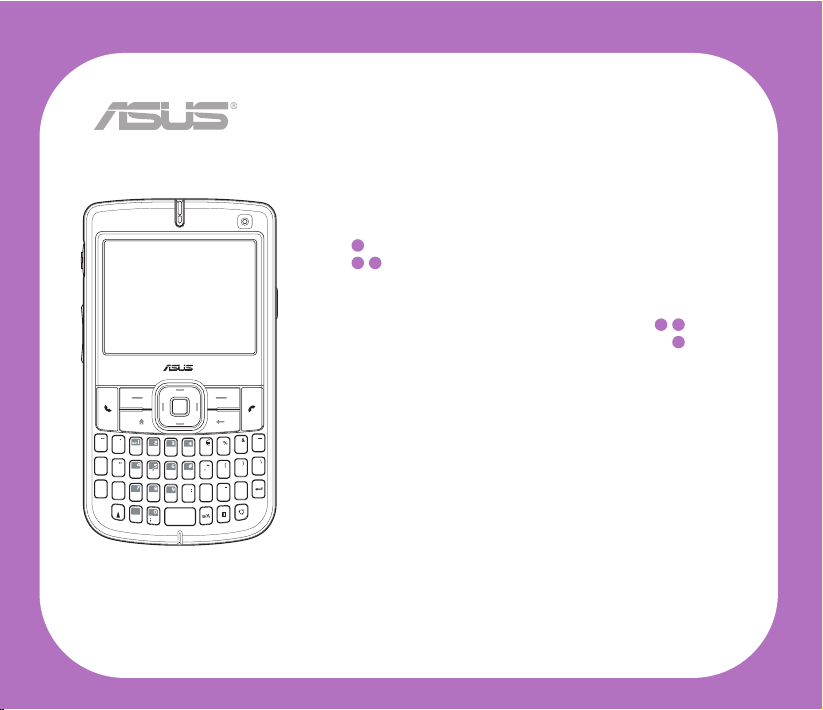
Quick Start Guide
M530w
SMARTPHONE
QWERTYUIOP
ASDF G HJKL
zXCVB N M,.
/
=
+
!
?
@
Space
Cap
2
English
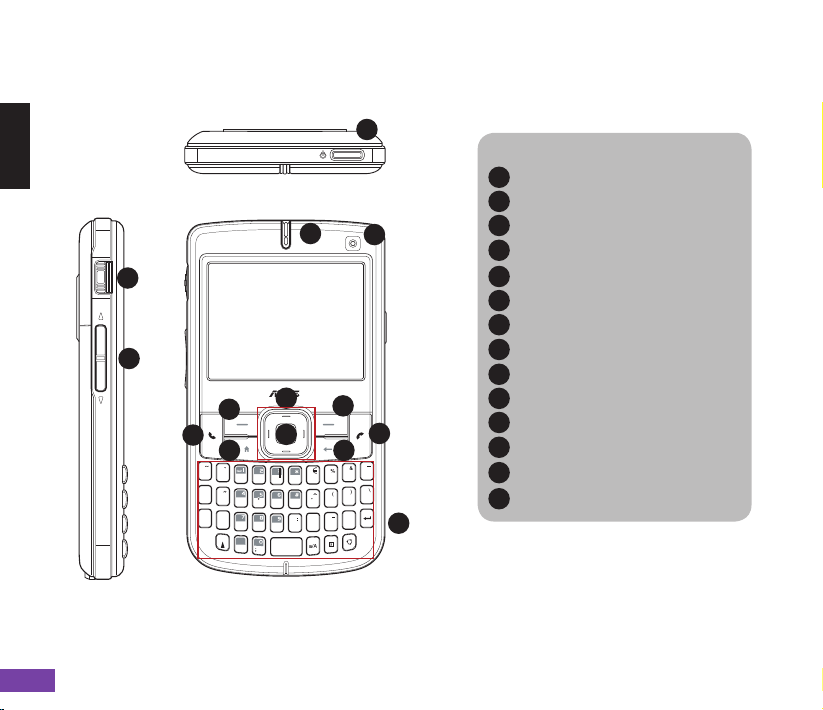
Getting to know your Smartphone
QWERTYUIOP
ASDF G HJKL
zXCVB N M,.
/
=
+
!
?
@
Space
Cap
Layout
Top feature
Components:
Power/Quick List button
Power LED
I Sub camera lens
Call key
Left soft key
Home Button
Navigation buttons
Action button
Right soft key
Back button
End key
The QWERTY keypad
Select button
Volume controller
1
2
3
4
5
6
7
8
9
10
11
12
13
14
1
23
4
5
11
7
8
10
9
6
12
13
14
Left side features Front features
3
English
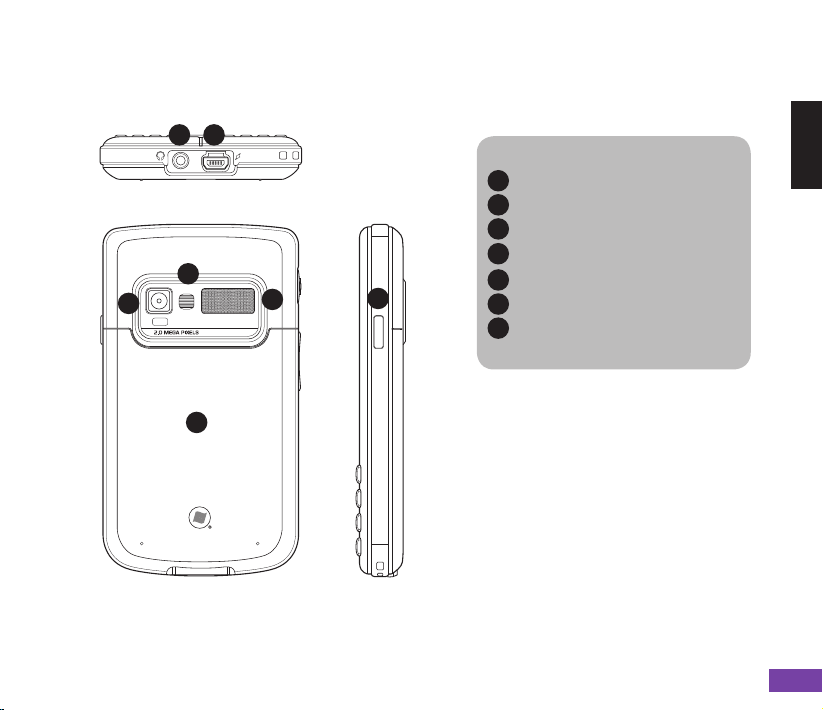
Components:
Earphone slot
Mini-USB connector
I Camera lens
Cameraashlight
Speaker
Battery compartment
Camera button / Function
Side key
15
16
17
18
19
20
21
AM
15 16
17
18
19
20
21
Right side featureRear features
Bottom features

4
English
Device components description
No. Item Description
1Power/Quick List button Press and hold to turn the phone ON/OFF.
Press and quickly release to open the Quick List, which gives
you quick access to Wireless Manager (for enabling and
disabling wireless capabilities), Key lock, Device lock, and preset
proles.
2Notication LED This multi-color LED noties the following:
• Green - Phone fully charged.
• Flashing green - Network detected.
• Red - Phone is charging.
• Flashing red - Event notication.
• Flashing blue - Bluetooth® or WLAN(IEEE 802.11b/g) ON.
3Sub Camera Lens This sub camera is for the video conference.
4Call key Press to answer a call or dial a number.
Press twice to redial last number.
Press and hold during an active call to switch to speakerphone
mode.
5Left Soft key Use to select the command right above it on the main display.
When the keypad is locked, press this key followed quickly by
the Asterisk key to unlock.
6Home Button Press to return to the Home screen.
7Navigation buttons Use this to move up, down, right, and left through selections on
the display.
The primary use of the Up and Down navigation keys is for
movement within menus and navigation through contacts.
The primary use of the Left and Right keys is change settings
and edit text.

5
English
No. Item Description
8Action button The Action key acts much like the Enter key on a keyboard. In
general, press to conrm an action.
When you scroll to a check box, pressing the Action key selects
or clears the check box.
9Right Soft key Performs the task indicated above the button.
10 Back button Press to go back to the previous screen.
Press to delete in a text eld.
11 End key Press to end a call.
Press and hold to lock the keypad.
12 QWERTY keypad Press to enter text, numbers, and symbols.
13 Select button The Select button acts much like the Action key. Press this button to
conrm an action. When you scroll to a check box, press this button
to clear the check box.
14 Volume controller Press the arrow buttons to adjust the volume.
15 Earphone port Plug headset accessory to this port.
16 Mini-USB connector Use this connector to synchronize your data or to charge the
battery.
17 Camera lens This 2-megapixel camera comes with Auto-Focus (AF) lens and
ash light features.
18 Camera ashlight Allows you to capture images in a dim environment.
Press and hold the mode switcher button to turn this ashlight
on/off.
19 Speaker Allows you to listen audio media and phone calls.
20 Battery compartment Contains the battery that supplies power to the device.
6
English
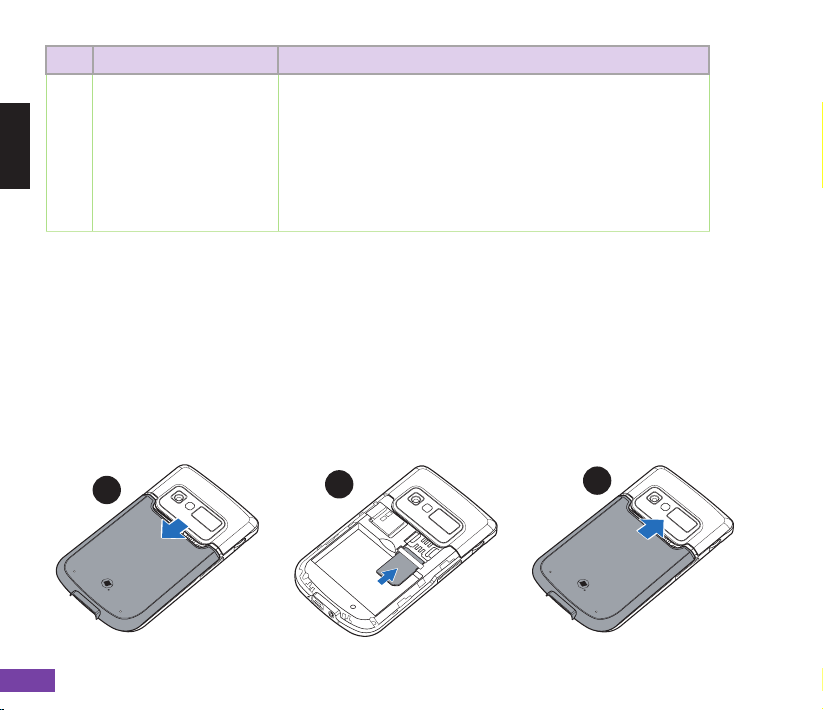
Setting up your Smartphone
1. Remove the battery compartment cover.
2. Insert the SIM card into the slot with its nicked corner and its contacts face down.
3. Replace battery compartment cover.
To install a SIM card
123
No. Item Description
21 Camera button / Function
Side key By default, this button is assigned to activate the Camera
application:
Press to launch the camera viewnder.
Press to take a picture if already in camera mode.
To change the key assignment and activate other applications
using this button, press Start > More > Settings > More > Key
Assignment. From the dropdown list, select the application you
want to activate using this button.

7
English
To install a microSD card
1. Remove the battery compartment cover.
2. With the label side (usually the side with the card
manufacturer’s name) face up, and the barcode/serial
number side face down, insert the card into the
microSD card slot located on the right side of the
phone.
3. Push the card all the way into the slot until it ts
completely.
To charge the battery
1. Connect the AC adapter to a power source.
2. Connect the power cable plug to the mini USB sync and power connector.

8
English
To turn ON your phone
1. Press and hold Power ( ) for approximately three seconds until the display turns on.
3. If you are asked for a Personal Identication Number (PIN) code, key in the code using the
keypad, then press Action (
QWERTYUIOP
ASDF G HJKL
zXCVB N M,.
/
=
+
!
?
@
Space
Cap
). The main display shows the idle screen.
4. Enter your PIN and press Done. Wait for your operator and Microsoft screens to load.
Home screen
The Home screen automatically displays when you turn on your Smartphone or leave it idle.
Status indicators
Time/Date
Your next appointment
Select and press Action to
open Calendar
Your service provider
Select and press Action to
open Wireless Manager
Most recently-used programs
Left soft key command
Press the Left soft key to
launch the Start menu, which
displays all the installed
programs
Right soft key command
Press the Right soft key to open
Contacts, Messages, or Call History.
Network signal strength
Power status
9
English
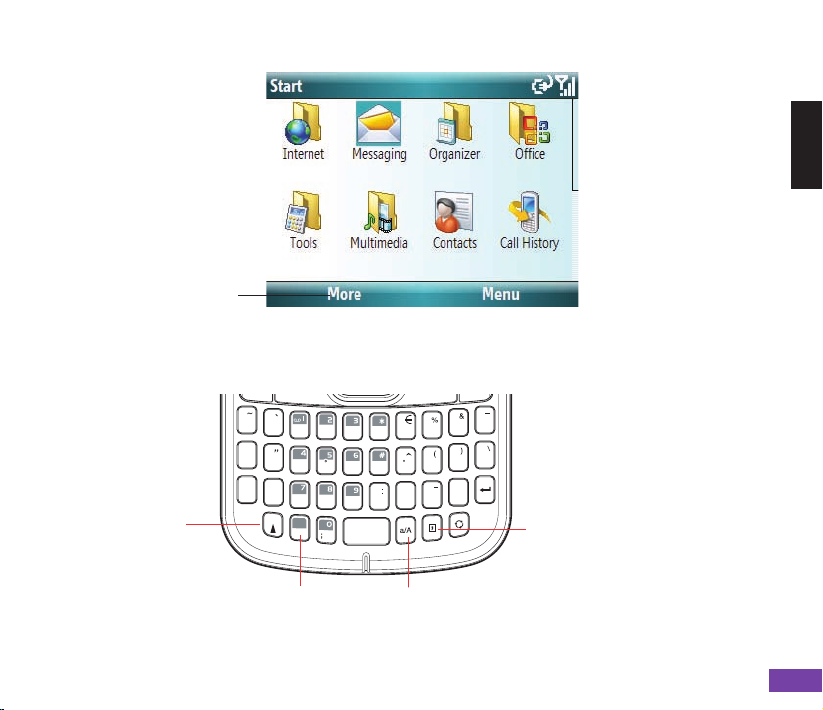
Start Menu
Press More to display the
next screen of programs
QWERTY keypad
QWERTYUIOP
ASDF G HJKL
zXCVB N M,.
/
=
+
!
?
@
Space
Cap
Caps lock
Press to enter
uppercase
texts.
Input key
Press to change the input
mode.
Symbols key
Press and hold, then
short press the key
containing the symbol
you want to enter.
Symbols Table key
Press to display
the list of available
symbols.
Other manuals for M530w
2
Table of contents
Languages:
Other Asus Cell Phone manuals


Asus
Asus Live G500TG User manual

Asus
Asus ZC451TG User manual

Asus
Asus PadFone Station User manual

Asus
Asus ROG PHONE 7 User manual

Asus
Asus ZenFone Max Pro ZB601KL User manual

Asus
Asus Z01GS User manual

Asus
Asus GO182 User manual

Asus
Asus ZenFone Max Plus ZB570TL User manual

Asus
Asus P550 User manual

Asus
Asus Zenfone 2 Laser ZE551KL User manual


