
APW Wyott Mauler M2 User manual

Bluetooth Speaker
Mauler M2
User manual


ENGLISH 4
DEUTSCH 11
ČESKY 18
SLOVENSKY 25
MAGYAR 32
WARRANTY & SUPPORT 39
GARANTIE & BETREUUNG 39
ZÁRUKA & PODPORA 39
ZÁRUKA & PODPORA 39
GARANCIA & TÁMOGATÁS 39
4 ENGLISH
PACKAGE CONTENTS
●1 Bluetooth speaker
●1 micro USB cable
●1 3.5mm audio cable
●1 user manual
FEATURES
●IPX7 certification of water resistance.
●High-end Actions chip set with Bluetooth V4.2 and support for profiles A2DP, AVRCP
and HFP.
●Built-in microphone for receiving calls after pairing with phone.
●Playing time up to 8 hours at moderate volume.
●Watertight for 30 minutes at 1metre, protection level IPX7.
TECHNICAL SPECIFICATIONS
Chipset Actions 2815
Bluetooth version V4.2
Supported Bluetooth profiles A2DP, AVRCP, HFP
Wireless range up to 10 m
Driver size 1.75” x 2
Output 20W(2x 10W)
Bluetooth frequency 120 Hz-18 kHz
5ENGLISH
Impedance 4Ω
Sensitivity 87 dB ±3 dB (dB / 1m / 1V)
Signal-to-noise ratio ≥60 dB
Battery built-in lithium-ion battery, 7.4 V, 2,000mAh
Input voltage 5V(DC) / 2 A
Playing time (via Bluetooth) up to 8 hours (at moderate volume)
Call time 10 hours
Playing time (via cable) 8 hours
Call time (via cable) 10 hours
Standby time 80 hours
Charging time 4–5 hours
Dimensions Ø87 x 190mm
Weight 568 g
Protection level IPX7
Operating temperature -10°C – +50°C
Operating humidity: 80% humidity
Storage temperature -20°C – +60°C
Storage humidity 80% humidity

6 ENGLISH
DESCRIPTION OF BUTTONS AND THEIR
FUNCTIONS
Bluetooth mode
Button / LED signal light
– Press and hold for about 3 seconds to turn the speaker on or off. An acoustic signal
will always sound.
Button
–Music play mode: Press briefly to play. Pressing briefly again interrupts play.
–Call mode: Press briefly to take an incoming call or to hang up. Press and hold to
refuse an incoming call.
–Bluetooth mode: Press and hold to simultaneously pair Bluetooth and switch speaker
into device search mode.
Button
– Press briefly to increase volume. Press and hold to skip to the next song.
Button
– Press briefly to lower the volume. Press and hold to skip to the previous song.
Button
– For switching to TWS mode (pairing two speakers)
7ENGLISH
AUX-IN mode
Button / LED signal light
– Press and hold for about 3 seconds to turn the speaker on or off. An acoustic signal
will always sound.
Button
– Press briefly to increase volume.
Button
– Press briefly to lower the volume.
CONTROLS
1. Bluetooth mode
1.1. Initial pairing
Press and hold button for about 3 seconds to turn on the speaker. The speaker automatically
switches to Bluetooth mode and starts searching for accessible devices.The LED will flash blue.
Turn on your mobile phone’sBluetooth function and launch a device search. From the list,
choose “APW Mauler M2”.

8 ENGLISH
Power ON/OFF
LED indicator
The mobile phone and speaker will pair. If pairing succeeds, the LED signal light will
continuously glow blue.
1.2. Pairing again
If the phone and speaker have been paired once, they automatically pair for about 10 seconds
after the speaker is turned on and put into Bluetooth mode. If pairing doesn’t occur, pair
manually as described below.
2. AUX-IN mode
The speaker has an audio input. Using the 3.5mm audio cable (included), connect the speaker
to your mobile phone, MP3 player, computer or laptop. The LED lights up white and you can
play music.
Briefly press the button to switch the speaker to Bluetooth, or AUX IN mode, if the audio
cable is connected.
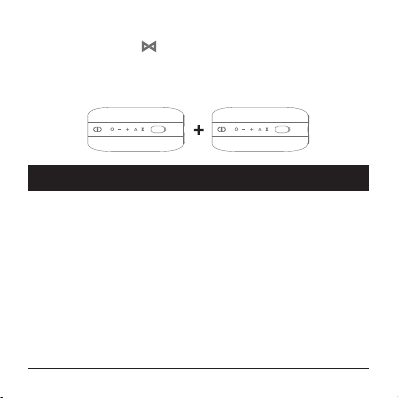
3. TWS function
If you have two speakers and want to pair them wirelessly to get the best stereo sound, do
the following:
– Make sure that your phone’sBluetooth function is on.
9ENGLISH
– Turn on both speakers.
– Press and hold button for about 2 seconds on each speaker. Both speakers will
give off an acoustic signal that speaker pairing has started. After 8 to 10 seconds, both
speakers pair and the LED lights up white.
– Turn on your mobile phone’sBluetooth function. Search for the device “APW Mauler
M2” and pair. Then both speakers and the phone will be paired.
CHARGING
The speaker is equipped with abuilt-in rechargeable battery.
Before first use, we recommend fully charging the battery.
To charge the battery, use only the micro USB cable included. Loosen the protective cover
and use the micro USB cable to connect the speaker to the plug adapter or to your computer.
During charging, the light-up charging signal light glows red. When the signal light goes out,
the battery is charged. Charging takes about 4 to 5 hours.
Storage:
Turn the speaker off and store it in adry, well-ventilated place at atemperature lower than
40°C. High temperatures may affect the speaker’ssurface and shorten the life of its built-in
battery.
Notes:
This speaker works with phones, tablets, etc. It is compatible with phones, pads, tablets and
Bluetooth receivers, and is compatible with these operating systems: Windows XP/Vista/Win7/
Win8/Win10.
This user manual is based on use with amobile phone.
10 ENGLISH
The wireless operating range is 10 metres. If the music being played is interrupted or the
sound isn’t very good, shorten the distance by moving the mobile phone closer to the speaker
or vice versa.
SAFETY INFORMATION
●Use the product only for its intended purpose.
●This product is not atoy. It may contain small parts. Keep it out of the reach of children.
●Don’t use or store the product in adusty or dirty environment.
●Do not store the product at high temperatures or low temperatures. Store the product
in adry location.
●Do not dismantle the product. Unauthorized modifications can damage the product and
cause severe injury.
●Do not use the product if it has been damaged or gives off asuspicious smell.
●To clean the surface of the product, use only asoft, clean, dry cloth.
WARNING! To prevent hearing damage, do not listen to music for
along time at excessive volume.
Table of contents
Languages:









