
Acer Halo Smart Speaker User manual
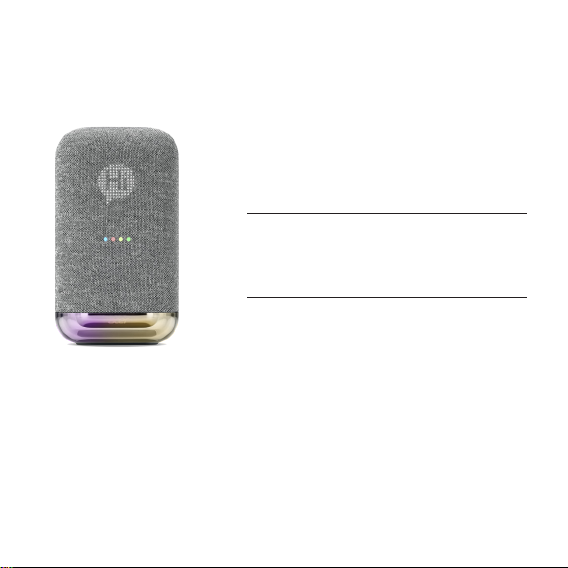
Acer Halo Smart Speaker
Listen to how it can help
宏碁智慧音箱
智慧小助理,聲控日常大小事
Quick Start Guide
快速入門指南
MODEL: HSP3100G

EN-1 EN-2
■A Closer Look
1
2
Front
1. LED display*
2. RGB lighting
* The LED display function depends
on the dierent models.
1
2
Back
1. AUX IN jack
2. DC-in jack
1
3
2
Top
1. Microphone on/o
2. Volume up/down
3. Play/Pause
■Plug In And Power On
• Insert the power adapter cable into the
DC-in jack on the back side of your Smart
Speaker.
• Install the included plug as shown in the
gure and then plug it into a power outlet.*
• The microphone is ON by default.
* The plug type may vary by regions.

EN-1 EN-2
■Get Started
1. Connect your mobile device to the
Wi-Fi network that you'll use for your smart
speaker.
2. Get the latest version of the Google Home
app and Google app.
3. Make sure your device has Android 5.0 or
higher.
4. On your phone or tablet, open the Google
Home app. Follow the steps.
Connect to Wi-Fi
Choose the Wi-Fi network you would
like to use with your Google Assistant
speaker
ACER
ABC1234
Free Wi-Fi
Next
‧
‧
‧
■Using Google Assistant
Easily enjoy music, plan your day, nd answers and more, hands-free. Just say, "Hey Google" to
get started.
THINGS TO TRY Example voice commands
Play and control music Play some music / Increase volume / Pause / Stop
Set reminders Remind me to buy a cake at 5 PM on Friday
Ask questions What time is it in London?
Set an alarm Wake me up at 7 AM every day
Check the weather What’s the weather today?
Plan your day What is my agenda today?
Control smart home devices Turn on the lights
Learn more about what Google Assistant can do at:
http://assistant.google.com/discover/
Office
Set up Google Assistant speaker
Settings
You don’t have any rooms yet. Add
your devices to see everything in one
place.
Hey Google
EN-3 EN-PB
■Personalize The Display
You can have the key messages on the display at a glance, for example:
• Date • Time • Timer
• Weather • Temperature • Volume
Furthermore, your display can be customized with animations, designed icons or special texts/
numbers to share with others. To learn more about it, please visit www.acer.com.
■Bluetooth Pairing
After nished speaker setup and connect to internet through Google Home app.
Just say “Hey Google, Bluetooth Pairing” and follow voice instruction to pair speaker with your
device.
Acer Support
NOTE
• All images in this document are for reference only. Actual product may vary from image.
• Pease visit Acer website for up-to-date information, help and downloads.
• Google, Android, Google Play and Google Home are trademarks of Google LLC.
• Google Assistant is not available in certain languages and countries.
• Apple and iPhone are trademarks of Apple Inc., registered in the U.S. and other countries.

TC-1 TC-2
■認識您的智慧音箱
1
2
前視圖
1. LED 顯示幕 *
2. RGB 彩色燈光
* LED 顯示幕功能會因型號不同而有
所差異。
1
2
後視圖
1. AUX 音源輸入插孔
2. DC 電源插孔
1
3
2
上視圖
1. 麥克風開啟 / 關閉
2. 音量調高 / 調低
3. 播放 / 暫停
■插入電源並開啟
• 將電源變壓器纜線插入智慧音箱背面的 DC
電源插孔。
• 如圖所示安裝隨附的插頭,然後將其插入電
源插座。*
• 麥克風預設為開啟狀態。
* 插頭類型可能因地區而異。

TC-1 TC-2
■開始使用
1. 將行動裝置連上「Google 助理」裝置使用
的Wi-Fi 網路。
2. 取得最新版的「Google Home」應用程式
和「Google app」。
3. 請確認您的裝置為 Android 5.0 以上版本。
4. 在您的手機或平板電腦上開啟「Google
Home」應用程式。按照畫面上的步驟操
作。
選擇 Google 助理揚聲器要使用的 Wi-Fi 網路
ACER
Free Wi-Fi
下一步
取消
邀請住家成員
設定
你尚未設定任何房間。新增裝置之後,
即可在同一位置查看所有資訊。
■使用 Google 助理
免動手就能輕鬆完成居家生活大小事。主要品牌行動號招:只要說出「Ok Google」即可。
我想要這樣做 你可以這樣說
放音樂 放點音樂來聽 / 提高音量 / 暫停 / 停止
提醒我 提醒我晚上 7:00 要去買牛奶
問問題 倫敦幾點鐘了 ?
設鬧鐘 明天早上 7:00 叫我起床
報天氣 今天天氣如何 ?
播放與控制音樂 /媒體 我今天的行事曆有什麼 ?
控制智慧家電裝置 開燈
想要進一步了解 Google 助理的功能,請造訪:
https://assistant.google.com/intl/zh_tw/ Ok Google

TC-3 TC-PB
■設計個人化的 LED 顯示幕
您可以一目了然地在 LED 顯示幕上顯示重要訊息,例如:
• 日期 • 時間 • 定時器
• 氣象 • 溫度 • 音量
此外,您可以設計動畫、圖示或富藏含意的文字 / 數字來客制化獨一無二的顯示幕,還可以與他
人分享。要了解更多資訊,請造訪 : www.acer.com。
■藍牙配對
智慧音箱設置完成後,透過 Google Home 應用程式連接至網際網路。
只需說「Hey Google,藍牙配對」,然後按照語音提示將智慧音箱與您的裝置配對即可。
Acer 服務支援
注意
• 本指南中的所有圖片僅供參考用。實際產品可能與圖片有所差異。
• 請造訪 Acer 網站以獲取最新資訊、幫助和下載。
• 「Google」、「Android」、「Google Play」和「Google Home」是 Google LLC 的商標。
• 某些語言和國家 /地區無法使用 Google 助理。
• Apple 和iPhone 均為 Apple Inc. 在美國及其他國家和地區註冊的商標。

Safety Instructions And Regulations
安全指示與規範

English
■Information for your safety and comfort
Safety instructions
Read these instructions carefully. Keep this document for future reference. Follow all warnings
and instructions marked on the product.
Turning the product off before cleaning
Unplug this product from the wall outlet before cleaning. Do not use liquid cleaners or aerosol
cleaners. Use a damp cloth for cleaning.
CAUTION for plug as disconnecting device
Observe the following guidelines when connecting and disconnecting power to the power
adapter unit: Install the power adapter unit before connecting the power cord to the AC power
outlet.
Unplug the power cord before removing the power adapter unit from the smart speaker.
CAUTION for accessibility
Be sure that the power outlet you plug the power cord into is easily accessible and located
as close to the equipment operator as possible. When you need to disconnect power to the
equipment, be sure to unplug the power cord from the electrical outlet.
Warnings
• Do not use this product near water.
• Do not place this product on an unstable cart, stand or table. If the product falls, it could be
seriously damaged.
• Slots and openings are provided for ventilation to ensure reliable operation of the product and
to protect it from overheating. These openings must not be blocked or covered. The openings
should never be blocked by placing the product on a bed, sofa, rug or other similar surface.
This product should never be placed near or over a radiator or heat register, or in a built-in
installation unless proper ventilation is provided.
• Never push objects of any kind into this product through cabinet slots as they may touch
dangerous voltage points or short-out parts that could result in a fire or electric shock. Never
spill liquid of any kind onto or into the product.
• To avoid damage of internal components, do not place the product on a vibrating surface.

• Never use it under sporting, exercising, or any vibrating environment which will probably
cause unexpected short current or damage devices.
Safe listening
Follow these instructions, suggested by hearing experts,to protect your hearing.
• Gradually increase the volume until you can hear it clearly and comfortably and without
distortion.
• After setting the volume level, do not increase it after yourears adjust.
• Limit the amount of time listening to music at high volume.
• Avoid turning up the volume to block out noisy surroundings.
• Turn the volume down if you can’t hear people speaking near you.
Using electrical power
• This product should be operated from the type of power indicated on the marking label. If you
are not sure of the type of power available, consult your dealer or local power company.
• Do not allow anything to rest on the power cord. Do not locate this product where people will
walk on the cord.
• If an extension cord is used with this product, make sure that the total ampere rating of the
equipment plugged into the extension cord does not exceed the extension cord ampere
rating. Also, make sure that the total rating of all products plugged into the wall outlet does not
exceed the fuse rating.
• Do not overload a power outlet, strip or receptacle by plugging in too many devices. The
overall system load must not exceed 80% of the branch circuit rating. If power strips are used,
the load should not exceed 80% of the power strip's input rating.
• This product's power supply is equipped with a three-wire grounded plug. The plug only fits
in a grounded power outlet. Make sure the power outlet is properly grounded before inserting
the power supply plug. Do not insert the plug into a non-grounded power outlet. Contact your
electrician for details.
Product servicing
Do not attempt to service this product yourself, as opening or removing covers may expose you
to dangerous voltage points or other risks. Refer all servicing to qualified service personnel.
Unplug this product from the wall outlet and refer servicing to qualified service personnel when:
• The power cord or plug is damaged, cut or frayed.
• Liquid was spilled into the product.
• The product was exposed to rain or water.
• The product has been dropped or the case has been damaged.
This manual suits for next models
1
Table of contents
Other Acer Speakers manuals









