4IPNET EAP260 User manual

EAP260 V1.20
Enterprise Access Point

User’s Manual
EAP260 Enterprise Access Point ENGLISH
1 Copyright © 4IPNET, INC.
Copyright & Disclaimer
Copyright
The contents of this publication may not be reproduced in any part or as a whole, stored,
transcribed in an information retrieval system, translated into any language, or transmitted in any
form or by any means, mechanical, magnetic, electronic, optical, photocopying, manual, or
otherwise, without the prior written permission of 4IPNET, INC.
Disclaimer
4IPNET, INC. does not assume any liability arising out the application or use of any products, or
software described herein. Neither does it convey any license under its parent rights not the parent
rights of others. 4IPNET further reserves the right to make changes in any products described herein
without notice. The publication is subject to change without notice.
Trademarks
4IPNET (4ipnet) is a registered trademark of 4IPNET, INC. Other trademarks mentioned in this
publication are used for identification purposes only and may be properties of their respective
owners.

User’s Manual
EAP260 Enterprise Access Point ENGLISH
2 Copyright © 4IPNET, INC.
Table of Contents
1. Before You Start ..................................................................................................................................6
1.1 Preface.................................................................................................................................................6
1.2 Document Conventions....................................................................................................................6
1.3 Package Content................................................................................................................................7
2. System Overview and Getting Started .............................................................................................8
2.1 Introduction of 4ipnet EAP260 ......................................................................................................8
2.2 Hardware Description .....................................................................................................................9
2.3 Hardware Installation....................................................................................................................11
2.4 Console Interface............................................................................................................................12
2.5 Access Web Management Interface.............................................................................................14
3. Connect your AP to your Network..................................................................................................18
4. Adding Virtual Access Points ..........................................................................................................24
5. Secure Your AP..................................................................................................................................26
6. Create a WDS Bridge between two APs.........................................................................................35
7. Web Management Interface Configuration...................................................................................37
7.1 System...............................................................................................................................................39
7.1.1 General............................................................................................................................39
7.1.2 Network Interface........................................................................................................... 41
7.1.3 Port..................................................................................................................................42
7.1.5 CAPWAP .........................................................................................................................45
7.1.6 IPv6.................................................................................................................................47
7.2 Wireless............................................................................................................................................48
7.2.1 VAP Overview.................................................................................................................48
7.2.2 General ........................................................................................................................... 51
7.2.3 VAP Configuration .........................................................................................................53
7.2.4 Security...........................................................................................................................54
7.2.5 Repeater .........................................................................................................................58
7.2.6 Advanced........................................................................................................................60
7.2.7 Access Control................................................................................................................62
7.2.8 Site Survey......................................................................................................................66
7.3 Firewall.............................................................................................................................................68
7.3.1 Firewall List ....................................................................................................................68
7.3.2 Service ............................................................................................................................72
7.3.3 Advanced........................................................................................................................73
7.4 Utilities.............................................................................................................................................75
7.4.1 Change Password............................................................................................................75

User’s Manual
EAP260 Enterprise Access Point ENGLISH
3 Copyright © 4IPNET, INC.
7.4.2 Backup & Restore...........................................................................................................76
7.4.3 System Upgrade ............................................................................................................. 77
7.4.4 Reboot ............................................................................................................................78
7.4.5 Upload Certificate ..........................................................................................................79
7.4.6 WAPI Certificate ............................................................................................................80
7.4.7 Channel Analysis............................................................................................................ 81

User’s Manual
EAP260 Enterprise Access Point ENGLISH
4 Copyright © 4IPNET, INC.
7.4.7ChannelAnalysis

User’s Manual
EAP260 Enterprise Access Point ENGLISH
5 Copyright © 4IPNET, INC.
7.5 Status................................................................................................................................................82
7.5.1 Overview .........................................................................................................................82
7.5.2 Associated Clients ..........................................................................................................84
7.5.3 Repeater .........................................................................................................................85
7.5.4 Event Log........................................................................................................................86
7.6 Online Help .....................................................................................................................................87
User’s Manual
EAP260 Enterprise Access Point ENGLISH
6 Copyright © 4IPNET, INC.
1.Before You Start
1.1 Preface
This manual is intended for system integrators, field engineers, and network administrators to set up
4ipnet’s EAP260 802.11n/b/g 2.4GHz MIMO Access Point in their network environments. It contains step-
by-step procedures and visual examples to guide MIS staff or individuals with basic network system
knowledge to complete the installation.
1.2 Document Conventions
Represents essential steps, actions, or messages that should not be ignored.
Note: Contains related information that corresponds to a topic.
Indicates that clicking this button will save the changes you made, but you must reboot
the system for the changes to take effect.
Indicates that clicking this button will clear what you have set before the settings are
applied.

User’s Manual
EAP260 Enterprise Access Point ENGLISH
7 Copyright © 4IPNET, INC.
1.3 Package Content
The standard package of EAP260 includes:
4ipnet EAP260 x1
Quick Installation Guide (QIG) x1
CD-ROM (with User’s Manual and QIG) x1
Console Cable x1
Ethernet Cable x1
Power Adapter (DC 5V) x1
Detachable Antenna x2
It is recommended to keep the original packing materials for possible future shipment when repair or
maintenance is required. Any returned product should be packed in its original packaging to prevent
damage during delivery.
User’s Manual
EAP260 Enterprise Access Point ENGLISH
8 Copyright © 4IPNET, INC.
2. System Overview and Getting Started
2.1 Introduction of 4ipnet EAP260
The 4ipnet EAP260 Enterprise Access Point embedded with 802.11 n/b/g 2.4GHz MIMO radio in dust-
proof metal housing is designed for wireless connectivity in enterprise or industrial environments of all
dimensions. EAP260 makes the wireless communication fast, secure and easy. It supports business
grade security such as 802.1X, and Wi-Fi Protected Access (WPA and WPA2). By pushing a purposely
built button, the 4ipWES (Press-n-Connect) feature makes it easy to bridge wireless links of multiple
EAP260s for forming a wider wireless network coverage.
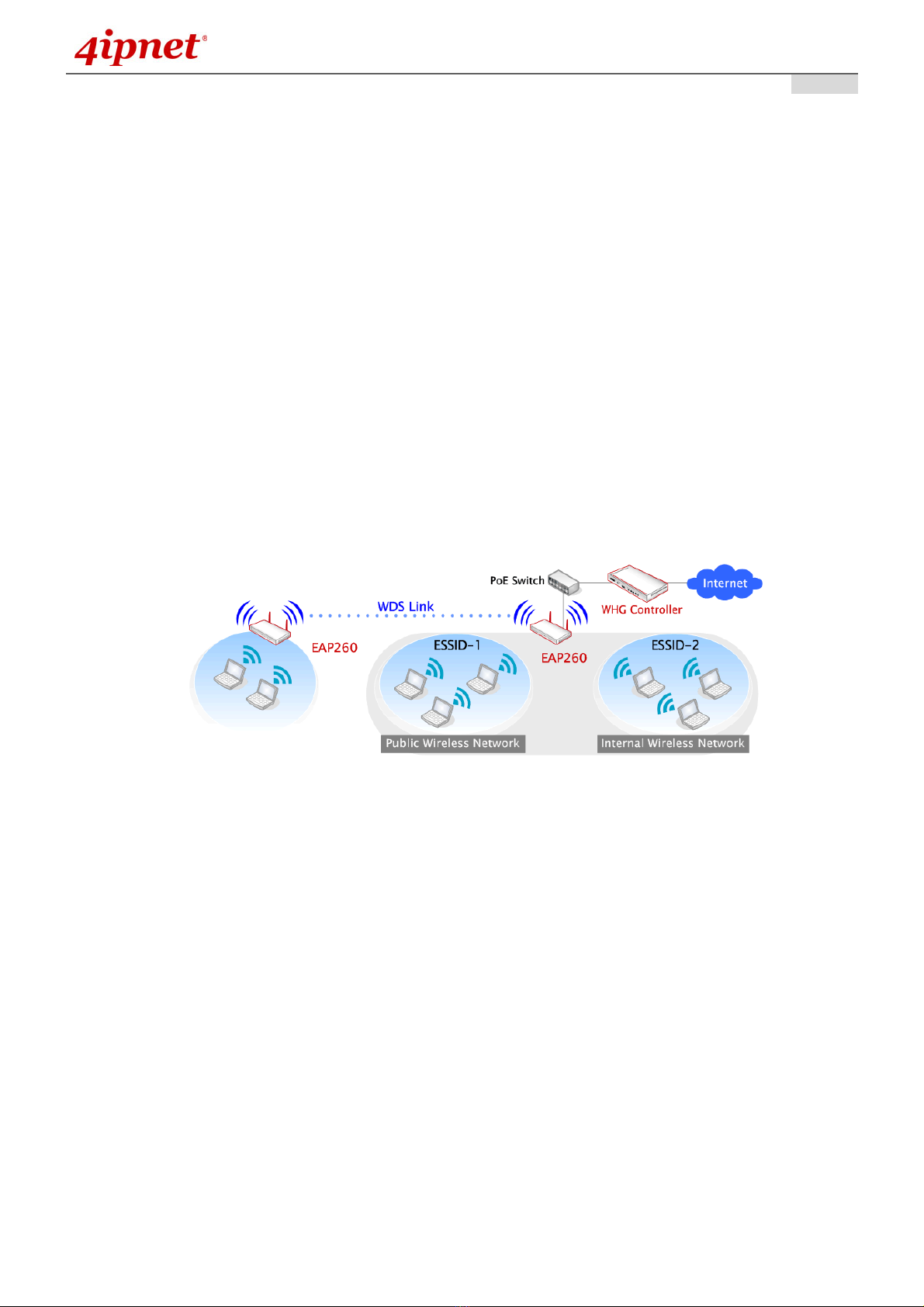
EAP260 also features multiple ESSIDs with VLAN tags and multiple Virtual APs, great for enterprise
applications, such as separating traffic from different departments using different ESSIDs. The PoE LAN
port is able to receive power from Power over Ethernet (PoE) sourcing devices. Its metal case is IP50
anti-dust compliant, which means that EAP260 is well suited to WLAN deployment in industrial
environments.
Wired and Wireless Network Layout with EAP260s
User’s Manual
EAP260 Enterprise Access Point ENGLISH
9 Copyright © 4IPNET, INC.
2.2 Hardware Description
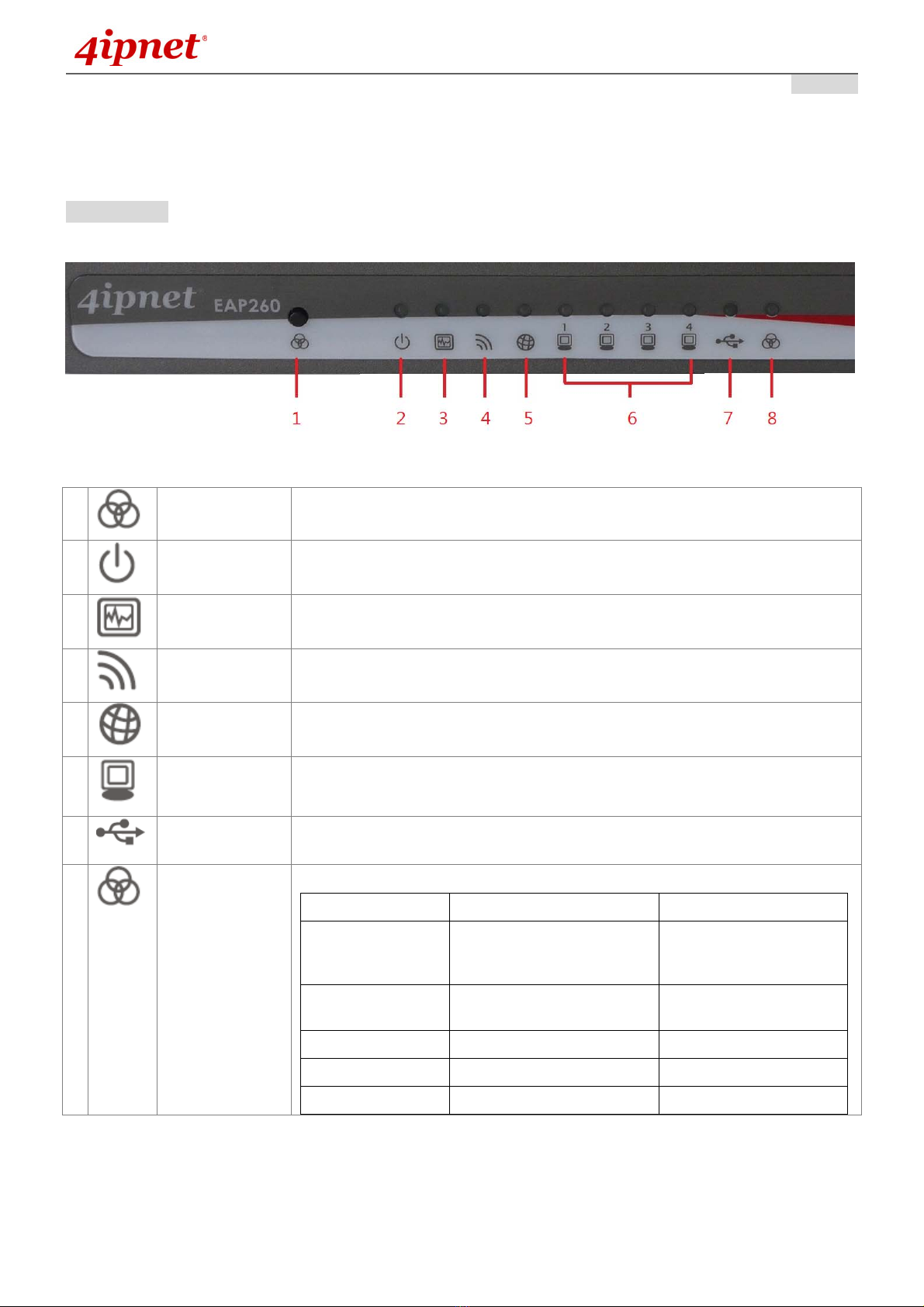
This section depicts the hardware information including all panel description.
Front Panel
Figure 1 EAP260 Front Panel
1
WES button Press and hold for 5 seconds to initiate Master WES process. Press and
release to initiate Slave WES process.
2
Power LED On indicates power on.
3
Status LED On indicates the system is ready.
4
Wireless LED On indicates wireless network interface is ready for service.
5
Uplink LED On indicates the Uplink is connected.
6
LAN1 - 4 LED Indicates the connection status of each LAN.
7 USB LED Indicates the status of USB connection. The USB port is reserved for future
use.
8
WES LED For indicating WDS connection status.
Master Slave
WES Start LED (Green) OFF and then
BLINKING SLOWLY
LED (Red) OFF and
then BLINKING
SLOWLY
WES Negotiate BLINKING NORMALLY
(Green) BLINKING NORMALLY
(Red)
WES Timeout LED (Green) ON LED (Red) ON
WES Success LED (Red) ON LED (Green) ON
WES Fail LED (Green) ON LED (Red) ON
Other manuals for EAP260
1
Table of contents
Other 4IPNET Wireless Access Point manuals

4IPNET
4IPNET EAP737 User manual

4IPNET
4IPNET EAP210 User manual

4IPNET
4IPNET EAP220 User manual

4IPNET
4IPNET EAP701 User manual

4IPNET
4IPNET OWL610 Operator's manual

4IPNET
4IPNET EAP727 User manual

4IPNET
4IPNET EAP320 V1.20 User manual

4IPNET
4IPNET EAP210 User manual

4IPNET
4IPNET EAP727 User manual

4IPNET
4IPNET EAP700 User manual

4IPNET
4IPNET OWL800 User manual

4IPNET
4IPNET EAP110 User manual

4IPNET
4IPNET EAP200 User manual

4IPNET
4IPNET EAP750 V1.00 User manual

4IPNET
4IPNET OWL630 User manual

4IPNET
4IPNET EAP706 User manual
4IPNET
4IPNET EAP210 User manual

4IPNET
4IPNET OWL300 User manual

4IPNET
4IPNET EAP747 User manual

4IPNET
4IPNET OWL550 User manual