ZyCast HDIP-8000 Instruction Manual

User Guide and Installation Manual
HDIP-8000
8-Input HD IP Streaming Server
ZyCast Technology, Inc.
No. 33, Lane 181, Chung Hwa Road
Section 4, Hsin Chu, Taiwan 30060
Tel: +886-3-5400-949 Fax: +886-3-5400-413
E-mail: [email protected]m.tw
www.zycast.com.tw
1 HDIP-8000 Manual V1.0

Table of Contents
Safety Precautions.................................................................................................................................................3
Package Contents...................................................................................................................................................3
Section 1 Introduction to HDIP-8000..............................................................................................................4
Product Description.........................................................................................................................................................................4
Specifications......................................................................................................................................................................................5
Installation...........................................................................................................................................................................................6
Unpacking and Inspection.............................................................................................................................................................6
Hardware Installations and Connections................................................................................................................................6
Section 2 Device Progra ing and Setup...................................................................................................7
Connecting to the GUI Interface .................................................................................................................................................7
Factory Default IP 192.168.1.9...................................................................................................................................................7
Encoder Progra ing and Setup via GUI Interface:.................................................................................7
Overview Page of HDIP-8000.......................................................................................................................................................7
Overview Page of HDIP-8000.............................................................................................................................8
GUI Login Password ........................................................................................................................................................................8
Encoder Setup....................................................................................................................................................................................9
Section 3 IP Strea ing Setup...........................................................................................................................10
Disabling IP Strea s:.........................................................................................................................................10
Section 4: Network Configuration.................................................................................................................11
Management IP Setup ..................................................................................................................................................................11
Streaming IP Setup .......................................................................................................................................................................11
Section 5: Ad inistration.................................................................................................................................12
Reboot ...............................................................................................................................................................................................12
Reset to Default .............................................................................................................................................................................12
Backup ...............................................................................................................................................................................................12
Restore/Upload saved file configurations ..........................................................................................................................12
Change Password .........................................................................................................................................................................13
EAS.......................................................................................................................................................................................................13
Private Address Ranges, IPv4....................................................................................................................................................14
Product Notes:......................................................................................................................................................14
2 HDIP-8000 Manual V1.0

Safety Precautions
The presence of this symbol is to alert the installer and user to the presence of uninsulated dangerous
voltages within the product’s enclosure that may be of sufficient magnitude to produce a risk of electric
shock.
TO REDUCE THE RISK OF FIRE OR ELECTRIC SHOCK, DO NOT EXPOSE THIS DEVICE TO RAIN OR
MOISTURE. DO NOT OPEN THE UNIT. REFER SERVICING TO QUALIFIED PERSONNEL ONLY.
DO NOT apply power to the unit until all connections have been made, all components have been
installed and all wiring has been properly terminated.
DO NOT terminate, change or uninstall any wiring without first disconnecting the unit’s power
adapter from the device.
This device is supplied with the appropriately rated power supply. The use of any other power supply
could cause damage and invalidate the manufacturer’s warranty.
DO NOT connect the power cord to the device if the power cord is damaged.
DO NOT cut the power cord.
DO NOT plug the power cord into an AC outlet until all cables and connections to the device have
been properly connected.
The device should be installed in an environment consistent with its operating temperature
specifications. Placement next to heating devices and ducts is to be avoided as doing so may cause
damage. The device should not be placed in areas of high humidity.
DO NOT cover any of the device’s ventilation openings.
DO NOT cover or obstruct the device’s fan or fan openings.
If the device has been in a cold environment allow it to warm to room temperature for at least 2 hours
before connecting to an AC outlet.
Package Contents
This package contains:
HDIP-8000 8-Input HD IP Streaming Server
One power cable
Nine (9) Mini Din 10pin/6 RCA Cables
Eight (8) HDMI Cables
One installation / configuration manual
Inspect the package before starting installation to ensure there is no damage and all supplied contents are present.
3 HDIP-8000 Manual V1.0

Section 1 Introduction to HDIP-8000
Product Description
ZyCast's HDIP-8000 8-Input HD IP Streaming Server allows the user to stream up to eight (8) HD / SD video sources over
an IP Network to an unlimited number of PC’s or Tv’s using a STB like the RB-601 within the IP Network. The IP Streaming
Server accepts 8 HDMI or 8 mini-DIN (Component/Composite) video inputs and the unit is designed to deliver a rich HD/SD
Streaming experience for its users deploying MPEG-2 or H.264 standards. The HDIP-8000 HD Streaming server enables
high-definition streaming with resolutions up to 1080p, providing the highest quality viewing experience for your customer.
Each of the 8-encoders is MPEG-2 or H.264 switchable and supports UDP/RTP Multicast or Unicast stream types. The 1RU
high design saves space and is easily controlled via a web UI for rapid deployment.
High resolution up to1080p
MPEG-2 or H.264 video (selectable) output
8-input HDMI or (Component / Composite) via DIN cable
Variable bitrate control
MPEG-1 Layer II, AAC, AC-3 passthrough
Individual IP stream Enable / Disable control
Closed captioning support
Rack mountable 1RU height
4 HDIP-8000 Manual V1.0

Specifications
INPUTS
HDMI x8 1.4v
DIN x8 (Component / Composite) via mini-DIN
AUDIO Inputs
Audio Input Embedded CM / Dolby Digital passthrough / via DIN (Analog L/R)
VIDEO Encoder
Resolution: 1080p(H.264 Only), 1080i, 720p, 576p, 576i, 480p, 480i
Video Codecs M EG-2 M @HL
Video Codecs H.264 (HD) > 1080p30, H @Level 4.2 / ≤1080p30, H @Level 4 >720p30,
H @Level 3.2 / ≤720p30, H @Level 3.1
Video Codecs H.264 (SD) Frame rate > 30, M @Level 3.1 / ≤30, Level 3
VIDEO Bitrate
M EG-2 SD: 1 to 8Mbps / HD: 10 to 15.7Mbps
H.264 SD: 1 to 4Mbps / HD: 4 to 8Mbps
AUDIO Encoder
Audio Compression M EG-1 Layer II, AAC, Dolby passthrough
Output
Connector Type 1RJ-45, GbE
Streaming rotocols UD /RT Unicast, Multicast
Stream Types 8 S TS
Stream Control Enable / Disable control per stream
General
Local Monitoring LED system indicators ( ower & 8 Encoder status LEDs)
GUI Supported IE9, FireFox, Chrome, Safari
assword rotected GUI: Changeable
Fan Cooled Internal
ower Supply 12VDC 7.5Amp
Consumption 50W typical, 52W max.
Dimensions 482.7mm x 286mm x 44.2mm / 1RU 19” EIA
(Housing Body: 438mm x 286mm x 44.2mm)
*Subject to change without notifications
5 HDIP-8000 Manual V1.0

Installation
System Installer must adhere to Article 820-40 of the NEC that provides guidelines for proper grounding and specifies
that the cable ground shall be connected to the grounding system of the building, as close to the point of cable entry as
possible.
Unpacking and Inspection
Each unit is shipped factory tested. Ensure all items are removed from the container prior to discarding any packing material.
Thoroughly inspect the unit for shipping damage with particular attention to connectors and controls. If there is any sign of
damage to the unit or damaged or loose connectors contact your distributor immediately. Do not put the equipment into
service if there is any indication of defect or damage.
Hardware Installations and Connections
It is highly recommended that quality cables and connectors be used for all video and audio source connections.
1. The unit is designed to be rack mounted in a standard EIA 19” rack.
2. The unit comes standard with HDMI and DIN inputs (Component and Composite video inputs). The HDIP-8000
streamer is intelligently designed to detect the video input from the video source. HDMI Connection: Connect the
HDMI cable(s) from the video source(s) into the HDMI input(s). Or, Connect the DIN Cable to the back of the
encoder as required using the DIN to DIN or DIN to breakout cable.
Repeat this step for each video source connection required.
Be sure the connections for each source are consistent with the unit’s inputs (IN1…IN8).
3. When connecting to an IP network use an IGMP capable and enabled switch. (It is highly recommended an IT
professional who is familiar with IGMP switches assists in setting up the IGMP Switch).
4. Connect the included power cord to the unit’s POWER plug.
5. Connect the power cord to an appropriately rated AC power outlet.
6 HDIP-8000 Manual V1.0

Section 2 Device Programming and Setup
Connecting to the GUI Interface:
Factory Default IP: 192.168.1.9
1. Connect an Ethernet cable directly from a PC/laptop to the Remote Setup Port on the rear panel of the HDIP-8000.
2. Modify your PC/Laptop IP address to 192.168.1.11.
3. Enter ‘192.168.1.9’ into your web browser.
4. Enter GUI and make required device changes.
5. Save all changes as required, upload and reboot changes.
6. Verify parameters then end web session.
Encoder Programming and Setup via GUI Interface
:
After connecting the device to the Remote Setup port located on the rear of the device and connecting to a PC / Laptop.
Step 1:
Enter Device's IP address in web browser.
Overview Page of HDIP-8000
7 HDIP-8000 Manual V1.0

Overview Page of HDIP-8000
Welcome page showing overview status of the HDIP-8000 when fully functioning showing Video Source Setting, Video
Output Codec, Audio Output type, Video Mode, Bitrate, Status of Stream, Stream Destination IP address/Port, and if the
stream is Active or Inactive, as well as other device information.
Step 2: Enter User Name/Password
GUI Login Password:
Default User Name: admin
Default Password: Admin123
Select Encoder Setup from the top menu and the Login window will appear
Enter the default user name and password.
Note: To change the Password for the GUI go to the Administration Tab.
8 HDIP-8000 Manual V1.0

Step 3:
Encoder Setup
Encoder Setup
Use the Encoder Setup page to set each encoder.
Select the blue edit icon next to each encoder and change/modify all parameters as required.
Step 4: Select Save and Confirm to save all modified parameters.
Application Note:
When installing the HDIP-8000 ensure to assign a unique ‘TS_ID’ and ‘Program Number’ for each encoder (Encoder 1
thru Encoder 8). If installing more than 1 HDIP-800, the installer may use the backup and upload functions to speed up the
install process.
When installing multiple HDIP-8000 devices in an IPTV system be sure not to duplicate any ‘TS_ID’ or ‘Program
Numbers.’
9 HDIP-8000 Manual V1.0
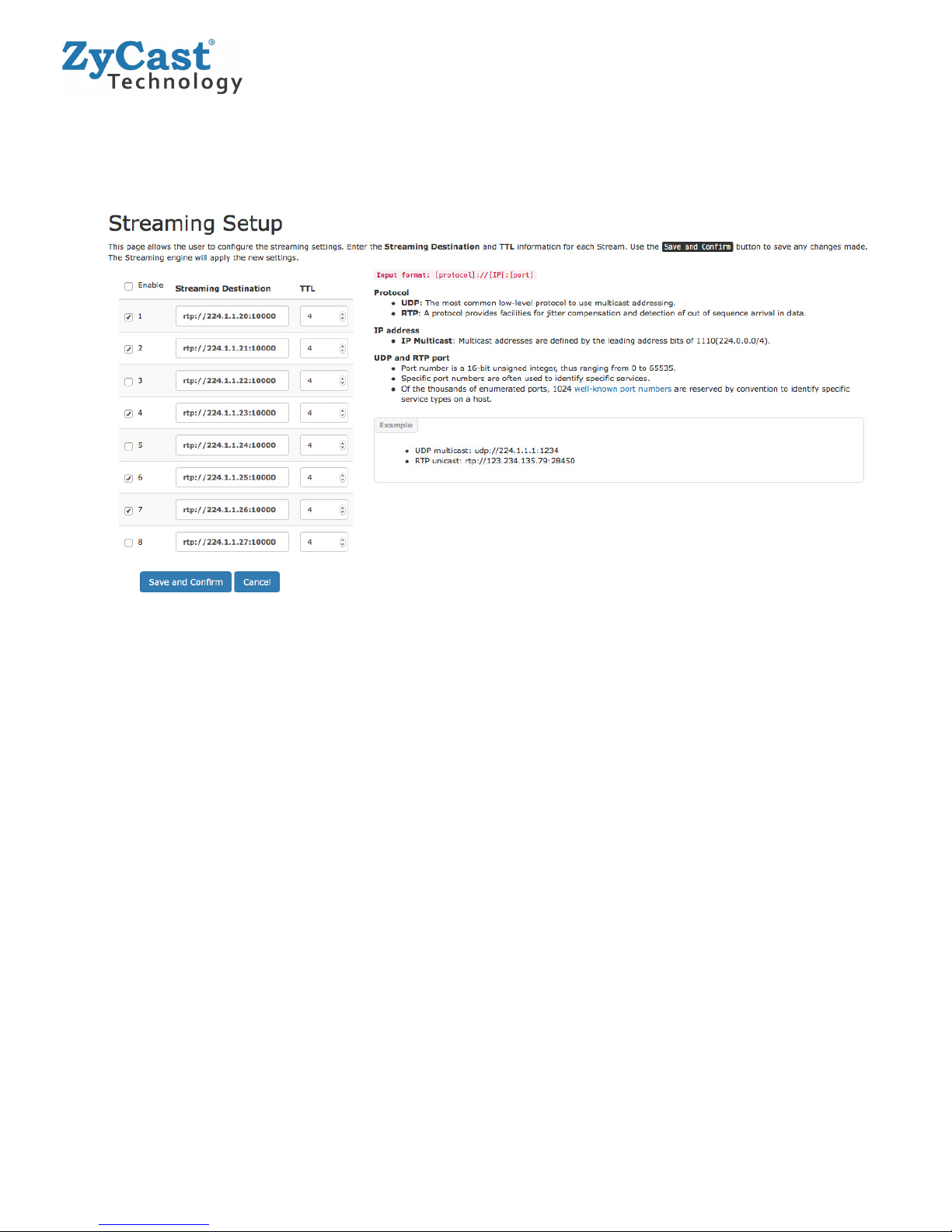
Section 3 IP Streaming Setup
Step 5: IP Streaming
1. Enable the Stream by selecting the check box 1-8.
(All streams can be enabled at the same time by using the “master” checkbox)
2. Enter the stream Destination IP [ example: udp://224.1.1.4:1234].
3. Set the TTL value.
4. Select ‘Save and Confirm’ once all the streams are setup.
Disabling IP Streams:
The HDIP-8000 offers the user a SPTS output stream. Each Stream can be disabled as required.
To disable an IP Stream uncheck the checkbox in front of the appropriate IP Stream_ID (1-8).
10 HDIP-8000 Manual V1.0
Table of contents