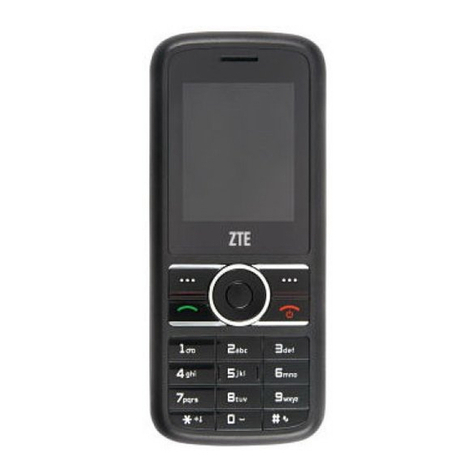
ZTE-G X760 User manual

GSM Dual-Band GPRS Digital
Mobile Phone
User Manual

文档信息
版本 修订日期 修订人 软件版本 备注
V1.0 08 年7月 赵琼 X760_Z3_EFPSY_B
07A1_00

The manual is applicable for ZTE-G X760 mobile phone
GSM Dual-Band GPRS Digital Mobil
e
Phone

Copyright ©2008 by ZTE Corporation
All rights reserved.
No part of this publication may be excerpted, reproduced, translated or
utilized in any form or by any means, electronic or mechanical, including
photocopying and microfilm, without the prior written permission of ZTE
Corporation.
ZTE Corporation reserves the right to make modifications on print errors or
update specifications in this manual without prior notice.
Version 1.0, Jan. 2008

Table of Contents
1 Before Use..........................................................................................1
1.1 Introduction ................................................................................1
1.2 Safety Instructions......................................................................2
1.3 Safety Warnings and Precautions..............................................2
1.4 Parts Definition...........................................................................9
1.4.1 Appearance .......................................................................9
1.4.2 Mechanical Parts.............................................................10
1.4.3 Key Definitions ...............................................................11
1.4.4 Descriptions of Touch-screen Shortcuts......................12
1.4.5 Descriptions of icons on status bar .............................12
1.5 Battery .......................................................................................13
1.5.1 Removing the Battery.....................................................13
1.5.2 Installing the Battery......................................................14
1.5.3 Charging the Battery......................................................16
1.6 Insert and Remove SIM Card ...................................................17
1.7 Insert and Remove Memory Card ...........................................18
1.8 Power On/Off............................................................................20
2Enter 3D Interface..........................................................................22
3Communication...............................................................................24
3.1 Call.............................................................................................24
3.1.1 Make a Call .....................................................................24
3.1.2 Emergency Calls .............................................................25
3.1.3 Answer Calls ...................................................................25
3.1.4 Adjust the Volume .........................................................26
3.1.5 Hands-free.......................................................................26

6
3.1.6 Call Options ................................................................... 26
3.2 Messages.................................................................................. 28
3.2.1 SMS ................................................................................. 28
3.2.2 MMS ................................................................................ 31
3.2.3 Voice Mail Server ........................................................... 36
3.2.4 Broadcast Message........................................................ 36
3.3 Contacts ................................................................................... 37
3.3.1 Quick Search .................................................................. 37
3.3.2 Search Entry ................................................................... 37
3.3.3 Add New Entry ............................................................... 37
3.3.4 Caller Group................................................................... 38
3.3.5 Copy All .......................................................................... 39
3.3.6 Delete All........................................................................ 39
3.3.7 Preferred Storage .......................................................... 39
3.3.8 Information .................................................................... 39
3.4 Call History............................................................................... 40
3.4.1 View ................................................................................ 40
3.4.2 Delete Call Log .............................................................. 41
3.4.3 Call Time ........................................................................ 41
4Entertainment ................................................................................ 42
4.1 WAP ........................................................................................... 42
4.2 Games....................................................................................... 43
4.3 Music......................................................................................... 44
4.3.1 Audio Player................................................................... 44
4.3.2 FM Radio......................................................................... 45
4.3.3 Sound Recorder ............................................................. 46
4.4 Video......................................................................................... 47
4.4.1 Camera ........................................................................... 47
4.4.2 Album ............................................................................. 48

4.4.3 Video Player ....................................................................49
4.4.4 Video Recorder ...............................................................50
5Applications ....................................................................................51
5.1 STK Service................................................................................51
5.2 Alarm .........................................................................................52
5.3 Organizer ..................................................................................52
5.3.1 Calendar..........................................................................52
5.3.2 Calculator........................................................................53
5.5.3 Stopwatch........................................................................53
5.3.4 Convertor ........................................................................54
5.5.6 World Clock.....................................................................54
5.4 File Manager..............................................................................54
5.5 Settings......................................................................................55
5.5.1 Pen Calibration................................................................55
5.5.2 User Profiles....................................................................56
5.5.3 Phone Setup....................................................................56
5.5.4 Call Setup........................................................................58
5.5.5 Network Setup ................................................................59
5.6.6 Security Setup.................................................................61
5.6.7 Restore Factory Settings................................................64
6 USB Data Function..........................................................................65
6.1 Mass Storage.............................................................................65
6.2 Webcam .....................................................................................65
7Input Methods.................................................................................66
7.1 General Description .................................................................66
7.2 Keypad Definitions ...................................................................67
7.3 Descriptions of Input Methods ...............................................67

8
7.3.1 Handwriting Input Method ........................................... 67
7.3.2 French Input Method..................................................... 68
7.3.3 English Input Method.................................................... 68
7.3.4 Number Input Method .................................................. 68
7.3.5 Symbol Input Method.................................................... 69
8Appendix ......................................................................................... 70
8.1 Special Functions..................................................................... 70
8.2 Shortcuts .................................................................................. 72
8.3 Clearance and Maintenance ................................................... 73
9 Failure Analysis ............................................................................. 75
10 FCC Regulations........................................................................... 76
RF Exposure Information (SAR) ..................................................... 77
10 FCC Regulations............................................錯誤! 尚未定義書籤。

錯誤! 尚未定義樣式。
1
1Before Use
1.1 Introduction
Thank you for choosing ZTE Corporation’s ZTE-G X760 GSM Dual-Band
GPRS Digital Mobile Phone.
To guarantee your mobile phone always in its best condition, please read
this manual carefully and keep it for future use.
The pictures in this user manual are only used to demonstrate the mobile
phone’s functions, so they are maybe different from what you see on your
mobile phone. Please refer to your mobile phone if there are any
differences.
Note:
Digital Mobile Phone is shortly referred to as Mobile Phone
in the manual.
Your mobile phone offers the following functions:
Voice Call Originates traditional voice calls based on
GSM/GPRS network.
SMS Sends, receives and edits short messages.
MMS Provides MMS function.

2
Multimedia Provides audio player, camera, video player,
sound recorder, etc.
Organizer Provides calculator, stopwatch, converter, etc.
1.2 Safety Instructions
If your mobile phone is lost or stolen, notify your service provider
immediately to prevent others from abusing it. Meanwhile you need
provide your service provider with your mobile phone’s IMEI, which is
printed on the label on the back of your mobile phone (appears after the
battery is taken out). Keep the IMEI properly for future use.
To protect your mobile phone against abuse, take the following
precautions:
zSet PIN code (as your phone needs SIM card) and modify it from time
to time.
zTake your mobile phone along as much as possible.
1.3 Safety Warnings and Precautions
Precautions for using your mobile phone
Traffic Security
zPay attention to traffic security and follow all local relevant laws and
Other manuals for X760
1
Table of contents
Other ZTE-G Cell Phone manuals