Zebex ZB-2200AM SERIES User manual

USER'S MANUAL
ZB-2200AM
SERIES
The manual can be used as
keyboard emulation, RS- 232C
serial interface, CMOS serial
interface and wand emulation.

IMPORTANT NOTICE
ZEBEX INDUSTRIES INC. MAKES NO
WARRANTY WITH REGARD TO THIS
MATERIAL, INCLUDING, BUT NOT LIMITED TO,
THE IMPLIED WARRANTIES OF
MERCHANTABILITY AND FITNESS FOR A
PARTICULAR PURPOSE. ZEBEX INDUSTRIES
INC. SHALL NOT BE LIABLE FOR ERRORS
CONTAINED HEREIN OR FOR INCIDENTAL
CONSEQUENTIAL DAMAGES IN CONNECTION
WITH THE FURNISHING, PERFORMANCE, OR
USE OF THIS MATERIALS.
Copyright 1998 by
ZEBEX INDUSTRIES INC.
IBM is a registered trade mark of International Business Machines
Corp.
IBM PC/XT is a product of International Business Machines Corp.
IBM PC/AT is a product of International Business Machines Corp.
IBM PS/2 is a product of International Business Machines Corp.
NEC is a registered trade mark of NEC Corporation.
All other registered trade marks are registered companys'
property.
ZEBEX is a registered trade mark of ZEBEX INDUSTRIES INC.
All rights reserved, reproduction of this document or any
portion of its contents is not allowed without the specific
written consent of ZEBEX INDUSTRIES INC.
Every effort is mode to ensure the accuracy jof our product
information; however, we accept no responsibility for errors
or omissions. Specification or version may be subject to
change without notice. The actual specification and version
are based on the product delivered.
PRINTED IN JANUARY 1998
USER'S MANUAL
The manual can be used as
keyboard emulation, RS- 232C
serial interface, CMOS serial
interface and wand emulation.

IMPORTANT NOTICE
Every effort is mode to ensure the
accuracy jof our product information;
however, we accept no responsibility for
errors or omissions. Specification or
version may be subject to change
without notice. The actual specification
and version are based on the product
delivered.
PRINTED IN JANUARY 1998
TABLE OF CONTENTS
Introduction...................................................1
Default Parameters........................................2
Program Procedure.......................................5
System Setting..............................................6
Scanning Mode Selection...............................7
Header And Trailer........................................7
Inter- Message Delay.....................................8
Inter- Character Delay....................................8
Message/ Block Mode Selection.....................8
Beeper Tone Selection...................................9
Bar Code ID Selection.................................10
RS-232C Serial Communication Parameters
Setting......................................................11
Handshaking Protocol..........................11
ACK/ NAK Response Time Setting.......12
Baud Rate...........................................12
Data Bit...............................................13
Stop Bit...............................................13
Parity Setting.......................................13
Message Terminator............................14
Break Code On/ Off Setting.................17
Keykboard Emulation Parameters Setting....14
Keyboard Type Selection.....................14
Language Selection.............................16
Message Terminator............................17
Function Key Emulation.......................17
Capital Lock Setting.............................17
Reading Code Selection...............................18
Code 39 Parametrs Setting..........................20
Interleaved 2 Of 5 Parameters Setting.........21
Chinese Post Code Parameters Setting.......22
UPC/ EAN/ JAN Parameters Setting............23
Codabar/ Monarch Parameters Setting........26
Code 128 Parameters setting.......................27
MATRIX 25 Parameters Setting...................27
MSI/Plessy parameters setting.....................28
i

Italian Pharmac Parameters Setting..............30
ISBN/ ISSN Conversion...............................31
Wand Emulation Parameters Setting...........31
Emulation Speed Selection..................32
Emulation Data Output Selection.........32
Appendix A
Code 39 Full ASCII Code Table...................33
Appendix B
Code 39 Full ASCII Bar Code Table.............35
ii
1. INTRODUCTION
The series CCD scanners can be configured by
scanning a series of programming bar code labels.
This allows decoding options and interface
protocols to be tailored to a specific application.
The configuration is stored in non-volatile memory
and will not be lost by removing power from the
scanner.
The scanner must be properly powered before
programming. For RS-232C type scanners, an
external power adaptor must be used to supply
DC power to the scanner. If a keyboard emulation
type scanner is used with a IBM PC/XT/AT, PS/2
or any fully compatible computers, power will be
drawn from the keyboard port. No external power
adaptor is required. If keyboard emulation type
scanner is used with any other non IBM PC
compatible computers, an external power adaptor
may be needed.
During the programming mode, the CCD scanner
will acknowledge a good and valid reading with a
short beep. It will give long beeps for either an
invalid or bad reading.
2. PROGRAMMING OPTIONS
Programmable options are divided into four
groups. The first group includes the options that
show the general behavior of the CCD scanner.
The second group of options governs the
operation of RS-232C type serial ports. The third
group selects the keyboard type that the keyboard
emulation type will be emulated. The last group
sets the decoding parameters for each bar code
symbology.
1

3. DEFAULT PARAMETERS
This table gives the default settings of all the
programmable parameters. The default settings
will be restored whenever the "Reset"
programming label is scanned and the CCD
scanner is in programming mode.
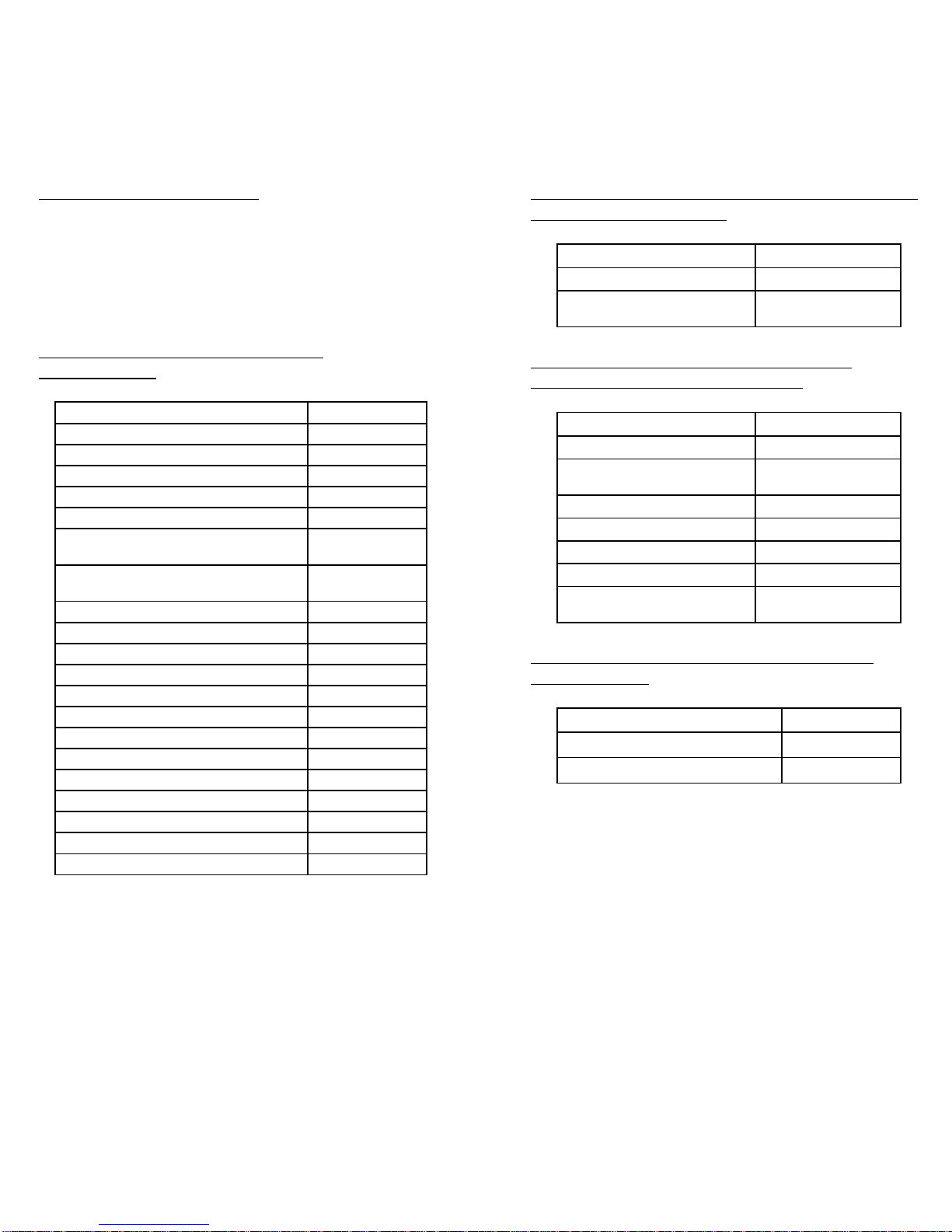
DEFAULT VALUES OF OPERATING
PARAMETERS
Function Default Values
Scanning Mode Selection Trigger mode
Header and trailer None
Inter-Message delay Normal
Inter-Character delay Normal
Message/Block mode selection Message
Send command in block mode
communication Disable
Good read beeper tone selection 2KHz/120
mSec
Code identifier transmmiting Disable
Code 39 bar code identifier code M
ITF 2 of 5 bar code identifier code I
Chinese post code identifier code H
UPC-E bar code identifier code E
UPC-A bar code identifier code A
EAN-13 bar code identifier code F
EAN-8 bar code identifier code FF
Codabar bar code identifier code N
Code 128 bar code identifier code K
Code 93 bar code identifier code L
MSI bar code identifier code P
MATRIX 25 bar code identifier code G
2
DEFAULT VALUES OF KEYBOARD EMULATION
PARAMETERS SETTING
Function Default Values
Keyboard type selection IBM PC/AT USA
Message terminator Enter/ carriage
return
DEFAULT VALUES OF RS-232C SERIAL
COMMUNICATION PARAMETERS
Function Default Values
Handshaking protocol None
ACK/NAK response time
setting 300 msec
Baud rate 9600
Data bit 8
Stop bit 1
Parity Mark (None)
Message terminator
selection CR/LF
DEFAULT VALUES OF WAND EMULATION
PARAMETERS
Function Default Values
¡°Wand emulation speed Normal
¡°Wand emulation output Black = High
Note: For wand emulation, the configuration is
only effective for the items with asterisk (¡°).
3

DEFAULT VALUES OF DECODING
PARAMETERS
Function Code Default Value
Code 39 Enable
ITF 2 of 5 Enable
Chinese Post Code Disable
UPC/EAN/JAN Enable
Codabar Enable
Reading codes ¡°MSI Disable
selection Code 128 Enable
Code 93 Enable
¡°ITAT Disable
¡°EAN-128 Disable
¡°MATRIX 25 Disable
¡° Italian Pharmac Disable
ISSN/ ISBN Disable
Codes Standard
Code 39 Start/stop characters Not transmitting
Check digit Disabled
Concatenation Off
Interleaved Length 6-32 digits
2 of 5 Check digit Disable
Chinese Post Length 10~16 digits
Code Check digit Transmit
Format All
Addendum Disable
UPC-E=UPC-A Disabled
UPC/EAN/JAN UPC-A leading digit Transmit
UPC-A check digit Transmit
UPC-E leading digit Transmit
UPC-E check digit Transmit
Type Standard
Codabar Start/stop characters A,B,C,D
Length 6~32 digits
Code 128 FNC 2 append Disable
Check digit Disable
MSI Length Variable
Check digit Transmit
Italian Pharmac Transmit "A" Character Not transmitting
MATRIX 25 Length Fix 10 digits
Check digit Disable
4
Note: The configuration of the items with
asterisk (¡°) is effective when being appointed in
advance.
4. PROGRAM PROCEDURE USING BAR CODE
MENUS
START
Rwad Start of
Configuration Label
Set All
Defaults Set
Operating
Parameters
Set
Serial Port
Parameters
Set
Decoding
Parameters
No
Yes
No
Yes
Read End of
configuration
lable
Re ad Abort
Label
END
Set
Keyboard
Type
Finish Discard
5

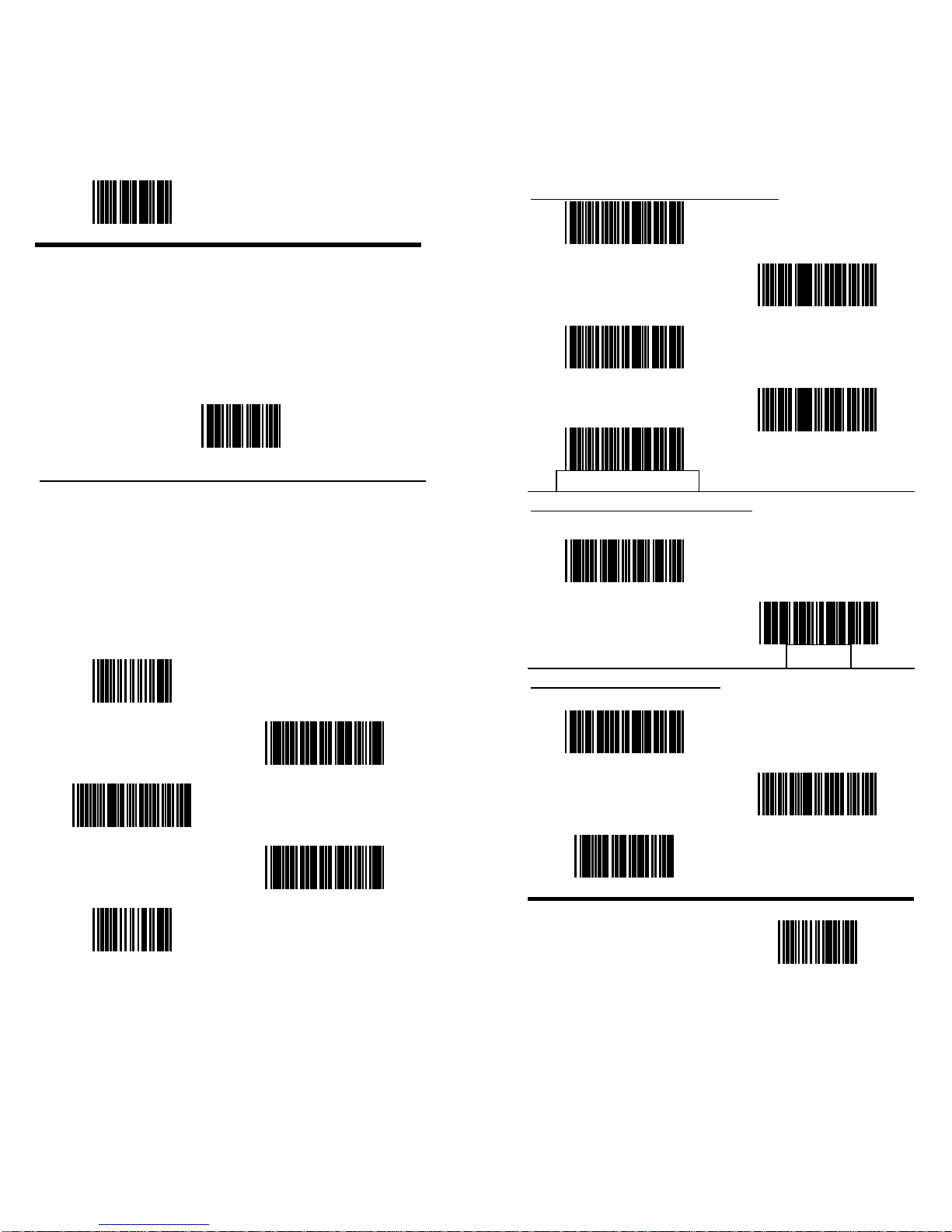
Start of Configuration
•The reading of the "RESET " label turns all the
parameters back to default values.
•When you intend to turn your scanner back to
default parameter, please scan the "Start of
configuration" label first, then scan "RESET"
label and finally scan the "End of
configuration" label.
RESET
•The reading of the "ABORT" label discards all
the parameters read prior to the "End of
configuration".
•The scanner remains in the last interface
mode when the scanner is reset. The lable
below should be scanned if th escanner is
configured the first time.
ABORT
RS-232C
PC/ AT
WAND EMULATION
SHOW VERSION
6
SCANNING MODE SELECTION
Auto Scan Mode
Testing Mode
Alternate Mode
Repeat Mode
Trigger Mode
DATA REDUNDANT CHECK
Enable
Disable
HEADER AND TRAILER
Header
Trailer
Set
End of Configuration
7

Start of Configuration
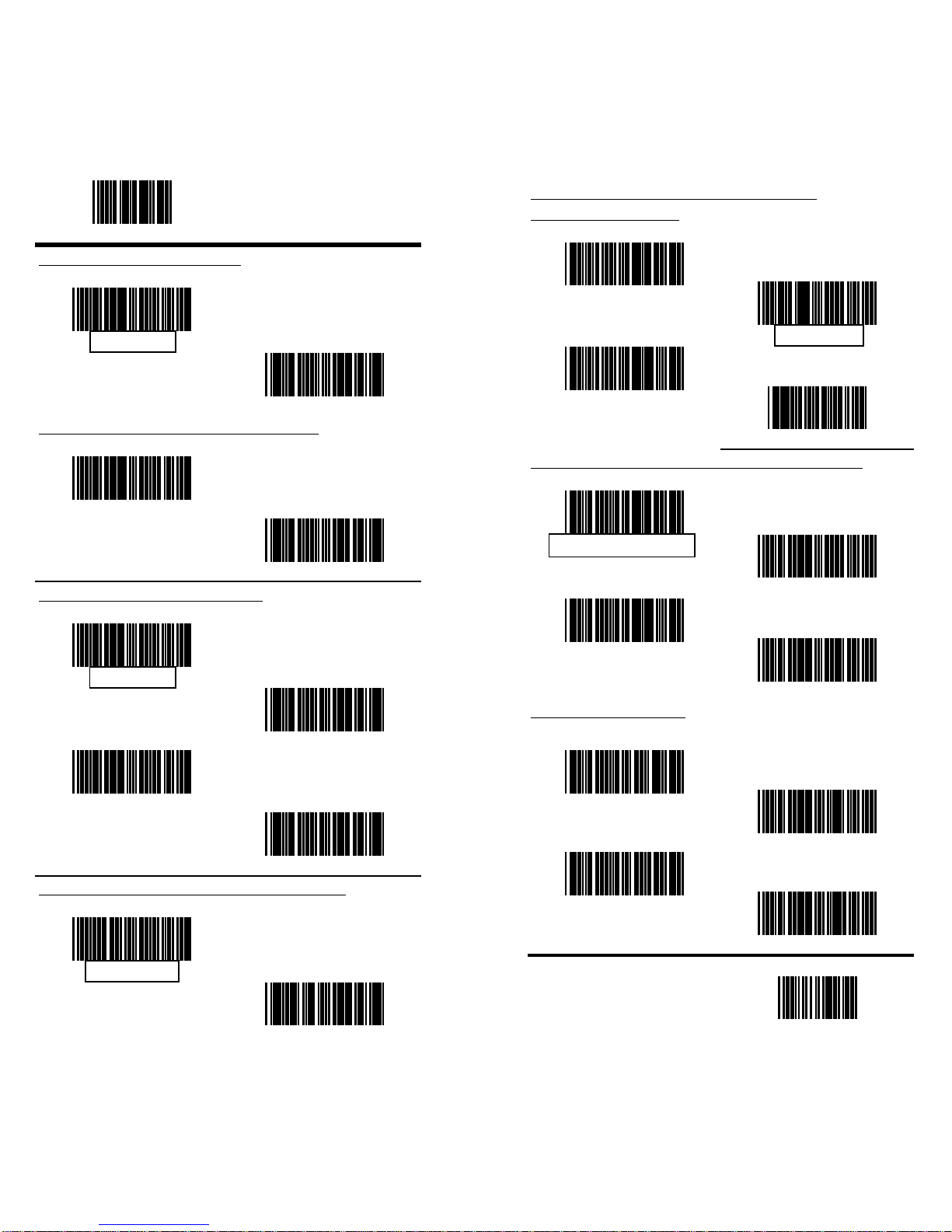
INTER-MESSAGE DELAY
None
100 mSec
INTER-MESSAGE DELAY (Cont’d)
500 mSec
1 Second
INTER-CHARACTER DELAY
None
10 mSec
20 mSec
50 mSec
MESSAGE/BLOCK MODE SELECTION
Message
Block
8
SEND COMMAND IN BLOCK MODE
COMMUNICATION
Enable
Disable
Store
Set
GOOD READ BEEPER TONE SELECTION
Medium
Low
High
Disable
SOUND DURATION
long(120ms)
Medium(50ms)
Short(20ms)
Very short(5ms)
End of Configuration
9

Start of Configuration
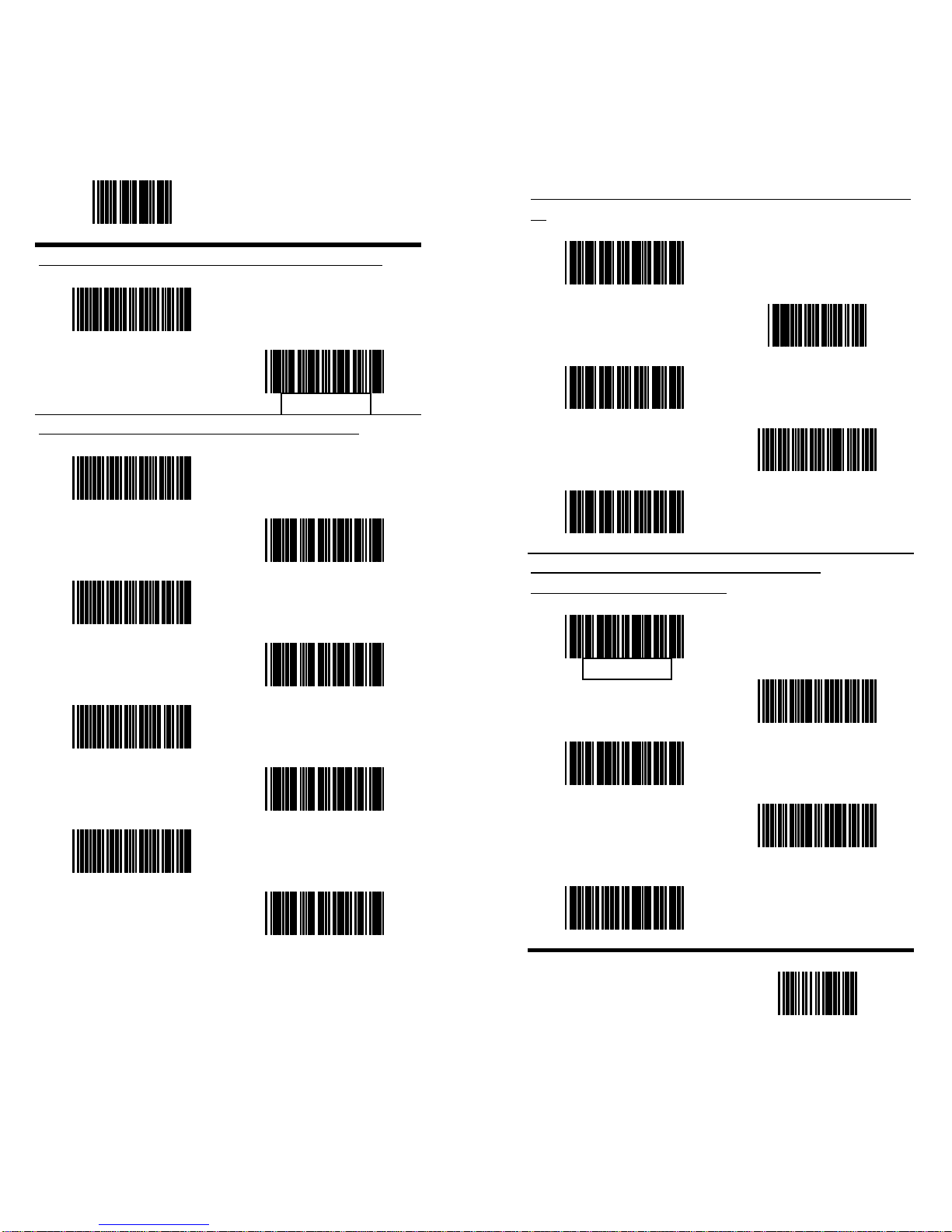
BAR CODE IDENTIFIER CODE SELECTION
Enable
Disable
BAR CODE IDENTIFIER CODE SETTING
UPC- E
UPC- A
EAN- 13
EAN- 8
Chinese post code
ITF 2 OF 5
Codabar
Code 39
10
BAR CODE IDENTIFIER CODE SETTING (Cont'
d)
Code 128
Set
Code 93
MSI
MATRIX 25
RS-232C SERIAL COMMUNICATION
PARAMETERS SETTING
HANDSHAKING PROTOCOL
None
RTS/ CTS
ACK/ NAK
Xon/ Xoff
ACK/NAK RESPONSE TIME SETTING
300 mSec
End of Configuration
11

Start of Configuration
ACK/ NAK RESPONSE TIME SETTING (Cont' d)
2 Sec
500 mSec
3 Sec
1 Sec
5 Sec BAUD RATE
19200
9600
4800
2400
1200
600
12
DATA BIT
7
8
STOP BIT
1
2
PARITY
Even
Odd
Mark
Space
End of Configuration
13
Table of contents
Other Zebex Barcode Reader manuals

Zebex
Zebex Z-6181 User manual

Zebex
Zebex Z-6182 User manual

Zebex
Zebex Z-608 User manual

Zebex
Zebex Barcode scanner User manual

Zebex
Zebex Z-3392BT User manual

Zebex
Zebex Z-5112 User manual

Zebex
Zebex Z-6070 Series User manual

Zebex
Zebex Z-3191BT Instruction Manual

Zebex
Zebex Z-3052 User manual

Zebex
Zebex Z-3191BT Instruction Manual

Zebex
Zebex Z-6082 User manual

Zebex
Zebex Z-5130 User manual

Zebex
Zebex Z-9000 Use and care manual

Zebex
Zebex Z-5160 User manual

Zebex
Zebex Z-6170 User manual

Zebex
Zebex Z-3191BT Instruction Manual

Zebex
Zebex Z-3100 User manual

Zebex
Zebex Z-8072 User manual

Zebex
Zebex Z-8082 Lite User manual

Zebex
Zebex A-52M User manual