ZACO V6 User manual

Find more information at
www.zaco.eu
English
ZACO-V6
Robot Vacuum Cleaner
User Manual
Italiano
Français
Español
Deutsch
English

2
English
Find more information at www.zaco.eu
ZACO Customer Service
Customer Service Number:
00800-4237796 (European Free Call)
0209-53038-383 (Direct Line - DE)
Email: support@zacorobot.eu
www.zaco.eu
Dear Customer,
thank you for purchasing ZACO A0 robot vacuum cleaner!
You‘ve joined the millions of people who clean with robots - the smarter way
to get it down.
Please take a few moments to read this manual and get acquainted with your
robot, to get the best performance from your robot. lf you have any problem,
please don‘t worry, you are supposed to contact our customer service first or
visit our website at www.zacorobot.eu for more information.
Best regards,
ZACO Customer Service
RobovoxZACO zaco_robot ZACO Robot
Robovox Distributions GmbH
Hamburger Straße
45889 Gelsenkirchen
Germany
Dear Customer,
thank you for purchasing ZACO V6 robot vacuum cleaner!
You are now part of the ZACO Family! You‘ve joined the millions of people
who clean with ZACO - the smartest way to get it down.
Please take a few moments to read this manual and get acquainted with your
robot, to get the best performance from your robot. lf you have any problem,
please don‘t worry, please contact our customer service first or visit our
website at www.zaco.eu for more information.
Best regards,
ZACO Customer Service

3
English
Find more information at www.zaco.eu
Contents
Safety Instructions .....................................................................................4
Product Parts ................................................................................................. 6
Main body / dust bin / Water tank / Charging dock / Remote control ............6-8
Accessories ..........................................................................................................................9
Product operation ...................................................................................0
Charging ...........................................................................................................................
Remote control ................................................................................................................2
Starting Up / Pause / Sleep ......................................................................................... 3
Scheduling............................................................................................................... 4-9
Invisible Wall.....................................................................................................................
Water tank operation..............................................................................................2-2
App download and user instruction...............................................23
Product maintenance ........................................................................... 24
Side brush maintenence ...............................................................................................24
Dust bin and lters maintenance ..............................................................................25
Dust bag use.....................................................................................................................26
Water tank maintenance .............................................................................................. 27
Drop sensors and charging pin maintenence ........................................................28
Troubleshooting ........................................................................................29
Product Specifications ......................................................................... 3

4
English
Find more information at www.zaco.eu
Safety Instructions
Before using the electrical device, basic precautions should always be followed.
READ ALL INSTRUCTIONS BEFORE USING THIS APPLIANCE.
PLEASE SAVE THESE INSTRUCTIONS.
1. This device is not suitable to be used by children under the age of 8 or by people
with physical or emotional disabilities. If to use, please operate the device under the
supervision of a guardian. Please do not let children sit on the robot or use the robot
as a toy.
2. Please remove all obstacles such as power cords or other small items before using
the robot. Do not let curtains or tablecloths touch the oor. When using the
mopping function, please fold the edges of the carpet so that they work as a barrier
for the robot.
3. If there are stairs, please do a test run to see whether the robot detects the edge of
the staircase.
4. Make sure the power supply voltage matches the voltage marked on the charging
station.
5. Use the robot only indoors and only in home environments. Do not use it outdoors
or in commercial or industrial environments.
6. Only use the original rechargeable battery and charging station provided by the
manufacturer. Non-rechargeable batteries are strictly forbidden to use. For battery
details, please refer to the technical specications.
7. Do not let the robot get into contact with water.
8. Do not wipe the robot with a wet cloth.
9. Do not use the robot on wet oors.
10. Do not use the robot around open res or around fragile objects.
11. Do not use the robot in temperatures over 40 degrees Celsius or below -5 degrees
Celsius.
12. Do not let hair, cloth or ngers come close to the product‘s openings or operating parts.
13. Do not let the robot suck in any material or items that might get stuck in the device,
such as stones, paper, etc.

5
English
Find more information at www.zaco.eu
Safety Instructions
14. Do not let the robot vacuum ammable materials such as gasoline or printer toner.
15. Do not allow the robot to absorb any products that are burning such as cigarettes,
matches, ashes, or other items that may cause a re.
16. Do not use the robot if the suction port is blocked. Clean up dust, hair, cotton, etc. to
ensure air can ow smoothly.
17. Do not use a damaged charging station.
18. Do not use the power adapter to drag or pull the robot or its charging station. Do
not allow the robot to operate while the power adapter is attached. Keep the power
adapter away from heat sources.
19. If the power adapter is damaged, replace it with an ocial ZACO power adapter
only. Do not use uncertied replacement parts from third parties.
20. Make sure the dust bin and the lter are properly installed before using the robot.
21. Do not use the robot if a baby is sleeping in the room.
22. Do not use the robot when the device is damaged due to dropping it, water
damage, or outdoor use. To ensure warranty, only let the robot be repaired by the
ocial ZACO Repair Service. In this case, please contact the ZACO Customer
Support.
23. If the robot will not be used for a long time, disconnect it from the power supply
and turn o the power switch on the side of the device.
24. Before cleaning and maintaining the product, please turn o the power switch and
disconnect the power adapter.
25. Before disposing the product, please remove the device from the charging station,
turn o the power switch and remove the battery.
26. When disposing the battery, you must follow local laws and regulations.
27. Never dispose of the robot or its battery by putting it on re as it may cause an
explosion, even if the product is severely damaged.
28. Please follow the instructions to use the product. ZACO by Robovox Distributions
GmbH will not take responsibility for loss or damage caused by improper use.
6
English
Find more information at www.zaco.eu
Product parts
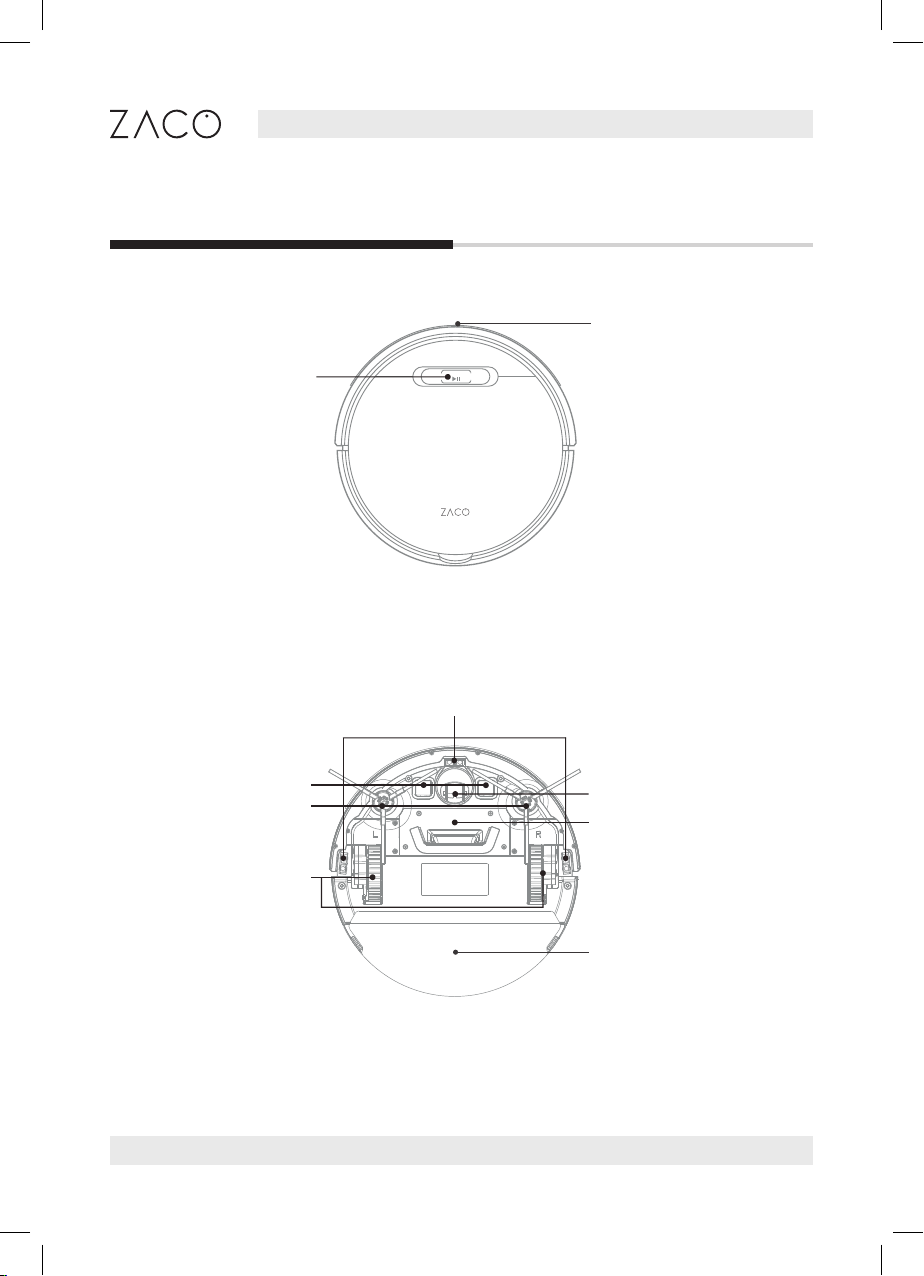
Main body and partsMain body and parts
Auto clean button
Anti bumper sensors
Side brushes
Left / right
wheel
Battery lid
Charging pins
Cli sensor
Nose Wheel
Dust bin

7
English
Find more information at www.zaco.eu
Dust bin
Power switch
Cleaning tool
Dust bin
Product parts
High performance lter
Dustbin cover
Handle
Cleaning tool

8
English
Find more information at www.zaco.eu
Display screen
Direction
AUTO mode/Pause
Schedule setting
MAX mode
Edge mode
Return to
charging station
Spot mode
Clock setting
Direction
Product parts
Charging Station
Remote control
Power indicator light
Power adapter
Charging pin
Note: / / / cannot be used during a cleaning cycle.
Power supply socket

9
English
Find more information at www.zaco.eu
Product parts
List of Accessories
Charging station
Robot Water tank
High Performance Filter
V-børster
2 Side Brushes
rengøringsværktøj
AAA Battery
Remote control Power adapter Cleaning tool
(2) Ekstra sidebørster
User manual
ZACO-A
Robot Vacuum Cleaner
User Manual
2 Dust bags InvisibleWall transmitterInvisibleWall transmitter
ZACO-A10
Robot Aspirador
Manual del Usuario
ZACO-A0
Robotdammsugare
Bruksanvisning
ZACO V6
Robot Vacuum Cleaner
User Manual

10
English
Find more information at www.zaco.eu
Product operation
1Place the charging station
1. Connect the adapter to the charging station
2. Place the charging station on the ground. Do not place any objects m to its left /
right side and 2m to its front. Reective objects, in particular, can cause issues with
nding the charging station.
3. Connect the power supply.
2Turn on the robot
The power switch is inside the robot. Press “I”
to turn on the robot; Press “O” to turn it o.
Charging Station
Note: After the charging station is connected, the indicator light on the top
of the charging station will be on.
Note: After the robot finished cleaning, it is recommended to not turn it off,
and let it charge for the next use.
Table of contents
Other ZACO Vacuum Cleaner manuals